• Hello MLAers! We've re-enabled auto-approval for accounts. If you are still waiting on account approval, please check this thread for more information.

x86 card revival thread

This is the kind of reverse engineering most emulators have to do, because there is usually no way to read the PLDs/FPGAs, and the custom ICs are black boxes.

The 32K RAM window is probably mapped at 0xFFFF8000 on the x86 side since the 386+ boots at 0xFFFFFFF0. If 0xFs040000 is written after that image is downloaded, whatever it writes then can be assumed to be telling the x86 to boot, and if it's written both before it may also control where the 32K window is in the x86 space.

I assume the Mac is then waiting for some kind of response; if it's polling that will be obvious, and if it's not then the x86 code probably is doing something to cause a NuBus interrupt.
 
Naming clarity:
After digging around more in the resource fork of the OrangePC 3.8 application and looking at the decl ROM contents on my NuBus OrangePC cards, I have determined that the card with a 386sx/Cx486SLC and single ISA slot is just called the "OrangePC" with no number/suffix. I also have the manual for the original card and it does not refer to any number/suffix on the end of the name. 210-290 cards with the PGA-169 socket for full 486 CPUs is referred to in the code as the "OrangePC 2".
It looks like there are basicly three different OrangePC 200 Series cards:
  1. the card with a 386sx/Cx486SLC and single ISA slot whose DeclROM contains
    Code:
    CPU_80386_OrangeMicro_OrangePC
    will be indentified as "OrangePC" in the application. Because that card uses the 82C836 chipset, the application will upload the CHIPS & TECHNOLOGIES BIOS to the card.
  2. the card whose DeclROM contains
    Code:
    CPU_486_OrangeMicro_OrangePC
    will be identified as "OrangePC 2". It's built around the OPTi chipset and will be uploaded with the AMI BIOS.
  3. the third card uses the 82021 Turbo PC/AT Chipset by ACC Micro. That card contains a socket for a math coprocessor. This card is probably the only one form the 200 series that contain its BIOS (AWARD) on the board itself stored in a pair of EPROMs. I think those were dumped here. The card must also contain a DeclROM. I'm not sure it was dumped before.
OrangePC 3.8.2 knows how to handle the cards 1 & 2 as well as later PCI ones.
I don't know which application version works with the card #3.
 
The third card uses the 82021 Turbo PC/AT Chipset by ACC Micro. That card contains a socket for a math coprocessor. This card is probably the only one form the 200 series that contain its BIOS (AWARD) on the board itself stored in a pair of EPROMs. I think those were dumped here. The card must also contain a DeclROM. I'm not sure it was dumped before.
...
I don't know which application version works with the card #3.
I believe that the card you are describing is the Orange386, which is not compatible with the "OrangePC" software. The only place I have managed to track down the software for it is here: https://vintageapple.org/macdrivers/cards.shtml . I do not own one of these cards to dump the DeclROM. It looks like the last one sold on eBay in late 2022 for $200 USD. Apple Rescue of Denver also appears to have one at the time of this post for $600 USD. So they are around, but uncommon and expensive, as is the case with all of these alternate OS/co-pro boards.
 
I'm not sure. The card I'm describing looks like that.
That card looks exactly like my original OrangePC which does use the OrangePC 3.8.2 software. Post #144 on this thread has a photo of my card, but a lot of it is covered by the sound card in an ISA riser. This card has a Chips 82C836 chipset and gets its BIOS from the OrangePC application; I have actually found its BIOS binary using ResEdit. I don't have an Orange386 myself, but I did see in the Apple Rescue listing that it has two chips labeled "BIOS LO" and "BIOS HI", leading me to believe that this card does store the BIOS on the card. Digging into the Orange386 software in ResEdit also reveals no evidence of a BIOS binary. I can't find what chipset it has, but I'm guessing that it is the ACC 82021 that you mentioned.
 
That card looks exactly like my original OrangePC which does use the OrangePC 3.8.2 software. Post #144 on this thread has a photo of my card, but a lot of it is covered by the sound card in an ISA riser. This card has a Chips 82C836 chipset and gets its BIOS from the OrangePC application; I have actually found its BIOS binary using ResEdit. I don't have an Orange386 myself, but I did see in the Apple Rescue listing that it has two chips labeled "BIOS LO" and "BIOS HI", leading me to believe that this card does store the BIOS on the card. Digging into the Orange386 software in ResEdit also reveals no evidence of a BIOS binary. I can't find what chipset it has, but I'm guessing that it is the ACC 82021 that you mentioned.
I've mistakenly linked a wrong post. The correct post is here.
You're right - that's a Orange386 card with two ISA slots that uses the ACC 82021 chipset.
 
Hi there, I can get the P166 PCI PC-Card but with no breakout cable. The joystick is separate on that one the other connector is the combination of apple-video to the pc-card video. Can I make any use of this card without the breakout cable?

There seems to be an internal video connector on the pc-card, what cable is this and how can this be connected to the internal video of the Mac?
 
You need the breakout cable for the longer P100 - 166 cards, as they act as a passthrough using whatever monitor you have. The 7" card has a GIMO connector for internal video and sound on particular Mac models but I find monitor sensing can be a bit troublesome. There are aftermarket adapters out there for the Apple compatibility cards so getting this running isn't as difficult without the rare cable.

Any Mac with a PCI slot that can fit the card, and natively run Classic Mac OS can work - PCSetup 2.17 works with later versions of Mac OS 8.5+ and up.
 
I'm currently trialling a 7" Apple PC compatibility card (the Cyrix 5x86 100Mhz model with ATI Mach64 onboard - no idea if PCI or ISA implementation), using the GIMO adapter in a PowerMac 5500 225Mhz board ... in a "Takky" modified Color Classic with the old standard "VGA mod", of 640 x 480 @ 60Hz.

Yep, a lot going on there - does anyone know if the GIMO adapter completely bypasses the onboard video circuitry of the Mac it hosts on? It works, DOS text and 320 x 200 VGA modes look a treat, but the monitor switches off when I try to load Windows 3.1 or 95 with the standard VGA driver (which is 640 x 480 @ 60Mhz). Pressing control + Enter it gets back to the Mac fine.

I think the line sense mode of the internal VGA display is incorrect and might need more investigation on the Takky mode side. Adjusting the monitor detection on the PC control panel does nothing - in fact it doesn't switch over properly on anything but "auto detect" mode.
 
i wonder whether the 7" Apple PC Compatibility Card could be made to work in a Wings-card equipped Molar G3 with the internal CRT and speakers?
 
So far only limited success of the 7" Cyrix 5x86 card in a Color Classic ... the display appears dimmer than it should (as mentioned DOS text and low resolution graphics look great but darker in games compared to standard PC); then the monitor switches off for 60Hz 640 x 480 and above video modes. I went through and double, triple checked the harness and monitor sense wiring all good. I've found some DOS utilities that might force refresh modes and uniVBE-style utilities for future testing.

In the Molar G3, you may encounter similar issues as me. The next test is the card in a 5500 black Mac, which will be interesting. It didn't like working in a TAM (no video at all only external)
 
swap the 5500 black Mac's 603e for a 745L (if the stock 603e is a BGA chip) and stuff the 7" DOS-card in along with the TV+FM-tuner hardware and that'd be one beast of a machine
 
Yeah agree - that's a future test! Reckon the CRT will be happier working with the card. Of course a 3DFX card would be good in there too!
 
Either that, or put the 12" DOS compatibility-card into a PowerMac 6500 (after swapping its 603e for a 745L) that's kitted out with all the Gazelle-specific upgrades, and hook that up to one of these bad-boys.
 
Lol, yeah sounds good! Not sure if the 12" card would fit in a 6500.

Haven't dragged out my Macs yet to test the 7" card in other machines.
 
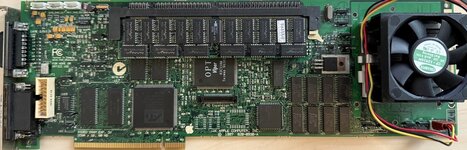
Its time for more PC card shenanigans! This time I've modded the final Apple PCI model card that shipped with a Pentium 166.

The first task at hand is a re-cap. The original capacitors on these cards leak like crazy (I've seen 5 so far, all 5 have had very leaky caps; especailly the ones near the VRAM). I got tantalum polymer caps to replace the originals, but the vias are so densely packed on these cards that the larger footprint on the tant-polys were shorting random things out and I ended up having to solder them on sideways (see photos at the end). If anyone else re-caps one of these, I'd recommend just sticking with can-style aluminum capacitors to keep things simple.

For mods, I started by de-soldering the original CPU and replacing it with a Socket 7 socket so I can easily swap CPUs and test others. There is also a convenient jumper location (J9) to get 12V for a fan. I confirmed that the Apple PC card does not use split rail voltage and that the stock Core/IO voltage is set to a blistering 3.52V (likely a holdover from the Cyrix 6x86 models). Thankfully, the voltage regulator is adjustable. R62 and R76 form a voltage divider that controls the Core/IO voltage with a formula of VOUT = 1.21 * (1 + R76 / R62). By replacing the resistors with some that I harvested from dead hard drives, I got the core voltage down to ~3.3V to maximize the options that I have for replacement CPUs. The CPUs I tested are as follows:
  • Working:
    • Cyrix MII-300GP
    • P54CS Pentium 200
    • P55C Pentium MMX 233
    • Pentium OverDrive MMX 200
  • Not working:
    • IDT WinChip 2 200 (Even set at 3.52v)
    • AMD K6-233 (3.2v model)
By default, every one of the working CPUs (besides the OverDrive) operates at 166MHz because both BF pins are pulled low. After probing around, I discovered that the BF pins are strapped as follows:
  • BF0:
    • Low: R155
    • High: R154
  • BF1:
    • Low: R157
    • High: R156
  • BF2:
    • Not Connected
This allowed me to set the CPU frequency easily for the Pentium CPUs; but to fully control the Cyrix chip, a bodge would need to be added to the BF2 pin to allow an external pull up/down. I believe that the Cyrix chip could be clocked to 266MHz, which would result in maximum raw integer performance. However, it already runs extremely hot at 3.3v 233MHz even with the "big" socket 370 cooler I have on it, so I think I'm personally sicking with the Pentium MMX 233 (R154 + R156 required to get 233MHz). It runs much cooler, even at 3.3V (its own datasheet specifies 3.7V as absolute max, it should be just fine). Even if you don't want to go through the trouble of installing a socket, just setting R157 and R154 is all you need to get the stock CPU running at 200MHz easily.

Finally, the bus can also be overclocked on these cards! The only higher setting than the default bus speed of 66.6MHz is 80MHz. This is achieved simply by removing R78. I was able to get my Pentium MMX running at 280MHz with this speed and it survived benchmarks and some light multimedia tasks without crashing. I didn't try this with the stock CPU, but it could be possible to get it running as fast as 240MHz (possibly assisted by the stock 3.52V Core/IO).
PCCard_Mod_Front.jpg
PC_Card_Resistors.jpg
 
Last edited:
@evanboonie such nice research, thanks for posting it up. Hoping to explore my P100 card soon and will try a 133Mhz overclock as initial test.

How did you desolder the CPU, was this a relatively easy job with the right tools or manage to become tricky?
 
How did you desolder the CPU, was this a relatively easy job with the right tools or manage to become tricky?
It was extremely tedious, but it didn't seem to risk much damage to the board itself. I actually got a lot of 4 of these cards missing their heat sinks which I did the same mods to. Only one of the Pentium 166 CPUs survived the process; one of them actually split straight in half! 3 of the 4 cards ended up working. The one broken card looked like it had been dropped off of a roof, so I'm skeptical that I damaged it in some way; that could have even been the CPU that split in half (maybe it was cracked initially, but I don't remember now). My process was as follows:
  • Add fresh leaded solder to each pin
  • Coat all pins with flux
  • Place above a board heater (mine was set to 120C)
  • Use a hot air station ramping up temps about once a minute (I have a pretty crappy station, your temps may or may not need to go as high in the end)
    • 250C
    • 300C
    • 350C
    • 400C
  • Use a soldering iron to help heat some of the pins and push down on them lightly until the CPU starts to loosen
  • A combination of tweezers and tapping the card on the edge of the board heater to get the CPU to fall out
  • Use a fine tip on the soldering iron and remove the solder from each hole with good quality braid
I think using a de-soldering gun could help reduce thermal stress on the CPU and possibly speed up the process, but a board heater is likely still necessary. The GND and VCore/IO pins are on some pretty big copper planes. One warning I have is that the solder pads on the P100 card don't seem to be quite as robust. The one I have was so damaged by leaky caps that I decided to harvest it for parts for this project. It could be all of the electrolyte degrading the copper bonding, but definitely be gentle with that card if you ever replace any chips.

Some other notes I have about the P100 card:
  • The VCore/IO regulator is of a different design. It uses a TL431 driving a MOSFET. It looks adjustable, through R59 and R64, but I'm not sure what it is set to by default. Its FET is also much more limited in terms of current than the P166 card.
  • The bus speed is set the same way. The resistor to remove for 80MHz is in the same location, but is R61 on this card.
  • BF resistor locations are missing/different. BF0 can at least be pulled low with R55 reverse of the CPU, but a quick follow of traces + probing didn't turn anything else up. My card has some severe trace damage and is missing components, so I can't really look into it much further on my end. Bodges could be your friend if you find they are floating on a working card. The Pentium MMX Datasheet has my favorite socket/pin diagrams for socket 5/7 I've found so far.
  • No fan header on this card
 
Last edited:
Thanks for sharing your project. The limitation on other CPUs is probably software. Can you get to the BIOS? With BIOS patches and voltage adapters even the oldest socket 5 PCs can run AMD CPUs. The "plus" versions have L2 cache built into the CPU that can make a huge difference in performance. Does the apple card have any external cache?
 
Back
Top