
I am also under the impression that the BIOS is what is restricting IDT and AMD chips from running on these cards. There doesn't seem to be a way to get into the BIOS from the software though. The Apple cards inject the BIOS at startup time from the resource fork (similar to how all but the very earliest and latest OrangePC cards worked). Opening the "PC Setup" control panel in ResEdit shows the BIOS. I'm not familiar enough with classic Mac OS development to know how to copy it out, modify it, then replace it. Patching the BIOS should absolutely be possible though. As for cache, the Apple cards (P100 and P166) have 256k of 15ns L2 cache built into the card. The cache shows up on the BIOS boot screen, but HWiNFO and CPU-Z can't see it. The cache does show up and is working with cachechk and speedsys though.Thanks for sharing your project. The limitation on other CPUs is probably software. Can you get to the BIOS? With BIOS patches and voltage adapters even the oldest socket 5 PCs can run AMD CPUs. The "plus" versions have L2 cache built into the CPU that can make a huge difference in performance. Does the apple card have any external cache?

-
 Hello Guest! We're hosting a challenge to welcome vintage Intel macs to the MLA during the month of July! See this thread for more information.
 -
We've made some quality of life improvements to the Trading Post. More info here.
You are using an out of date browser. It may not display this or other websites correctly.
You should upgrade or use an alternative browser.
You should upgrade or use an alternative browser.
x86 card revival thread
- Thread starter jeremywork
- Start date
I think there has been some success patching the OrangePC versions. There is a thread about that here:
www.vogons.org/viewtopic.php?t=83107
www.vogons.org/viewtopic.php?t=83107
Okay, this actually describes a process for extracting the BIOS from the resource fork and replacing it with a modified version! After talking with some folks at VCFMW this weekend, I think it might even be possible to upgrade these cards with an ATI Rage Pro Turbo! From what I can gather, the PCI versions of the early Rage chips in QFP are pin compatible with the Mach64. So it may be possible to replace the VBIOS as well. Then we could get Direct3D and OpenGL on the Apple card along with a K6-III! It still wouldn't be an OrangePC 660, but damn close and much easier to find.I think there has been some success patching the OrangePC versions. There is a thread about that here:
www.vogons.org/viewtopic.php?t=83107
Hi All, just picked up a Serial/Parallel OrangPC 220 for my Quadra 950 and, whilst it boots to DOS waiting for a disk, it won't try and boot a floppy disk in the mac drive. Is there some method to get a virtual floppy image running? I'm running 3.8.2 from the "200" folder in the usual archive, but I'm thinking this software may be too new? Does anyone have a copy of the older version anywhere?
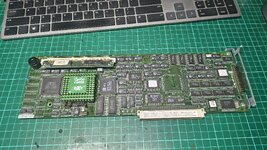
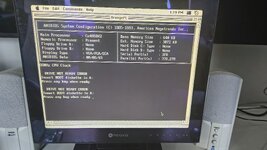
So yeah, with "emulate 1.44mb" drive it shows up as None for Drive A: in the BIOS? Evil.
So yeah, with "emulate 1.44mb" drive it shows up as None for Drive A: in the BIOS? Evil.



My first attempt to get the Rage 3D Pro working on the P166 Apple PC Compatibility Card has failed. I found a PCI version using 40SOJ EDO memory that I thought would be a good transplant candidate. My attempt consisted of the following:
- De-solder and read the PCI card's BIOS chip
- Use a hex editor to trim off the 32k of blank space from the PCI card BIOS
- Extract the PC Card BIOS from the control panel using a modern Mac and ResForge
- Using AMIBCP, find the VBIOS in embedded in the system BIOS extracted from the control panel
- Run the "RU.EXE" program included in the AMI.ROMUtils on the PC card itself to find the Vendor and Device ID of the Mach64
- Again running AMIBCP, delete the original VBIOS and inject the new one using the previously discovered Vendor and Device IDs
- Open the newly minted BIOS in a hex editor and copy/paste it over the original in the control panel using ResForge
- Delete preferences files and replace the original control panel with my modded one
- De-solder the Rage 3D Pro and memory from the PCI card
- De-solder the Mach64 and memory from the PC compatibility card and replace it with the GPU and memory from the Rage 3D Pro
- Learn more about Vendor and Device IDs and see if that is important
- Study the documentation more and ensure there aren't additional connections that are required for a Rage 3D Pro vs a Mach64
- Track down an x86 motherboard with built-in Rage 3D pro and extract the VBIOS from its BIOS, maybe embedded VBIOS is different than a PCI VBIOS?
- Hope and pray I can find a copy of the "mach64 BIOS Kit"/"rage BIOS Kit" I saw mentioned in the chip documentation from ATI. This should allow the creation of a new custom VBIOS.
- Rage Pro Programmers Guide
- Rage Pro Windows Programmers Guide
- 3D Rage Pro Specifications
- Mach64 Programmers Guide
- Mach64 BIOS Kit
- rpep64: VBIOS from the PCI card
- rpep32: PCI VBIOS without blank space
- ATIBIOS: VBIOS extracted from the PC card system BIOS
- BIOS 1: Apple PC compatibility BIOS extension
- BIOS 8: The original system BIOS for the PC card
- BIOS9: The modded system BIOS for the PC card (replaced VBIOS)
- PC Setup: Modded control panel containing the modded system BIOS
Attachments
I made up several BIOS mods containing the original and replacement VBIOS with the Mach64 and 3D Rage Pro Device ID's on each. No combination of VBIOS configurations worked with the 3D Rage Pro installed on the card. Just a black screen when attempting to boot the PC. I was also unable to find a datasheet with pinouts and signal descriptions for the Mach64, so I am not able to confirm 100% pin compatibility. I can't really get much further just looking at a black screen though, so I've started toning out the "XD Expansion" port on the card to see if there is any way I can hook it up to a POST analyzer.
Beyond that, I think I'm getting into some serious low-level debugging territory and possibly even a logic analyzer. That isn't something I'm really equiped to do or have much interest in pursuing at this time. Regardless, I do think designing an external PCI riser that lets you hook up low profile PCI cards using the host Mac's PCI slot for power could be another interesting project. Adding a video card in that way would require a second display and not function with the built-in video switching, but I still think it could be interesting.
Beyond that, I think I'm getting into some serious low-level debugging territory and possibly even a logic analyzer. That isn't something I'm really equiped to do or have much interest in pursuing at this time. Regardless, I do think designing an external PCI riser that lets you hook up low profile PCI cards using the host Mac's PCI slot for power could be another interesting project. Adding a video card in that way would require a second display and not function with the built-in video switching, but I still think it could be interesting.

Reply/Radius seemed to have gotten into the DOS card game too. Unlike their Nubus PPC line cards (which were clones of Hondini for 7100/8100), this is a new design with in-house software. Note this is the first I've seen of screenshots of this bespoke software.

 tinkerdifferent.com
Also it seems they resold(?) the cards for the x200/x300 Nubus LC PowerMacs: https://archive.retro.co.za/mirrors/68000/www.vintagemacworld.com/radius/domlc.html
DOS on Mac
Hi folks, Last week I received the long-awaited Reply (Radius) Dos On Power Mac card. There is potential for upgrading: add video memory, replace a processor with support for up to 200 Mhz, and replace the L2 cache card. In this regard, I have a question for the experts of this forum. On...
tinkerdifferent.com
Also it seems they resold(?) the cards for the x200/x300 Nubus LC PowerMacs: https://archive.retro.co.za/mirrors/68000/www.vintagemacworld.com/radius/domlc.html
Last edited:
I put it off because I don't really enjoy the work of toning out signals, but I finally finished the "XD Expansion" pinout! I should probably start another thread on these mods... But for now, I at least determined that while the connector only exposes a subset of the ISA connector, the correct signals are present to make a POST card work. I believe the connector is a JAE KX14/15. The dimensions don't exactly match the datasheet, but it is very close in measurement and visuals so I think I'll at least give it a shot unless someone else knows what it is.
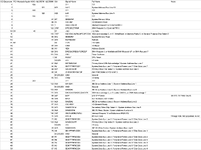
I have also attached a photo I found on an eBay listing for the Serial/Parallel card in case anyone else has ideas on the connector:
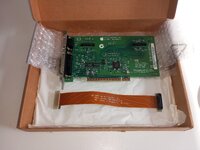
I have also attached a photo I found on an eBay listing for the Serial/Parallel card in case anyone else has ideas on the connector:

 ! (Though is it even possible to support a non-standard frame buffer size?)
I've also just finished mapping out all of the PCI pins on the chipset to possibly build out a custom FPC (think console HDMI mods) in the hopes of adding an adapter for low-profile PCI cards to the last two Apple PC Compatibility Cards.

 docs.google.com
PC Card ISA/PCI

I bought an OrangePC 530 card from Mr @Powerbase and courtesy of @jeremywork pinout sleuthing earlier in this very thread, here is the yet to test DIY 62 pin umbilical cable I've made up. It's configured with a 128MB DIMM and Pentium 233MMX CPU; also note creative use of a paperclip to remake a missing clip on the heatsink/fan assembly!
The official cable has more connectors, this one has monitor (female VGA connector), single COM port for mouse, audio in/out and game port (a last minute addition as thought maybe it's MIDI IN and we all like that). Also I maxed out the capabilities of the DB63 casing any more cables it would split open.
Will try it in my PPC 7300 very soon
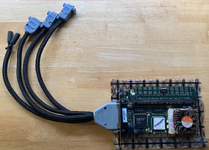
The official cable has more connectors, this one has monitor (female VGA connector), single COM port for mouse, audio in/out and game port (a last minute addition as thought maybe it's MIDI IN and we all like that). Also I maxed out the capabilities of the DB63 casing any more cables it would split open.
Will try it in my PPC 7300 very soon

Thank you for finally getting that going! Were you going with the original Cyrix or the Pentium MMX?
We will see! Concerned about shielding and need to double check pinouts but was fun making up the cable. It’ll run the Pentium MMX for sure - those Cyrix PR rated CPUs always ran hot and performance well below standard. Also it looks nice on display never seen such a shiny Cyrix CPU like yours!
You’re right about the manual being hard to find! I think I’ve got it in a .bin file will extract on vintage Mac next to check jumper settings.
As it can take an MMX CPU there is chance it’ll like a K6-2 later but unsupported.
Similar threads
- Replies
- 2
- Views
- 325

- Replies
- 10
- Views
- 272


- Replies
- 14
- Views
- 3K

- Replies
- 5
- Views
- 589
