Looking for Formac ProMedia 40 ROM Rip

It could also be a defective ram chip, flakey connection, a defective resistor, a defective GPU .... so many options ...
Yeah, I've repaired a fair few PCI video cards. I've never seen issues only while 2D acceleration is running before though.

It can't be a loose connection to VRAM or a bad trace / pin if I can use the almost full VRAM as a framebuffer without issue (I can do 1920x1024 at 8 bit fine, which is about 1.875MB out of the 2MB available.

I should perhaps move it to a slightly more period appropriate age computer perhaps, to reduce variables.
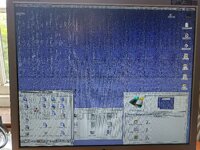
 
Ok, confirmed the issue, weird and annoying as it is.

So I extended the card to 4MB. One of the chips was bad that I added, so I got artifacts on the lower 1/5 of the screen at 1280*1024 at Thousands of colours. I found two alternative chips and swapped them in and the artifacts went away. So we know the display is using more than 2MB for the framebuffer, and that the bottom 1/5 or so uses the new chips.

I then turned on acceleration...

The acceleration artifacting only impacts the top 4/5 of the screen. Keep in mind that there are 45ns chips in both portions. So I suspect, some of these 45ns chips might be... How you might say, "optimistic". Not sure if someone re-labelled them back in the day to make their card look better (they're soldered, so unlikely to be modern upgrades), or if they were marginal from factory.

FYI I'm now testing using my junker 8600, just in case it was a compatibility issue with the QuickSilver.

1000035634.jpg

Other interesting stuff...

I tried a Virge DX with the Formac ROM but it didn't display anything (not a suprise, I'm sure the ROM checks for the PID).

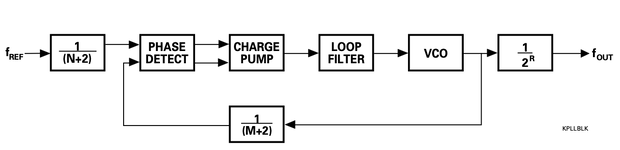
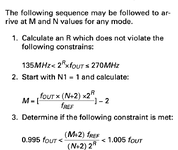
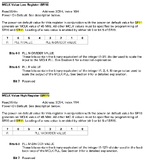
I replaced the 60MHz hex frequency parameter right at the start of the ROM with 50MHz, and it made absolutely no difference. It didn't change the benchmark score, didn't change the reported speed in the older GA Control Panel, and it didn't solve the artifacts with 2D acceleration.

I have some more RAM chips on the way from China. Hopefully they're fast enough. I can test them in the sockets before using them to replace the onboard chips.
 
Last edited:
I replaced the 60MHz hex frequency parameter right at the start of the ROM with 50MHz, and it made absolutely no difference. It didn't change the benchmark score, didn't change the reported speed in the older GA Control Panel, and it didn't solve the artifacts with 2D acceleration.

The 60MHz string is just for the display in the older control panel (4.x). The 5.x control panel no longer displays the chip frequency. Somewhere in the rom there are some bytes that can be changed to get higher clock speeds.

I have completely socketed my flashed PC Virge to test different VRam chips but after some time the card developed similar stripes like you have, although less extreme. At first it only happened at higher resolutions and 8bit color but now it happens all the time :-/. Some pins might not be soldered correctly and have to clean the card in my ultrasonic cleaner and reflow the pins.

-Jonas
 
The 60MHz string is just for the display in the older control panel (4.x).
That text didn't change when I changed it to 50MHz. It is in HEX rather than a String. But yes, it doesn't seem to be a setting for the actual speed.

I have completely socketed my flashed PC Virge to test different VRam chips but after some time the card developed similar stripes like you have, although less extreme. At first it only happened at higher resolutions and 8bit color but now it happens all the time :-/. Some pins might not be soldered correctly and have to clean the card in my ultrasonic cleaner and reflow the pins.
Yeah, bad connections look similar :(

In my case it goes away when I turn off acceleration, which is the unusual thing that shows it isn't a bad connection.
 
I spoke to my dad earlier and he thinks he has a ProFormance, ProFormance II, ProFormance Lite and ProFormance III in a box... I might need to borrow them for Science.
 
Back
Top