• Hello MLAers! We've re-enabled auto-approval for accounts. If you are still waiting on account approval, please check this thread for more information.

Another IIci ROM hack

I like the metal clip idea too. So now we have both tt and olePigeon with sources for the 64-pin sockets. Hopefully the ones you both have access to are compatible with each other!!! This is excellent news! I'm excited to make a USB programmer board now.

Now, I will get to figuring out why some of the nets on the untested SIMM are shorted together!

Edit: Upon further inspection, here's what's going on with the shorted stuff:
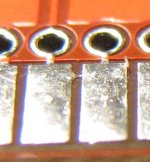
BadBridge.JPG

Definitely fixable with the X-acto knife, but annoying. So it's NOT my vias being bigger causing problems after all. Disappointing especially after my first flawless experience with Seeed Studio, but I can deal with it (especially for the price). The traces look fine, and this only appears to be a problem with the contacts on the bottom of the board; the contacts on the top are fine.


 
Hmm, why is the section of the board under the edge connector pads a darker shade of red than the rest? Does it not have soldermask on it or something?

 
Definitely fixable with the X-acto knife, but annoying.
CrapShack has a MUCH better tool for that purpose, mine's an angled wedge blade and a bent point probe "connected" by an octagonal yellow plastic handle.

So it's NOT my vias being bigger causing problems after all. Disappointing especially after my first flawless experience with Seed Studio, but I can deal with it (especially for the price)
If you got the board yield you requested along with the "untested overrun," and they're fixable, I'd say your experience has remained flawless! :approve:

 
Hmm, why is the section of the board under the edge connector pads a darker shade of red than the rest? Does it not have soldermask on it or something?
Yeah, there's no soldermask there. The connectors are so close together that my PCB software leaves it out of the entire area. It looks like I'm leaving 8 mils of clearance around pads and Seeed will let me go down to 0.1 mm (about 4 mils), so I might try 4 mils on the next batch.

Is it solder that is bridging between the pads in that picture? I guess I didn't pay attention...so in that case, the mask would have helped against the problem I'm seeing, right? I would assume they add the solder coating to the pads after everything else is finished with the boards?

Definitely fixable with the X-acto knife, but annoying.
CrapShack has a MUCH better tool for that purpose, mine's an angled wedge blade and a bent point probe "connected" by an octagonal yellow plastic handle.
I live in the middle of nowhere where we don't have Radio Shack anymore :( Interesting, what is the tool designed for originally?

If you got the board yield you requested along with the "untested overrun," and they're fixable, I'd say your experience has remained flawless! :approve:
Well, I ordered 10 boards and 50% electrical testing. I received 10 boards, with 5 of them marked as tested. One of the un-tested boards has that fixable problem and I haven't checked the others yet. I guess this would be a good reason to pay $10 for the 100% testing service. Anyway, not really a complaint on my part, it's not a huge deal. But I'm glad I checked the board *before* assembling it because otherwise I would have been freaking out trying to find shorts in my own soldering, which would be hard to see underneath the sockets :)

Can't wait to get the programmer board working, because then the chips can be soldered directly onto the SIMM! (Or I can put sockets on anyway if requested by the super hackers)

 
I vote keeping the sockets if it's not much more difficult. If you do the unimaginable and mess up one of the ROMs, it's much easier to replace. :)

 
Hey dougg3,

Nice work :) I'm glad the MESS ASC code was able to help. Our IIci emulation plays music and game sounds great in both games and things like PlayerPRO so I'm pretty confident in both the wavetable and FIFO mode emulation for the original ASC. The stripped-down ASC inside the V8 ASIC (LC/LC II) has not-quite-compatible registers, and LC III's Sonora is different yet again. The Enhanced ASC (which Apple calls "Batman") removes the wavetable mode entirely and has real variable sample rate and volume control on the FIFOs.

 
On second thought, there's only about 10 mils between the pads, so I don't think Seeed will be able to fit much solder mask in there anyway (only 2 mils). Probably not worth changing...

I vote keeping the sockets if it's not much more difficult. If you do the unimaginable and mess up one of the ROMs, it's much easier to replace. :)
Since I'm not a high-volume operation, I'll ask each person what they want :) The sockets add some cost to the board, but I see what you mean. For now I have to use sockets anyway, since I don't have the programmer board ready.

Hey dougg3,
Nice work :) I'm glad the MESS ASC code was able to help. Our IIci emulation plays music and game sounds great in both games and things like PlayerPRO so I'm pretty confident in both the wavetable and FIFO mode emulation for the original ASC. The stripped-down ASC inside the V8 ASIC (LC/LC II) has not-quite-compatible registers, and LC III's Sonora is different yet again. The Enhanced ASC (which Apple calls "Batman") removes the wavetable mode entirely and has real variable sample rate and volume control on the FIFOs.
Thanks Arbee! The ASC emulation in MESS is fantastic! Awesome work! Without MESS there's no way I would have figured it all out. How did you figure out what all the bits do? Was it basically a matter of disassembling the OS/ROM and looking at how the registers are accessed?

SIMM update: The resistors and LEDs have arrived. So I have all the parts needed to build some rev. 2 SIMMs. I may just have to put some resistors and LEDs on an otherwise unpopulated board to test out the glowing eyes circuit with a bench power supply :-)

 
Just in time for Halloween.

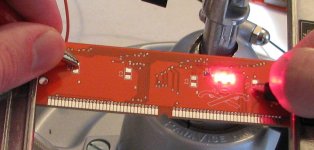
It's aliiiiive....it's aliiiiiiiiive...

LEDsWork.JPG

The LED circuit definitely works. My camera doesn't do well with the huge difference in brightness between the rest of the board and the LEDs, but it DEFINITELY works! Now to assemble the rest of the board. More soon...

 
Well, I'm fighting one hell of a battle assembling this SIMM. I *really* can't wait to ditch the sockets.

I'm finding annoying shorts between pins. It looks like all the solder paste isn't necessarily flowing nicely where it's supposed to go, or something. Every time I fix a short, I check for other shorts and don't find any, so I wash the board. Then, I come back after it's dry, and there's ANOTHER short! The worst part is that there are 4 possible sockets the short can be on and I can't see any of them, so it's basically "try to get some flux in that location on each socket, heat up the pins, and cross your fingers". Repeat, until the short goes away.

The shorts are gone according to my multimeter -- except for one I CANNOT for the life of me fix between VCC and write enable, but it doesn't matter right now because that would only prevent programming it from the external board -- when I put it in the IIci those pins are connected together anyway.

But it just won't boot. I got it to boot once with a set of smaller EEPROMs inside, but now it won't work at all. I'm thinking there may be a loose pin somewhere, but I'm too frustrated to keep working on it today.

On the bright side (no pun intended), the LEDs work great! They are looking good and they are extremely bright. Maybe too bright!

 
Thanks :) for sure!

I actually went back to it tonight and fixed that last short by adding more solder, which seemed to get the existing solder flowing. I also fixed a loose pin. At this point the SIMM tests perfect electrically but still won't boot.

I think I will start fresh with another PCB, and go back to cutting out the bottom plate for simpler soldering. I'll also leave out the LED parts until I know the SIMM can boot my IIci.

 
At this point the SIMM tests perfect electrically but still won't boot.
Rats. How are you doing the electronic testing-- with a multimeter, checking for shorts or opens everywhere? It sounds like you already tested pretty thoroughly for short circuits everywhere, but maybe there's an open (broken connection) that you missed? Or maybe one of the chips isn't socketed firmly, or there's some corrosion on a pin preventing it from making good contact with the socket?

I've forgotten now why you used SMD sockets instead of through hole ones. It sounds like the SMD ones are a pain in the butt! :-)

It would be tedious, but you might try manually reading out some EPROM values by connecting appropriate high and low voltages to your SIMM connector pads with alligator clips or something. That way you'd be reading it the same way the Mac does, from the same contacts.

 
Addendum to BMOW's suggestion:

If you've got a ROM SIMM Socket, one of the larger ones would actually be better, build yourself a testing setup/prototype of the read portion of the programmer circuit in the same step. Wire wrap on a stock project/prototyping PCB would be my medium of choice for such a rig.

BTW: 15 pages & counting! Nice initial post Mr. very much EX-noob around this nook-o-da-web! :approve:

 
I'm testing using a multimeter to be sure that every connection that is supposed to be connected is connected -- so that except for the data lines, the corresponding pins on each socket are connected together, and that there are no shorts between nearby socket pins. I also have checked that each SIMM contact is connected to the correct socket pins. So yeah, I'm looking for both opens and shorts.

It could definitely be a loose socket connection, PLCC sockets are pretty flimsy.

I used SMD sockets because they are physically smaller and because the through holes eat up a bunch of routing space on the bottom of the board. The SMD sockets aren't terrible to work with if I cut out the bottom plastic plate, so I'm going to try that.

I'm just not equipped to read values from the board yet, but I really like the idea! I don't have enough alligator clips and stuff to put a 0 for example on every address line and CS and OE. Likewise I don't have any SIMM sockets yet either :)

Thanks for the ideas guys! Today is a fresh new day so hopefully I can get to the bottom of it.

Edit: I just found another weird short that I hadn't found yesterday. It's not between nearby pins, but that's clearly because it's between a pin and a nearby via. I can't see it, but that HAS to be where it is. This board may be fixable after all!

 
Success! It was that last short I just found, and the SIMM works now. That makes me happy because I know that the rev 2 board works now.

I just made another SIMM which I did more carefully, and it had one short. I fixed that and it began to work, but halfway through the crazy long startup chime, it went all nuts. It didn't work after that. I then found ANOTHER short which was NOT there before, so I'm 99% sure that the solder paste is to blame. I took the board and very thoroughly washed it with cold water, and then the short disappeared. I'm still letting it dry now so I don't know if it will work after that, but weird, huh?

I used less paste this time which helped, but I think what's happening is some extra unheated paste is getting left behind and intermittently causing problems.

Until I have a reflow oven working that can heat up ALL the paste, I will probably return to cutting out the bottoms of the sockets and using regular solder. That combination has worked for all other boards I have made with no problems. Anyway, success!

 
And now I've been hit with another unexpected curveball.

The IIci motherboard I've been using to test my SIMMs with is no longer functional. When I hit the power button on either the back or the keyboard, nothing happens, nada. It's not the power supply -- the power supply boots my hacked IIci motherboard fine, and it's definitely putting out the 5V trickle voltage.

This is a motherboard which I have not recapped or cleaned at all, so it's possible that's all it needs, but it's funny that it just started doing it now that I'm messing with the rev. 2 SIMM. I'm not even going to touch my hacked motherboard with these SIMMs until I figure out what's going on with my now non-functional motherboard.

*sigh*

P.S. I was thinking, my SIMM programmer board should be able to test for shorts...that will be very handy. It won't be able to tell me which chip/socket it's on (except for the data pins), but that will be very helpful for testing.

 
Thanks for keeping us posted. I'm anxiously waiting.

Out of curiosity,did the LED eyes light up when the SIMM is inserted? Or are you testing it without the LEDs? I saw the picture you made and it looks awesome.

 
Yep, the LEDs light up as soon as power is turned on (well, they did until my motherboard gave up the ghost). They look great!

 
Thanks Arbee! The ASC emulation in MESS is fantastic! Awesome work! Without MESS there's no way I would have figured it all out. How did you figure out what all the bits do? Was it basically a matter of disassembling the OS/ROM and looking at how the registers are accessed?
I started with the Linux and BSD drivers, which as you know don't actually do much. Then I spent a lot of time in IDA Pro and the MESS debugger stepping through stuff and scratching my head. The Sound Manager relies on the interrupts instead of polling like the boot beep and that was "interesting" again, although there were some useful clues in Guide to the Macintosh Family Hardware, 2nd edition. Mini vMac also had a partial ASC that was in the ballpark for the wavetable mode but not quite right, and that helped to jump start that aspect.

Got the Quadra 700 to boot into Finder in MESS this weekend after a few months of hitting my head against various aspects, but there's always more work to do :)

 
Back
Top