• Hello MLAers! We've re-enabled auto-approval for accounts. If you are still waiting on account approval, please check this thread for more information.

Another IIci ROM hack

How about putting another, more common type of connector on the top of the SIMM for programming? Is there space for two rows of 0.1" header? Or just pick any connector type that's fairly common, and small enough to fit. Connect the traces from the programming header to the matching traces from the SIMM edge connector, and you're done.


 
64 pin sockets seem to be hard to find. Someone here did mention their local shop had a bunch of 64 pin sockets.

How about using a 72 pin SIMM connector if the pin pitch is the same and holding it in place while it programs (not ideal but reminds me of an old MacWorld article that suggested using rubber bands to hold SIMMs with broken retaining clips)? Perhaps a 72 pin SIMM could be cut down to 64 pins by snipping bits in-between and then when soldered may not be noticeable. That could work if the retaining clips and notch locators are the same at the ends. Just some ideas...

How many pins total are needed to program all the chips on the ROMM?

 
How about putting another, more common type of connector on the top of the SIMM for programming? Is there space for two rows of 0.1" header? Or just pick any connector type that's fairly common, and small enough to fit. Connect the traces from the programming header to the matching traces from the SIMM edge connector, and you're done.

This could definitely work, and it would be cheap too (I'm pretty sure SIMM sockets are fairly expensive). The main challenge is that all the data lines are on the bottom of the SIMM and I may have some trouble bringing them to the top. If at all possible I'd prefer to just use the existing connector...or maybe try to fit the header near the bottom of the board. In fact...I already have vias on all the SIMM contacts. Maybe I could make them big enough to solder in a header, while still leaving room for the SIMM to fit in its socket. I guess I have to be careful I don't get solder all over the contacts though.

64 pin sockets seem to be hard to find. Someone here did mention their local shop had a bunch of 64 pin sockets.
Right--olePigeon found some. I'm just worried about the long term availability of them, that's why I'm thinking about a more common connector of some kind.

How about using a 72 pin SIMM connector if the pin pitch is the same and holding it in place while it programs (not ideal but reminds me of an old MacWorld article that suggested using rubber bands to hold SIMMs with broken retaining clips)? Perhaps a 72 pin SIMM could be cut down to 64 pins by snipping pits in-between and then when soldered may not be noticeable. That could work if the retaining clips and notch locators are the same at the ends. Just some ideas...
How many pins total are needed to program all the chips on the ROMM?
I'll play around with seeing how my SIMM fits in a 72-pin socket. I didn't think about that! For temporary programming purposes (which is exactly what we would be using it for), I bet it would work fine.

Each chip has 32 pins, 8 of which are unique to that chip, the other 24 are shared. It should be a total of 24+8+8+8+8=56 pins needed, I think.

 
The thickness of your SIMM is almost perfect for using the smaller header pins (.05" Centers?) along the top edge. I'll bet there are ribbon cables that come in a usable width to connect to whatever you want! [;)] ]'>

Use a pair of cables with the extra headers on one side of your SIMM tied to ground for alternate ground crosstalk prevention. }:)

 
I think I know what you're talking about, and 0.05" pitch is exactly what I'd need (it matches the SIMM contacts perfectly). I think if I could make them work on the BOTTOM of the SIMM, it would be easier so I wouldn't have to route all the data lines to the top. Even if I could just solder the ribbon cable to the SIMM and leave it floating when not in use or something...

What do you mean about using a pair of cables? Are you saying that I should add another ribbon cable with all ground wires to help with interference?

 
Haven't touched the SIMM PCB layout yet (sorry! I'm still trying to figure out a way to squeeze user programmability into version 2 so everyone won't need an EEPROM burner). It'll probably involve another external programmer board.

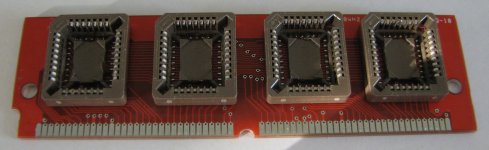
I can now happily say that I can make boards without totally destroying the bottoms of the PLCC sockets. As you can see in the picture, I still do melt the plastic a little bit, but now that I have a small bent tip for my iron and a good needle tip and plunger for my solder paste syringe, it's looking like I can solder these sockets:

GoodSockets.JPG

 
or you can grab a tube of Zephaste solder paste, and heat the board up from the bottom. It will melt the paste into solder, and bond the sockets to the board without melting anything, you just need a tc (thermocouple) to monitor the temps, dont want to exceed 220c

 
I wouldn't worry so much about the programmable version as yet.

Nailing down the current design's features-n-possible flaws ought to be the main focus for the nonce, IMHO. ;)

Baby steps! :approve:

You've come along so successfully with the ROM SIMM design and with such amazing progress on your the startup sound hack . . .

. . . that maybe it's time to THINK! (blatant early Sixties IBM reference) [:D] ]'>

 
True true, but if it's as simple as making sure the vias that connect the top contacts to the bottom contacts are big enough and aligned, and then soldering a 0.05" pitch header in them, it would be nice to have the Rev. 2 SIMM board ready as soon as I have a programmer board designed :) I just found a promising header/socket pair and tried to get some free samples from Samtec. We'll see if they will let some random hobbyist order free samples from them or not!

 
you could also produce a double-edge SIMM. That way, one side inserts into the mac, and the other side fits a more common slot to program it, or potentially another mac.

 
I thought about that (I think BMOW suggested it also), but the problem is that I think it would be hard to get all of the traces (especially D0 through D31) to the top of the board. The PLCC chip layout puts the data pins all at the bottom of the board so that it's trivial to connect them all to their contacts. I think I'd have some trouble bringing them up to the top, especially since I'm using the bottom as my ground plane and I don't want to tear it up too much.

I could always stick everything in and see what the autorouter comes up with I guess...

I want to see how well the 0.05" pitch headers work. They might be too tiny and easily bendable/breakable. We'll have to see...

 
dougg3 sent me his ROM SIMM and helped me burn the ROM image to install in my SE/30. At first we were stumped because the custom chime did not sound. dougg3 discovered that earlier series II Macs use a different sequence. Once that part was figured, out the new startup chime works!

Here is my demo video on the result:

https://player.vimeo.com/video/30290934
 
It's very cool to see a compact Mac with that startup sound! I'm still thinking about what it might take to fix the weird display pattern that appears.

Just for reference for anybody interested, it turns out that the SE/30 and other older II series Macs execute a different code path than the IIci when booting from a IIci ROM. My original patch only fixed the instruction that jumps to the startup chime for the IIci. There is another location in the ROM that also jumps to the sound playing code, and that code is used by the SE/30 and II at least. Although I don't have an SE/30 here, I was able to verify it using MESS. So now there are two locations to patch in the ROM. I'll post updated instructions on my blog later.

 
I liked the sound effects! Especially the moaning sound as you replaced the ROM SIMM, it sounds like a zombie getting a brain transplant or something.

 
You folks are ALMOST tempting me to FINALLY install Flash . . . ::)

. . . but I SHALL CONTINUE TO RESIST ASSIMILATION BY THE 'NETBOOBTUBE! }:)

 
If you're using a modern browser, you can watch YouTube or Vimeo with HTML5. On tt's link, there's a tiny little "Switch to HTML5 player" link that won't require Flash. With YouTube, you can choose to view everything in HTML5 here:

http://www.youtube.com/html5

Uh oh, have I just sucked you in? ;-)

 
Back
Top