• Hello MLAers! We've re-enabled auto-approval for accounts. If you are still waiting on account approval, please check this thread for more information.

Running the Thunder II 1360 at 1600x1200

Well then for full support of 1600x1200 it sounds like, two routes:

1.) Find a Thunder II GX 1600, get someone to desolder the ROM, dump it, good to go.

2.) Diff the two Thunder IV GX ROMs @Bolle provided to glean the difference and see if we can patch the Thunder II GX 1360 ROM. I'd probably have to do the same and hope my Thunder II non-GX 1360 is HW-wise (except the add-on card).

That might cover 1600x1200, but looks like I have some work to figure out how to get a non-existent 1280x1024 resolution to work.
I’m actually hoping that 2 might lead us to better understanding where the timing data is, potentially enabling the creation of new resolutions as well.

Since you have the same oscillator speed and memory on your card, I think it’s 100% the same, so hacks should translate.
 
Paul Pratt's "SlotRom" program will dump all NuBus cards' ROMs over the bus.


Depending on the card a dump made that way may or may not match the actual EPROM contents. Some cards saved a few chips by having the EPROM contents inverted (0 bits are 1, 1 bits are 0) and things like that, but you can convert an in-machine dump to work on an EPROM if you know the original format.
 
Paul Pratt's "SlotRom" program will dump all NuBus cards' ROMs over the bus.


Depending on the card a dump made that way may or may not match the actual EPROM contents. Some cards saved a few chips by having the EPROM contents inverted (0 bits are 1, 1 bits are 0) and things like that, but you can convert an in-machine dump to work on an EPROM if you know the original format.
Fortunately SuperMac ROMs aren't swapped, so I think a straight dump will work...unlike Radius 😛.
 
@Bolle - yep. ;-) However, the 1600 board looks like a respin that probably has some improvements (and/or cost reductions). And yes, you have 2 1600s, albeit an older and newer one. There's no reason to pay more for a Thunder IV 1600 board...well there may be bug fixes - you should burn-in test it. It's probably OK. Anyway, thanks for doing that test to confirm - I was pretty sure that would work - all the same hardware. In that era, SuperMac played a lot of marketing tricks with firmware variations for identical hardware, as in the case of the Spectrum/24 PDQ+ vs. Thunder/24 (the same board less the GWorld slots that will work with a Thunder/24 ROM).
 
The changes between the 1360 and 1600 IV ROM are moderate:

- 3 bytes modified in the Primary INIT at 0x46C1
- 30 more bytes in the driver Open function at 0x8B6C
- What looks like updates to table data
- Possible offset updates to correspond to the 30 byte slide

@Arbee you can probably get a 1600 working in MAME by just using the other ROM :).
 
The timing data is in the video sRsrcs. Just compare the sRsrcs and resolutions and it should become apparent.

If you have a Thunder II 1360 and a Thunder IV 1360 side-by-side, you can compare the sRsrcs for the 1360 config to see if the timing values are the same. If they have common elements, then you can use the timing from the Thunder IV 1600 (carefully) to replace a config in the 1360 ROM (if it's not possible to get the II 1600 ROM).

Otherwise, there appear to be hardware differences between Thunder II and the later Thunder IV (CLUT, BSR) that might make comparison impossible. If the ROM on the Thunder II GX 1600 is soldered, then it is easy enough to read it with a chip clip extension without desoldering. And, if it is soldered, the main reason was probably to stop people from realizing they could plug it into a Thunder II 1360 GX and upgrade it.

The other strategy would just be to dump the II GX 1600 ROM in memory and then re-sRec it with a moto tool. A little more work, but no soldering. It should be readable from the board.
 
The timing data is in the video sRsrcs. Just compare the sRsrcs and resolutions and it should become apparent.

If you have a Thunder II 1360 and a Thunder IV 1360 side-by-side, you can compare the sRsrcs for the 1360 config to see if the timing values are the same. If they have common elements, then you can use the timing from the Thunder IV 1600 (carefully) to replace a config in the 1360 ROM (if it's not possible to get the II 1600 ROM).

Otherwise, there appear to be hardware differences between Thunder II and the later Thunder IV (CLUT, BSR) that might make comparison impossible. If the ROM on the Thunder II GX 1600 is soldered, then it is easy enough to read it with a chip clip extension without desoldering. And, if it is soldered, the main reason was probably to stop people from realizing they could plug it into a Thunder II 1360 GX and upgrade it.

The other strategy would just be to dump the II GX 1600 ROM in memory and then re-sRec it with a moto tool. A little more work, but no soldering. It should be readable from the board.
Yeah, the II 1600 is soldered, which amusingly means it never got proper support for later OS because you couldn't replace field replace it...at least that's what I understand from the support documents. I've seen a picture to support that, but never a card in-hand.

Do you know specifically where the timing is in the sResources? I explored that avenue via the video modes but maybe I did it wrong...it only offered the newly added resolutions for pan-and-scan and refused to actually output a different physical resolution. And mapped the framebuffer wrong so everything output a bit nonsense.

I can definitely try comparing the II 1360 and IV 1360 to see if they take the same timing data, but I'm just not sure where to look.

And yeah, I tried using the IV ROM on a II for fun quite awhile ago and no dice.
 
Of those white values, the only ones that I thought might be interesting from a monitor/output perspective were (using the SuperMatch 1360x1024 as an example):
  • The 0F near the beginning - across the records this one roughly maps to screen resolution (except the 60Hz SuperMac).
  • The 000F0022 00CC00D7 near the middle - outside of the last two records, this value is different for every record.
  • The 0429042C in the middle - this one also kinda maps to the resolution (well the first 2 bytes anyway)
The rest of the values don't show a good pattern across the records to be what we might be looking for from a monitor/resolution selection perspective.
  • The 0F near the beginning feels like some sort of clock scalar for the horizontal resolution (note the odd entry out on the 1024x768 modes and the corresponding horizontal timing parameters).
  • The 000F002200CC00D7 is the horizontal timing parameters. I'm not quite sure what's going on here, but the 0022 is clearly the end of the back porch, and the 00CC is the end of the active area (the difference between them has the bit pattern for the horizontal resolution embedded in it), and this makes 00D7 the end of the front porch (and total line time), which would make the 000F the horizontal blanking length. Unless I've got this somewhat rotated.
  • The 0429042C is more properly 00280429042C, the vertical timing parameters. These are easier to read, because they're calibrated in scanlines. 0028+0400+1 is 00429, where 0400 is 1024, the vertical resolution, making 0028 the end of the front porch and 042C the end of the back porch.
  • All of this suggests a consistent 0002 for the vertical blanking length.
 
  • The 000F002200CC00D7 is the horizontal timing parameters. I'm not quite sure what's going on here, but the 0022 is clearly the end of the back porch, and the 00CC is the end of the active area (the difference between them has the bit pattern for the horizontal resolution embedded in it), and this makes 00D7 the end of the front porch (and total line time), which would make the 000F the horizontal blanking length. Unless I've got this somewhat rotated.
I'll go one further, as I think that I have the weirdness figured out: For all modes except the first 1024x768 mode, it's 8 pixels per clock of the horizontal timing machine. For that one other mode, it's 4 pixels to the clock. And the corresponding difference in the record is that fairly early 5000 instead of a 5002.
 
  • The 0F near the beginning feels like some sort of clock scalar for the horizontal resolution (note the odd entry out on the 1024x768 modes and the corresponding horizontal timing parameters).
  • The 000F002200CC00D7 is the horizontal timing parameters. I'm not quite sure what's going on here, but the 0022 is clearly the end of the back porch, and the 00CC is the end of the active area (the difference between them has the bit pattern for the horizontal resolution embedded in it), and this makes 00D7 the end of the front porch (and total line time), which would make the 000F the horizontal blanking length. Unless I've got this somewhat rotated.
  • The 0429042C is more properly 00280429042C, the vertical timing parameters. These are easier to read, because they're calibrated in scanlines. 0028+0400+1 is 00429, where 0400 is 1024, the vertical resolution, making 0028 the end of the front porch and 042C the end of the back porch.
  • All of this suggests a consistent 0002 for the vertical blanking length.

Sweet. Now just need to figure out how to convert this entry to be 1280x1024 instead of 1280x960 :)

Screenshot 2024-07-30 at 4.34.08 PM.png
 
  • The 0F near the beginning feels like some sort of clock scalar for the horizontal resolution (note the odd entry out on the 1024x768 modes and the corresponding horizontal timing parameters).
  • The 000F002200CC00D7 is the horizontal timing parameters. I'm not quite sure what's going on here, but the 0022 is clearly the end of the back porch, and the 00CC is the end of the active area (the difference between them has the bit pattern for the horizontal resolution embedded in it), and this makes 00D7 the end of the front porch (and total line time), which would make the 000F the horizontal blanking length. Unless I've got this somewhat rotated.
  • The 0429042C is more properly 00280429042C, the vertical timing parameters. These are easier to read, because they're calibrated in scanlines. 0028+0400+1 is 00429, where 0400 is 1024, the vertical resolution, making 0028 the end of the front porch and 042C the end of the back porch.
  • All of this suggests a consistent 0002 for the vertical blanking length.

I'll go one further, as I think that I have the weirdness figured out: For all modes except the first 1024x768 mode, it's 8 pixels per clock of the horizontal timing machine. For that one other mode, it's 4 pixels to the clock. And the corresponding difference in the record is that fairly early 5000 instead of a 5002.
Jeez, I forgot I was even looking at these back on page 1...nice decoding!

Let me try adding this to my table decoder so we can easily deconstruct all of entries.
Sweet. Now just need to figure out how to convert this entry to be 1280x1024 instead of 1280x960 :)

View attachment 76440
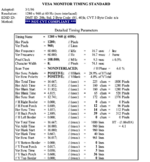
You can start with the VESA timings:
Don't use reduced blanking.

Some parameters should be obvious already, but we need to reverse the clock scalar to get it to the correct pixel clock.

You'll also need to modify the Video Mode to match or the framebuffer won't be allocated correctly.
 
Apparently, I can't leave this thread alone tonight.
000005d2 : 61ff BSR $000005d3
000005d4 : 0000 0068 ORI.B #$68,D0
This is a BSR with a 32-bit offset, targeting $0000063c.

Looking at the 1024x768@60 mode, I see an htotal value of $014f (335), times four to get pixel clocks is 1340. The vtotal is $328 (808), giving 1340 * 808 = 1082720 pixel-clocks per frame, or 64963200 pixel-clocks per second. That's just under 65 MHz. If the fastest crystal on the board is 50 MHz, then there's almost certainly a PLL being used as a clock multiplier, which in turn suggests trying to find the base frequency and scaling terms.

I haven't been able to make any numbers work out when playing with the $0c90 / $0571 / $0551 / $0550 values, and there are a couple other fields that are almost certainly flags of some sort, but I think that I've got about as far as I'm getting on this without either actual experimental data or doing my own code analysis on the declaration ROMs.
 
Last edited:
Hmm, attempting to understand this timing stuff is hurting my brain :)

Code:
SuperMatch High-Res 20 Color

00000076 1F320000 50020600 4F010101 000F001E 00BE00C9 0002002D 03ED03F0 FFFFFFFF 00E7FFFF 0000FFFF 00000000 00000000 00404000
05508005 05000000 E0C0B576 256D0000 00000040 00810073 00000500 03C09500 53757065 724D6174 63682048 6967682D 52657320 32302043 6F6C6F72 00

Resolution: 0500 03C0 = 1280x960 (guessing 60Hz)

Horizontal Timing Parameters: 000F 001E 00BE 00C9
Vertical Timing Parameters: 0002 002D 03ED 03F0

Not sure how the above translates into:

Screenshot 2024-07-30 at 9.02.09 PM.png
 
Not sure how the above translates into:
It doesn't... looks like they don't use VESA standard timing for their 1280x960 implementation.

Your timing values convert like this...

Starting with:
000F 001E 00BE 00C9

...each value converted to decimal and multiplied by 8 will turn this into:
120 240 1520 1608
(factor 8 is used because the active interval scaler is likely 8 for this resolution, otherwise the values wouldn't make any sense):

And that translates to:

1608 pixels total
1520 begin h blank
240 end h blank
120 end h sync
sync will always start at the beginning of a line at pixel 0.


Same for the vertical values, but you don't have a scaling factor for those and instead the real values are listed:
0002 002D 03ED 03F0
2 45 1005 1008

1008 lines total
1005 begin v blank
45 end v blank
2 end v sync
sync also starts at line 0
 
So going by the VESA standard timing for 1280x1024@60Hz those should be your parameters:

000E 0014 00B4 00D3
0003 0004 0400 042A


General timing

Screen refresh rate 60 Hz
Vertical refresh 63.981042654028 kHz
Pixel freq. 108.0 MHz
Horizontal timing (line)

Polarity of horizontal sync pulse is positive.
Scanline part Pixels Time [µs]
Visible area 1280 11.851851851852
Front porch 48 0.44444444444444
Sync pulse 112 1.037037037037
Back porch 248 2.2962962962963
Whole line 1688 15.62962962963

Vertical timing (frame)

Polarity of vertical sync pulse is positive.
Frame part Lines Time [ms]
Visible area 1024 16.004740740741
Front porch 1 0.01562962962963
Sync pulse 3 0.046888888888889
Back porch 38 0.59392592592593
Whole frame 1066 16.661185185185
 
Thanks @Bolle!

Also trying to figure which data tables in the ROM are used when.

1.) The entry I posted a few posts earlier:

Code:
SuperMatch High-Res 20 Color

00000076 1F320000 50020600 4F010101 000F001E 00BE00C9 0002002D 03ED03F0 FFFFFFFF 00E7FFFF 0000FFFF 00000000 00000000 00404000
05508005 05000000 E0C0B576 256D0000 00000040 00810073 00000500 03C09500 53757065 724D6174 63682048 6967682D 52657320 32302043 6F6C6F72 00

is one of about 20 entries in a table that is found at an offset about 15K bytes into the ROM (after the sResource entries and various offsets they reference) but before the driver code (which begins about halfway through the ROM). I believe these 20 entries map to the options given when you first boot with the card and the slot PRAM values are invalid (or you hold the option key down on boot).

2.) Then there's the list of vendors/resolutions offered by the SuperVideo CDEV and this seems to be a much more extensive list than what it shown in the initial boot options. For example, "NEC" as a vendor is given as an option in the CDEV but is not in the boot option list (#1 above) and I don't see NEC referenced anywhere in the ROM file. Which means this is probably coming from the CDEV.

3.) Then there the sResource entries per resolution which contain multiple bit depth options. It doesn't look like timing info is present in these entries.

4.) Then there are the sVidAuxParams. I don't see timing info specified in these entries either.

Given you can boot for the first time, choose an entry in the SuperMac first boot set of options, and not ever use the CDEV, that suggests the timing values in #1 above are enough. But the question I have is if you later then go and choose a different option in the CDEV, where does it get the timing parameters from?
 
So going by the VESA standard timing for 1280x1024@60Hz those should be your parameters:

000E 0014 00B4 00D3
0003 0004 0400 042A

Is one of the 00B4 (horizontal) or 0400 (vertical) incorrect? I would have expected the 00B4 to be 00A0 (1280) or if it's 00B4 (1440) then I would have expected the 0400 to be something higher if it's calculated similarly?
 
Back
Top