
You are using an out of date browser. It may not display this or other websites correctly.
You should upgrade or use an alternative browser.
You should upgrade or use an alternative browser.
Running the Thunder II 1360 at 1600x1200
- Thread starter eharmon
- Start date



For mapping the register writes, there's MAME implementations of the Spectrum PDQ, Thunder IV, and a CRTC:
nubus_specpdq.cpp
thunder4gx.cpp
supermac.cpp
None perfectly matching the II, but since they all used similar (or identical) chipsets, I suspect the II should be almost the same. @Arbee do you have insights?
This is interesting. Are these meant to fully emulate the hardware (ie. the ROM code wouldn't know the difference from a real board) or is it limited (ie. the control panel thinks it's a real card but direct memory access to registers wouldn't work exactly the same)?
Cool stuff! I remember seeing a mention in the SuperMac ROM thread but didn't look at it.
From what @MacOSMonkey mentioned and what I saw in the ROM code, it looks like the register offsets in the slot space are at offsets $c000000 and $d000000 (in that general area). SMT02S historically at $c000000, SQD at $e000000, and others at $d000000. So for slot $E, it would be $ec000000 for SMT02S as an example.
I'm looking at the Mame Thunder4GX code. @Arbee I assume this is where the register handlers are installed? nubus_thunder4gx_device::device_start() line 179 with the calls:
Looks like it's shifted by 4 bits? Like for the clockgen_w, it's at slotspace + 0xc00000 which would be within the frame buffer I would think? As opposed to slotspace + 0xc000000 which is what I would have expected. (I did not look at the install_device code... only just glancing at this - I should probably look at all of the code first before asking questions but being really lazy here).
Or is this code not what I think it is
I'm looking at the Mame Thunder4GX code. @Arbee I assume this is where the register handlers are installed? nubus_thunder4gx_device::device_start() line 179 with the calls:
Code:
nubus().install_writeonly_device(slotspace+0xc00000, slotspace+0xc0000f, emu::rw_delegate(*this, FUNC(nubus_thunder4gx_device::clockgen_w)));
nubus().install_device(slotspace+0xc40000, slotspace+0xc8ffff, emu::rw_delegate(*this, FUNC(nubus_thunder4gx_device::registers_r)), emu::rw_delegate(*this, FUNC(nubus_thunder4gx_device::registers_w)));
nubus().install_device(slotspace+0xcc0000, slotspace+0xcc1fff, emu::rw_delegate(*this, FUNC(nubus_thunder4gx_device::accel_r)), emu::rw_delegate(*this, FUNC(nubus_thunder4gx_device::accel_w)));
nubus().install_device(slotspace+0xd00000, slotspace+0xd000ff, emu::rw_delegate(*this, FUNC(nubus_thunder4gx_device::ramdac_r)), emu::rw_delegate(*this, FUNC(nubus_thunder4gx_device::ramdac_w)));
Looks like it's shifted by 4 bits? Like for the clockgen_w, it's at slotspace + 0xc00000 which would be within the frame buffer I would think? As opposed to slotspace + 0xc000000 which is what I would have expected. (I did not look at the install_device code... only just glancing at this - I should probably look at all of the code first before asking questions but being really lazy here).
Or is this code not what I think it is

This is real hardware emulation with the ROM code loaded. AFAIK they've all been reversed and don't emulate complete behavior, though, so it won't be gospel on how real hardware reacts in every situation. But the memory maps should be correct.This is interesting. Are these meant to fully emulate the hardware (ie. the ROM code wouldn't know the difference from a real board) or is it limited (ie. the control panel thinks it's a real card but direct memory access to registers wouldn't work exactly the same)?
Cool stuff! I remember seeing a mention in the SuperMac ROM thread but didn't look at it.

Not sure if that helps but here's dumps of the ROMs from both of my Thunder IVs. One is a 1360 and the other one is a 1600.
They both claim to be version 1.2 and both list all three Thunder IV variants in them (1152, 1360 and 1600) but yet the files differ slightly in a few locations... not sure if they are really "universal" or if each card variant has a specific ROM.
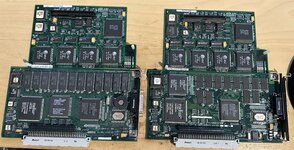
They both claim to be version 1.2 and both list all three Thunder IV variants in them (1152, 1360 and 1600) but yet the files differ slightly in a few locations... not sure if they are really "universal" or if each card variant has a specific ROM.
Attachments
Bolle - have you tried swapping the ROMs on those boards? The 1600 just looks like a relayout of the 1360 board.
Also, if the Radius ICs are post-merger rebrands, then all you need is the sRsrc data from the 1600 x 1200 sRsrc. However, BSR is obviously not the same since it must be triple-channel in these '93-'94 boards. Anyway, the ROM swap may work. They're just PLCC's (not soldered). The earlier boards were basically the same design with gimped firmware.
Also, if the Radius ICs are post-merger rebrands, then all you need is the sRsrc data from the 1600 x 1200 sRsrc. However, BSR is obviously not the same since it must be triple-channel in these '93-'94 boards. Anyway, the ROM swap may work. They're just PLCC's (not soldered). The earlier boards were basically the same design with gimped firmware.
There's 6 MB of VRAM on the card, from slotspace + 0 to slotspace + 0x5fffff. So the pixel clock generator is at 0xc00000, the general registers are at 0xc40000, the blitter is at 0xcc0000, and the DAC is at 0xd00000.I'm looking at the Mame Thunder4GX code. @Arbee I assume this is where the register handlers are installed? nubus_thunder4gx_device::device_start() line 179 with the calls:
Code:nubus().install_writeonly_device(slotspace+0xc00000, slotspace+0xc0000f, emu::rw_delegate(*this, FUNC(nubus_thunder4gx_device::clockgen_w))); nubus().install_device(slotspace+0xc40000, slotspace+0xc8ffff, emu::rw_delegate(*this, FUNC(nubus_thunder4gx_device::registers_r)), emu::rw_delegate(*this, FUNC(nubus_thunder4gx_device::registers_w))); nubus().install_device(slotspace+0xcc0000, slotspace+0xcc1fff, emu::rw_delegate(*this, FUNC(nubus_thunder4gx_device::accel_r)), emu::rw_delegate(*this, FUNC(nubus_thunder4gx_device::accel_w))); nubus().install_device(slotspace+0xd00000, slotspace+0xd000ff, emu::rw_delegate(*this, FUNC(nubus_thunder4gx_device::ramdac_r)), emu::rw_delegate(*this, FUNC(nubus_thunder4gx_device::ramdac_w)));
Looks like it's shifted by 4 bits? Like for the clockgen_w, it's at slotspace + 0xc00000 which would be within the frame buffer I would think? As opposed to slotspace + 0xc000000 which is what I would have expected. (I did not look at the install_device code... only just glancing at this - I should probably look at all of the code first before asking questions but being really lazy here).
One thing to watch out for when looking at the actual handler functions is that MAME passes the "offset" from where it was installed in bus width units, which is 32 bits here. So accesses from 0xc40000 to 0xc40003 all get offset 0, 0xc40004 to 0xc40007 are offset 1, and so on. You determine the byte address for byte or word accesses by the optional mem_mask parameter, which has 0xff for the active byte lane(s).
There's 6 MB of VRAM on the card, from slotspace + 0 to slotspace + 0x5fffff. So the pixel clock generator is at 0xc00000, the general registers are at 0xc40000, the blitter is at 0xcc0000, and the DAC is at 0xd00000.
Ok. So this looks like the standard slot space. I was looking at the super slot space based on the offsets @MacOSMonkey mentioned earlier so that’s what confused me.
Ahh, right. Most cards' ROMs/drivers don't use the super slot space even if the hardware allows it because super slot space pretty much doesn't exist in 24-bit mode.Ok. So this looks like the standard slot space. I was looking at the super slot space based on the offsets @MacOSMonkey mentioned earlier so that’s what confused me.
Alright I connected my card back up again, and set it for 1024x768. I get the following bits in sPRAM, this time I think I have them mapped correctly to the sPRAM APIs and the disassembly offsets:
EDIT: After futzing, the unknown value after Physical Resolution is definitely the monitor type.
I think this is still wrong though, vendorUse1 should be offset further. Is Offset 1 with the bit-depth data controlled by the OS and not part of the sPRAM?
Code:
Offset 0 (boardID) / -64(a6):
    Board ID: $523
Offset 2 (vendorUse1) / -62(a6):
    Unknown: 0b1000 / $8
    Bit-depth: $4 (24-bit)
Offset 3 (vendorUse2) / -61(a6):
    Physical Resolution: $13 (1024x768)
Offset 4 (vendorUse3) / -60(a6):
    Monitor: $42 (SuperMatch 21-T XL)
Offset 5 (vendorUse4) / -59(a6):
    Video Mode: $8D (Mode 141 - 1024x768)
Offset 6 (vendorUse5) / -58(a6):
    Unknown: 0b10000100 / $84
Offset 7 (vendorUse6) / -57(a6):
    Unknown: 0b00101100 / $2C
EDIT: After futzing, the unknown value after Physical Resolution is definitely the monitor type.
I think this is still wrong though, vendorUse1 should be offset further. Is Offset 1 with the bit-depth data controlled by the OS and not part of the sPRAM?
Last edited:
Ahh, right. Most cards' ROMs/drivers don't use the super slot space even if the hardware allows it because super slot space pretty much doesn't exist in 24-bit mode.
Yeah, from the disassembly of the PrimaryINIT it seems to be interacting with the super slot space.
Alright I connected my card back up again, and set it for 1024x768. I get the following bits in sPRAM, this time I think I have them mapped correctly to the sPRAM APIs and the disassembly offsets:
Code:Offset 0 (boardID) / -64(a6): Board ID: $523 Offset 2 (vendorUse1) / -62(a6): Unknown: 0b1000 / $8 Bit-depth: $4 (24-bit) Offset 3 (vendorUse2) / -61(a6): Physical Resolution: $13 (1024x768) Offset 4 (vendorUse3) / -60(a6): Monitor: $42 (SuperMatch 21-T XL) Offset 5 (vendorUse4) / -59(a6): Video Mode: $8D (Mode 141 - 1024x768) Offset 6 (vendorUse5) / -58(a6): Unknown: 0b10000100 / $84 Offset 7 (vendorUse6) / -57(a6): Unknown: 0b00101100 / $2C
EDIT: After futzing, the unknown value after Physical Resolution is definitely the monitor type.
I think this is still wrong though, vendorUse1 should be offset further. Is Offset 1 with the bit-depth data controlled by the OS and not part of the sPRAM?
I don’t know the answer to the vendorUse1 question but for vendorUse6, the disassembly seems to show the code is setting flags in that byte based on the environment like slot manager version, quick draw 32 support, etc.


Alright I connected my card back up again, and set it for 1024x768. I get the following bits in sPRAM, this time I think I have them mapped correctly to the sPRAM APIs and the disassembly offsets:
Code:Offset 0 (boardID) / -64(a6): Board ID: $523 Offset 2 (vendorUse1) / -62(a6): Unknown: 0b1000 / $8 Bit-depth: $4 (24-bit) Offset 3 (vendorUse2) / -61(a6): Physical Resolution: $13 (1024x768) Offset 4 (vendorUse3) / -60(a6): Monitor: $42 (SuperMatch 21-T XL) Offset 5 (vendorUse4) / -59(a6): Video Mode: $8D (Mode 141 - 1024x768) Offset 6 (vendorUse5) / -58(a6): Unknown: 0b10000100 / $84 Offset 7 (vendorUse6) / -57(a6): Unknown: 0b00101100 / $2C
EDIT: After futzing, the unknown value after Physical Resolution is definitely the monitor type.
I think this is still wrong though, vendorUse1 should be offset further. Is Offset 1 with the bit-depth data controlled by the OS and not part of the sPRAM?
Yes, vendorUse1 is set by Monitors control panel and contains the bit depth that will be requested in a setMode call. There's no expectation that the card does anything with this byte. It is still part of the slot PRAM record though.
There's a comment in DC&D about this also.
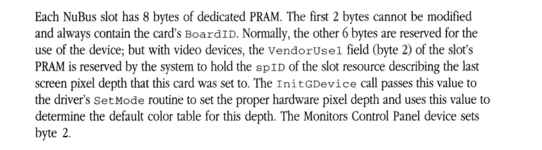
Those offsets look correct. Here is slot PRAM record as I use it.
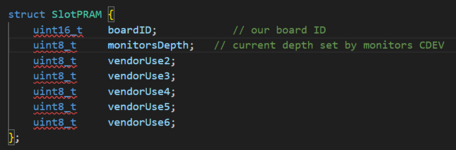
To make things easier, rather than reverse engineering from scratch you might have a look at the attached pickles sources for an example of how they handled early initialization/etc. The supermario system 7.1 dump also contains quite a bit of useful video code examples.
Attachments
Last edited:
Huh, interesting. Why didn't I have that idea before?Bolle - have you tried swapping the ROMs on those boards? The 1600 just looks like a relayout of the 1360 board.
It works just fine, the card that came as a "1360" will display 1600x1200/24bit with the ROM from the 1600 while the 1360 ROM limits both cards to 1600x1200/8bit.
Guess I've got two 1600s now.
Makes sense why it never seems to change on my machine.I don’t know the answer to the vendorUse1 question but for vendorUse6, the disassembly seems to show the code is setting flags in that byte based on the environment like slot manager version, quick draw 32 support, etc.
Ah! Those are the magic words I was trying to skim for in the documentation. I think my eyes skipped right over the middle of that paragraph.Yes, vendorUse1 is set by Monitors control panel and contains the bit depth that will be requested in a setMode call. There's no expectation that the card does anything with this byte. It is still part of the slot PRAM record though.
There's a comment in DC&D about this also.
View attachment 76414
Those offsets look correct. Here is slot PRAM record as I use it.
View attachment 76410
So I think the offsets I pasted above should match the disassembly. Crucially, it should help us understand what section deals with the physical output configuration, as that would be reading from -61(a6), as a short-cut from fully reversing it.
For vendorUse6, that makes sense why it never changes on my system.
I know adding and modifying the sResources for video modes works (you can select and configure those resolutions successfully), so if we can just modify the physical output configuration, it should be simple from there.
I’m also curious if I can map the monitor types to all the IDs to figure out how to convince it to enable the (existing) 1080p output mode. The 1360 does include that in its sResources (unlike 1600x1200, which seems to have had its references removed), but it never shows up as an option. I don’t think it really supports sense codes so it must depend on monitor type…
Did we ever find a Thunder II manual? I don’t think I have one, but it might be interesting to see it’s official specs as well.
Envious. I’ll have a look to see if there’s anything obvious in the ROM differences. There are some 1600x1200 references hidden in the II ROM so maybe it’s also been patched out similarly.Huh, interesting. Why didn't I have that idea before?
It works just fine, the card that came as a "1360" will display 1600x1200/24bit with the ROM from the 1600 while the 1360 ROM limits both cards to 1600x1200/8bit.
Guess I've got two 1600s now.
That also means if a 1600 ROM for the II was ever dumped, it might just work, for 1600x1200 anyway…pretty sure it was also just a re-layout.
Huh, interesting. Why didn't I have that idea before?
It works just fine, the card that came as a "1360" will display 1600x1200/24bit with the ROM from the 1600 while the 1360 ROM limits both cards to 1600x1200/8bit.
Guess I've got two 1600s now.
Well then for full support of 1600x1200 it sounds like, two routes:
1.) Find a Thunder II GX 1600, get someone to desolder the ROM, dump it, good to go.
2.) Diff the two Thunder IV GX ROMs @Bolle provided to glean the difference and see if we can patch the Thunder II GX 1360 ROM. I'd probably have to do the same and hope my Thunder II non-GX 1360 is HW-wise (except the add-on card).
That might cover 1600x1200, but looks like I have some work to figure out how to get a non-existent 1280x1024 resolution to work.
Similar threads


- Replies
- 33
- Views
- 9K

