• Hello MLAers! We've re-enabled auto-approval for accounts. If you are still waiting on account approval, please check this thread for more information.

Realtek RTL8139D PCI Network Card Compatible with a PowerMac 6500?

That would be the ‘Alternate Ethernet’ option that they said they selected.
My bad: "Alternate Ethernet" is also shown in the separate pulldown selection in the TCP/IP settings in Open Transport and the like, so I thought that was the control panel being described, rather than the AppleTalk one.
 
I'm updating the thread with the lastest issue I've run into. The PM6500 is up and on the network and can talk to my LC475 without issue. It's not the same with the SE/30. I'm using a BlueSCSI with WiFi to get it on line and that works great. But the SE/30 has it's own network called 'Alternate Ethernet' to use the DaynaPort drivers to connect on line. Since the PM6500 and LC475 have ethernet cards and are hardwired to my local network, they are on an 'Ethernet' network but it appears to be isolated from from the SE/30. I have Appletalk on and I log into the LC and PM and they talk to each other. So how do I join the SE/30 to the 'ethernet' network so everyone can talk to each other? And what about my Win10 and 11 laptops along with my Synology NAS? I would like to have everyone sharing files. So, why are there two Apple ethernet virtual networks and how can I get everyone talking?

Thank you,
Gerry

I think the issue could be your WiFi router. It is much more common than not that they do not bridge the AppleTalk protocol traffic between their WiFi and Ethernet interfaces (as they absolutely do for TCP/IP). Apple's long discontinued AirPort basestation products support this but not sure if any modern/3rd party ones can do this.

On your SE/30 you say you are able to "connect on line" which I'm interpreting to mean you can access things over IP, e.g. telnet, ftp and/or http to Internet sites (and/or local network resources?) that support old machines? If that is working than your BlueSCSI WiFi setup must be working over the 'Alternate Ethernet' network interface selected in the TCP/IP control panel, so I would expect if you also have the AppleTalk control panel set to 'Alternate Ethernet' everything on the SE/30 side is setup correctly and both TCP/IP and AppleTalk are communicating with your WiFi router. One BlueSCSI aspect I guess it would be good to confirm is you are sure you configured the BlueSCSI to explicitly connect to your WiFi network (name/password), I think it might by default connect to any open WiFi network and of course you neighbors open WiFi might provide Internet access but isn't going to see things on your wired network.
 
Both the LC475 and SE/30 are running 7.5.3 rev. 2. Open Transport is active on all of the Classic Macs. Presently, I'm unable to reinstall OS 9.1 on the 6500 as I don't have an install disk but have one on order. The recovery disk for the 6500 installs 8.0 which appears to cause issues. The SE/30 can run 8.1 (I found a prebuilt .HDA file with 8.1 already installed) pretty well given I have an accelerator installed. AppleTalk and Open Transport are running on all three machines but the SE/30's Chooser doesn't list any other Macs when I select AppleShare even though the 6500 and 475 do see each other in their respective Choosers under AppleShare. Finally, the Chooser (7.6.2) running in the 6500 has a field in the lower right corner where I can enter a server IP address. I found today that I can enter my NAS's IP address and the 6500 sees my NAS and connects to the Diskology's virtual drives as they are listed on the Desktop. But the 475 and SE/30 don't have that field in their Choosers (7.5.4). I also have an FTP server running on my M1 MBP but it can't connect to anyone else on the local LAN. I can ping the A/V devices on my network from my win 11 Dell laptop but it can't ping the 6500, the LC475 or the SE/30. And no one else sees the SE/30 at all. It's as though the SE/30 has it's own network connection that only gets it onto the internet but is isolated from anything else even though my local network is flat with only the last octet changing with the subnet set to 255.255.255.0. Weird stuff.

Also, as a PS, In the TCP/IP control panel, the 6500 shows three options in the 'connect via' field: Ethernet, AppleTalk (MacIP), and PPP. The LC475 shows AppleTalk (MacIP) and Ethernet. The SC/30 shows Alternate Ethernet and AppleTalk (MacIP). That's why I think the SE/30 is isolated from the Ethernet connection (could those be virtual paths?). Since all three have the AppleTalk connection, should I switch over to that and see if they all connect to each other? And will that allow other clients, like the M1 MBP and Win 11 to see everyone?

Thank you for your time and help,
Gerry
 
Last edited:
I found this section in the manual for it.

EtherTalk​

When configured to use “EtherTalk Alternative” in the Network Control Panel, AppleTalk traffic will be sent over the BlueSCSI network interface to enable AppleShare and other AppleTalk protocols over Wi-Fi.

Since this traffic is sent as multicast though, some wireless access points will not forward it properly. Multicast traffic must also be sent at the lowest “mandatory data rate” of a Wi-Fi network since it has to be sent to all clients on the network, which means it will be very slow (often slower than wired LocalTalk) and can drop packets.

My theory is that is your WIFI network doesn't support Multicast traffic at the mandatory data rate therefore AppleTalk will not work.
WiFi DaynaPORT - BlueSCSI v2 DocumentationBlueSCSIhttps://bluescsi.com › docs › WiFi-DaynaPORT
 
Last edited:
Thank you mikes-macs for your tenacity and posting. I decided to take the LC475 and SE/30 off of the AppleTalk network and put an ethernet card in the LC475 and use my Asante EN/SC to put the SE/30 on ethernet via its SCSI bus. Now communication between all three Macs works much faster and reliably. Right now I'm fighting with Keychain in 9.1. I'm trying to update 9.1 to 9.2.2 on the PM6500 using OS9 Helper but it crashes during installation.
Thank you for following up on this issue. I really appreciate it.

Gerry
 
You're welcome. Now that they all have a wired connection to the same network you could use AppleTalk and TCP/IP. I owned a PM 6500 once and I believe Mac OS 9.1 was that last OS for it. Is there a reason you want Mac OS 9.2.2? 9.2.2 is mainly support for classic within Mac OS X and also accelerated graphics cards plus Multi-User login. Also I believe you must upgrade in increments with Mac OS 9 installers if I remember correctly but the hardware must support the update.
 
Last edited:
As I posted in "PM6500 and Upgrading to 9.2.2" upgrading to 9.2.2 fixed most all of my problems with the PM6500. It no longer freezes when copying gigabytes of data from one drive to another, KeyChain now works with no errors and I've been able to upgrade to Mac OS 9.2.2.

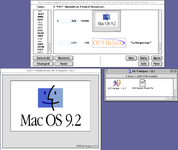
In the OS 9.2.2 startup splash screen, there is some text that says "Old World support 1.0.1." I was wondering what it meant and here's what I found:

"Old World Support 1.0.1" appearing on the splash screen of a beige Mac running OS 9.2.2 points to a system where the Mac OS is using a software-based Toolbox in RAM rather than a physical ROM chip. This scenario was specific to "Old World" Macs that had been updated to run newer versions of Mac OS that were originally designed for "New World" hardware.

Old World vs. New World Macs

Old World Macs: Macs released before the iMac G3, such as the beige Power Macintosh models, housed a significant part of the Mac OS Toolbox in a physical ROM chip. These models relied on this built-in ROM for basic boot functionality. A key distinguishing feature is their lack of built-in USB ports.

New World Macs: Starting with the iMac G3, Apple switched to a system where an Open Firmware boot ROM loaded the Mac OS Toolbox into RAM from a Mac OS ROM file on the boot volume. This made the system more flexible and easier to update. New World Macs were the first to feature factory-built-in USB ports.

Why Old World Support 1.0.1 appeared

The message "Old World Support 1.0.1" would display during the startup of a beige, Old World Power Macintosh for two specific reasons:

1. Installing a newer OS:
While Mac OS 9.2.2 was designed for later New World machines, it was possible to install it on certain older, beige Power Macs. A "hack" was used to make the installer think it was running on a newer machine.
2. Bridging the boot process:
This process installed "Old World Support," a software component that helped bridge the Old World machine's hardware-based boot routine with the newer, software-based boot process of Mac OS 9.2.2. When the system started up, it would load this special software, and the version "1.0.1" would be visible as a line of text on the splash screen during the boot process.

Common machines and context

This situation was most common on PCI-based Power Macintosh models, like the Power Macintosh 7600, that were updated with Mac OS 9.2.2. The boot process would display the standard Mac OS splash screen, and the "Old World Support" message would appear along with the system's version number before the desktop loaded. This allowed users to run the final version of the Classic Mac OS on their older, but still powerful, beige hardware.

------------------------------------------------------

So that information explains how the last version of the classic Mac OS can run on my PM 6500. I thought I'd pass it along for people who might be curious.

My ultimate goal is to make my classic macs as useful as possible in today's computer world. So, my next question is how can I get these old Macs (SE/30, LC475 and a PM6500) browsing the internet? I can browse through www.frogfind.com if I only want text. I know I need some kind of proxy, like a Raspberry Pi, to pre-digest web pages for me. But what's the simplest solution with hopefully not buying any more hardware? I do own a Win 11, Win 10 and an M1 MBP that could be set up as a proxy but, specifically, how can I do it? And please, keep it simple for a newbie like me. Perhaps there's already a complete answer available so please point me in the right direction.

As always, that you for your time and attention.
Gerry

 
I tried to use OS9 Helper but I kept getting errors when trying to install the 9.2.1 update. I found another entry in the Macintosh Repository about 9.2.2 System file for pre-G3 Power Macs. Replacing my 9.1 System File with this one brought me up to 9.2.2 and fixed my problems with freezing and KeyChain errors.
 
I tried to use OS9 Helper but I kept getting errors when trying to install the 9.2.1 update. I found another entry in the Macintosh Repository about 9.2.2 System file for pre-G3 Power Macs. Replacing my 9.1 System File with this one brought me up to 9.2.2 and fixed my problems with freezing and KeyChain errors.
"9.2.2 System file for pre-G3 Power Macs" is originally from https://macos9lives.com/downloads -- if you're planning to spend any time on that system, I highly recommend registering on that site, as the forums can be very useful for triaging OS9-specific issues (and the people who developed that image are active on there).
 
adespoton - Thank you for the re-direct to the macos9lives website. I think this is the missing link I need to figure out my last set of issues with the PM6500. It's been running much better since replacing the System Folder. I now hope to find out if the PM can run OSX 10.0.

Thank you,
Gerry
 
Back
Top