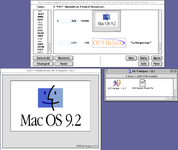
As I posted in "PM6500 and Upgrading to 9.2.2" upgrading to 9.2.2 fixed most all of my problems with the PM6500. It no longer freezes when copying gigabytes of data from one drive to another, KeyChain now works with no errors and I've been able to upgrade to Mac OS 9.2.2.
In the OS 9.2.2 startup splash screen, there is some text that says "Old World support 1.0.1." I was wondering what it meant and here's what I found:
"Old World Support 1.0.1" appearing on the splash screen of a beige Mac running OS 9.2.2 points to a system where the Mac OS is using a software-based Toolbox in RAM rather than a physical ROM chip. This scenario was specific to "Old World" Macs that had been updated to run newer versions of Mac OS that were originally designed for "New World" hardware.
Old World vs. New World Macs
Old World Macs: Macs released before the iMac G3, such as the beige Power Macintosh models, housed a significant part of the Mac OS Toolbox in a physical ROM chip. These models relied on this built-in ROM for basic boot functionality. A key distinguishing feature is their lack of built-in USB ports.
New World Macs: Starting with the iMac G3, Apple switched to a system where an Open Firmware boot ROM loaded the Mac OS Toolbox into RAM from a Mac OS ROM file on the boot volume. This made the system more flexible and easier to update. New World Macs were the first to feature factory-built-in USB ports.
Why Old World Support 1.0.1 appeared
The message "Old World Support 1.0.1" would display during the startup of a beige, Old World Power Macintosh for two specific reasons:
1. Installing a newer OS:
While Mac OS 9.2.2 was designed for later New World machines, it was possible to install it on certain older, beige Power Macs. A "hack" was used to make the installer think it was running on a newer machine.
2. Bridging the boot process:
This process installed "Old World Support," a software component that helped bridge the Old World machine's hardware-based boot routine with the newer, software-based boot process of Mac OS 9.2.2. When the system started up, it would load this special software, and the version "1.0.1" would be visible as a line of text on the splash screen during the boot process.
Common machines and context
This situation was most common on PCI-based Power Macintosh models, like the Power Macintosh 7600, that were updated with Mac OS 9.2.2. The boot process would display the standard Mac OS splash screen, and the "Old World Support" message would appear along with the system's version number before the desktop loaded. This allowed users to run the final version of the Classic Mac OS on their older, but still powerful, beige hardware.
------------------------------------------------------
So that information explains how the last version of the classic Mac OS can run on my PM 6500. I thought I'd pass it along for people who might be curious.
My ultimate goal is to make my classic macs as useful as possible in today's computer world. So, my next question is how can I get these old Macs (SE/30, LC475 and a PM6500) browsing the internet? I can browse through
www.frogfind.com if I only want text. I know I need some kind of proxy, like a Raspberry Pi, to pre-digest web pages for me. But what's the simplest solution with hopefully not buying any more hardware? I do own a Win 11, Win 10 and an M1 MBP that could be set up as a proxy but, specifically, how can I do it? And please, keep it simple for a newbie like me. Perhaps there's already a complete answer available so please point me in the right direction.
As always, that you for your time and attention.
Gerry