• Hello MLAers! We've re-enabled auto-approval for accounts. If you are still waiting on account approval, please check this thread for more information.

Macintosh SE/30 M5119 - Restoration

Got UD12 back on and all traces properly connected. Not pretty but it's solid.
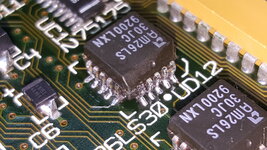
20250127_125444.jpg

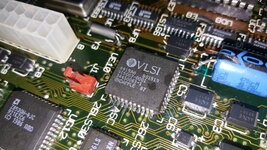
Working up the courage to put UE10 back on, and bodge the broken traces. Will test it at that point, before removing TL071 and Q2, to see if any improvement or progress has been made.
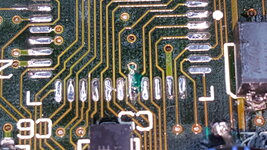
 
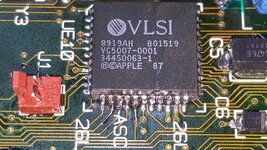
Had to make a new trace for Pin 35 on the ASC UE10 chip, and then UV solder mask the nearby trace to keep from bridging the pins.
20250127_165805.jpg


The UE10 pins on the bottom row of the chip are not soldered in yet, and need to be bodged still, but the rest of the ASC is connected to the correct pins, and not bridged. Pin 35 was verified to be connected to the underside of the board at C32. This all looks correct so far.
20250127_214802.jpg

Will finish the bottom row of pin connections, (3) need to be repaired with a 30 gauge wire from the exposed trace to the chip leg, on pins 19, 20, and 22.
 
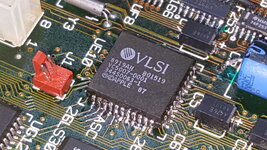
Got the ASC UE10 back on, and all traces restored.
20250128_122440.jpg

20250128_131427.jpg

No chime, no change. This all had to be done at some point, so not a complete waste of time.

Will begin checking the CPU and ROM traces next.
 
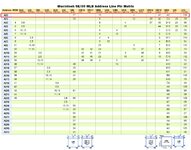
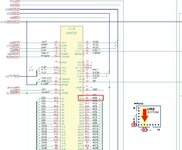
In getting started looking for corroded/broken traces, I looked at the SE/30 Pin matrix at the bottom of the schematic. Seemed like A(0) was as good a place to start as any.
A2 CPU pin.jpg

Since my CPU is socketed, and flipping the LB over trying to measure points on both sides was a hassle, removed the CPU, and stuck a component leg in what I think is pin A2:
20250206_171900.jpg

I arranged the DMM on the other side of the CPU's pin 0 white mark, to be sure, there is no continuity from CPU A(0) pin A2, to UK 6, UE10, or UD8.
A2.jpg


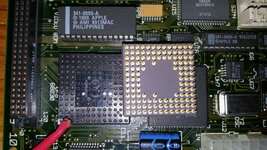
Looking closer at the CPU socket, there was a cap that leaked nearby, and I think I can see corrosion under the socket. That should be pin A2, facing the camera.
20250206_171748.jpg

I can get continuity from all of the other chip pins, and according to the pin matrix, but A(0) pin A2 does not exist.

Going to remove the CPU socket, and see what's happening under there.
 
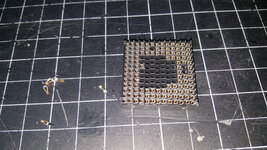
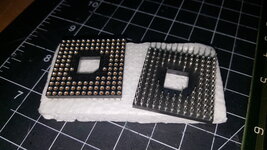
Got the socket out, probably should have tried Deoxit on the pins first, as it looks good under there.
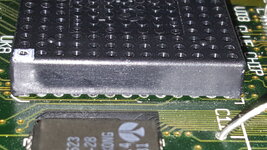
20250206_192232.jpg


Unfortunately some pins came out of the socket, and seem to be a bit rough.
20250206_192251.jpg

Should I spend time trying to repair this socket? Is there a good alternative for sale?
 
If you want something out of Digikey / Mouser, look for Aries 128-PGM13039-10.
They are not cheap either. As @croissantking said, CPU insertion / removal will be harder but it's decent enough with the Aries (if the CPU pins are clean)
 
Thanks for the replies. I'm hoping to never have to remove the CPU again, if it goes in once, and all the pins have continuity, I'm happy. Are you guys saying that won't be possible with the ebay socket?
 
Thanks for the replies. I'm hoping to never have to remove the CPU again, if it goes in once, and all the pins have continuity, I'm happy. Are you guys saying that won't be possible with the ebay socket?
It’s possible, just annoying, I even found a technique that doesn’t butcher the socket!
 
It’s possible, just annoying, I even found a technique that doesn’t butcher the socket!
I searched here earlier and others said the ebay socket worked for them.

I'll look at repairing my stock socket again, but it was having continuity problems, and some of the solder that came off, was like the corroded solder from my UE10, where it sticks to everything, and globs together plugging the hole and won't remove easily.
 
It’s possible, just annoying, I even found a technique that doesn’t butcher the socket!
Got to thinking about when you said "technique", is that for the cheap ebay socket, to make it fit?

Since I've not seen the problem yet with inserting a 68030 in to a cheap ebay socket: is the issue because of the alignment of the pins, or the diameter of the pin sockets, that causes issues?

Would this problem be for all aftermarket PGA sockets, including the Aries, or Mil-Max? What sets these apart, besides the cost?

Thanks!
 
Inserting chips in machined-pin PGA sockets is easy. Removing them is the problem; it takes a lot of force to pull the chip straight out. I've found it's much better to slowly "walk" the chip out of the socket by prying alternate sides. The TE 58113-1 tool as recommended by zigzagjoe here is really the ticket. Unfortunately they've gone out of production and are hard to find now.

I 3D-printed a puller tool and was horrified by the amount of force it took to remove a 68030 from one of those aftermarket machined-pin sockets with it. I do not recommend trying that method at all.

The Amphenol sockets that Apple used are really nice. Unfortunately I haven't found NOS ones anywhere. I second croissantking's recommendation to try to save yours.
 
Since I've not seen the problem yet with inserting a 68030 in to a cheap ebay socket: is the issue because of the alignment of the pins, or the diameter of the pin sockets, that causes issues?
I think it's simply the nature of the connection; you're pressing a pin into a machined socket. There are tight tolerances involved.

Would this problem be for all aftermarket PGA sockets, including the Aries, or Mil-Max? What sets these apart, besides the cost?
I haven't tried them all, but anecdotally, all the aftermarket PGA sockets of this style are pretty much the same in practice.
 
Got to thinking about when you said "technique", is that for the cheap ebay socket, to make it fit?
I bought mine from exxos store in the UK, but it looks the same as the various machined sockets you can get new.

As @obsolete says, 'walking' the chip out slowly is the way to go. I use a flat bladed screwdriver in between the edge of the socket and underside of the CPU, which I twist to slowly lever it out at each corner. In addition, I place a thin metal blade (a discarded snap-off piece from a Stanley knife) over the lip of the PGA socket which I move around with the screwdriver so it doesn't dig into the plastic as I twist. On the board I use for testing components, I also don't have the CPU inserted all the way – so it's easier to remove.
 
Last edited:
Much appreciation for the knowledge and info, thanks!

I'll try to repair the stock socket before the ebay socket's arrive, but I'll solder an ebay/machine pin socket to the LB when it gets here, and test all of the traces and connections on the Pin Matrix, that way. Then decide where to finally seat the 68030, shouldn't need to seat it for testing the LB. Removing the machine pin socket should be easier than that stock one, if necessary.

Thanks again.
 
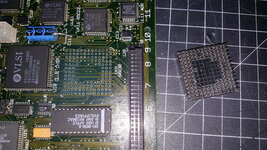
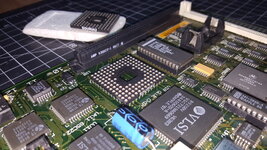
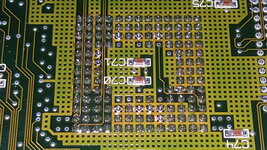
Got most of the socket installed. There are some areas that look to have exposed traces, so I'll fix those with UV solder mask, and then finish the remaining pins.
20250212_152157.jpg
Pretty sure if I don't fix those exposed areas, a short would occurred.
 
Got the CPU traces covered, and the ebay socket fully installed.

Checked every last Address line on the Pin Matrix, all of the pins are there and connected.
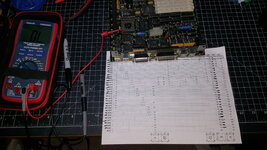
20250214_234446.jpg

Will do the Data lines tomorrow.
SE30 Data Lines.jpg
 
Has anyone here successfully completed the SE/30 Data Pin Matrix? I'm showing that the columns in the chart don't match the CPU Pin numbers, but everything else lines up.

Example: I'm in CPU pin K13, but it tones at ROM Pin 16, at D8, Pin 10 at S1A and S3A, and Pin 1 of the FPU. The colors correspond to the CPU Pin, and the results returned.
SE30 Data Lines Wrong.jpg
Is the SE/30 Data Pin Matrix, known to be off, or the chart skewed?

The thing that really is confusing me, is that the chart lists Pin Nxx, there are only (13) pins, that's A-M, N would be Pin 14. What am I doing wrong here?
 
Last edited:
Back
Top