Looking for Formac ProMedia 40 ROM Rip

Perfect - a second card arrived here yesterday and had exactly this issue. Your timing is impeccable

Another difference is how the card selects a default setting. I find 1.0.6 selects a higher refresh rate by default which exceeds the capabilities of my elderly 4:3 LCD. This actually means I can't easily use 1.0.6 as most of not all of the boot key combinations also assume that my monitor is capable of high refresh rates. I sure there is a way around, but for now I just used the newer ROM.
Quite fascinating. I have the exact opposite situation. The 126 Rom seems to default to 75Hz while the 106 Rom defaults to 60Hz, in my case. I use an Extron RGB2HDMI 300A which can do almost everything you throw at it (15Khz - 120Khz no problem) and a Hauppauge standalone HDMI-recorder. The Extron RGB2HDMI 300A converts even the strange 31Hz resolutions of the 126 Rom but sadly shifts them so much to the right that i cannot get everything on screen.
 
Quite fascinating. I have the exact opposite situation. The 126 Rom seems to default to 75Hz while the 106 Rom defaults to 60Hz, in my case. I use an Extron RGB2HDMI 300A which can do almost everything you throw at it (15Khz - 120Khz no problem) and a Hauppauge standalone HDMI-recorder. The Extron RGB2HDMI 300A converts even the strange 31Hz resolutions of the 126 Rom but sadly shifts them so much to the right that i cannot get everything on screen.
That's really odd!

Yeah, I've barely used the 1.0.6 ROM because I just end up in unsupported modes :LOL: I'm using a 1280x1024 LG panel from the early 2000s. I need to replace the caps on the power board in my ViewSonic that can handle just about any video signal including from a Toby, which is useful (most LCDs don't like the output from a Toby).
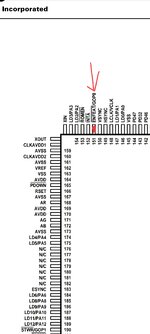

 
There is a jumper that has to be closed for the mac to work. If the jumper is not closed, the mouse pointer will not move and be invisible
On my card, the jumper in the same location is actually pre-populated with a header and called J4. It connects to pin 151 on the ViRGE chip, which is "Enable Feature".

1000035681.jpg


1000035683.jpg

So something to do with board expansion features. Formac must expect it to be enabled.
 
On my card, the jumper in the same location is actually pre-populated with a header and called J4. It connects to pin 151 on the ViRGE chip, which is "Enable Feature".
...
So something to do with board expansion features. Formac must expect it to be enabled.
I don't know where it goes on my card on the Virge chip but on the PCI-bus it goes to INTA and is used for the mouse in some kind of fashion. Without the Jumper, it just goes to an unpopulated feature connector.
It was actually the first time that a PC-Virge would not directly work on the mac. I have checked some PC-Virge boards bust most of them are just too slow in regards to the VRAM.
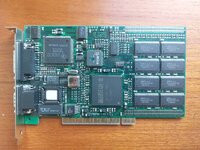
I have a 4x Virge PCI-graphics card (somewhere) with a cable-whip to connect 4 monitors. It uses a PCI bridge and 4 normal Virge-chips with memory and VGA-bios each on a 12" double-stack PCB PCI card. Due to some difficulties locating said board in the chaos i call storage, i could not test it out with the Mac. It would have been a very interesting Mac accessory since the 2D performance of the Virge is not bad at all. Having 4 high-res monitors in 1997 from a single PCI-slot would have been awesome.
 
It would have been a very interesting Mac accessory since the 2D performance of the Virge is not bad at all. Having 4 high-res monitors in 1997 from a single PCI-slot would have been awesome.
F/A-18 Hornet supports multi-monitor views. I've never actually tried it, but if you set up 3 monitors you can have front and sides on three displays.

Might be a fun experiment. It would have to be software flat shading though as the various versions, only the Korea based on version 3.x supported hardware acceleration and that was just Glide and OpenGL.
 
You guys seem to be having a lot of fun :)

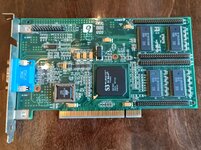
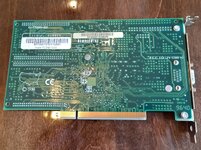
I was hoping I could join in, but I'm not sure:
IMG_20260507_145147_735.jpg
IMG_20260507_145159_123.jpg

I've been using this card in an old PC just for booting into DOS to test and flash PC video cards. I grabbed it from a scrap bin many years ago and kept it around because it worked, and I thought it was a boring card with no Mac equivalent, so I wouldn't be tempted to flash it...

The little bit of research I've done makes it sound like the Virge/VX (988) is the same as the Virge you guys are using (325) but uses VRAM (early term for dual ported memory?) vs. standard DRAM. I have no idea whether that would make it different enough for the same firmware not to work.
 
You guys seem to be having a lot of fun :)

I was hoping I could join in, but I'm not sure:
View attachment 98591
View attachment 98590

I've been using this card in an old PC just for booting into DOS to test and flash PC video cards. I grabbed it from a scrap bin many years ago and kept it around because it worked, and I thought it was a boring card with no Mac equivalent, so I wouldn't be tempted to flash it...

The little bit of research I've done makes it sound like the Virge/VX (988) is the same as the Virge you guys are using (325) but uses VRAM (early term for dual ported memory?) vs. standard DRAM. I have no idea whether that would make it different enough for the same firmware not to work.
So I tried a DX out of curiosity with no luck. It probably has a different VID and so the ROM doesn't like it. The various chips do have differences, but are pretty similar... A competent hacker could probably bodge at least 2D to work...

On the other hand, Number 9 is an interesting firm. Go back to the 80s, their first hardware was for the Apple II. They moved into fairly high end graphics cards. That S3 is one of the less fancy cards, but they actually made their own silicon, which Formac used.

This is my Formac Proformance 80, which uses a Number 9 Imagine 128 II (they tend to have Beatles song related names and strings in the ROM).

Formac Proformance 80.jpg

So the card is a good brand and probably one of the nicest S3s, but the Mac ROM we're flashing is for the vanilla Virge.
 
Hang about!? Where is that from? :LOL:
I simply modified the Rom to see the DX in two locations.
0x0024: 3355 3156 -> 3355 018A
0x6867: 5333 38A0 5631 -> 5533 38A0 8A01
Textures are not rendered, though. The 3D-engine code in the GA-control panel has to be updated, it seems.
 
I simply modified the Rom to see the DX in two locations.
0x0024: 3355 3156 -> 3355 018A
0x6867: 5333 38A0 5631 -> 5533 38A0 8A01
Textures are not rendered, though. The 3D-engine code in the GA-control panel has to be updated, it seems.
Perfect - I was wondering if it would happily do 2D with just an ID swap. I'm just much less proactive that you are!
 
Perfect - I was wondering if it would happily do 2D with just an ID swap. I'm just much less proactive that you are!
A Virge GX (SGRAM) works with the same Rom but is not usable since i get A LOT of errors while blitting and screen drawing.
After a few seconds, the screen is nearly unreadable. GA identifies the GX as a Virge, though.
The mouse is also not working at the moment.
 
A Virge GX (SGRAM) works with the same Rom but is not usable since i get A LOT of errors while blitting and screen drawing.
After a few seconds, the screen is nearly unreadable. GA identifies the GX as a Virge, though.
The mouse is also not working at the moment.
The Mouse problem was because there were damaged traces on the back of the card.
After i repaired them, the card was a bit more usable but is still producing irritating visual noise.
3D is not working with the GX card at all.
Maybe it is the SGRAM or the changed architecture of the chip.


The 4-monitor card has Virge GX with 30ns DRAM and is seemingly clocked @75MHz
Any attempt to get the Virge Chips recognized on the Mac were futile.
Only the Digital PCI-PCI bridge chip was recognized ... but as an ethernet controller with monitor-out !?
Maybe the PCI-PCI bridge was somehow preconfigured to only work in conjunction with the original "STB MVP Workstation" Rom?
 
Last edited:
I simply modified the Rom to see the DX in two locations.
0x0024: 3355 3156 -> 3355 018A
0x6867: 5333 38A0 5631 -> 5533 38A0 8A01
Textures are not rendered, though. The 3D-engine code in the GA-control panel has to be updated, it seems.
The first mod changes the device ID in the PCI Header from 5631 to 8A01.
The second mod makes the same change to some PPC code in the ndrv driver.
 
I simply modified the Rom to see the DX in two locations.
0x0024: 3355 3156 -> 3355 018A
0x6867: 5333 38A0 5631 -> 5533 38A0 8A01
I made some errors when i manually typed the bytes in the comment.
Somehow i sometimes changed 53 to 55 without noticing.
Here are the correct values:

Correction:
wrong: 0x0024: 3355 3156 -> 3355 018A
correct: 0x0024: 3353 3156 -> 3353 018A

wrong: 0x6867: 5333 38A0 5631 -> 5533 38A0 8A01
correct: 0x6867: 5333 38A0 5631 -> 5333 38A0 8A01

The changes are to the identification routine and the PCI-Identifier. The GA control panel seems to use the rom routines for identification and therefore the code in the identification routine has to be modified as well.

-Jonas
 
I have extracted the 3D and 2D graphics driver from the GA-5.9.6 control panel. A quick search for any readable strings for setting the memory clock did not result in any findings. Also looking for the addresses used to change the memory clock did not result in anything helpful. I think that the drivers would have to be decompiled to get anything out of them.
 

Attachments

I have extracted the 3D and 2D graphics driver from the GA-5.9.6 control panel. A quick search for any readable strings for setting the memory clock did not result in any findings. Also looking for the addresses used to change the memory clock did not result in anything helpful. I think that the drivers would have to be decompiled to get anything out of them.
I've spent a while digging around but haven't pinned it down yet. If they've made a function to set registers in the card and called it from elsewhere, frustratingly the register and values will be separated. Also parameters might be stored entirely separately in another resource.

What we're looking for is probably 10, 11, 15, 15... Not in a row, but close together in that order. It's the register indexes that would be called to set the MCLK. I might write something that searches all resources for an occurrence of those values close by to each other.
 
I have extracted the 3D and 2D graphics driver from the GA-5.9.6 control panel. A quick search for any readable strings for setting the memory clock did not result in any findings. Also looking for the addresses used to change the memory clock did not result in anything helpful. I think that the drivers would have to be decompiled to get anything out of them.

the ndrv that is in the fcode image of the PCI Option ROM is responsible for controlling a display in Open Firmware and in Mac OS (handles detecting a connected display, and setting resolutions and color depth and color palette). I extracted the ndrv from each fcode image as a .pef file for disassembly.

The 2D graphics driver from the control panel is something else. I don't know what it does - it doesn't have any exports. Maybe it patches stuff.

The MPW DumpPEF command is not the best way to disassemble a PEF (it doesn't show where the TVectors get called). I used Jasik's Nosy II to get a better disassembly. I think I have macros somewhere that can help convert a Nosy listing into a compilable assembly file. I think Nosy .asm listings are missing required info that is included in .list listings so I included both (I don't remember what the required missing info is).
 

Attachments

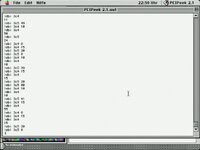
I tried tinkering with the PCI memory space but i lack the knowledge to do anything worthwhile.
Nonetheless here are some tools to peek and poke around...

Usage:
Open PCIPeek 2.1 ->
Code:
***** PCIPeek 2.1  6/95,  Let's you peek and poke your PCI devices! *****

    Originated by: Rob Glanville, Jano Banks, Mike Regal, and Al Scalise
    Modified by: Jano Banks and Paul Freeburn

--------------------------------------------------------------------
DXY <addr>      --> Display (Read) X=B/W/L/P, Y=C/I/M/T
    DBC < 8-bit hex addr> = Reads 8-bits from current node's Configuration Space
    DWC < 8-bit hex addr> = Reads 16-bits byte-reversed from current node's Configuration Space
    DLC < 8-bit hex addr> = Reads 32-bits byte-reversed from current node's Configuration Space
    DPC < 8-bit hex addr  8-bit page length> = Reads page 8-bits (default 128-bytes) from current node's Configuration Space
    DBI <32-bit hex addr> = Reads 8-bits from current node's IO Space
    DWI <32-bit hex addr> = Reads 16-bits byte-reversed from current node's IO Space
    DLI <32-bit hex addr> = Reads 32-bits byte-reversed from current node's IO Space
    DPI <32-bit hex addr 12-bit page length> = Reads page 8-bits (default 128-bytes) from current node's IO Space
    DBM <32-bit hex addr> = Reads 8-bits from any memory location
    DWM <32-bit hex addr> = Reads 16-bits byte-reversed from any memory location
    DLM <32-bit hex addr> = Reads 32-bits byte-reversed from any memory location
    DPM <32-bit hex addr 12-bit page length> = Reads page 8-bits (default 128-bytes) from any memory location
    DBT <no args>         = Reads 8-bits from current node with an Interrupt Acknowledge Cycle
    DWT <no args>         = Reads 16-bits byte-reversed from current node with an Interrupt Acknowledge Cycle
    DLT <no args>         = Reads 32-bits byte-reversed from current node with an Interrupt Acknowledge Cycle

SXY <addr data> --> Set (Write) X=B/W/L, Y=C/I/M/S/B
    SBC < 8-bit hex addr 8-bit hex data>  = Writes 8-bits to current node's Configuration Space
    SWC < 8-bit hex addr 16-bit hex data> = Writes 16-bits byte-reversed to current node's Configuration Space
    SLC < 8-bit hex addr 32-bit hex data> = Writes 32-bits byte-reversed to current node's Configuration Space
    SBI <32-bit hex addr 8-bit hex data>  = Writes 8-bits to current node's IO Space
    SWI <32-bit hex addr 16-bit hex data> = Writes 16-bits byte-reversed to current node's IO Space
    SLI <32-bit hex addr 32-bit hex data> = Writes 32-bits byte-reversed to current node's IO Space
    SBM <32-bit hex addr 8-bit hex data>  = Writes 8-bits to any memory location
    SWM <32-bit hex addr 16-bit hex data> = Writes 16-bits byte-reversed to any memory location
    SLM <32-bit hex addr 32-bit hex data> = Writes 32-bits byte-reversed to any memory location
    SLS <32-bit hex data 32-bit hex data> = Writes 32-bits byte-reversed to PCIBus where current node lives with Special Cycle
    SLB <32-bit hex data 32-bit hex data> = Writes 32-bits byte-reversed to all PCIBuses in the system with Special Cycle

C <no args> --> Displays current node's PCI Configuration Header (first 64 bytes of Configuration Space)

N <no args> --> To select new node name

? <no args> --> Prints this menu
--------------------------------------------------------------------

Enter new node name =>formacGA6
Current node info:
    Name:           formacGA6
    Slot:           A1
    Unit-Address:   6800
        Bus Number:          0
        Device Number:       D
        Function Number:     0
>C
Vendor ID        = 5333     | 0x00
Device ID        = 5631     | 0x02
Command          = 0006     | 0x04
Status           = 0200     | 0x06
Revision ID      = 06       | 0x08
Class Code       = 030000   | 0x09
Cache line size  = 00       | 0x0C
Latency          = 20       | 0x0D
Header type      = 00       | 0x0E
BIST             = 00       | 0x0F
Base addr 0      = 84000000 | 0x10
Base addr 1      = 00000000 | 0x14
Base addr 2      = 00000000 | 0x18
Base addr 3      = 00000000 | 0x1C
Base addr 4      = 00000000 | 0x20
Base addr 5      = 00000000 | 0x24
Cardbus CIS Ptr  = 00000000 | 0x28
Subsys Vendor ID = 0000     | 0x2C
Subsys ID        = 0000     | 0x2E
ROM base         = 80800000 | 0x30
Reserved         = 00000000 | 0x34
Reserved         = 00000000 | 0x38
Interrupt line   = 00       | 0x3C
Interrupt pin    = 01       | 0x3D
Min_Gnt          = 04       | 0x3E
Max_Lat          = FF       | 0x3F
>

(HQXed ShrinkWrap image)
 

Attachments

Back
Top