It says 11.4.0?Which version of gcc do you have installed? You'll want to make sure you have at least GCC 4.4.


It says 11.4.0?Which version of gcc do you have installed? You'll want to make sure you have at least GCC 4.4.

Usually booting 7.5.5 doesn't reach the Finder unless you're holding the shift key during boot to disable extensions. It appears to be the same for Infinite Mac. Those DMA aborts are removed from my fork. Whatever is causing my fork to hang might be related to whatever is doing the non-DWORD read or it might be something else. It would be nice to be able to use Conflict Catcher to find the conflicting extensions, but it doesn't let you indicate pass/fail of a test during extension load time even though Conflict Catcher can appear during extension load time which is unfortunate since it can't handle conflicts that cause the Finder to be unreachable? Maybe I'm using it wrong.
Yup, that seems to improve things. Will have to try that with the other OS versions that had problems.The issue appears to be the Apple Photo Access extension -- disabling it both makes the non-DWORD read go away, and allows the Finder to successfully start.

 github.com
Some not very productive discussions (an issue tracker is not a forum), so I locked it for a bit. Unlocked now.@mihai I noticed there were a whole bunch of comments added to:

Investigate DingusPPC · Issue #219 · mihaip/infinite-mac
https://github.com/dingusdev/dingusppc is actively being developed and making progress (thread). Basic boot Video out Sound out Disk image loading Floppy Hard disk (needs better disk image support,...
Were they bots? What happened?
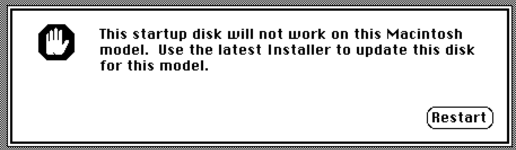
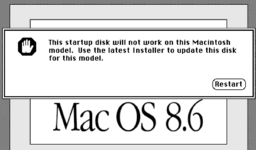
I didn't realise/forgot Enablers went away after System 7.x. I think I was a bit confused, because late versions of Classic Mac OS seemed to need matching Mac OS ROM files with the OS, at least on New World Macs.I built those images a while back (for Basilisk II for 8.1 and SheepShaver for everything later). IIRC I did a universal install for all of them, any ideas for what enablers might be required (also, I thought they went away with later OS versions)?
OK, so this is where it gets odd. I tried your link, it worked on my Mac mini 2012 under Catalina and Chrome. Then I tried it on this MacBook M2 under macOS 15.3.2 and Safari and it was fine.The 6100 booted 8.1 for me in Infinite Mac
https://infinitemac.org/1998/Mac OS 8.1?machine=Power+Macintosh+6100
but I think it had to boot 3 times to get to the Finder? That's weird. Is it starting with empty PRAM that needs to be setup?
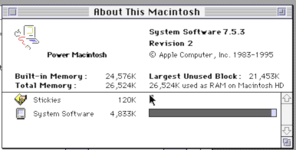
Mac OS 8.5 appears to hang too.8.6 HD hangs on the 6100 (doing printer port AppleTalk stuff) but the CD should boot.
Oh, OK.DingusPPC needs to be modified to properly emulator a printer port or ethernet port that doesn't have anything connected to it.
Seems to be an issue with cross-region DMA (Power 6100 has multiple RAM regions because parts are not contiguous or are mirrors of other parts). I got a similar abort with selecting 264 MB but not 136 MB RAM.OK, so this is where it gets odd. I tried your link, it worked on my Mac mini 2012 under Catalina and Chrome. Then I tried it on this MacBook M2 under macOS 15.3.2 and Safari and it was fine.
Then I tried these variants:
- No Saved HD - fine.
- Ram reduced to 24MB - fine.
- After booting the first time I enabled VM and rebooted, then I got the first error message below.
- Same as (2), but booting 7.5.3, then turning on VM and rebooting. Worked fine.
Yup, same issue has 8.6 with the AppleTalk/printer port. 8.1 AppleTalk/printer port handling is different and doesn't hang.Mac OS 8.5 appears to hang too.
So, does that mean it's likely to be a bug in this file?Seems to be an issue with cross-region DMA (Power 6100 has multiple RAM regions because parts are not contiguous or are mirrors of other parts). I got a similar abort with selecting 264 MB but not 136 MB RAM.
github.com
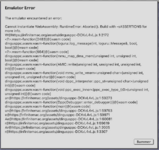
The Emulator Error that you posted has the stack trace but it appears to be incomplete (maybe because of optimizations). The abort message is in theSo, does that mean it's likely to be a bug in this file?

dingusppc/devices/common/dbdma.cpp at master · dingusdev/dingusppc
An experimental emulator. Contribute to dingusdev/dingusppc development by creating an account on GitHub.
Or the code that handles the specific DMA channel? Where are regions handled?
mmu_map_dma_mem function in ppcmmu.cpp. We can get the full stack trace running the debug version of the emulator on a local machine.
OK, thanks!The Emulator Error that you posted has the stack trace but it appears to be incomplete (maybe because of optimizations). The abort message is in themmu_map_dma_memfunction in ppcmmu.cpp. We can get the full stack trace running the debug version of the emulator on a local machine.
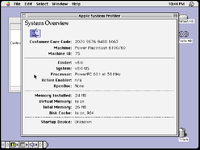
DingusPPC pm6100 should work up to 9.0.4.Amazing, I can now run Mac OS 8.0 on the PPC 6100 Dingus PPC emulator!
DingusPPC has a counterDon't know why it says "56MHz".
g_icycles with increment of 1 per PPC instruction. The counter is converted to nanoseconds by shifting it right by icnt_factor bits. icnt_factor is currently 4 which means each instruction is assumed to be ≈ 16 ns (62.500 MHz instruction frequency). The PDM cpu clock calculated in ROM at 0x403036CC gets a value of 0x034F0F0F = 55512847 Hz = 55.512847 MHz which is a period of 18.013 ns. There's a table in ppcexec.cpp which shows the results of different icnt_factor values for pm6100.g_icycles as a binary fraction (denominator), and use an integer increment that is not 1 for the numerator. The more bits we use for the fraction, the closer we can get to 60 MHz but the less time it would take for the 64-bit value of g_icycles to wrap around.g_realtime flag. If it is true then guest nanoseconds matches host nanoseconds. If the host is too fast or too slow then the guest Mac might not boot. To handle this, one might boot with g_realtime set to false, (the default), then set it to true after the guest Mac has booted and calculated all the clock speeds. Code that uses CPU instruction loops to wait a specific amount of time (instead of using a timer that has the time) would probably not work correctly since the calculated CPU speed would not be consistent for the guest after switching to realtime.Not enough RAM or a bug? DPPC pm6100 can have up to 264 MB of RAM but the infinitemac UI is currently limited to 136 MB. There is a bug with DMA emulation with 264 MB of RAM. It happens when different RAM banks are adjacent in physical memory and the DMA physical address range crosses a RAM bank boundary. It may happen with other memory configurations. A fix would be to ensure the RAM is allocated by the host in a single block.I tried running it with 12MB of RAM, but it failed to boot.
Not enough RAM probably.I've tried Mac OS 8.1 which booted OK with 24MB and VM off, but wouldn't with VM on. I could run it with 40MB and VM on though.
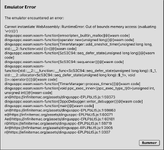
That's a bug. It doesn't look like the DMA bug I mentioned. I wonder if the bug happens with non-webasm version of DPPC? The error message from that would be more useful.Mac OS 8.5 failed at 40MB with VM off. I got this message:
It was the same with Mac OS 8.6/40MB (didn't try higher).
iMac G3 should boot everything up to Mac OS 8.6. Did you check the Mac OS 8.5 HD to make sure it has "Mac OS ROM" version 1.1.2?iMac 233MHz/64MB freezes part of the way through booting Mac OS 8.5.
I'm not able to reproduce this in a native build with the same arguments and disk image (even when building with ASan and other diagnostic tools). It appears to be a double-free when using timers, which are more frequently used by the JS build (since it polls for new data).That's a bug. It doesn't look like the DMA bug I mentioned. I wonder if the bug happens with non-webasm version of DPPC? The error message from that would be more useful.