
-
 Hello Guest! We're hosting a challenge to welcome vintage Intel macs to the MLA during the month of July! See this thread for more information.
 -
We've made some quality of life improvements to the Trading Post. More info here.
You are using an out of date browser. It may not display this or other websites correctly.
You should upgrade or use an alternative browser.
You should upgrade or use an alternative browser.
Design68: A 65% replacement keyboard using AppleDesign controllers
- Thread starter demik
- Start date

100%. I just don't understand enough about the circuit to know where I'd need to do that. If you can give me an idea of how I'd need to setup the new switch to send an escape signal, I'd definitely go for it. I'd be willing to document it for you and others. And as you said, I could do a test run with a spare switch before cutting up the board - so I'd feel better about the process.That's a good question. Are you willing to cut traces and use a couple of bodge wires to the controller pins ? (It's possible to use an extra switch for testing before messing with the PCB)

Well it's just a matter of wiring the switch where it's supposed to be in the keyboard matrix.
On the Design68, the X pin is the "top right" on a switch, Y being the bottom left. (As seen from above the keyboard)
For ESC you do need a switch between X17 and Y2.
- X17 available keys are TAB and CAPS LOCK
- Y2 available keys are right shift and up arrow
I hope that does make sense. If you connect the switch using wires, you can 100% go back to where you are now.
If you would rather like having a new PCB, I can probably release a new revision with solderable jumpers so you can have either ESC+DEL or Page Up+Page Down
On the Design68, the X pin is the "top right" on a switch, Y being the bottom left. (As seen from above the keyboard)
For ESC you do need a switch between X17 and Y2.
- X17 available keys are TAB and CAPS LOCK
- Y2 available keys are right shift and up arrow
I hope that does make sense. If you connect the switch using wires, you can 100% go back to where you are now.
If you would rather like having a new PCB, I can probably release a new revision with solderable jumpers so you can have either ESC+DEL or Page Up+Page Down
I believe it does. So If I attach a key switch with the top right pin to the top right pin of wither TAB or CAPS LOCK, and the bottom left pin to the bottom left pin from the right shift or UP ARROW key, that should enable that switch to function as an escape key, Then I could cut the traces to the existing PAGE UP key and run the bodge wires as I did and it would turn that PGUP key into an escape key. Do I have that correct?Well it's just a matter of wiring the switch where it's supposed to be in the keyboard matrix.
On the Design68, the X pin is the "top right" on a switch, Y being the bottom left. (As seen from above the keyboard)
For ESC you do need a switch between X17 and Y2.
- X17 available keys are TAB and CAPS LOCK
- Y2 available keys are right shift and up arrow
I hope that does make sense. If you connect the switch using wires, you can 100% go back to where you are now.
If you would rather like having a new PCB, I can probably release a new revision with solderable jumpers so you can have either ESC+DEL or Page Up+Page Down
EDIT: OK, I figured it was a low risk thing to try so I did it. And it works with a separate switch. The bodge wire is going to be long, but I'm excited to be able to put my nice keyboard back on my Mystic CC! Thanks for the information. Although I do thing a toggle for switching the PGUP and PGDN keys would be a killer feature.
Can you provide the X and Y keys for the DELETE key so I can re-wire that one as well? Seems weird to have a PGDN and ESC key.
Last edited:
Actually, after looking at the board, I just realized the traces for the X pin for those appears to be on the top of the board, and unless I'm mistaken, I won't be able to access the top of the board without removing every switch. So, looks like I might need to order another batch of PCBs and switches to make this happen...I believe it does. So If I attach a key switch with the top right pin to the top right pin of wither TAB or CAPS LOCK, and the bottom left pin to the bottom left pin from the right shift or UP ARROW key, that should enable that switch to function as an escape key, Then I could cut the traces to the existing PAGE UP key and run the bodge wires as I did and it would turn that PGUP key into an escape key. Do I have that correct?
EDIT: OK, I figured it was a low risk thing to try so I did it. And it works with a separate switch. The bodge wire is going to be long, but I'm excited to be able to put my nice keyboard back on my Mystic CC! Thanks for the information. Although I do thing a toggle for switching the PGUP and PGDN keys would be a killer feature.
Can you provide the X and Y keys for the DELETE key so I can re-wire that one as well? Seems weird to have a PGDN and ESC key.

Damn, sorry forgot about that damn plate 
It seems there is still a way. We got lucky with the traces, so remove only PGUP+PGDN switches and cut the top traces from there, then add one wire to fix Y7 (return / backspace). Here is a schematic for you
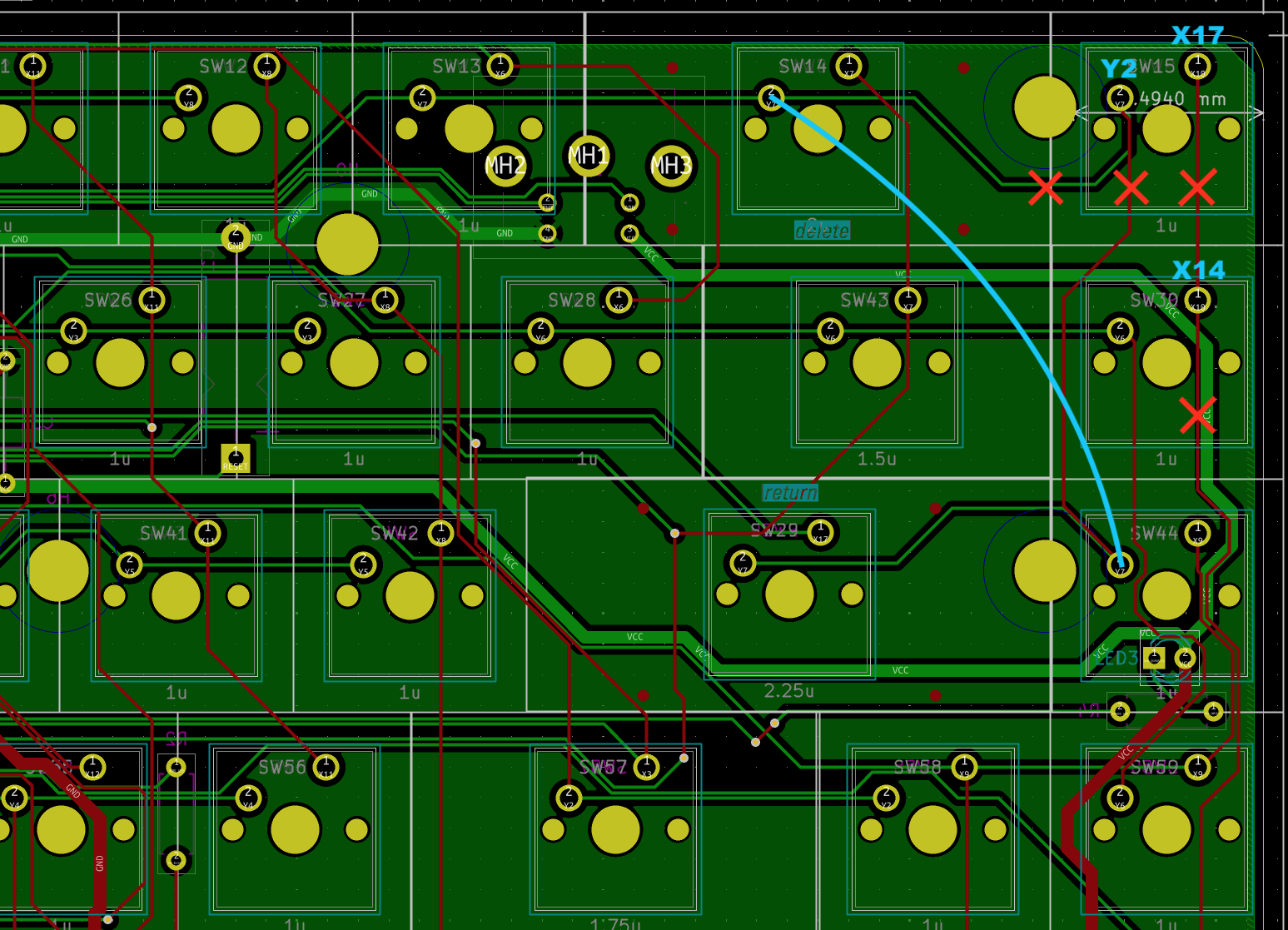
As for DEL, it's X14 and Y6
- X14 is T, B, G, and left arrow
- Y6 was already used by PGDN so no patching needed there
Just need two spare switches if they don't come easily
It seems there is still a way. We got lucky with the traces, so remove only PGUP+PGDN switches and cut the top traces from there, then add one wire to fix Y7 (return / backspace). Here is a schematic for you
As for DEL, it's X14 and Y6
- X14 is T, B, G, and left arrow
- Y6 was already used by PGDN so no patching needed there
Just need two spare switches if they don't come easily
Ah, I didn't think about being able to cut the trace after removing the switch... Brilliant! And I already re-assembled my keyboard... Back to the workbench...Damn, sorry forgot about that damn plate
It seems there is still a way. We got lucky with the traces, so remove only PGUP+PGDN switches and cut the top traces from there, then add one wire to fix Y7 (return / backspace). Here is a schematic for you
As for DEL, it's X14 and Y6
- X14 is T, B, G, and left arrow
- Y6 was already used by PGDN so no patching needed there
Just need two spare switches if they don't come easily
Thanks so much for getting this information!
And I'm back! I love this keyboard, but had to switch it out when I got that Apple IIe card because the escape key is how you switched back to the Mac side when in Apple II mode. Thanks again!Ah, I didn't think about being able to cut the trace after removing the switch... Brilliant! And I already re-assembled my keyboard... Back to the workbench...
Thanks so much for getting this information!
How difficult would it be to add Alps switch pads to the ANSI PCB? I've spent all of 10 minutes in kicad so I have no ability to gauge the effort.
I do have enough broken keyboards to harvest a complete set of switches, and
I just think it would be very cool to have a 68% with alps switches and actual ADB controller.
I do have enough broken keyboards to harvest a complete set of switches, and
I just think it would be very cool to have a 68% with alps switches and actual ADB controller.
How difficult would it be to add Alps switch pads to the ANSI PCB? I've spent all of 10 minutes in kicad so I have no ability to gauge the effort.
I do have enough broken keyboards to harvest a complete set of switches, and
I just think it would be very cool to have a 68% with alps switches and actual ADB controller.
I tried that unfortunately it doesn't work. While replacing the footprints and rerouting would only take a few hours, the issue is that ALPS switches are rectangle and slightly bigger than cherry switches, so they will not clear the plate
They require a PCB mount keyboard or a dedicated ALPS plate.
Does anyone have an extra PCB they'd be willing to sell me? I can order a new batch of 5, but I don't trust myself to not try to build all 5 (key caps and switches get expensive! Trying to build one with clear keycaps to go with my transparent SE/30 and transparent mouse And would prefer something cheaper than the $25 from JLCPCB...


Does anyone have an extra PCB they'd be willing to sell me? I can order a new batch of 5, but I don't trust myself to not try to build all 5 (key caps and switches get expensive! Trying to build one with clear keycaps to go with my transparent SE/30 and transparent mouse And would prefer something cheaper than the $25 from JLCPCB...
Yeah no kidding... I ended up building 4 out of my 5 pcbs... unfortunately, already sold the remaining one.
Thanks for the info, I would need much practice with kicad to modify this to use the ADB contoller and add arrows and other keys that are nice for A/UX.I tried that unfortunately it doesn't work. While replacing the footprints and rerouting would only take a few hours, the issue is that ALPS switches are rectangle and slightly bigger than cherry switches, so they will not clear the plate
They require a PCB mount keyboard or a dedicated ALPS plate.
ALPS 60% keyboard PCB
GitHub - tmk/alps64: Poker X compatible 60% size PCB supports various Alps switch keyboard layouts like AEK, Omnikey, Dell, V60MTS and Infinity(KiCad Project)
Poker X compatible 60% size PCB supports various Alps switch keyboard layouts like AEK, Omnikey, Dell, V60MTS and Infinity(KiCad Project) - tmk/alps64
 github.com
I dont need 5 MX switch PCBs either, just one, if someone is planning on ordering a set.
I may order a set. I think 5 runs something like $25-30. But as I said, I don't have the self control not to build all five if the PCBs are laying around. If you and anyone else wanted to take some of the boards off my hands, I could do the re-order on JLCPCB...Thanks for the info, I would need much practice with kicad to modify this to use the ADB contoller and add arrows and other keys that are nice for A/UX.
ALPS 60% keyboard PCB

GitHub - tmk/alps64: Poker X compatible 60% size PCB supports various Alps switch keyboard layouts like AEK, Omnikey, Dell, V60MTS and Infinity(KiCad Project)
Poker X compatible 60% size PCB supports various Alps switch keyboard layouts like AEK, Omnikey, Dell, V60MTS and Infinity(KiCad Project) - tmk/alps64
I dont need 5 MX switch PCBs either, just one, if someone is planning on ordering a set.
Yes please, one.I may order a set. I think 5 runs something like $25-30. But as I said, I don't have the self control not to build all five if the PCBs are laying around. If you and anyone else wanted to take some of the boards off my hands, I could do the re-order on JLCPCB...
Does anyone have an extra PCB they'd be willing to sell me? I can order a new batch of 5, but I don't trust myself to not try to build all 5
Yeah no kidding... I ended up building 4 out of my 5 pcbs... unfortunately, already sold the remaining one.
That's not how it works
 . I always give my remaining PCBs, so sure for one PCB it's expensive but still less than building more keyboards
That's not how it works
Haha! the problem is I have four and every time someone posts in this thread, I get this itch to build another!!
OK, I put in an order and I'm only building ONE. One with transparent switches and transparent keycaps for my MacEffects clear SE/30 build. (I will likely keep one PCB in case I need to do any key manipulation like I did before, but I will have 3 I'm looking to pass along quickly to keep myself under control!Yes please, one.
DM me and we can figure out shipping when they arrive and I complete my build to confirm they are working. Now I just need to find one more compatible AppleDesign keyboard... That's not how it works . I always give my remaining PCBs, so sure for one PCB it's expensive but still less than building more keyboards
That's a good way to think about it. With this new one, I'll have 6, and the keycaps and switches (and Tester68 keyboard) costs add up.
I did take a chance on a different keyboard, so I'll let you know if it works, but I couldn't find any translucent gray Tester68, so I ended up ordering a Novice68 version. It looks like maybe the PCB is the same, so I'm hoping it will work without modification, but I'm ok if I have to modify the case a bit. The translucent gray looks to be a lighter color that I think will look better with my transparent keys. It also has exendable feet, which I like to adjust the angle. So, I'll let everyone know if it's an option.
Last edited:
Ha, not sure if you want/can cancel the order and wait for the next PCB revision (the one with selectable ESC+DEL and PGUP+PGDN) block.
Although knowing my todo list, there may be a "few" weeks of delays



Ha, my impatience gets me again!
I will probably just do the trace cutting I did on the previous build. But I do think it is awesome to add that selectable key config. Are you just going to add some headers with jumpers to decide between the two settings? Or is there a cleaner approach with tiny switches?
Similar threads

- Replies
- 1
- Views
- 2K


- Replies
- 12
- Views
- 8K


- Replies
- 19
- Views
- 16K

- Replies
- 19
- Views
- 9K