


• Hello MLAers! We've re-enabled auto-approval for accounts. If you are still waiting on account approval, please check this thread for more information.

Another IIci ROM hack

Nice! I look forward to the programmer board, although I can't make any useful comments in that area.

On the other hand, I've INITified the ROM disk driver, so you can just drop it in your system extensions and mount your ROM disk (assuming you have a 512KB disk image located at 0x40880000). In addition to just INITifying it, I've fixed some things about the driver: it correctly identifies the volume as locked and it claims to be "unmountable" (meaning you get a dialog saying it won't come back until you reboot if you try to eject it, same as other "fixed" disks).

It looks like file extensions of ".hqx" aren't allowed to be attached to posts, so I'll keep it on my machine: http://synack.net/~bbraun/romdrv0.2.sit.hqx

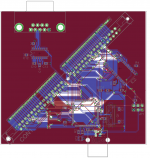
 
Suggestions/criticisms are welcome!
dougg3,

I would suggest to move some vias here and there (away from each other, place them between pins, not directly at the pin they're not connected to) and reroute some traces manually. I marked some examples in red in the picture.

I'm not nitpicking.. :-)

board_suggestion.png

 
I have dumps of the Daystar 4.01 and 4.11 at:

http://www.prismnet.com/~trag/Daystar/Turbo040/

It's been years since I experimented with these, but IIRC, the 4.01 worked with the LC version and the 4.11 worked with the version with an FP unit. There was an 'i' version of the Turbo040, Turbo040i, which had a 68040 with no floating point unit. and the regular version in which the 68040 came with the floating point unit.

These dumps are from pulling the chips out of the socket and reading them on a programmer.

 
It looks like file extensions of ".hqx" aren't allowed to be attached to posts, so I'll keep it on my machine: http://synack.net/~bbraun/romdrv0.2.sit.hqx

Nice work! That's cool! I'm having a heck of a time downloading the file from your machine...is all your bandwidth taken up, or is something else weird going on? I haven't been able to download either file. They all stall at like 1% or 3%.

I would suggest to move some vias here and there (away from each other, place them between pins, not directly at the pin they're not connected to) and reroute some traces manually. I marked some examples in red in the picture.I'm not nitpicking.. :-)
I appreciate it ojfd! Thanks! Those traces you highlighted near the bottom are examples of what I've been fixing. I just missed those two, so thanks for pointing that out! I also see what you did in the mid-right and will implement those ideas too--it'll look much better after doing that!

I may have to mess around with the design near the crystal oscillator. Apparently those can be pretty sensitive and I might want to make sure everything stays away from it. Luckily the two lines near it are not ones that will be toggling much (reset and chip select).

I have dumps of the Daystar 4.01 and 4.11...

These dumps are from pulling the chips out of the socket and reading them on a programmer.
Interesting, trag! Your dump of the 4.01 chip does not match olePigeon's in-system dump of 4.01. I wonder how that works...maybe there is some kind of in-between hardware layer that decrypts the contents of the chip on the fly or something? After a quick glance I don't see a simple relationship between the two.

I was just going through olePigeon's 4.01 dump and found this gem:

Code:
--- Does your mother know you're reading our ROM code? ---
;-)

 
Wow, I've missed a lot of action in the past week or so...

dougg3, how are you finding the strings in the DayStar ROM?

Did anyone see how the DayStar ROM patches the part of the host ROM that does the memory check? :b&w:

Does the DayStar incompatibility happen if you don't change the icons?

The ROM/RAM disk sounds very promising. I'm looking forward to Mac Classic boot capability, if possible. Is there a tutorial on how to properly add the disk image to the ROM?

Great job guys!!

 
I checked the spacing on the 64-pin SIMMs today. My ROM SIMM fit in all of them, so I guess they're the right size. I did discover that some of them are 45° angle, and some are 90° angle. There appears to be plenty of each. I wouldn't recommend the slotted one, it would be difficult to pull the SIMM out.

 
Is there a tutorial on how to properly add the disk image to the ROM?
For the ROM disk, this is what I did for my setup (IIx w/IIsi ROM):

Create the empty disk image:

Code:
dd if=/dev/zero of=diskimage bs=524288 count=1
Using minivmac, boot into a working system. Any will do. Then attach that blank disk image. MacOS in minivmac should ask you if you want to initialize the disk. Say yes. Put anything you want on it, fill up that 512KB!

Then concatenate it with the IIsi ROM image:

Code:
cat IIsi.ROM diskimage > awesome.rom
Next, the image needs to be split into four parts for burning to each of the four chips on the SIMM. I have a small program available in source form here. The syntax of the (hastily slapped together) tool is in the form of "splitter infile outfile1 outfile2 outfile3 outfile4".

Code:
gcc -o splitter splitter.c
./splitter awesome.rom awesome_{1,2,3,4}.bin
The output files match the IC numbers on the ROM SIMM, they don't correspond to byte order. So awesome_1.bin should be burned to IC1 and so forth.

Put the SIMM in your machine, and boot! It should boot normally since the IIsi ROM image is unmodified. Next, grab the ROMDisk driver, extract, and throw the ROMDisk extension in your Extensions folder. Reboot. You should now have the disk image you created in minivmac mounted on your desktop.

If you install the ROMDisk extension without the modified ROM, it will present a dialog saying the disk is unrecognized, do you want to initialize it? Even if you say Initialize here, it'll fail since it's ROM.

Keep in mind this is kind of hardware specific and should work on a IIx, SE/30, IIcx, and IIsi, but I've only tested on the IIx.

 
It should be better, at least for the moment.
Cool, thanks! Got it!

dougg3, how are you finding the strings in the DayStar ROM?
I'm finding the strings using the "strings" command built-in to Linux (and available with cygwin on WIndows). It should also come with OS X, I believe.

I just type:

Code:
strings romdump.bin
And it prints out a bunch of ASCII strings. Most of them are random garbage but you get a few useful ones.

Did anyone see how the DayStar ROM patches the part of the host ROM that does the memory check? :b&w:
I haven't found that part yet. Only found the ROM checksum test. But my understanding is that since it can be disabled or enabled in software, it probably patches the code to jump to a routine in its own ROM that checks a special PRAM value or something.

Does the DayStar incompatibility happen if you don't change the icons?
We will know more soon :)

I checked the spacing on the 64-pin SIMMs today. My ROM SIMM fit in all of them, so I guess they're the right size. I did discover that some of them are 45° angle, and some are 90° angle. There appears to be plenty of each. I wouldn't recommend the slotted one, it would be difficult to pull the SIMM out.
Excellent! By 45°, are you meaning the kind like our motherboards have, where you put it in at 45 and then push and it "clicks" at 90°? I totally agree, the ones where you just push it down would be a pain in the butt to get out, especially with the small programmer board.

I may have to ask if you can pick some of those up pretty soon. I'd like to have one of the sockets in my hand before I have the board manufactured, just to make sure the holes are correct (I imagine they are fine).

Once I send it off to manufacturing, I can move away from the hard stuff and into my area of expertise, software :) I'll probably start by getting it working completely over RS232 serial, with USB only used for powering. Once that works and I've verified all my flashing routines, I can move over to getting the USB communication working. Finally, I'll make a bootloader so that its firmware can be updated in case I discover a bug after I've started shipping them out, or if I have to add support for additional chips. Fun, fun, fun! And I mean that sincerely! And it'll be completely open-source :)

 
Progress on the ROMDisk booting thread:

I've got a slightly modified version of the driver that I just slapped down on top of the .Sony floppy disk driver in ROM. It attempts to boot the ROMDisk, but once the System starts loading, it hangs at the Welcome to Macintosh screen. It looks like the System needs to reinit the driver when control transfers from the ROM to the OS or something.

Also, when you do a Minimal OS install for a particular machine, it apparently checks the machine type and ROM version in bytes 8 & 9 of the ROM. I can only get a minimal install of 6.0.8 for 1 machine type in the 512KB disk image, and I'm on a IIx with a IIsi ROM, so it gets very confused. Changing bytes 8 & 9 of the ROM to match the IIx ROM seem to fool it.

I'm really looking forward to the SIMM programmer! Removing the SIMM, and then removing, programming, reinserting each of the 4 chips, and then putting the SIMM back in is tedious business. :)

 
Excellent! By 45°, are you meaning the kind like our motherboards have, where you put it in at 45 and then push and it "clicks" at 90°? I totally agree, the ones where you just push it down would be a pain in the butt to get out, especially with the small programmer board.
Those are the 90° sockets. The 45° sockets you stick the SIMM in at about 70°, then push it down and clicks in at 45°. Hmm, well, maybe it's closer to 30°. Anyway, it's like the Quadra 605's RAM. I guess I shoulda described it as a low-profile socket.

Edit: Are you gonna screen the Jolly Roger on the board? :) Doesn't need LEDs or anything. :p

 
Progress on the ROMDisk booting thread:
Cool! This is going to be so awesome! So do you think you have to replace the .Sony driver in the System file as well?

I'm really looking forward to the SIMM programmer! Removing the SIMM, and then removing, programming, reinserting each of the 4 chips, and then putting the SIMM back in is tedious business. :)
LOL, tell me about it! It was even worse before I had the SIMM when I was figuring out the startup chime code...

I agree though, pulling the chips out of their sockets sucks. What's really bad is the sockets I'm using don't work with my PLCC extractor tool, so I kind of have to pull them out a corner at a time. Sometimes it bends the pins a bit :(

The programmer board should be able to program the chips much faster, too. It seems like it takes forever to program each chip with my burner, but the datasheet for the SST39SF040 says the typical chip rewrite time should be about 8 seconds. Since all 4 chips will be programmed simultaneously, you get the picture :) Even if it takes 30 seconds or a minute, it would still be a huge improvement.

The 45° sockets you stick the SIMM in at about 70°, then push it down and clicks in at 45°.
Ah, gotcha. I personally like the 90 degree ones, but I guess it doesn't matter much as long as they fit on the board! :)

Edit: Are you gonna screen the Jolly Roger on the board? :) Doesn't need LEDs or anything. :p
Absolutely! It can be much bigger, and EAGLE should be better at importing the graphic, too. I can do your first version that was solid, I think...

 
Progress on the ROMDisk booting thread:
Cool! This is going to be so awesome! So do you think you have to replace the .Sony driver in the System file as well?
Nice! If you haven't already, check out the source code for Mini vMac. It patches over the .Sony driver in ROM before it boots the Mac, exactly as it sounds like bbraun is doing it. Any possible driver re-init problems should effect Mini vMac the same way. Since Mini vMac doesn't require any changes to the System file on the disk images that it boots, I assume that replacing the driver inside the System file isn't required.

 
Yeah, I'm thinking it's not due to System issues. There are a couple things I'm investigating in order of likelihood:

1) I have funky code for the accRun control code for posting the disk mount notification. It should probably just be a straight post. The ROM doesn't mount drives when booting, it just takes drives off the drive queue and inspects them for bootability (modulo a bunch of other code that checks the PRAM value for desired boot disk, whether the mouse is down and should eject the floppy, etc). It then stores the drive number it selected to boot from in a low memory global, and boots the blessed System file. I suspect the System needs the drive mounted, and calls the boot drive's driver Control function with csCode=accRun, which is supposed to post a diskEvt notification, which will mount the drive, and everything continues happily booting. I'm not positive the System calls accRun on it's own, the .Sony driver installs VBL task that fires every 60 ticks (1 second), and polls the state of the floppy drive. If a disk is inserted, it calls accRun on its self, which in turn does the PostEvent. So, it's possible my Control function isn't getting called with accRun, the drive is never mounted, and the System is freaking out because it has no root disk.

2) I'm using the device control entry's dCtlStorage element to allocate a handle to the drive queue element. The .Sony driver allocates a pointer for its local data (including its drive queue element) and sticks it at 0x134. I may be losing something here?

3) I don't support several Control and Status codes, including drive & disk icon retrieval. It could be hung up on that, although I'm somewhat skeptical.

Minivmac's disassembly of the ROMs has been invaluable, as have the minivmac and basilisk ii source bases.

Have I mentioned I'm looking forward to the programmer? ;)

 
Me too! It'll be an interesting experience doing all four at once right on the SIMM Card!

You've just gotta love all the progress that's been made on so many different fronts in this, and BMOW's Thread when so many comrades are working in collaboration on so many interrelated projects! Synergy ROCKS!!! [:D] ]'>

I'm going to have to do a major re-work of the intro & add links to all the related threads. :approve:

My new ROM SIMM arrived today, BTW!

 
Ok, further progress, but pretty weird. I've gone back to using a straight IIx ROM to simplify the Minimal System install problem. Changing the machine time and rom revision seemed to sufficiently fool the System's check, but the less variables the better.

Good news: I can boot the rom disk all the way to the finder, navigate around, etc.

It turns out it was a problem with the drive getting mounted after the system booted. Setting dNeedTime (0x20) on the driver flags with a delay of 60 ticks, the System will invoke the Control function with csCode=accRun when it's ready, the driver posts a diskEvt event, and boom, booting.

Bad news:

1) After booting, the cursor doesn't move! Mouse down works fine, keyboard works fine, the cursor just doesn't move.

2) If there is another disk in the system (like the SCSI disk), the System will boot off the ROM disk, but attempt to root off the other disk instead of the ROM disk.

 
1) After booting, the cursor doesn't move! Mouse down works fine, keyboard works fine, the cursor just doesn't move.
This is what you'd see if SCC interrupts weren't getting through. Mouse movement generates an SCC interrupt, but the mouse button is a poll rather than an interrupt, and keyboard interrupts come from the VIA. So maybe your init code is leaving the SCC in a weird state, or stomping on the SCC interrupt handlers or something?

 
I've had some time to play with all three ROM SIMMs today, but my results may not mean much, I just discovered that my IIsi

has been booting happily for quite some time with the ROM SIMM jumper REMOVED! [:O] ]'>

IIsi ROM Image does NOT work on modified Rev 0 ROM SIMM . . .

. . . it boots fine on both the stock Rev 0 ROM SIMM and the Jolly Roger Rev 1 ROM SIMM, though!

The IIvx ROM Image does NADA! No Boot Chimes, No Video off MoBo.

The Quadra 650 ROM Image at least gives MoBo Video, but no boot chime.

Methinks I'll need to be removing some ROMs from the IIsi MoBo before further testing.

Comments, gang? :?:

 
Good news: I can boot the rom disk all the way to the finder, navigate around, etc.
Woohoo!

I just discovered that my IIsi has been booting happily for quite some time with the ROM SIMM jumper REMOVED! [:O] ]'>
I have no idea what the ROM SIMM jumper does on the IIsi -- does it behave exactly like the IIci's one, where it's supposed to be in there if there is motherboard ROM, and removed if using the SIMM? I vaguely remember that we talked about this before, but I can't remember...

IIsi ROM Image does NOT work on modified Rev 0 ROM SIMM . . .. . . it boots fine on both the stock Rev0 ROM SIMM and the Jolly Roger Rev 1 ROM SIMM, though!
I'd say this finally confirms it...my IIsi mod was not necessary. The original SIMM works fine in the IIsi without any changes. Thanks, Apple, for having your IIsi dev notes wrong... :-)

The Quadra 650 ROM Image at least gives MoBo Video, but no boot chime.
Interesting! I guess the Quadra 650 ROM is based on the IIci and not the IIsi...

Methinks I'll need to be removing some ROMs from the IIsi MoBo before further testing.

Comments, gang? :?:
I don't think removing ROM from the motherboard will do anything, really. As long as the jumper is disabling them, it's having the same effect that you would see from removing the ROM.

 
If the IIsi is booting just fine from the MoBo ROMs when the jumper is supposedly disabling them, they can ONLY be getting in the way of booting off some other ROM Image on the ROM SIMM!

Or is my logic flawed somehow?

 
Back
Top


