• Hello MLAers! We've re-enabled auto-approval for accounts. If you are still waiting on account approval, please check this thread for more information.

Another IIci ROM hack

I remember being confused by the jumper and possibly never following through to completely figure it out. It may not work exactly the way that we might expect. I clearly remember being baffled by my then damaged Mac IIci starting from my IIfx SIMM when the onboard ROM was not working (corroded trace) and the jumper was set either way. It seemed to me that the SIMM almost could override the onboard ROM regardless of the jumper, and at that point I wondered if these extra VCC lines in the SIMM may actually be sending info back to the Mac somehow, telling it that there's a SIMM there. It was ALL speculation though. Further testing is necessary.

 
Interesting! Naturally since you mentioned that, I grabbed my multimeter and played around to see what exactly the ROM SELECT jumper does. Here are some tidbits (I have taken the ROM select jumper out):

The resistance between the DIP ROMs' chip select pin and the ROM SIMM socket's A19 contact is 1.3 ohms. They're pretty much shorted together. The DIP ROMs' chip select pins are NOT connected to the SIMM socket's chip select pin.

The resistance between the DIP ROMs' output enable pin and the bottom pin of the W1 (ROM SELECT) jumper is 1 ohm. They're pretty much shorted together. They show a 4.7k resistance to both +5V and GND (not surprising since +5V and GND only have a resistance of about 16 ohms between each other). If I power on the IIci with the jumper removed, the pin shows +5V, so I'm going to have to say that it's a 4.7k pull-up resistor to +5V.

The resistance between the SIMM socket's output enable pin and the top pin of the W1 jumper is 0 ohms. It doesn't appear to be connected to +5V or GND, so this is probably the actual output enable line of the CPU/bus/whatever.

The chip select pin of the SIMM socket is shorted to ground.

All the VCC pins on the SIMM socket are shorted together.

In conclusion:

The DIP ROMs' active-low output enable pins are connected to a 4.7k pull-up resistor to +5V, so the DIP ROMs won't write anything to the data bus if the jumper is removed. If the jumper is put in place, it connects them to the actual output enable line, overriding the pull-up resistor, so they will write to the data bus when requested. BUT....the chip select line also matters as I describe below.

The connection between the DIP ROMs' chip select pin and A19 is very, very interesting, especially considering that the DIP ROMs themselves only go up to A18 (keeping in mind that A0 and A1 are unused). As far as I can tell, it turns the DIP ROM chip select pin into another address line. If A19 is zero, the DIP ROMs are activated. If it's 1, the DIP ROMs are deactivated.

The ROM SIMM's chip select is always activated since it's connected to ground.

I don't think the VCC pins do anything special...

So if the jumper is on, and a ROM SIMM is in, I'm thinking that the DIP ROMs will be activated for the first 512k of ROM space, and then deactivated for the next 512k of ROM space, then activated for the next 512k of ROM space, and so on. Does this sound right to the hardware gurus? I tried to verify with MicroBug, but whenever I try to dump 0x40900000, which would be the first repetition location after the base ROM address of 0x40800000, it crashes out of MicroBug back to the desktop. Even with my SIMM which *definitely* has data at that location since it has 2 MB of space. Ugh...I'm pretty sure the ROM should be repeating at that location.

OK, that was with System 7.0.1. My other IIci runs System 7.6 and is showing exactly what I thought -- the first 512K is the ROM, the next 512K is filled with 0xFFs, the next 512K (where A19=0 again) is the ROM, and that repeats throughout the entire ROM space.

So it seems like the SIMM and the DIPs should be conflicting with each other half of the time if the jumper is left in place while the SIMM is also in there. I'm still thinking the chips on the SIMM are just stronger outputs than the DIP chips in that case...

Anyway, this theoretically means you could make a ROM SIMM that is an ADD-ON to the existing ROM space. You leave the stock ROM in place and it still boots from it, but then you use the other unused alternating 512K spaces of ROM where A19=1 to put additional stuff, and leave the ROM select jumper in place. Doesn't seem too useful to me when we are able to modify the ENTIRE ROM to do stuff like custom startup chimes, but it's still interesting.

Wow. That was a lot to write. What do you guys think?

 
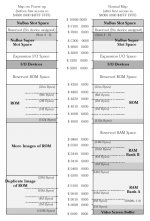
Thanks ojfd -- I have that (as well as the IIci's version which is in Guide to the Macintosh Family Hardware), but it's basically showing that the ROMs repeat throughout that entire space of 0x40000000 to 0x42000000. (In fact I see a typo on the chart -- it should be 40800000, not 48000000 below 42000000).

None of the diagrams I have seen have ever mentioned what I just discovered tonight about the soldered ROMs only repeating in every other 512KB block due to the soldered ROMs' chip select line being tied to A19. It would be interesting to see if the IIsi has the same behavior. I would guess it does.

Anyway, no worries -- everything behaves as it should with my SIMM when the ROM select jumper is removed. (Well, except when olePigeon's accelerator card is installed -- the jury's still out on why that is). This is just me trying to understand the behavior if you accidentally leave the jumper in with the SIMM also in :-)

BTW, in my other IIci that has socketed DIP ROMs with my custom DIP chips, if I put in my ROM SIMM and leave the jumper on, I get the chimes of death. I'm guessing this is because my custom DIP ROMs and the SIMM's chips get in a battle that neither can fully win, unlike the battle between the stock DIP ROMs and my SIMM's chips (where my SIMM's chips win against the stock DIP ROMs). So the checksum fails because I get random bits and pieces when the contents of the DIPs differ from the contents of my SIMM.

 
None of the diagrams I have seen have ever mentioned what I just discovered tonight about the soldered ROMs only repeating in every other 512KB block due to the soldered ROMs' chip select line being tied to A19. It would be interesting to see if the IIsi has the same behavior. I would guess it does.
:O Can I determine this this with a continuity tester? :?:

 
Yes -- in fact you can test it without a continuity tester if you want.

Hit the programmer's switch (wait, does the IIsi even have one? do you have to hit command-power key?) and type:

DM 40800000

This will show the beginning of ROM

Now type:

DM 40900000

This will show the first repetition of ROM, and it should be identical (if it crashes, like mine does in 7.0.1, that's OK)

Now type:

DM 40880000

Does it show another repetition of the ROM, or a bunch of FFs? If it shows a bunch of FFs, the IIsi is probably wired the same way as the IIci.

If you really want to test the continuity to see it, find the IIsi soldered ROMs and test each pin's continuity against SIMM socket pin 42. I don't know the pinout of the IIsi's soldered ROMs, but if anything shows continuity to the A19 pin, you have probably found it.

 
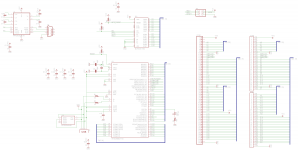
Here's what I have for a schematic right now. Hopefully this isn't too crazy...

SIMM-2011-11-17.png

I ended up using every pin on the microcontroller.

The PRTR5V0U4D is for ESD protection when you're plugging/unplugging the USB cable.

CON1 is a 64-pin SIMM socket.

CON2 and CON3 are the Samtec headers I have as a backup plan if the SIMM sockets don't work out.

 
So if the jumper is on, and a ROM SIMM is in, I'm thinking that the DIP ROMs will be activated for the first 512k of ROM space, and then deactivated for the next 512k of ROM space, then activated for the next 512k of ROM space, and so on. Does this sound right to the hardware gurus?
It doesn't really make much sense.

Let me rephrase...

The conclusions you've drawn from the evidence you've reported make sense.

Causing the logic board ROM to be inactive over 50% of the addresses doesn't make any sense.

If you want to create repeating images in the address space, you just arrange (logically/electrically) for Output Enable and Chip Enable to be Low whenever the chosen address space is addressed, and let the lower addresses roll over on the address pins of the device.

I can't think of any reason the designers would cause the ROM to roll over half as often as it should.

Other thought: I don't think olePigeon ever reported whether his ROM works with the jumper removed and the Daystar upgrade removed.

If his ROM is functional, then the explanation for his IIci booting up with the jumper and ROM SIMM installed may be that the logic board ROMs and the SIMM ROMs are synchronized enough to not cause any problems when the Daystar upgrade is not present. However, the presence of the Daystar upgrade changes the timings enough to screw things up when they're both active. That's assuming that the SIMM and the logic board ROMs have the same code installed.

A little far fetched, but possible, I think.

I haven't been around in a while. Great work, by the way. I admire your creation.

olePigeon, does that parts shop near you have 160 pin DIMM sockets with keys between 30 -31 and 55 -56. Since it's 1 - 80 on one side and 81 - 160 on the other side, the keys are also between 110 - 111 and 135 - 136.

 
Hey trag,

Thanks!

I wrote that thing pretty quickly and didn't make it clear when I wrote it -- that's the way the factory DIP ROMs behave with no SIMM installed at all. I'm guessing you already picked up on that, but I just reread my post and it was really confusing because I kept mentioning the SIMM even though it didn't really apply. Just thought I'd make sure that we're on the same page there. I don't understand the whole "A19 = chip select" thing either. I'm wondering if maybe it was originally going to serve as a "chip select 0", with "chip select 1" being the inverted output of the same address line? So that way the extra 512KB of space between every ROM repetition would be where the second ROM bank would go. Maybe they were originally planning on putting 1 MB of soldered ROM into it, using that technique for the chip selects? But even then, aren't there better ways to do that, like you mentioned? Anyway, I agree, it doesn't make a lot of sense from a design standpoint.

 
On some Macs, the ROM/ROM SIMM was meant to be, and was implemented in the memory map as, an expansion of ROM as a storage medium. But on others, it was only meant to act as the Mac's mundane Boot Code/ToolBox Routine Repository. In these Macs, there was no provision for ROM based storage expansion in the Memory Map. I need to find the page, IIRC it was in GttMFH2e, with the table listing which Macs had which of those two very different types of Memory Mapping/ROM configurations.

Might this explain some of the strange ROM/ROM SIMM juju that appears to be cropping up? :?:

Does the Area 19 Mystery have anything to do with the Jumper Pin on/off config?

Are those pins tied together on the MoBo ROMs?

Dunno, I'm just tossin' 'em out there as they pop into the 'ole noggin' before they leak outta my ears. :-/

N.B. trag, I edited your text to "I haven't been around," that being what appeared to be your meaning from the context. If not, I'll correct it if you let me know. ;)

 
It doesn't have anything to do with the jumper -- the chip select pin of the DIPs is connected to A19, regardless of the jumper setting :) I'm still very interested if you get a chance to test this on your IIsi. I suspect it will have the same behavior, but it's definitely interesting!

 
I'm still very interested if you get a chance to test this on your IIsi. I suspect it will have the same behavior, but it's definitely interesting!
I've been in White Elephant Thread and Scan Dump mode for a while, which entails rummaging through the magic boxen for goodies and content. This, of course, entails a LOT of cleaning up and organizing all kinds of strange MacCrap & MiscCrap, not to mention a brief sojourn through the SPARCstack project after finding, researching and going back to test my 21" 13w3 cabled SUN CRT. Therefore, I'm not exactly up to speed on where things stand here.

How about making up a precise listing of the set of tests to be done in your reply?

I'll bet another IIsi slinger will rush to make a content contribution to your amazing project before I can get to it . . .

. . . the more Sancho Panza's you can recruit . . . the more windmills we can demolish in search of your impossible dream!

WhereTF IS Dulcinea?

YO! Maniac! Chime in here if you're still around! We miss you!

edit: p. 19!!!!!!!!!!!!!!!!! I wonder if any other non-Post Your . . . thread has achieved this level of interest? Nice intro post, buddy!

 
Haha I know! I keep looking at this thing with all the views and pages it has...wow!

OK -- here's a detailed set of steps to perform:

  1. Boot up a IIsi (preferably, one with soldered ROMs--I'm pretty sure the ROM SIMM will behave normally). Get into the MicroBug debugger (I don't know if the IIsi has a programmer's switch, but if it doesn't, just press command+powerkey to get into it
  2. Type:
    Code:
    DM 40800000
    (and press return) -- this should print the beginning of the ROM contents. Take note of the first few bytes so you can compare against the other dumps I'm about to instruct you to do.
  3. Now, type
    Code:
    DM 40900000
    Does it show another copy of what you saw earlier, or what? It shows another copy on my IIci when it runs System 7.6, but it crashes back to the desktop on System 7.0.1.
  4. Now, type
    Code:
    DM 40880000
    This is the important one -- does it show another copy of the ROM, or a bunch of FFs? If it shows a bunch of FFs, then the IIsi soldered ROMs are wired the same way as the IIci.
  5. To get out of the debugger, type
    Code:
    G


I am looking at a picture of a IIsi motherboard. It has two 44-pin ROMs, presumably each 128K x 16 bits in size. JEDEC has a specification for 44-pin, 128K x 16 EPROMs, but the pins are numbered differently from how they are numbered on the motherboard. The motherboard has pin 1 at a corner, and the specification has pin 1 in the middle of one of the sides. So for now I'm not going to bother asking for any continuity tests on the motherboard. The software test I detailed above should work fine...

 
Is the ScreenShot option available while in MicroBug Debugger Mode? That'd be handy! :?:

BTW, you've been awarded an official 68kMLA 'nick: DQ . . . Doug Quixote! :approve:

 
I don't think it will let you take a screenshot...but if you just look at the first 4 bytes or so (which will be the ROM checksum) you will easily be able to tell. I guess the most important part of the test is just to do the 40880000 one and see if it's filled with a bunch of FFs or not.

 
To answer some questions:

1. My IIci will not boot with the jumper pulled and no ROM installed, even if accelerator is installed.

2. It will boot regardless of the jumper so long as a ROM is installed.

3. Chime of death when both accelerator and ROM installed; jumper doesn't make a difference.

4. ROM checksum appears to be identical with or without the accelerator installed (see attachment.)

I don't have an extra ROM or burner to just put the normal ROM on to see if it's a hardware conflict. So I can't test that.

 
Last edited by a moderator:
Thanks for all the info olePigeon!

That basically tells me that the SIMM overpowers the onboard ROMs when both are activated (e.g. when you leave the jumper in). Although it doesn't seem to matter, it's probably better to leave the jumper off when the SIMM is installed :)

The checksum is identical, but the contents have indeed changed. It appears that the Daystar card does some patching--in fact, when the checksum is calculated on the Daystar ROM, it comes out incorrect (it doesn't match the stored one). So this probably means the Daystar card disables the ROM checksum check...

My initial guess is that the Daystar ROM adds some kind of patch that is conflicting with the patches that are present in the ROM SIMM. We're getting into really strange territory now...I'll see if I can find anything that would be an obvious incompatibility.

 
How about using http://minivmac.sourceforge.net/extras/copyroms.html to copy the complete contents of the ROM while the accelerator is installed, but the ROM SIMM isn't? Then run it a second time with both the accelerator and the ROM SIMM uninstalled to get the original "Apple Factory" ROM image, and compare the two resulting files using a binary diff program? That would show you which portions of the original ROM the accelerator is patching, and you can look for any overlap with the areas patched by the custom ROM SIMM.

 
That's exactly what olePigeon did last night :) I just took a look at the dumps:

The Daystar image changes the Happy Mac icon and the Happy Mac icon mask, so does the ROM SIMM. I really doubt this will cause any problems, but depending on how the upgrade card implements the patched sections of ROM (does it store a complete copy of the new icon, or just a diff against the stock IIci Happy Mac icon?) it might make the Happy Mac look totally crazy. Either way, it's probably not going to be possible to change the Happy Mac while the Daystar upgrade is installed. I suppose it could be done by tracing through and patching the code so it jumps around the normal "Happy Mac display" routine, but I'd rather not get into that at the moment...

The other thing is that the Daystar upgrade keeps the stock checksum in place, even though it's wrong after Daystar's patches are in place. Maybe the Daystar patch, instead of actually calculating the ROM checksum, looks to ensure the stock IIci checksum (368cadfe) is in the first four bytes, and if it doesn't, it plays the Sad Mac? It's a possibility. I may have to disassemble the changes that the Daystar ROM makes to see if that's what is going on. This is what I'm guessing is happening.

Other than that, none of the Daystar ROM patches overlap with the SIMM patches.

I'm also curious, as you said olePigeon, as to whether a ROM SIMM with a stock IIci dump will still work with the upgrade card. My initial guess is "yes", but I'm still kind of curious as to what the upgrade card does to override the built-in ROM in certain places.

Edit: It looks like the cache connector has access to the ROM output enable signal. It's probably overriding it at that point and putting something else onto the data bus whenever a matching address appears on the address bus.

Edit2: This whole "repeats every other 512KB" discussion from earlier was useful. The patched Daystar ROM sometimes jumps into the $40880000 space, which is not a repetition of the stock ROM. Looks like Daystar provides its own ROM that maps into that area as well...

Edit3: The Daystar ROM only disables the checksum test. It still calculates the checksum but forces the checksum routine to always return "OK". So I still don't know if there's somewhere else that's testing to make sure the original ROM signature is in place, but I'm still suspecting there's a test like that somewhere...


 
Last edited by a moderator:
Back
Top