@eharmon - good! That may be the best you can do. It sounds like you are having clock alignment/rounding issues with the missing pixels.
Here are my morning thoughts: I looked back in the thread and your monitor is the E178FP. From the
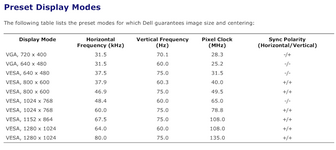
Dell User Guide, the supported modes are as follows:
View attachment 76640
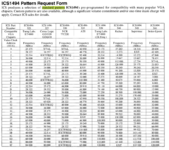
So...per the spec...you would ideally need a dot clock of 108Mhz for 60Hz or 135Mhz for 75Hz. According to the ICS1494 table, config $1F is 122.32Mhz. So, coming back to the discussion of the $0f clock selector and likely support for 1280x1024 (my earlier post), you can try setting $0f as the clock selector for 130.48Mhz, which is going to be closer to the spec for 1280x1024 75Mhz (within 3.3%) and your Dell monitor
may be tolerant of the deviation...but there's still potentially a rounding issue. The monitor(s) tolerate 122.32Mhz, which is even further away. So...? You may get back the missing pixels.
Looking at the ICS1494-543 config table, the
other option in the quest for perfection would be to try to use mask configuration $01 for the sRsrc clock select byte and add an external 135Mhz oscillator. The Thunder II has an additional oscillator pad on it adjacent to the 1431818Mhz refClock. Thunder/24 didn't have this pad, but Thunder II does (extra design flexibility). Just verify that the output is connected to the EXTFREQ/Pin 7 on the ICS1494. If so, the config $01 trick + custom oscillator may work, the timing should be perfect and the other monitor configurations would still work.
Depending on the accelerator interference fit, you might be able to socket the oscillator pad location. This method might offer the best outcome and also point to additional flexibility for screwing around with other timings, like 1600x1200 - or whatever. However, the ICS1494 output is buffered, so if you're not going to add a bypass hack (lift the ICS output and add a switch) the output will still probably have a
specified max of 135Mhz.
If you only ever plan to use it in a certain configuration, then just bypass it, with or without a switch. There doesn't seem to be a way to trick the ICS1494 into outputting it's max frequency, which would be a great solution...but...nope.
Just some more experiments to try. Maybe something above will work for you.
Actually -- I was stuck in 75Hz mode. You could also try
config $1c and run at 1280x1024 60Hz. $1c is very close to the 108Mhz spec at 107.35Mhz (within 0.6%). May work better and not have pixel issues...but 75Hz would certainly be easier on your eyes and look nicer.