• Hello Guest! We're hosting a challenge to welcome vintage Intel macs to the MLA during the month of July! See this thread for more information.

Unhappy PowerMac 9600

I've had a PowerMac 9600 sitting in storage for years. This computer originally came from an Apple authorized reseller in Nelson, BC. Today, I finally decided to try to get it going. I get a power button LED and fans and drives spin up, but no boot chime. Not even a chime of death.

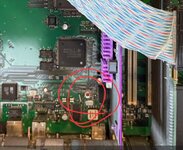
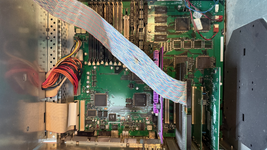
Upon inspection, I don't see any obvious problems. There's some dust, but nothing that looks like capacitor juice or corrosion. I defused the battery bomb when I first got it, and that hadn't gone off. (It's hidden under the SCSI cable in the photo.)

Next steps will be a thorough disassembly and cleaning, and I should probably get the PSU recapped and tested. And that will probably take me a while. But before I start, I figured it was worth posting here to see if anyone has immediate thoughts or tips about common issues on the 9600? From what I see in other forum posts, these are usually relatively trouble-free, so I had hoped this would be turnkey. Alas, it was not to be.1.png
 
I've had a PowerMac 9600 sitting in storage for years. This computer originally came from an Apple authorized reseller in Nelson, BC. Today, I finally decided to try to get it going. I get a power button LED and fans and drives spin up, but no boot chime. Not even a chime of death.

Upon inspection, I don't see any obvious problems. There's some dust, but nothing that looks like capacitor juice or corrosion. I defused the battery bomb when I first got it, and that hadn't gone off. (It's hidden under the SCSI cable in the photo.)

Next steps will be a thorough disassembly and cleaning, and I should probably get the PSU recapped and tested. And that will probably take me a while. But before I start, I figured it was worth posting here to see if anyone has immediate thoughts or tips about common issues on the 9600? From what I see in other forum posts, these are usually relatively trouble-free, so I had hoped this would be turnkey. Alas, it was not to be.View attachment 100827
Hey, what you describe sounds most like either dirty contacts on the CPU (most likely) or RAM. This group of TNT family machines seem particularly prone to it. Remove any expansion cards (PCI cards) other than the video card while testing.

Before anything else though, press the CUDA button on the board and try again, just in case. Then try unplugging and replugging in the CPU. Make sure it is all the way down. Think it is? Double check. Try again. Triple check. It's easy to do and the worst thing you can do, not to plug it all the way in.

If this doesn't get it going, I recommend buying some "Deoxit" contact cleaner (it is a little expensive, but excellent), the. Remove the CPU and RAM, then spray on the connectors, rub them a little with a paper towel, spray in the slot and re-insert. Leave it to dry for about 15 minutes and then give it another go.

It could be other stuff, but it is often CPU or RAM. I don't know why they don't death chime even when it is the RAM, but I find mine almost never death chime.
 
Hey, what you describe sounds most like either dirty contacts on the CPU (most likely) or RAM. This group of TNT family machines seem particularly prone to it. Remove any expansion cards (PCI cards) other than the video card while testing.

Before anything else though, press the CUDA button on the board and try again, just in case. Then try unplugging and replugging in the CPU. Make sure it is all the way down. Think it is? Double check. Try again. Triple check. It's easy to do and the worst thing you can do, not to plug it all the way in.

If this doesn't get it going, I recommend buying some "Deoxit" contact cleaner (it is a little expensive, but excellent), the. Remove the CPU and RAM, then spray on the connectors, rub them a little with a paper towel, spray in the slot and re-insert. Leave it to dry for about 15 minutes and then give it another go.

It could be other stuff, but it is often CPU or RAM. I don't know why they don't death chime even when it is the RAM, but I find mine almost never death chime.

Thanks for those tips! I tried reseating the CPU card. No luck, but it turns out it's a Sonnet Crescendo G4 card, so that's a nice surprise at least.

I may give Deoxit a try. Connectors look pristine, though. Much nicer than in my PowerMac 7300, which did have exactly this issue. (But unlike the 7300, this 9600 has been in airconditioned storage for the vast majority of its hiatus, except for a cross-country road trip from Nelson BC to Seattle WA to Florida.)
 
Yep, good thought. I tried giving it a push, but it made no difference. And I suppose after years with no NVRAM battery and no power plugged in, the PMU would be coming up from a default state. Still, it was worth a shot.
Sometimes it is a randomised state and pushing the button or zapping the PRAM puts it in a good default.
Connectors look pristine, though.
Look and are aren't the same thing. It doesn't take much at all. Worth getting a can to have around.
 
Sometimes it is a randomised state and pushing the button or zapping the PRAM puts it in a good default.

Look and are aren't the same thing. It doesn't take much at all. Worth getting a can to have around.
Very true. I'll also try pulling out PCI cards and RAM, although I do believe a video card is required for this thing to POST. But I can pull the other cards.
 
Back
Top