Looking for Formac ProMedia 40 ROM Rip

Is the "ViRGE Integrated 3D Accelerator" document sufficient for creating emulation for this PCI device? If so, then you could add emulation for this in DingusPPC, and log how the registers get accessed.
It... should be? But I'm not smart enough to even know where to start with such a thing.
 
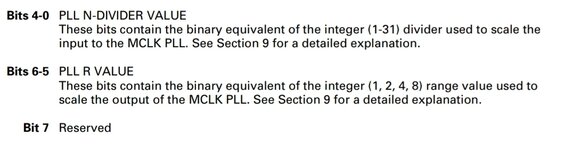
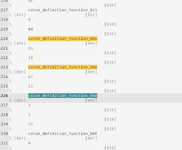
So is this the area we are interested in?

1777893012190.png

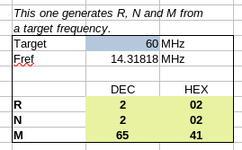
Is this loading 0x24 into SR10 and 0x41 into SR11?

That would be R=1, N=4 and M=65, which I don't think make sense.

Fout would be (67/(6*1))*14.31818 = 160MHz

Which is way too high.
 
Last edited:
I believe I found the equivalent place in the binary ROM and changed hex 41 to hex 36, but the symptoms remain the same and the driver still says "60MHz".

I don't understand why it is 0x41.

For interest for others, the offsets of interest look like they are C3E4, and C3F0.

1777899096504.png

You can see what I assume is the value and the register index being pushed onto the stack for the forth function and both pairs of numbers are in close proximity.
 
Last edited:
Would it be easier to set the speed ourselves with a little desktop application?

We send SR10, SR11 and then twiddle the value of SR15 twice if I remember. Not sure how to poke the register in a PCI card though, so hints welcome. I've written stuff to poke memory addresses on an SE and 475 before, I can use that code as a starting point if needed. Can I use the functions in the ROM to set the values from an application?
 
Last edited:
I don't understand why it is 0x41.
AHH,

1000035659.jpg

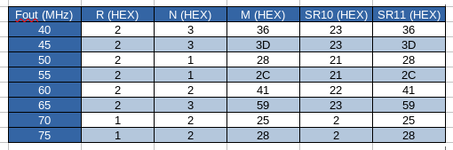
So, when bits 6-5 are 01 like they are with us for SR10, that means R=2. 00=1, 01=2, 10=4 and 11=8!

That means the ~160 is divided by 4, and so is 40MHz.

By scaling SR11, I've slowed this speed (which isn't the "accelerated" speed, but might be the acceleration off speed) to 33.3MHz.
Right... So I might try bumping it up to 55MHz.

This is by setting offset C3F0 to 5A.
 
Well, that's all very pointless. I have successfully increased the speed of the card, but only with acceleration turned off, so no optimised QuickDraw routines, probably just a dumb framebuffer. Interestingly, the driver has to not be loaded otherwise it overrides the speed to the lower value when acceleration is turned off.

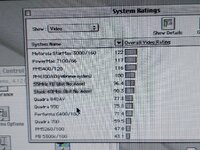
1000035660.jpg

So after far too much time poking the ROM... I suspect the driver sets the speed of the card. :LOL:

So our options are a custom program to set the speed, or hack the driver.
 
Last edited:
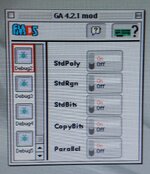
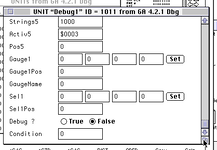
Another distraction - I was able to enable the debug panels in GA 4.x, but there is nothing that helps me there. Mainly just the ability to turn on and off individual acceleration functions, but nothing I can see to set the core clock speed.

An Advanced panel is also hidden in the 5.x versions, but I wasn't able to work out how to enable it (it was easier in 4.x because they'd left some templates in the resource fork).
 
What did you do to enable the debug settings?
The 4.5.0 Driver should have debug as well.
Since it has 3D acceleration, there might be something interesting hidden.
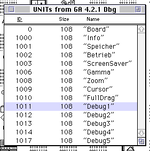
There is a flag in the UNIT resources that describe the panels.

1777915657832.png

1777915693494.png

I set "Debug" to "False" for the 5 Debug UNITs.

Yeah, I already poked 4.5, but I didn't have it on the computer with the network connection. But 4.2.1 should also have 3D acceleration shouldn't it? There is a switch for it I think? I've not been messing with 3D yet.
 
So after far too much time poking the ROM... I suspect the driver sets the speed of the card. :LOL:
The 1.2.6 Rom seemingly sets the speed that is later overwritten by the driver while the 1.0.6 Rom never sets the speed and leaves it on default values until the driver is loaded. That is a very interesting result as it suggests that this method may be used with other cards as well.

I had seen the debug-options in the driver with res-edit but i never got them to show up.
 
... But 4.2.1 should also have 3D acceleration shouldn't it? There is a switch for it I think? I've not been messing with 3D yet.
I think 3D only appeared with 4.5.0 (the version my original card shipped with on floppy) for the ProMedia
Version 4.5.0:
- NO support for NuBus graphic accelerators
- Improvement of 2- and 3-D acceleration (2-D = all cards, 3-D = ProFormance and ProMedia)
- Additional switch for deactivating 3-D and Quicktime™ acceleration
- Bugfix for Pagemaker 6.5 with Pro Vision 4/xx
- Gamma correction improved
- Cache performance in 8 bit with Pro Formance optimized
- Performance of Quicktime™ with Pro Media improved


Version 4.2.1 (last Version for 68k and NuBus):
- hardware acceleration for the Apple MPEG S/W decoder with ProFormance cards
- more Quicktime acceleration features (color transformations) with ProFormance cards
- control panel includes now the Quickdraw 3D acceleration software for the ProFormance cards
- minor drawing bug fixes for the ProMedia cards
 
yes, for the ProFormance card
Ah that makes sense. I don't think they hid it when you're using a PerMedia. I just haven't tried to use it as I was mostly working on sorting the graphics issues rather than testing features. Plus I've been switching between several driver versions testing things.
 
Back
Top