• Hello Guest! We're hosting a challenge to welcome vintage Intel macs to the MLA during the month of July! See this thread for more information.
  • We've made some quality of life improvements to the Trading Post. More info here.

PowerBook 2400c — Need to plug/unplug AC many times before chime

Hi everyone,

I’m currently working on three different PowerBook 2400c units, and they’re all exhibiting the same strange behavior:

I have to plug and unplug the AC adapter 5 to 10 times before the machine finally gives the startup chime and powers on.

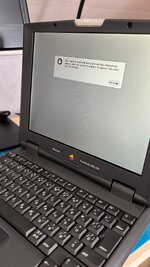
Once they chime, they boot and work fine. But until then, I can only hear a pop from the speaker, and GLOD when I press reset.

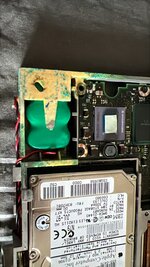
The fact that all three units behave identically makes me think of a small but critical component going bad with age. My first guess is something like a capacitor or transistor sensitive to oxidation, possibly linked to the infamous Varta PRAM battery leakage. I’ve checked for visible corrosion and cleaned what I could, but the issue persists.

Has anyone else seen this before on 2400c boards?
Any idea which component or section I should focus on?

Thanks in advance for your help — I’d love to get these little machines reliably booting again.
 

Attachments

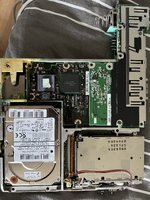
  • 7D062A38-096B-46AB-9D19-1C23DF50DD7B.jpeg
    7D062A38-096B-46AB-9D19-1C23DF50DD7B.jpeg
    1 MB · Views: 16
  • IMG_6536.jpeg
    IMG_6536.jpeg
    2.2 MB · Views: 16
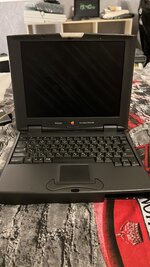
  • 547ABEF7-1893-4410-87D0-B4D9D2AB2E94.jpeg
    547ABEF7-1893-4410-87D0-B4D9D2AB2E94.jpeg
    1.1 MB · Views: 15
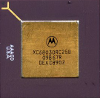
  • IMG_A301F32F-C7BE-4A6A-B044-A1AC560644D3.jpeg
    IMG_A301F32F-C7BE-4A6A-B044-A1AC560644D3.jpeg
    2 MB · Views: 15
  • 154F317E-2208-4193-AF4A-EE6EACB738EE.jpeg
    154F317E-2208-4193-AF4A-EE6EACB738EE.jpeg
    1.1 MB · Views: 15
Hi LeSpameur,

That is unusual how it happens on all, I'm currently in a similar situation with my 2 x 2400c. One unit is fine while the other can boot from cold in similar situation - holding down the power key and plugging in the (powered) charger into the jack it would boot out of the blue and attempt to boot before crashing. Reset and I couldn't get it to chime again, but am very familiar with the speaker pop and GLOD after a short moment suggesting you won't get very far with it as is.

I'd suggest all of yours need a deeper clean (vinegar to neutralise the green battery acid), removal of the PRAM batteries completely (it's not needed) and to reseat the CPU daughter card after some deep cleaning of the CPU connectors starting with electronic cleaning solvent. You might find you can get 2 good units shuffling parts around and one for parts.

My thread here talks about other things:

 
I’ve already tried everthing, I even gave the board an ultrasonic cleaning.

Since the machine stays powered on when it freezes, that suggests there’s no major power supply issue. It’s more likely to be a bad oscillator or a failing PMU-related IC.
 
I would buy some Varta cells and replace the backup batteries before doing anything else. The 2400c is inordinately sensitive to this.
 
I would buy some Varta cells and replace the backup batteries before doing anything else. The 2400c is inordinately sensitive to this.
I have an other 2400c which is working just fine without one.
End of discussion, the 2400c does NOT need a PRAM battery to boot properly.
 
@LeSpameur US cleaner hey, might give that a go on mine. I still think the fragile and hot placement of the CPU daughter card is the main culprit for most GLOD 2400cs.

@beachycove removing the PRAM battery in these does rule out any PMU issue, they boot without one - as soon as you plug it in, mind you.
 
@LeSpameur USクリーナーですね。私も試してみようかな。CPUドーターカードの脆弱で高温になる配置が、ほとんどのGLOD 2400csの主な原因だと私はまだ考えています。

@beachycove これらのPRAMバッテリーを取り外すと、PMUの問題は除外されます。バッテリーがなくても起動します。ただし、接続するとすぐに起動します。
P-RAMデータが破損している場合、起動中にシステムが停止することがあります。その場合は、本体背面のフロッピーディスクコネクタの上にあるRESETボタンを押してください。リセットしても変化がない場合は、電源ボタンを押してすぐにキーの組み合わせ(Option + Command + P + R を押し続ける)を使用してP-RAMリセットを実行してください。システムが自動的に再起動します。確実を期すため、この手順をもう一度繰り返すことをお勧めします。2回目の再起動が始まったらキーを離してください。また、P-RAMバッテリーを取り外すと、システムの起動と画面の点灯に約45秒かかります。バッテリーを元に戻した後は、最初の起動時のみ約45秒かかりますが、それ以降の起動では画面の点灯に約15秒かかります。P-RAMに何らかのデータが書き込まれているようです。このデータが保存されると、システムがそれを読み取るため、起動時間が短縮されます。
 
@LeSpameur USクリーナーですね。私も試してみようかな。CPUドーターカードの脆弱で高温になる配置が、ほとんどのGLOD 2400csの主な原因だと私はまだ考えています。

@beachycove これらのPRAMバッテリーを取り外すと、PMUの問題は除外されます。バッテリーがなくても起動します。ただし、接続するとすぐに起動します。
P-RAMデータが破損している場合、起動中にシステムが停止することがあります。その場合は、本体背面のフロッピーディスクコネクタの上にあるRESETボタンを押してください。リセットしても変化がない場合は、電源ボタンを押してすぐにキーの組み合わせ(Option + Command + P + R を押し続ける)を使用してP-RAMリセットを実行してください。システムが自動的に再起動します。確実を期すため、この手順をもう一度繰り返すことをお勧めします。2回目の再起動が始まったらキーを離してください。また、P-RAMバッテリーを取り外すと、システムの起動と画面の点灯に約45秒かかります。バッテリーを元に戻した後は、最初の起動時のみ約45秒かかりますが、それ以降の起動では画面の点灯に約15秒かかります。P-RAMに何らかのデータが書き込まれているようです。このデータが保存されると、システムがそれを読み取るため、起動時間が短縮されます。
 
if you've already removed the PRAM battery, it shouldn't matter really... you should have already removed the battery... because it's leaking!

ideally you'd install a new battery, as the power management circuit depends on it. if you shut down the machine without a pram battery, you won't be able to power it on with the power button...

but it's a pain to replace the battery and you're risking a leak in what, 30 years or so?
 
Back
Top