Yet another simasimac SE/30 giving me grief

mattsoft

6502
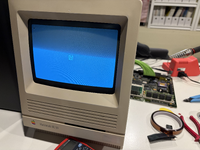
Started working on an SE/30 that won't start-up normally. Here are the symptoms:
  • Simasimac-looking image on boot
  • Death chimes immediately at power on
  • Interrupt button does nothing
  • Reset button will re-play the death chimes but not reset the image
I've done the following:
  • Voltages tested at molex on logic board are good
  • Recapped the SMD caps and cleaned the board
  • No battery damage
  • Tested RAM in another machine good
  • Reseated and cleaned the video ROM and PALs
  • Without ROM SIMM, no death chimes but same image -- guessing the ROM SIMM is OK
  • CPU is not halted (F12), CPU clock (E1) is good, CPU /AS and /DS are active -- I think the CPU is good which is probably consistent with death chimes at startup
  • Did the continuity test matrix from the last 2 pages of the schematics (that was labor intensive) and found no bad traces
  • Tested the clock signals from the troubleshooting guide (pg. 38), all are good
  • Performed the ROM address-walk from the troubleshooting guide (pg. 46), and other than the guide being slightly incorrect, the address-walk tested good
My next step is to continue through the troubleshooting guide (pg. 47+) and check the waves from the video ROM and multiplexing ICs.

Any other obvious ideas to check? I don't want to just start pulling chips, so any suggestions I can test with a multi or oscilloscope would be welcome. Thanks!
 

Attachments
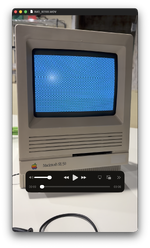
  • Screenshot 2026-05-24 at 4.33.29 PM.png
    Screenshot 2026-05-24 at 4.33.29 PM.png
    3.6 MB · Views: 11
Last edited:
I have seen the simasimac pattern for the NEC, Ti, and Mt VRAM chips, yours doesn't look like the typical simasima pattern.

It's good that you get a chime of any type, as it means you can most likely use a serial cable to read your error code:

A lot of times a full simasimac condition SE/30 won't load the ROM, like yours seems to be doing.

Seems like testing the Video ROM chip is a good place to start.

EDIT: The Simasimac Repair Guide recommends to test continuity between the PDS slot and ROM slot, and not the CPU directly, because it's easier to access, but if you have a broken trace in between the CPU and ROM, that won't always show up by checking only the PDS slot. I learned that one the hard way.
 
Last edited:
Ya, I'm going to check out the video ROM on the scope tomorrow. To connect the SE/30 to a modern PC/Mac via USB, I'll need to figure out all the cables and adapters to make it work. Does someone have handy-dandy links to those? :)
 
I was given this link back when I was building a cable for PC to SE/30:

But my SE/30 simasima wouldn't chime and therefore load the diagnostic ROM.

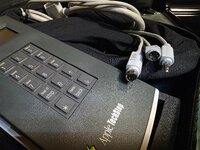
Did buy a Techstep later to confirm everything was functioning correctly; a 4-pin mini DIN for the SE/30 serial port is what's necessary if you decide to build one.
20260524_200820.jpg
 
Cables arrived and with the use of the excellent Reconnaissance app (https://recon-68k.github.io/) I connected the SE/30's serial port to a 2019 Intel Mac's USB port and ran the suite of tests.

A bunch of memory errors and a bad SWIM. Everything else checked-out OK, including all things video.

I toned out bank A and everything was good. Checked the /RAS and /CAS and all data and address pins on the SIMM slots and everything was good. So I started swapping SIMMs again for the 12th time just in case and...

No more simasimac screen or death chimes! The screen is now just pure grey and nothing else. Even though the SIMMs I had installed worked on my IIsi, they were giving the SE/30 grief. But now it looks like the SWIM is not working. Was going to scope it and see if anything is amiss and maybe reflow the pins, and then...

I restarted the SE/30 a couple more times and the simasimac and death chimes are back. lol! Maybe a cracked solder joint somewhere and the board flex of pushing and scoping got it to work or something.
 
The RAM might not be making good contact. You can probably limp it along with tape or the 3D-printed braces, but the slots themselves may need to be replaced eventually.
 
The RAM might not be making good contact. You can probably limp it along with tape or the 3D-printed braces, but the slots themselves may need to be replaced eventually.

ya, maybe. the SIMM sockets look good. every pin in bank A looks OK. I'm reflowing everything on this board just in case. lol
 
Back
Top