• Hello MLAers! We've re-enabled auto-approval for accounts. If you are still waiting on account approval, please check this thread for more information.

Testers Needed: Modified ROM for LC475/Q605

For those with LC475/Q605-type Macs (ROM checksum FF 74 39 EE), a working SIMM slot, a SIMM programmer, and an available 8MB SIMM..... I would appreciate feedback on the attached ROM.

Firstly, thanks goes to @JDW @Jockelill and @WillJac for doing some initial testing and providing feedback. An important lesson we learned during testing is to fully reset your PRAM before using a new ROM. Especially if the new ROM uses PRAM settings (such as this one).

Secondly, I want to specifically point out that I am using a modified version of the CDEV (control panel) that Garrett's Workshop developed. I trimmed down the control panel a little bit, and I plan to eventually make a new one from scratch. But they have a really nice CDEV that works for this initial testing. I have tried reaching out to them for permission to share, so if you have a contact for Zane or Garrett please share this posting with them. If they prefer, I can spin up a new CDEV and not use their version.

This ROM has the following hacks that have been documented previously (I am using the driver name "ROMDISK"):
**** You can use R (ROM) or RA (RAM) to boot accordingly
# 1) offset 1278 = Open ROMDISK driver during boot
# 2) offset 1706 = Treat ROMDISK as floppy
# 3) offset 4742A = Disable ROM checksum
# 4) offset 47908 = Disable memory test
# 5) offset 47A20 = Disable memory test
# 6) offset 79256 = Hard code ROM size for 24-bit/32-bit modes
# 7) offset 80599 = Patch MMU table for 8MB ROM
# 8) offset 805D9 = Patch MMU table for 8MB ROM
# 9) offset 814E5 = Patch MMU table for 8MB ROM

In addition, I have added the following:
# 1) offset 60080 = ROMDISK Resource Header (not using NETBOOT or ATBOOT, this is a FREE resource in the stock ROM)
# 2) offset 600B0 = ROMDISK Driver Header
# 3) offset 61000 = PRAM Repair Bit (01) to set mouse speed to max and volume to 3 during boot
# 4) offset 61010 = ROM/RAM disk size (currently 00 70 00 00; set to 00 30 00 00 for example if you intended to append a 3MB image and use a 4MB SIMM)
# 5) offset 61020 = ROM/RAM disk start offset, probably does not need to be changed

The CDEV will allow you to do the following (assuming you have a good PRAM battery):
# 1) Mount/not-mount ROM or RAM disk if booting from another device
# 2) Automatically boot from ROM or RAM disk

Important info re: offset 61000 in the ROM ("PRAM Repair Bit"): This is new, and I have been discussing this on another thread here. If this Byte is set to 01, this will automatically set the mouse to the max speed AND the volume to 3. This offset is part of the ROM/RAM disk driver, and will be loaded before any INITs. If you do not want this functionality, make sure to set this Byte to 00 before burning your SIMM.

Depending on if you use the ROM or RAM version of the disk, you should also notice a different icon in the Finder.

I am calling this version 0.91 based on previous work. Please test away and provide feedback!
 

Attachments

Last edited:
I have a IIfx and a Centris 610. I'd also have a IIci if I could ever get a working motherboard.

I also have a 2MB ROM and original programmer. I might have an 8MB ROM, but I don't remember.
 
Since the 475 ROM has (mostly) Q650 compatibility, I can give this a go as well.

Do you have any examples of problems without resetting PRAM? I'm curious if some funky behavior I've had in the past matches.
 
I have a IIfx and a Centris 610
I have a C/Q610 as well. So I have the same ROM ready to go for that specific machine. Right now it has a 7MB disk image appended, so if you could find your 8MB SIMM that would be ideal. I'll post the ROM for the C/Q610 tomorrow.

I could look at adding a 1MB disk image instead, but that would be a really tight squeeze.
 
Last edited:
Since the 475 ROM has (mostly) Q650 compatibility, I can give this a go as well.
I don't have a Q650. But I could work up this same list of hacks and ROM/RAM disk for that machine if you'd like to test it? Do you have an 8MB SIMM?

Do you have any examples of problems without resetting PRAM?
I'm going through my notes to see if I can make sense of what we ran into specifically. I seem to remember issues with some ROMs that might use the embedded NETBOOT resource in ROM for the disk driver. NETBOOT uses a lot of xPRAM bytes. Also some ROMs such as this one I uploaded utilize the "unused xPRAM" bytes to hold some settings such as always mount ROM disk when booting from other disk.

Also of note is that some programs such as TechTools don't actually fully zap PRAM/xPRAM.

There were some odd issues, such as RA not working to boot into the RAM disk etc.
 
@JDW had a really good idea regarding this thread. This was to be more verbose in the machine models that could be used for each ROM.

So on the attached file, this is ROM checksum FF 74 39 EE. Any of the machines listed below should be shoe-in candidates for testing:
  • Quadra 605
  • LC 475
  • LC 575 (including "Mystic")
  • Performa 475
  • Performa 476
  • Performa 575
  • Performa 577
  • Performa 578
Stay tuned for more ROMs with these same hacks. If you have any special requests, please let me know.
 

Attachments

Attached is ROM checksum F1 A6 F3 43. Any of the machines listed below should be shoe-in candidates for testing:
  • Quadra 610
  • Centris 610
Stay tuned for more ROMs with these same hacks. If you have any special requests, please let me know.
 

Attachments

Just to point out, you can easily change the size of the disk image on these ROMs if you do not have an 8MB SIMM. Just change the following offset to the disk size you will be using, and append a different disk image. I will write up an instruction manual soon :)

offset 61010 = ROM/RAM disk size (currently 00 70 00 00; set to 00 30 00 00 for example if you intended to append a 3MB image and use a 4MB SIMM)
 
Attached is ROM checksum 42 0D BF F3. Any of the machines listed below should be shoe-in candidates for testing:
  • Quadra 700
  • Quadra 900
I currently do not have a Q700, but one is in the mail. So I did my testing of this modified ROM and disk driver on a IIsi. Stay tuned for more ROMs with these same hacks. If you have any special requests, please let me know.
 

Attachments

I am not sure if @Mustermann is around anymore. But he had a pretty neat thread I linked to below regarding disabling the slow (70ns) onboard RAM for the LC475/Q605.


So I took his lead and implemented this in what I am now calling v0.92 of the driver. At offset A027C I basically just jump to offset 61030 in the ROM and perform the logic there to bypass 4MB banks. There is an inherent weakness I think in this approach, and that is if you ALSO have a 4MB SIMM installed. So this is something I want to fix. But importantly I think this will give us an opportunity to really dig into the MEMCjr IC to speed things up a bit with timing, etc.

On my machine I have a 128MB RAM SIMM, and I only see these two banks each now being filled. Importantly, About now shows 128MB instead of the previous 132MB.

So on the attached file, this is ROM checksum FF 74 39 EE. Any of the machines listed below should be shoe-in candidates for testing:
  • Quadra 605
  • LC 475
  • LC 575 (including "Mystic")
  • Performa 475
  • Performa 476
  • Performa 575
  • Performa 577
  • Performa 578
 

Attachments

Here is the "proof" that the v092 ROM for the Q605/LC475 (above) bypasses counting RAM bank 0 (slow onboard chips). Over the next couple days I am going to work on the Config register to see if I can get the MEMCjr to address the RAM at 60ns with the onboard chips disabled. (If you read the config bits below, the system is still addressing the RAM at 80ns by default).

1) This picture is a boot with the STOCK ROM. Notice that the system has counted 4MB (100) of RAM in Bank 0. 132MB total (4+64+64).
ROM_STOCK.jpg


2) This picture is a boot with the v092 ROM. Notice that the system has bypassed Bank 0. 128MB total (0+64+64).
ROM_v092.jpg
 
Last edited:
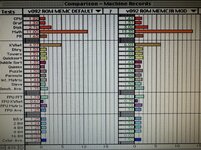
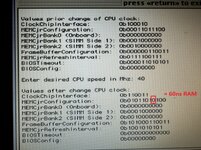
OK I ran an initial benchmark with extensions disabled on my LC475/Q605 with v092 of the ROM. Remember this version has the onboard chips disabled. I borrowed that hack from @Mustermann, and I also borrowed his LC475SetCPUClock program. But I made one change to the Config register bits for 40MHz. I changed bit 3 from 1 to 0 to allow 60ns RAM access. I believe this is safe since I am not using the onboard chips.

I am going to start ratcheting up the CPU frequency now to see how high I can push it with it still being stable.

1) v092 with no MEMCjr changes on LEFT; v092 with MEMCjr 40MHz & 60ns RAM on RIGHT
Benchmarks.jpg

2) Bit level comparison of BEFORE and AFTER
MEMCjr.jpg
 
OK I ran an initial benchmark with extensions disabled on my LC475/Q605 with v092 of the ROM. Remember this version has the onboard chips disabled. I borrowed that hack from @Mustermann, and I also borrowed his LC475SetCPUClock program. But I made one change to the Config register bits for 40MHz. I changed bit 3 from 1 to 0 to allow 60ns RAM access. I believe this is safe since I am not using the onboard chips.

I am going to start ratcheting up the CPU frequency now to see how high I can push it with it still being stable.

1) v092 with no MEMCjr changes on LEFT; v092 with MEMCjr 40MHz & 60ns RAM on RIGHT
View attachment 90842

2) Bit level comparison of BEFORE and AFTER
View attachment 90843
It would be interesting to compare just changing the latency with clock speed fixed.

Also - I suggest using Norton System Info (from Norton Utilities) if you want to test memory throughput; speedometer isn't much use on 68040s and mostly reflects clock speed as most tests fit in internal caches.
 
It would be interesting to compare just changing the latency with clock speed fixed.
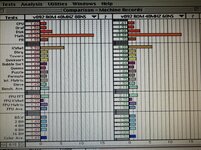
Great idea to compare like-for-like with the only difference being latency (80ns vs 60ns). The reduced latency of 60ns does show improvement over 80ns (see below). Both benchmarks were done with all the same registers and the same frequency of 40MHz (except of course the 1 bit change for the Config register).

I will get a copy of Norton Utilities and run another set of benchmarks while I stress test the CPU to see how high I can get it to run reliably.

80ns vs 60ns.jpg
 
You should also apply the rom speed mod if you haven’t. The default setting is very conservative and will slow ROM operations. The ROM SIMMs can all do better.
 
Oh that's a good idea to try that now with the onboard RAM disabled. I was just using romSpeed=100 (4) per the MEMCjr manual, which looks to be 120ns. I bet I could push this number down now with less latency on the RAM. I'll give this a go too :)
 
Oh that's a good idea to try that now with the onboard RAM disabled. I was just using romSpeed=100 (4) per the MEMCjr manual, which looks to be 120ns. I bet I could push this number down now with less latency on the RAM. I'll give this a go too :)
It should be totally independent from RAM speed as far as I know.

I set it to the fastest with a caymac rom and had no issues. I never did benchmark it though (is there a good toolbox routine benchmark?)
 
Yes I pushed the ROM speed to the lowest (fastest), with the CayMac universal SIMM, and no issues. I ran another quick benchmark comparison, this time between 40MHz/60ns RAM/120ns ROM and 40MHz/60ns RAM/55ns ROM, and the faster ROM does make a small but noticeable difference for just about every test. Would be cool to have a really deep Toolbox routine to really vet out the performance improvement.

As I continue testing, I really want to bake all these speed improvements into the ROM. So no CDEVs or INITs needed. At least that's what I am aiming for, for selfish reasons. With all this in place, this Q605 is a really snappy and fast machine. I'm excited now to see if I can break past that ~50Mhz threshold.
 
Back
Top