• We've made some quality of life improvements to the Trading Post. More info here.

TashTalk USB

You're probably aware of this already but there is an impression lever under the main cover which you can use to make the print darker or lighter.
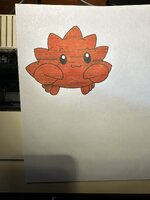
I was not 🙈 I had the whole thing apart for cleaning and lubrication and apparently had it set at the absolute minimum after reassembly. Looks heaaaaps better now, almost like it sets the ink amount or something haha.
C9C5CD71-005C-45B1-B116-EB08337E2D9B_1_102_o.jpeg

Also got it added to the printer tool and renaming support (Thanks @NJRoadfan!). I noticed that when doing a rename the printer seems to drop off the network (or at least stops responding to NBP) until I power cycle it. Still need to do a bit more testing with it (or figure out what Mac OS tool renames it to grab a cap), but it's working at least for a PoC.

Will get this merged in tonight ✌️
 
I was not 🙈 I had the whole thing apart for cleaning and lubrication and apparently had it set at the absolute minimum after reassembly. Looks heaaaaps better now, almost like it sets the ink amount or something haha.

View attachment 102067

Also got it added to the printer tool and renaming support (Thanks @NJRoadfan!). I noticed that when doing a rename the printer seems to drop off the network (or at least stops responding to NBP) until I power cycle it. Still need to do a bit more testing with it (or figure out what Mac OS tool renames it to grab a cap), but it's working at least for a PoC.

Will get this merged in tonight ✌️
Crab looking good! Kind of reminds of of LGR’s cool crab!

Waiting to receive a AppleTalk card for my imagewriter to give this a go.

Question, as I’m not very familiar with the whole AppleTalk network. After I install the card into the imagewriter can I just plug the printer straight into your Tashtalk USB? Or do I still need to plug it into an AppleTalk network adapter first? Also do I need to use the 3 pin AppleTalk cable or would a regular 8 pin serial cable work?
 
Each node requires an AppleTalk box which has an 8-pin connector that goes into the printer port of the vintage Mac (or TashTalk), and then a 3-pin cable (or a phone cable with PhoneNet) goes between each box. They should be dovetailed together when more than two nodes.
 
Yup what they said - you can use a direct cable from the printer in to TashTalk if you only want your Mac and IW connected of course too. Should work with any of the regular Apple printer cables.
 
Each node requires an AppleTalk box which has an 8-pin connector that goes into the printer port of the vintage Mac (or TashTalk), and then a 3-pin cable (or a phone cable with PhoneNet) goes between each box. They should be dovetailed together when more than two nodes.

Yup what they said - you can use a direct cable from the printer in to TashTalk if you only want your Mac and IW connected of course too. Should work with any of the regular Apple printer cables.
Perfect! Just the info I needed, thanks very much!
 
Note that they NBP type for ImageWriter LQ printers on AppleTalk is "LQ". The renaming command and the PAPStatus are all the same. Ghostscript has support for the higher resolution LQ only printing modes too.
 
I grabbed your latest changes - looks great, except I think your PAPER_PRESENT isn't quite correct. According to the netatalk papstatus.c I think it should be:

const PAPER_OUT_ERROR: u16 = 1 << 5;
and
const PRINTER_OFFLINE: u16 = 1 << 3;

without the change I'm getting a paper out error even though i have tractor fed paper.

offline is when the 'select' button is not... well selected.
 
Ahh yeah sorry about that, I realised I was off when I tried to print a few more things this morning. Will get it patched tonight before I make the official release. I did find for some reason too that printing a purely text PDF seemed to spit out the paper without printing anything which was odd, but an image (the crab) was fine. Once those two are sorted it should be official :)

Thank you so much for testing this!
 
Regarding the 'eject' - perhaps ghostscript messed up? I know that when I was testing things the printer would sometimes eject a page seemingly at the same time it would reset the appletalk connection.

a small part of me wishes I had the sheet feeder attachment. I don't know, it just seems interesting!
 
Regarding the 'eject' - perhaps ghostscript messed up? I know that when I was testing things the printer would sometimes eject a page seemingly at the same time it would reset the appletalk connection.

a small part of me wishes I had the sheet feeder attachment. I don't know, it just seems interesting!
Would definitely make using it with regular paper easier!
 
It does indeed appear to be Ghostscript bugging out - running it solo on the same PDF spits out a totally blank ImageWriter data stream. Time to dig in to their code..
Would definitely make using it with regular paper easier!
Same hah, if only they were cheaper. I'll be keeping an eye out for one just in case.
 
I had an exchange with the author who updated the Ghostscript ImageWriter driver a while back. Told him that ESC-c is used by all of Apple's drivers as the first command sent to the printer in a job to reset it. He didn't like the fact that the printer "took too long" to reset (it does a print head carriage sweep) and instead sent the defaults for every parameter to the printer. The reality is this may put the printer into an unknown state between jobs (particularly if they are terminated before completion) and can cause bugs to crop up that aren't easy to reproduce.

With regards to the form feeder. There is one common on the code that sticks out where a form feed is omitted at page end on the assumption that the maximum number of line feeds was reached and that the printer would auto eject it automatically. This once again is a bad idea as the printer supports both sheet fed and tractor fed paper and the driver supports both the ImageWriter II and LQ.

Finally, this whole driver didn't need to be re-written. I would have started with the much more modern Epson LQ drivers as a base and modified them for the ImageWriter's command set and reversed bit-order graphics printing.
 
Huh that’s all good to know. Would it make sense to inject that reset before the GhostScript commands start? It should be trivial enough for us to, but not sure if that would actually help or not.

I figured out at least what the blank page issue is and it seems transparency shoots the intermediate buffer up enough GhostScript bails and emits blank data. Tweaking some of the params to raise the limit makes it produce a proper image reliably, so will get that in tonight too.
 
I'm assuming the clients are feeding PDFs into Ghostscript? Annoyingly, the free GhostPDL doesn't support URF/Apple Raster input out of the box (that I know of). Using a IPP supported raster input format would avoid flattening and transparency issues, or you may have to process the job in two steps (PDF to raster like PNG, then raster to IW).
 
Back
Top