• Hello Guest! We're hosting a challenge to welcome vintage Intel macs to the MLA during the month of July! See this thread for more information.
  • We've made some quality of life improvements to the Trading Post. More info here.

TashTalk USB

You're probably aware of this already but there is an impression lever under the main cover which you can use to make the print darker or lighter.
I was not 🙈 I had the whole thing apart for cleaning and lubrication and apparently had it set at the absolute minimum after reassembly. Looks heaaaaps better now, almost like it sets the ink amount or something haha.
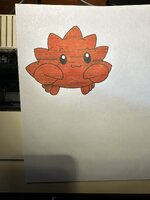
C9C5CD71-005C-45B1-B116-EB08337E2D9B_1_102_o.jpeg

Also got it added to the printer tool and renaming support (Thanks @NJRoadfan!). I noticed that when doing a rename the printer seems to drop off the network (or at least stops responding to NBP) until I power cycle it. Still need to do a bit more testing with it (or figure out what Mac OS tool renames it to grab a cap), but it's working at least for a PoC.

Will get this merged in tonight ✌️
 
I was not 🙈 I had the whole thing apart for cleaning and lubrication and apparently had it set at the absolute minimum after reassembly. Looks heaaaaps better now, almost like it sets the ink amount or something haha.

View attachment 102067

Also got it added to the printer tool and renaming support (Thanks @NJRoadfan!). I noticed that when doing a rename the printer seems to drop off the network (or at least stops responding to NBP) until I power cycle it. Still need to do a bit more testing with it (or figure out what Mac OS tool renames it to grab a cap), but it's working at least for a PoC.

Will get this merged in tonight ✌️
Crab looking good! Kind of reminds of of LGR’s cool crab!

Waiting to receive a AppleTalk card for my imagewriter to give this a go.

Question, as I’m not very familiar with the whole AppleTalk network. After I install the card into the imagewriter can I just plug the printer straight into your Tashtalk USB? Or do I still need to plug it into an AppleTalk network adapter first? Also do I need to use the 3 pin AppleTalk cable or would a regular 8 pin serial cable work?
 
Each node requires an AppleTalk box which has an 8-pin connector that goes into the printer port of the vintage Mac (or TashTalk), and then a 3-pin cable (or a phone cable with PhoneNet) goes between each box. They should be dovetailed together when more than two nodes.
 
Yup what they said - you can use a direct cable from the printer in to TashTalk if you only want your Mac and IW connected of course too. Should work with any of the regular Apple printer cables.
 
Each node requires an AppleTalk box which has an 8-pin connector that goes into the printer port of the vintage Mac (or TashTalk), and then a 3-pin cable (or a phone cable with PhoneNet) goes between each box. They should be dovetailed together when more than two nodes.

Yup what they said - you can use a direct cable from the printer in to TashTalk if you only want your Mac and IW connected of course too. Should work with any of the regular Apple printer cables.
Perfect! Just the info I needed, thanks very much!
 
Note that they NBP type for ImageWriter LQ printers on AppleTalk is "LQ". The renaming command and the PAPStatus are all the same. Ghostscript has support for the higher resolution LQ only printing modes too.
 
Back
Top