• Hello Guest! We're hosting a challenge to welcome vintage Intel macs to the MLA during the month of July! See this thread for more information.
  • We've made some quality of life improvements to the Trading Post. More info here.

TashTalk USB

Notice that the packet in your screenshot is a NBP Broadcast directed to a router (at least the LC thinks it should be one) at node 129, not a NBP Lookup to the broadcast address. In this case, the router at node 129 should be re-transmitting those packets at NBP Lookups to the broadcast address.

Without knowing @iigs123 's network configuration, its hard to know what is going on here.

Plus there are multiple problems. This example appears to be a non-responsive router. while the issue in the other two packet captures with TailTalk is that it isn't handling being on a routed network correctly, which causes problems with NBP lookups.

On non-extended networks, TailTalk needs to listen to RTMP broadcast traffic to glean the network number and node number of the router, then issue a ZIP query to the router to get the zone name.

On extended networks, TailTalk needs to broadcast a ZipGetNetInfo request, get the correct network range, node number of the router, and default zone, issue a new AARP Probe inside that network range, followed by a ZIP query to the router to retrieve the rest of the zone list.

I replicated the capture - the network is ImageWriter -> LC II -> TashTalk alone on phonenet.
 
I tested the new "Emulate a LaserWriter printer" option. Works, I don't know why I think this is so fun 🤓 I've never had printer on a classic Mac so perhaps it's just it. Thanks for adding this!
On my System 8 machine, which I happened to have at hand, I used the built-in Laserwriter 8 driver. Not knowing any better, I picked 'Color Laserwriter 12/600' and 'Generic' as the PPD File, seems to work just fine.

On my modern Mac I used 'brew install ghostscript' as instructed and it installed ok (and I can run 'gs') but TailTalk still doesn't allow me to select the 'Convert to PDF' option: it says it Ghostscript still isn't found. I tried rebooting, but still no, do I need to do something else to enable it?

Here are some prints from my OS8 machine (converted to PDF from the PS files on my modern Mac) in the meanwhile:

TailTalk_prints.png
 
Something to consider for a future version: I would love an option to keep the host Mac awake while TailTalk is running. I'm always forgetting about it, it falls asleep, and the share gets lost.
 
I tested the new "Emulate a LaserWriter printer" option. Works, I don't know why I think this is so fun 🤓 I've never had printer on a classic Mac so perhaps it's just it. Thanks for adding this!

On my System 8 machine, which I happened to have at hand, I used the built-in Laserwriter 8 driver. Not knowing any better, I picked 'Color Laserwriter 12/600' and 'Generic' as the PPD File, seems to work just fine.

On my modern Mac I used 'brew install ghostscript' as instructed and it installed ok (and I can run 'gs') but TailTalk still doesn't allow me to select the 'Convert to PDF' option: it says it Ghostscript still isn't found. I tried rebooting, but still no, do I need to do something else to enable it?

Here are some prints from my OS8 machine (converted to PDF from the PS files on my modern Mac) in the meanwhile:

View attachment 101253
Missed this earlier sorry! That _should_ be the only thing you need to do - TailTalk just tries to run "gs --version" at start up and if that succeeds it considers it present. If you do "gs --version" in a shell, what does it return?

Something to consider for a future version: I would love an option to keep the host Mac awake while TailTalk is running. I'm always forgetting about it, it falls asleep, and the share gets lost.
Ooo I'll have a look at how to do this in macOS, that would be a handy option I agree.
 
Ooo I'll have a look at how to do this in macOS, that would be a handy option I agree.
Nice! It could be as straightforward as a toggle "Keep Mac Awake" (indefinitely) but v2.0 might have some preference of an upper threshold of time. That way one could override the system's temporary short duration (mine is 2 minute sleep on battery) for say, an hour, and not keep it on forever.
 
I replicated the capture - the network is ImageWriter -> LC II -> TashTalk alone on phonenet.
My ImageWriter showed up today, and I have a LocalTalk board from @defor arriving soon. Hopefully I can replicate this and we can get it working - thanks again for your patience :)

Nice! It could be as straightforward as a toggle "Keep Mac Awake" (indefinitely) but v2.0 might have some preference of an upper threshold of time. That way one could override the system's temporary short duration (mine is 2 minute sleep on battery) for say, an hour, and not keep it on forever.
It looks like it's pretty trivial to do a simple "Keep Awake" button. For the first true 1.0 version I want to make a little config menu as I think the main window will start getting pretty big with all the things.
 
Merged in another round of changes that I think makes us start to behave correctly on LocalTalk networks with routers present. At least in my setup of a TailTalk as a LocalTalk client, AsanteTalk as the bridge, and a PB G3 and EtherTalk StyleWriter on the other end everything appears to work properly now - we choose an appropriate address range, use NBP BrReq's for lookups and route packets to the EtherTalk side correctly.

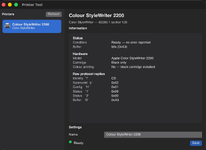
And in another note - one thing I really missed on modern machines was an equivalent of the classic Mac OS printer utility, namely to be able to change the name of devices, query status and installed features, enable/disable the startup page on LaserWriter and other things. I've started building one to try and have the same functionality and here's a rough sketch of it querying my 2200
scherm-afbeelding-2026-07-19-om-3-06-26-pm-png.101510

I still need to get the LaserWriter side working but I think it should be fairly easy. It's built in to TailTalk's app and can be launched any time the main server is running. Hope this will be useful for other folks too who are still rocking these old printers with modern machines.
 

Attachments

  • Scherm­afbeelding 2026-07-19 om 3.06.26 PM.png
    Scherm­afbeelding 2026-07-19 om 3.06.26 PM.png
    115.5 KB · Views: 50
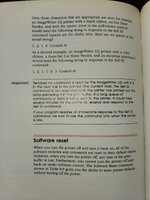
The ImageWriter supports printer information callback using the "ESC-?" command in addition to the PAPStatus reply block. Apple says the printer doesn't support this via the LocalTalk card, but their own drivers say otherwise! Its the only way to get the tray/feeder configuration for the ImageWriter LQ printers.
 
Ahh that is great to know! My LocalTalk card should be here tomorrow so I'll be jamming out on that next, hopefully can figure out what we are doing wrong.
 
Also before I forget, the command to change the NBP name of the printer is "ESC b" (0x1B 0x62) followed by a Pascal string with the new name. I would packet sniff Apple's Namer tool to confirm the exact format as this is undocumented in the ImageWriter manuals.

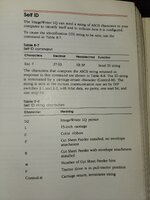
Since the LQ Reference manual isn't online, here is the Self ID info for the ImageWriter LQ. Re-reading the manuals, only the ImageWriter II specifically states that the ESC-? command is unsupported over AppleTalk (stick with PAPStatus for these). It is supported with the LQ.
 

Attachments

  • LQ Self ID 2.jpg
    LQ Self ID 2.jpg
    3.4 MB · Views: 8
  • LQ Self ID.jpg
    LQ Self ID.jpg
    3.3 MB · Views: 7
The ImageWriter lookup response isn't being captured by tashtalkcap.py or tailtalk, so, I used AppleTalk Peek running on my LC II to capture the packets between my Powerbook G3 and ImageWriter II. The only devices on this phonenet were the ImageWriter, LCII and PB G3. I omitted the first several packets of the PB checking its own names. It outputs a text file, below:

Code:
[B ] S: 244 D: 255 T: 55830      dT: 51214      (0007)  L: 31
     FF F4 01 00 1C 02 FC 02 21 71 00 00 F4 FC 00 01       ........!q......
     3D 0B 49 6D 61 67 65 57 72 69 74 65 72 01 2A          =.ImageWriter.*

[  ] S: 155 D: 244 T: 55835      dT: 5          (0008)  L: 41
     F4 9B 01 00 26 FC 02 02 31 71 FE FF 9B 8A 01 0B       ....&...1q......
     49 6D 61 67 65 57 72 69 74 65 72 0B 49 6D 61 67       ImageWriter.Imag
     65 57 72 69 74 65 72 01 2A                            eWriter.*

is the response somehow getting ignored or skipped by tashtalk? The investigation continues!
 
Back
Top