
-
 Hello Guest! We're hosting a challenge to welcome vintage Intel macs to the MLA during the month of July! See this thread for more information.
 -
We've made some quality of life improvements to the Trading Post. More info here.
You are using an out of date browser. It may not display this or other websites correctly.
You should upgrade or use an alternative browser.
You should upgrade or use an alternative browser.
TAM
- Thread starter falen5
- Start date


Is there no Maplin's near you? Pain having to go through mail-order for those small bits and pieces. Did you try http://ie.rs-online.com/web/ ? Next day delivery, based in Dublin.
Hope you'll get it going!
Hope you'll get it going!

Techknight - you sir..........are a genius
-
powersupply alive
-
tam..powering up.............display all garbage..........no sound..........still problems
-
starting a full recap of the motherboard
-
big thank you for everyones help so far.......
-
o god I love this stuff
-
-
powersupply alive
-
tam..powering up.............display all garbage..........no sound..........still problems
-
starting a full recap of the motherboard
-
big thank you for everyones help so far.......
-
o god I love this stuff
-
Last edited by a moderator:


(me expressing nonchalant look with arms-crossed expressingTechknight - you sir..........are a genius
-
-
 yeap yeap yeap.... I know



still not there with this tam
Did a recap of the motherboard and it is still the same - bad display, no sound, no control from front panel and harddrive wont spin up
-
ive checked all the caps to make sure they are all right but the tam is exactly the same as it was before the recap
-
to be honest I don't think it needed the recap yet - but sure anyway its done
-
have gone over the machine time and time again but I am at a loss as to the problem
-
I am trying to power it on with just 1 ram simm, no cache and no rom simm
-
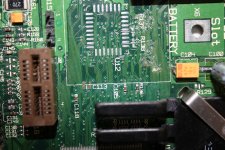
going over the motherboard with a magnifying glass I discovered that C113 is missing. It was located directly under the battery and looks like it was an acid victim
I have no way of knowing what its value was or how important it was.
You can still see green on the traces under where the battery was
-
however when I turn it on even though the display is all messed up, after 10 seconds I get the flashing disc icon....that means that much of the board must be good. It boots from a floppy but stops during boot and gives an error - probally wrong system on the floppy - I can use the mouse, even though the screen is all messed up, to eject the floppy
-
is there and schematics of the tam? - how would I get the value of c113?
-
dam acid leaks!!!! - starting to wonder if it is indeed too late for this board. Also it stops powering up after 5 or 6 powerups. You have to disconnect it for 20 min before it will start again
-
man this thing has truly wrecked my head. Tam = lovely machine to look at but a devil to work on. Just opening that powersupply took a whole day
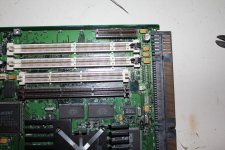
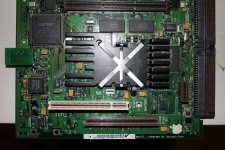
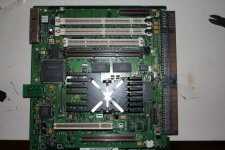
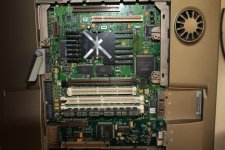
Did a recap of the motherboard and it is still the same - bad display, no sound, no control from front panel and harddrive wont spin up
-
ive checked all the caps to make sure they are all right but the tam is exactly the same as it was before the recap
-
to be honest I don't think it needed the recap yet - but sure anyway its done
-
have gone over the machine time and time again but I am at a loss as to the problem
-
I am trying to power it on with just 1 ram simm, no cache and no rom simm
-
going over the motherboard with a magnifying glass I discovered that C113 is missing. It was located directly under the battery and looks like it was an acid victim
I have no way of knowing what its value was or how important it was.
You can still see green on the traces under where the battery was
-
however when I turn it on even though the display is all messed up, after 10 seconds I get the flashing disc icon....that means that much of the board must be good. It boots from a floppy but stops during boot and gives an error - probally wrong system on the floppy - I can use the mouse, even though the screen is all messed up, to eject the floppy
-
is there and schematics of the tam? - how would I get the value of c113?
-
dam acid leaks!!!! - starting to wonder if it is indeed too late for this board. Also it stops powering up after 5 or 6 powerups. You have to disconnect it for 20 min before it will start again
-
man this thing has truly wrecked my head. Tam = lovely machine to look at but a devil to work on. Just opening that powersupply took a whole day
Last edited by a moderator:


Check the display cable and area. Also, try booting it with the rom.
hey unity. Why would that rom of been in it anyway. It will only show a display with one ram simm installed and nothing else. Will try the 2 rams but cant see it making any difference. Wont be trying the rom again
-
theres allot of green decay from acid on there
-
today I removed the big board that the power supply feeds into. It has allot of connections, checked them all, couldn't see any signs of damage/decay on anything. Removed all the other boards as well ......couldn't find anything wrong. Thinking of removing everything from the plastic housing so it would be easier to work on. Its difficult having to reassemble so much , everytime you want to test it.
-
there is no consistency in powering up..........different sounds, sometimes no display etc etc
-
tams are dam difficult
-
theres allot of green decay from acid on there
-
today I removed the big board that the power supply feeds into. It has allot of connections, checked them all, couldn't see any signs of damage/decay on anything. Removed all the other boards as well ......couldn't find anything wrong. Thinking of removing everything from the plastic housing so it would be easier to work on. Its difficult having to reassemble so much , everytime you want to test it.
-
there is no consistency in powering up..........different sounds, sometimes no display etc etc
-
tams are dam difficult
Last edited by a moderator:

I can find no reason for that ROM to be in there. As far as I know, its not needed for the upgrade card.
So keep it as basic as you can to see if you can get it going. By the way, I never heard of a TAM yet with bad caps. That is not saying they do not exist, they are rare machines, but I have yet to hear about one needing a re-cap. Mine works fine with no re-cap. Although I want to get it done. So I think maybe your issue is more with corrosion than anything. Which is not bad news since you can cob together a replacement board.
So keep it as basic as you can to see if you can get it going. By the way, I never heard of a TAM yet with bad caps. That is not saying they do not exist, they are rare machines, but I have yet to hear about one needing a re-cap. Mine works fine with no re-cap. Although I want to get it done. So I think maybe your issue is more with corrosion than anything. Which is not bad news since you can cob together a replacement board.
have to agree with you unity. When I began removing the caps there was plenty of electrolyte coming out of them. And after the full recap the machine was exactly the same
it made no difference what so ever. Pretty disappointed after the 4 hours I spent doing it
-
that missing c113...........I take it , its a capacitor ........I could take a cap that looks the same from a dead board and see what it does.....but I have no idea of the values ..........probally not a good idea
-
other than that im thinking acid corrosion.............all I can do with that is meter it out and with no similar board or schematic.....im done for
-
have to get another board ...........till then im stuck!!
just uploaded the recap video
it made no difference what so ever. Pretty disappointed after the 4 hours I spent doing it
-
that missing c113...........I take it , its a capacitor ........I could take a cap that looks the same from a dead board and see what it does.....but I have no idea of the values ..........probally not a good idea
-
other than that im thinking acid corrosion.............all I can do with that is meter it out and with no similar board or schematic.....im done for
-
have to get another board ...........till then im stuck!!
just uploaded the recap video
Last edited by a moderator:
Some info on the ROM slot.
http://appletam.ning.com/forum/topics/rom-slot-on-tam
Also I will go check mine, C113 may not be populated.
Also I wonder if a L2 cache is needed to boot. When one upgrades, one takes out that cache.
I will go try all this out now and let you know.
http://appletam.ning.com/forum/topics/rom-slot-on-tam
Also I will go check mine, C113 may not be populated.
Also I wonder if a L2 cache is needed to boot. When one upgrades, one takes out that cache.
I will go try all this out now and let you know.
cheers unity - appreciate it. I know nothing of the tam, its upgrades......I don't even know what cpu is in this thing.
-
ment to say...the pictures I posted above... the missing c113 is in the first picture - center of the shot. It looks like the pads are gone, and on the left it looks like part of the trace all crushed up
-
this thing is very very small.........don't know if I would even be able to install a replacement
-
ment to say...the pictures I posted above... the missing c113 is in the first picture - center of the shot. It looks like the pads are gone, and on the left it looks like part of the trace all crushed up
-
this thing is very very small.........don't know if I would even be able to install a replacement
Last edited by a moderator:
C113 is indeed populated. Its ceramic, like others, so I can not say the value. Apple seems to stick to a common group though on boards. So it may be like others such as C118. It does look like the pads are gone. Scratch the material to verify if its copper. Usually when pads are gone the substrate is more of a tan color. Those look darker. The only good thing is that I dont see traces from it, just two via. If so, one could glue a cap in place then use small wire to reach the vias. Would not have to even be covered wire.
I pulled the cache, it still booted without it. So in your case, make sure the ROM and cache are empty. At least you can rule them out.
I would also try just one DIMM slot at a time, which I think you did.
If you are getting a green light, I think your power supply is fine.
Also for the record, and verification, mine did boot with no battery. Which I now pulled and will toss after seeing this
I pulled the cache, it still booted without it. So in your case, make sure the ROM and cache are empty. At least you can rule them out.
I would also try just one DIMM slot at a time, which I think you did.
If you are getting a green light, I think your power supply is fine.
Also for the record, and verification, mine did boot with no battery. Which I now pulled and will toss after seeing this
Similar threads


- Replies
- 9
- Views
- 2K

