• Hello MLAers! We've re-enabled auto-approval for accounts. If you are still waiting on account approval, please check this thread for more information.

SE/30 no bong, irregular checkerboard video raster

Alex

6502
Hoping someone can give me some advice.

Issue

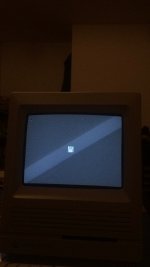
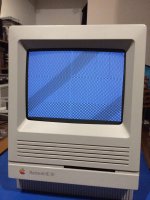
SE/30, no bong, video shows up but the image displayed is that of a static semi random checker board - see attached images

About the machine

- SE/30 no HD

- Removed all old caps, axials and electrolytics and replaced axials with axials and electrolytics with tantalums.

- Old caps had virtually no leaking when I received the board which was shipped in an antistatic bag

- Condition of board, looks clean but was purchased as untested. I only tested after replacing caps.

- Battery did not leak (no battery was included with the board)

What I have done.

Reseated the ROM.

Checked continuity for replaced caps and all pass as far as I can tell.

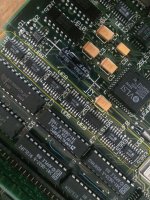
Reworked solder (reflowed) entire section marked in yellow (see image).

What I have NOT done.

Visually inspected analog board (dong that in a few minutes after discharging CRT)

Rework solder (reflow) the Analog board (potentially might help?)

Reseat RAM

Reseat Socketed Chips (but I don't have a proper tool to remove them)

If you have any advice or need photos of the logic board or sections of the logic board please let me know.

As I understand it this issue as a whole is know as SimasiMac.
IMG_1673.JPG

View attachment SE30_vid_issue.mov
Reflowed marked chips.jpg

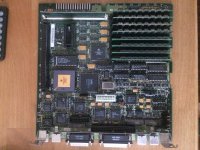
Board overview.JPG

 
Last edited by a moderator:
I have a second ROM from a second SE/30 board which is pretty messed up. Should I try that other ROM? I did try this second logic board and the issue was very similar just more garbled checkerboard pattern.

I cleaned the existing ROM and slot and there wasn't really much dirt that came off and nothing really changed.

 
Last edited by a moderator:
I'm sure the experts will chime in, but from what I have gathered and read:

1) Have you cleaned the logic board?  It does look like there was leakage around UE8 (which seems to be implicated in a lot of these SE/30 video issues).  You can see the corrosion around that chip's legs.  I usually use a generous amount of 99% Isopropyl and a toothbrush to clean around the IC connectors and I'll let the IPA soak in that area for a bit and then rinse off with lots more IPA.  My goal is to get as much of the old goo out from under the chips as possible.  The capacitor goo is conductive and can cause a lot of issues.

2) Have you checked the legs of UE8 to other points on the logic board to confirm continuity?

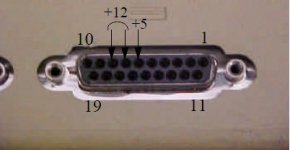
3) Have you checked the voltages at the floppy disk port?

It's odd that a second logic board did almost the exact same thing unless UE8 is gone on both of them or it is, as you seem to be thinking, a ROM issue (SIMM or seating of the SIMM).

 
Last edited by a moderator:
The RAM needs to have at least 4 slots filled. So if you only have 1 stick, or 2 sticks, it will never work. But you would also get a slow chimes of death. 

Since your not getting anything, you have open address/databus traces between ROM and the rest of the system. And this is assuming someone didnt plug something into the PDS slot and screw the motherboard prior to storage and caps leaking. 

JDW's board had this issue and needed the CPU replaced. 

 
Last edited by a moderator:
I'm sure the experts will chime in, but from what I have gathered and read:

1) Have you cleaned the logic board?  It does look like there was leakage around UE8 (which seems to be implicated in a lot of these SE/30 video issues).  You can see the corrosion around that chip's legs.  I usually use a generous amount of 99% Isopropyl and a toothbrush to clean around the IC connectors and I'll let the IPA soak in that area for a bit and then rinse off with lots more IPA.  My goal is to get as much of the old goo out from under the chips as possible.  The capacitor goo is conductive and can cause a lot of issues.

2) Have you checked the legs of UE8 to other points on the logic board to confirm continuity?

3) Have you checked the voltages at the floppy disk port?

It's odd that a second logic board did almost the exact same thing unless UE8 is gone on both of them or it is, as you seem to be thinking, a ROM issue (SIMM or seating of the SIMM).
1) The seller cleaned the board to the point that it was like new when I received it but he did claim that there was very very light leakage. In any event, I know that I did rework the solder on UE8 but I can let you know that there are no solder bridges and continuity is solid on UE8.

Yes, I will follow your advice on further cleaning with IPA soaking. Won't hurt.

2) yes, continuity is as should be and there are no bridges left behind by reworking the solder.

3) No I haven't. I believe I ran across this advice on a site but I can't find the link now.

Ahh, this is the link: https://www.classic-computers.org.nz/blog/2015-05-14-mac-plus-checkerboard.htm. I included the floppy port image.

On your comment, the other board is really in shambles, missing caps, an obvious battery leaked happened in the past, yeah…

2015-05-14-macplus-floppy-disk-connector.jpg

 
Last edited by a moderator:
you have open address/databus traces between ROM and the rest of the system
Could you elaborate? I am not sure what you mean by open address/databus. The traces all look great but tell me more and I will investigate accordingly.

I hope this machine is not beyond repair. The cost was sort of high, I knew it was dead but I purchased another board from the states and it took ages to arrive, the board with shipping was sort of killer but they are getting harder to come by. I hoping that there is a fix but yeah, traces look fine on the board. Tell me more if you can.

 
Last edited by a moderator:
I wish I could elaborate. But I cant. requires testing against the schematic for breaks. Once one is found, it gets patched up with a wire. 

 
The issue is now resolved, partially.

–––Video is fine. No Audio though.––– Will check cable running from the internal speaker to logic board tomorrow. I will also check the speaker itself to be sure there are no issues with it. These are sensible things to check first.

Here are the steps I've taken after the responses received thus far.

1) I populated all four SIMM slots in Bank A as per @techknight recommendation.

2) @superjer2000 noted some corrosion around UE8. With iron at 400°C I added some flux to the pins and began to heat the area up with some solder on the iron tip. I then cleaned with a q-tip soaked in Isopropyl Alcohol and repeated this procedure about 5 times around all of UC8, UD8, UE8 and UEF. Interestingly as heat was applied and the flux smoked, there was that distinct fish smell, indicating to me that there must have been some semi-significant cap leakage that the seller had not removed but then again, the steps in this point was a final bath as it were.

Observations since boot:

The machine continues to run (roughly 40 min as of this writing). I have no mouse attached but inserted a disk with a hand written diskette label with the title "Disk Tools 7.5" but the disk went through a single read attempt with a quick eject.

TO DO:

1) Connect a mouse

2) Find or create a minimal boot diskette to understand if I can get to the Finder

3) Determine why there is no audio

4) Adjust the display to spec (I think I have this documented somewhere — I will share it)

Status Summary:

Be sure to clean up all corrosion and battery and/or capacitor spillage. That tell-tale fish smell that is spewed into the air as you use solder and flux to clean up should be a clue that you are doing the right thing by cleaning.

(~20 min in and the Mac is sitting there with a nice bright screen and a quiet fan)

I will report back on my TO DO list.

IMG_1701.JPG

View attachment IMG_1703_480.mov
 
Last edited by a moderator:
The no sound issue could be something as simple as the speaker itself (plug headphones in and make sure)

Or it could be something as complex as a broken trace to the ASC IC. I have seen it a ton of times. The fact that its not wanting to boot from the disk may align with that theory, assuming the disk you inserted was good, and the floppy drive has been serviced as those are wildcards at this point. 

 
Last edited by a moderator:
The no sound issue could be something as simple as the speaker itself (plug headphones in and make sure)
The sound issue is now resolved. I believe it was related to the speaker either the positive or negative end of the speaker making contact with the frame of the boar.d 

Here is what steps I took.

1) I did a bit more work on any solder points that looked like they might be slightly corroded by any leakage from the original caps. So I simply cleaned with flux and solder, solder wick and Isopropyl Alcohol in repetition until the solder points appeared shiny and with good continuity

2) About a year ago, I completely took the machine apart and cleaned it up from head to toe but seeing that the original SE/30 board was in such bad shape I shelved the project until the last few days. Noticing this audio I suspected the speaker, cabling or something related. It turns out that the speaker in the cabinet was rotated 90° more than the relative correct position. I say this because the negative point on the speaker was hidden by the metal chassis and I believe it was making contact causing a short.

So, once I took the two steps above, one of the two solved the issue of the startup bong. I do believe the speaker was rotated incorrectly causing a short but I can't verify this. Anyway, once I rotated the speaker (had to remove glue and such to do so) sound returned.

Now onto the floppy drive, I think it has a few issues. Rattles a bit when attempting disk reads and then ejects. Granted I need a reliable working disk with a valid OS to attempt a boot. HD will come later.

 
Last edited by a moderator:
Hello

I have some updates.

The machine is sitting on my desk and is mostly ok, but RAM and floppy issues — @techknight maybe you can give me a hint?

ISSUE:

I populated Bank B or was it A? I would have to open it up again to be sure but when one of the banks was populated I got the exact same checkerboard pattern as originally posted at the very start of this post plus a death chime. I unpopulated the bank and the issue cleared itself and the Mac came back to life.

ISSUE #2:

The floppy drive seems to have some issue because on formatting diskettes it reaches about 1 minute or so into the format process and then reports a problem with the diskette. I tried 8 of them and it's all the same and I know these are known good diskettes because they were recently formatted on a IIsi without issue.

Are the two issues related and what should be my next point of suspicion?

WHAT I DID NOT DO:

- I did not move the SIMMs from the working bank to the suspect bank to rule out RAM or slots. I also need to carefully look at the SIMM slots but if the known good RAM from the known good bank is moved to the other bank and the Mac still boots I can rule out the SIMM slots and concern myself with potentially bad RAM. True?

MORE ON THE FLOPPY DRIVE:

I took it carefully apart, removing the two side springs and so forth, very carefully cleaned the r/w heads with IPA 99%, cleaned the joints that require lubricant and carefully applied fresh silicon based lubricant on those areas only. The lubricant was not spray based, it was applied using a toothpick.
- I have a spare drive from a duo dock that might work but I would have to compare part numbers.

- some diskettes that have been inserted appear on the desktop as blank PC formatted. About the same amount appear as 'unreadable, would you like to format'?

- Maybe I have to perform the track zero alignment procedure as per "The Dead Mac Scrolls"?

Sorry for the long text but any advice beyond what I have would be truly appreciated.

Thanks

View attachment Track Zero Procedure.pdf

 
ISSUE:

I populated Bank B or was it A? I would have to open it up again to be sure but when one of the banks was populated I got the exact same checkerboard pattern as originally posted at the very start of this post plus a death chime. I unpopulated the bank and the issue cleared itself and the Mac came back to life.
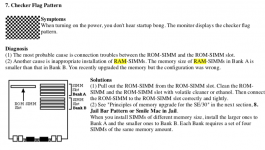
I have an update that I would like to share for future reference. I researched a little and found the following, see the PNG. I don't hear the startup bong, I hear the death chime in its place.


Symptoms
When turning on the power, you don't hear startup bong. The monitor displays the checker flag pattern.

Diagnosis
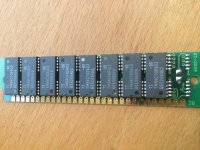
(1) The most probable cause is connection troubles between the ROM-SIMM and the ROM-SIMM slot.
(2) Another cause is inappropriate installation of RAM-SIMMs. The memory size of RAM-SIMMs in Bank A is smaller than that in Bank B. You recently upgraded the memory but the configuration was wrong.

Solutions
(1) Pull out the ROM-SIMM from the ROM-SIMM slot. Clean the ROM- SIMM and the ROM-SIMM slot with volatile cleaner or ethanol. Then connect the ROM-SIMM to the ROM-SIMM slot correctly and tightly.

The text also notes:
When you install SIMMs of different memory size, install the larger ones to Bank A and the smaller ones to Bank B. Each Bank requires a set of four SIMMs of the same memory amount.

CheckerFlag pattern and RAM correlation.png

 
Yeah, the SE/30 is super fussy about what combination of RAM goes in what bank. I had that problem and had to reinstall my configuration of 64 + 4 about five different times before I hit on the right combination. The summary you attached looks like the most thorough explanation I've seen.

(Oddly, it sticks in my mind that I had to do the reverse of what the usual advice recommends, put the larger size in Bank B... I documented my experience in an earlier post on these forums back in 2016. My SE/30 is finally kind of working and I'm not going to open it again to check!)

The floppy drive problem is not likely to be related to the other. If thorough cleaning didn't fix the problem of disks not reading and formatting correctly, you likely do have an alignment problem. I have never successfully fixed an alignment issue but others here might be able to advise. I didn't know there was an alignment procedure described in Dead Mac Scrolls, I will have to check that out.

Good luck!

 
Last edited by a moderator:
@tanaquil I sincerely appreciate your very thorough response and the summary of experiences you faced. It's helpful to know that my case is not isolated.

 
Back
Top