

So I went through the whole clone and build on my RPi3, but when I get to the "cat /var/log/rascsi.log" I get nothing. I can see rascsi.log in var/log but the file is empty. Did I read somewhere that RaSCSI doesn't work with a RPi3?



I saw this myself. Will be testing more soon, and will hopefully have an answer.So I went through the whole clone and build on my RPi3, but when I get to the "cat /var/log/rascsi.log" I get nothing. I can see rascsi.log in var/log but the file is empty. Did I read somewhere that RaSCSI doesn't work with a RPi3?
Yes, I copy'ed and pasted all the commands via SSH from Step #5:Nope. RaSCSI should work great with the Pi 3. The only Pi it won’t work with is the original (Raspberry Pi 1 model B) due to its smaller connector.
Did you restart the rsyslog service?
sudo systemctl restart rsyslog
sudo systemctl enable rascsi # optional - start rascsi at boot
sudo systemctl start rascsiSo I went through the whole clone and build on my RPi3, but when I get to the "cat /var/log/rascsi.log" I get nothing. I can see rascsi.log in var/log but the file is empty. Did I read somewhere that RaSCSI doesn't work with a RPi3?
I saw this myself. Will be testing more soon, and will hopefully have an answer.
Aha! You're doing that? That's great. Means I don't have to.(BTW - I owe Saybur a beer, or 20. His documentation for how the Nuvolink works is AWESOME!)
 I didn't want to do it much but it's a bit of a prerequisite for other things I want to do soooo...
Great suggestions! For the 3D-printed case, I think there might end up being several variants:2 different lid options would be good, one with and one without allowance for the 2nd db25 board. That’s really just because I wrecked my extension board by accident during my build so won’t be using it (I do prefer the access to the internal SCSI connector anyway).
Punch out, access for the lcd screen extension would also be handy.
The difference between the 2, 3 and 4 is really just the power and hdmi ports in terms of external access. You could get around specifying a case per board by making a simple single slit opening at the base of the Power I/O side that is large enough to accommodate all the ports instead of a single opening for each port (like the attached picture). A Pi zero could theoretically run the ethernet dongle out of any of the unused ports on a full sized case, so you could really just look into an alternate mounting scheme to mount a zero in a full size case versus a seperate pi zero case. You could even include port blockers to plug in place to give it a cleaner appearance versus unused openings if opting for a Zero.Great suggestions! For the 3D-printed case, I think there might end up being several variants:
- Internal hard drive bay mount
- External with one DB25
- External with two DB25
And then, there's the question of which Raspberry Pi. If you're going to use a Raspberry Pi 4 instead of a Zero W, that would be a different case, right? And what if you want to use a Zero W with a USB Ethernet Adapter (for eventual Ethernet support)? There seem to be a ton of possibilities.
Work and family have kept me super tied up for the last couple of weeks, so I haven't been able to build my RasSCSI yet. I hope to very, very soon. I'll probably get started on the case before I even get it working with my Mac. :lol:
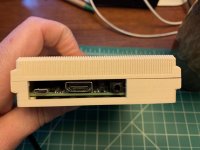

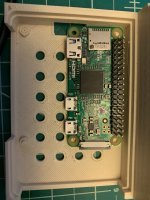

And I didn't place my 2 orders yet... well by the time I get my other projects done and I'm ready for this one, I'm guessing the next RaSCSI revision will be out and about.Holy cow!! The RaSCSIs sold out on Tindie!! Thank you to everyone who ordered!
Well Quick fix... I copied `CD-Sunrise v2.2c` to my Extensions folder and now I can see the drive. :lol:I'm having trouble mounting an ISO image. I have a `.iso` off the web for A/UX 3.0.1 and I've attached it with `rasctl -i 2 -c attach -f /path/to/file.iso`
It shows up as a CDROM using Lido 7.56. On my Mac IIsi running 7.5.5 I installed "Apple CD-ROM Setup 5.3.2" and I now have some CDROM-related Extensions in my System folder.
In Lido, when I click on the drive, I just get the error chirp. Is it my ISO image perhaps?
Should have a big batch around the end of October (fingers crossed). JLCPCB is renovating their factory, so they're limiting orders right now. (If anyone has any suggestions for alternatives that SMT assembly for about the same price, I'm all ears!)And I didn't place my 2 orders yet... well by the time I get my other projects done and I'm ready for this one, I'm guessing the next RaSCSI revision will be out and about.
You re-discovered issue #1 on Github!Well Quick fix... I copied `CD-Sunrise v2.2c` to my Extensions folder and now I can see the drive. :lol:
I totally forgot about this too. I'll add these details to the wiki re: mounting ISO images w/ RaSCSI.You re-discovered issue #1 on Github!
https://github.com/akuker/RASCSI/issues/1
You need to use a hacked Apple driver in order for the Apple CD driver to work. There are probably also third party drivers that work, but I went with the hacked apple driver method.
I'll add a note to the setup instructions. It probably doesn't help if this is buried in the Issues list.
Any chance of there being extra 2nd db25 boards/connectors to buy, I ruined mine during my build... long story. I’m not sure I’d ever use it it, but it would be nice to have.Should have a big batch around the end of October (fingers crossed). JLCPCB is renovating their factory, so they're limiting orders right now. (If anyone has any suggestions for alternatives that SMT assembly for about the same price, I'm all ears!)
Yup! I'll send you a PMAny chance of there being extra 2nd db25 boards/connectors to buy, I ruined mine during my build... long story. I’m not sure I’d ever use it it, but it would be nice to have.

Great to hear, I'm glad people are getting use out of it. Let me know if you see holes in the docs, I can fill those in from the original hardware if needed.(BTW - I owe Saybur a beer, or 20. His documentation for how the Nuvolink works is AWESOME!)
Ha! I knew I'd seen something about CDROM support but (at the time... Thanks NF_!) the setup docs
Slightly offtopic here, but from my experience (admittedly with scsi2sd) it is a lot easier to just copy the A/UX image to a virtual hard disc, boot from that and not muck about with CD-ROM emulation at all. The installer will quite happily run from something it thinks is an HD.I'm trying to boot/install A/UX and have had a bear of a time. I could get the Mac trampoline boot system setup, but the A/UX-proper installer side of things needs to access a second partition of the CDROM directly with all the A/UX stuff. (I think?)


