
-
 Hello Guest! We're hosting a challenge to welcome vintage Intel macs to the MLA during the month of July! See this thread for more information.
 -
We've made some quality of life improvements to the Trading Post. More info here.
You are using an out of date browser. It may not display this or other websites correctly.
You should upgrade or use an alternative browser.
You should upgrade or use an alternative browser.
Overclock LC475/P475/Q605 without soldering or spicy-o-clock
- Thread starter Mustermann
- Start date

Based on this document:Now I'm wondering if I keep running this extension should I add a CPU heatsink?
a heat sink and some airflow is required for 68040@33Mhz and above.
See chapter 11.9.1 Page 11-17 ff
If my understanding is right, TA shall not be negative.
If you do not take care of this, the system may crash or suffer permanent damage.
So answer is : Yes you should add a CPU heat-sink.
As bigger as better. If I remember right, 17mm is the maximum height to be able to close the lid.
Last edited:



See this post: https://68kmla.org/bb/index.php?thr...-soldering-or-spicy-o-clock.47946/post-539573OMG i love this!! Is there a compiled INIT already?
I would love to bench this against my q650-700@40mhz
I just gave that same test a go actually, the Q650 seems to still be a little faster where RAM is concerned since it can interleave RAM accesses (?). Q605 has a couple of wins in video performance as measured by Norton System Info but mostly the Q650 wins here too. Not far off though. Maybe 10% slower. Free performance, I cant argue.


Sweet find. Here's a quick and dirty extension to set 40mhz based on the code posted by @Mustermann. It loads as early as possible during the boot process to get running fast ASAP. Seems to work correctly: Clockometer reports 40mhz & corresponding speed improvement in Speedometer.
Also includes Symantec C project to compile. It's all hardcoded, if you want to try something else you'll need to pick different parameters and stick them in there.
What version of Symantec C did you use to compile this?
What version of Symantec C did you use to compile this?
I believe I used 7.
I believe I used 7.
I don't have any programming skills. @zigzagjoe Would you be able to compile a version of the extension that sets speeds at 20, 25, 33, 40 and 48Mhz?
I would really appreciate it.
Reason for 20Mhz: Would be nice to compare 1:1 with Centris 610.
25Mhz: Allows you to set speed to factory if a resistor swap was done to OC to 33mhz
33Mhz: Would be nice to have this 'lower' OC setting as an extension
40Mhz: You already have it
48Mhz: The top end of what was possible, it seems.
@Mustermann : Would this hack work on a 575 board?
As there is no 575 with me I just can guess:@Mustermann : Would this hack work on a 575 board?
If I remember right, 575 does use MEMCjr memory controller and Gazelle clock generator as well.
If someone has a schematic of 575 at hand you can check if Gazelle is used in the same way as in 475.
For both I do not have facts at hand yet.
If both is yes you can give it a try.
@zigzagjoe Are you able to let me know, how to make an extension from an standard app (output of C compiler/Linker)?It loads as early as possible during the boot process to get running fast ASAP. S
I noticed, you removed all "print" statements from code. This might be a prerequisite but if I compile it is still and standard app.
How to distinguish between early and late load?

How to tell the extension what to do?How about some oddball frequencies too: 35Mhz, 37Mhz. Just to try, I'm not sure how far my LC040 could go anyway.
I assume scanf will or work.
@zigzagjoe Are you able to let me know, how to make an extension from an standard app (output of C compiler/Linker)?
I noticed, you removed all "print" statements from code. This might be a prerequisite but if I compile it is still and standard app.
How to distinguish between early and late load?
I'm not any kind of expert on the topic, but these are the high points I have as I wrote a similar extension for my DiimoCache 030.
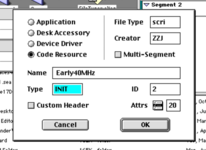
Using the scri file type causes it to be loaded very early in the boot process by pretending to be a worldscript extension.
Prepending a space also helps, but that's more for standard inits as there aren't many (if any) scri files typically.
INIT resource (a CODE resource by another name) should be ID 2. Might be able to use something different, but I know 2 works.
In Symantec C, I set the output to be a CODE resource and that above filetype. Then yes, just simple hardcoded values extracted from the switch statement for 40mhz. I removed the print/scanf statements since there's nothing productive that can be done with them as an INIT as those need the console emulation to do anything productive AFAIK.
I'd suggest while this approach works for a single focused extension to set a fixed speed, it's not the best approach for scaling to do anything else. Writing a control panel would be a more user-friendly approach. Symantec C++7 includes an example cdev, perhaps I will take a look at that later, but don't wait on me.
I think these two specific functions would be essential in a cdev.
- Allow setting arbitrary clock from the control panel, but make sure saving the clock frequency to apply at boot (if enabled) is a separate deliberate action so bad experiments don't get saved.
- While applying clock during boot, verify that the system didn't hang during boot by setting a persistent check value somewhere (in PRAM?) and only clearing it later, probably when finder completes loading would be good.

Probably worth the classic hold-space-to-disable-at-boot as well, or something of the like.I think these two specific functions would be essential in a cdev.
A value-add would be a simple timing loop to estimate current clock speed based on CPU type as Clockometer does, since most apps seem to detect the frequency reported by toolbox calls rather than actual.
- Allow setting arbitrary clock from the control panel, but make sure saving the clock frequency to apply at boot (if enabled) is a separate deliberate action so bad experiments don't get saved.
- While applying clock during boot, verify that the system didn't hang during boot by setting a persistent check value somewhere (in PRAM?) and only clearing it later, probably when finder completes loading would be good.
Does a hot-boot keep the frequency change, or does the ROM reset it to stock? If the former, holding space or what-have-you should really force it to stock again.
Also that's a curious note about the toolbox calls for frequency. Rocket IIs always claim to be 33MHz in basic tools (but Clockometer refuses to measure them) and I've wondered where they're getting that from...is that guessing from the TimeDBRA delay or something else?
That's a good question on the frequency change. Looks like it doesn't persist across soft reboots; held shift on the reboot and it was back to 25 on the subsequent reboot.Probably worth the classic hold-space-to-disable-at-boot as well, or something of the like.
Does a hot-boot keep the frequency change, or does the ROM reset it to stock? If the former, holding space or what-have-you should really force it to stock again.
Also that's a curious note about the toolbox calls for frequency. Rocket IIs always claim to be 33MHz in basic tools (but Clockometer refuses to measure them) and I've wondered where they're getting that from...is that guessing from the TimeDBRA delay or something else?
Not quite sure about toolbox/gestalt stuff for frequency. Some mechanism must exist, as tattletech and norton system info aren't even bothering to measure frequency when I know they're capable of it on older machines.
To derive the frequency yourself, I'd assume to do something like bogomips measurement does on linux; do some nonsense and measure it using a known time quantity, then identify the CPU type and use that to derive frequency (also controlling for cache states, I guess). Not a lot of fun but doable.
In the last days I got an additional Performa 475 in my hands showing exact the results described above. Clock speed up didn't work.Confirmed it does change all the other registers but doesn't touch the actual clock chip registers for some reason.
It will always report b00000000 for the clock chip and always tells me it's going to set it to b00000000...
View attachment 76211
If I let it run again all the other "old values" match what it set before, so I believe that part does work just fine. It just isn't touching the clock chip for me for some reason.
This Performa has "343S0161" soldered to the board.
Based on the MEMCjr datasheet my first assumption was that "343S0161" is not a Gazelle but a DP8534.
There is bit 8 of Register $F980000C to distinguish. First read display bit set for DP8534 in place.
Some tests later I noticed that the bit flips when changing other values. Very strange.
At the end I noticed that upper 6 bits were not set according to the register but keep the value read before.
Long story short: F980000C did not contain valid data because computer was set to 24bit addressing.
after changing to 32bit Clock speed up was working well.
Learning: Current code is not working in 24bit mode.
We need to find out, how to tell between 24 and 32 bit mode and where the registers were mapped in 24bit mode.
"343S0161" is a Gazelle as well.
Performa 475 with 68LC040RC25 was able to clock up to 40Mhz.
Everything above gave 40,21Mhz.
Seems to be limited by MC88920.
Performa 475 with 68LC040RC25 was able to clock up to 40Mhz.
Everything above gave 40,21Mhz.
Seems to be limited by MC88920.
In the last days I got an additional Performa 475 in my hands showing exact the results described above. Clock speed up didn't work.
This Performa has "343S0161" soldered to the board.
Based on the MEMCjr datasheet my first assumption was that "343S0161" is not a Gazelle but a DP8534.
There is bit 8 of Register $F980000C to distinguish. First read display bit set for DP8534 in place.
Some tests later I noticed that the bit flips when changing other values. Very strange.
At the end I noticed that upper 6 bits were not set according to the register but keep the value read before.
Long story short: F980000C did not contain valid data because computer was set to 24bit addressing.
after changing to 32bit Clock speed up was working well.
Learning: Current code is not working in 24bit mode.
We need to find out, how to tell between 24 and 32 bit mode and where the registers were mapped in 24bit mode.
No need - just wrap the actual register fiddling in SwapMMUMode calls. I should have put this in my extension; forgot I was running 7.6.1 which is 32 only. SwapMMUMode will do nothing if already in 32 (ie. harmless).
Code:
char busMode = 1;

SwapMMUMode(&busMode); // go 32 bit, if in 24 bit
(register stuff);
SwapMMUMode(&busMode); // return to original MMU modeSimilar threads
- Replies
- 20
- Views
- 5K

- Replies
- 10
- Views
- 2K
- Replies
- 9
- Views
- 5K
