Outbound Laptop repair/reverse engineering

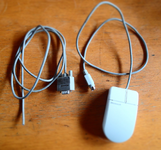
I bought a Microsoft InPort Mouse C3K5K5COMB and found that it wasn’t a simple pull-up design — it actually uses IC control.

So I wired the mechanical encoder and microswitches directly to the DIN 8-pin connector.

I also added 4.7 nF ceramic capacitors between each of the four terminals of the mechanical encoder and GND to suppress contact bounce.

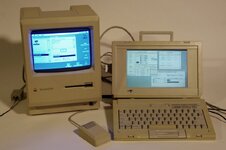
After 40 years, an external mouse is finally back on my Outbound.
Thank you.
Here’s another piece of information to share.


One possible cause of an Outbound failing to power on is a faulty reed switch in the power module.
The system is designed so that pressing the four keys activates the reed switch, which turns the power on.

The reed switch is still available today.

The power module is the aluminum case on the plug side of the AC adapter.
Ah, yes, that ID is for the serial mouse - you want the bus mouse version. Mine was marked C3K5K59937. Glad you got it working!

What did you do for the cable? All the serial cables I came across have a thick cable not suited for use as a mouse, initially I spliced a serial cable to the mouse but later made a custom plug casing out of ABS.
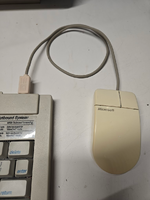

1776178839595.png
 
I used a D-sub 9-pin mouse cable and replaced it with a DIN 8-pin plug (soldering it was quite a challenge).

The mouse that originally came with my Outbound was discarded because it was mistakenly thought to be faulty when the keyboard battery voltage dropped (it had been lent out during a business trip).

Since then, for about 40 years, I haven’t been able to find a Microsoft Bus Mouse. I also tried modifying several Bus Mice, but none of those attempts worked.

Until now, I couldn’t confirm whether the external mouse port was functioning properly.
But now I can confirm that everything on my Outbound Docking System is working correctly.

I’m truly grateful.
 

Attachments

  • P4158134.png
    P4158134.png
    1.8 MB · Views: 14
  • IMG001.jpg
    IMG001.jpg
    66.2 KB · Views: 13
I used a D-sub 9-pin mouse cable and replaced it with a DIN 8-pin plug (soldering it was quite a challenge).

The mouse that originally came with my Outbound was discarded because it was mistakenly thought to be faulty when the keyboard battery voltage dropped (it had been lent out during a business trip).

Since then, for about 40 years, I haven’t been able to find a Microsoft Bus Mouse. I also tried modifying several Bus Mice, but none of those attempts worked.

Until now, I couldn’t confirm whether the external mouse port was functioning properly.
But now I can confirm that everything on my Outbound Docking System is working correctly.

I’m truly grateful.
Glad you were able to get it working! It looks good - factory, even. What did you do for the plug?

Also, I'm jealous of your working docking setup. I don't have the docking bits for mine.
 
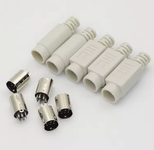
I found a beige DIN plug on AliExpress.

Running the Mac from a RAM disk is surprisingly smooth, and I’ve been using it in a fairly practical way by connecting SheepShaver over Ethernet with an Asante EN/SC adapter.
 

Attachments

  • 2026-04-15 22.43.42.png
    2026-04-15 22.43.42.png
    121.1 KB · Views: 9
I think I'm just going to throw together an adapter to use an optical mouse for the VCF display. Probably more reliable than the ball mouse at least.
 
I bought a Microsoft InPort Mouse C3K5K5COMB and found that it wasn’t a simple pull-up design — it actually uses IC control.

So I wired the mechanical encoder and microswitches directly to the DIN 8-pin connector.

I also added 4.7 nF ceramic capacitors between each of the four terminals of the mechanical encoder and GND to suppress contact bounce.
Just to correct my previous note:
Using 4.7 nF ceramic capacitors for debouncing does not allow proper tracking when the mouse is moved quickly.
Around 1.0 nF seems to be optimal.
 
Took a second to probe the presumed video port on the outbound. As expected, it's very much not VGA and if you plugged a VGA monitor in it's going to short the -16v line to ground. Don't do that!

Bought one back in the 90s that someone had done that to. It killed a diode in the power supply. Machine would not boot up until I replaced that diode. Happily, Perfit was still operating at the time and they were willing to give me the part number for the dead diode.
 
First, the driver does read CHS values from the disk: I tested 93.75 MB working (CHS 800 6 40) which all values are different from the original drive. I am sure there is a limit somewhere but I'm in no hurry to find it :)

IIRC, various old Connor 2.5" IDE drives worked including 20, 40, 60 and I think 80 MB.

You may have already discovered this, but you can switch between internal floppy and internal hard drive, by installing the desired hardware and then running the EEPROM updater (forget what Outbound called it) and it will configure the machine for whichever was installed.

Was the GAL on the floppy controller locked?
 
I would if my mouse worked 🥲
At this point I can't tell if it's just the mouse itself not working or if there's a problem with the computer. I think when I was trying to run things with just the keyboard alone it would freeze up when opening apps. It also doesn't prompt to initialize the RAM disk which I thought it was supposed to do.

Are you using the correct key sequence when you boot the Outbound? There's a different sequence for keyboard - docked, and keyboard - not docked, and if you use the docked when they keyboard is detached it usually won't work. Vice versa and one gets strange behavior, IIRC.
 
Especially as they supposedly support up to 16MB in the ramdisk.

Can confirm from experience that 16 MB is supported. However, even while shut down, a 16 MB RAM disk will deplete the main battery in less than 24 hours. So if one wants the Silicon disk to be persistent, one needs to leave the Outbound plugged in.

I've toyed with the idea of building some SIMMs out of SRAM chips to lower the power requirements. Not sure how well that would work out by the time I add logic to deinterleave the addressing.
 
Booting from disks (not read only) is a bit corrupt-y still but it will read disks written in other machines and write disks that other machines can read, in 1.4MB Mac, 800KB Mac, 720KB PC, and 1.4MB PC.


Everything I post is IIRC, because it was 2 decades ago, so sorry for repeating IIRC, over and over again.

IIRC, there's a floppy corruption issue if you leave the floppy inserted when you shut down. I think htere were some details, but I can't remember them. I probably have a written note somewhere. Where? Good question.
 
Until now, I couldn’t confirm whether the external mouse port was functioning properly.

Hmmm. Has @cheesestraws ever been in touch with you? He was trying to get a docking card working a few years ago and needed the pinout for the docking cable.

 
Mouse that came with my Outbound Model 125. From the discussion here should I conclude that not all Bus Mice will work?

IMG_2816[1].JPG


IMG_2817[1].JPG
 
I also pulled the GAL from the External floppy and dumped it. It was a GAL16V8A 25QJ in PLCC form factor.
Thank you for that. It's been 30 years since I programmed a PLD. Does the .zip file contain what I'd need to use my TL866II+ to program a GAL16VD-15 with that logic? Sorry for being obtuse.

Also, do you have the SCSI adapter? Would you like to read the GAL from a SCSI adapter?
 
Back
Top