• Hello MLAers! We've re-enabled auto-approval for accounts. If you are still waiting on account approval, please check this thread for more information.

Micron Xceed Color 30 fail

Crutch

68000
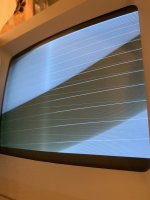
My recently acquired Xceed Color 30 worked a few times ... then started failing intermittently (popping noise from the analog board, and bright scan lines on the screen with no video) before failing completely (same symptoms, 100% of the time).

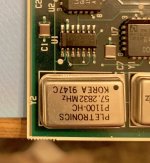
I noticed the IC at U1 gets extremely hot (painful to touch) quickly when powered up.  I'm hoping that replacing it will solve my problem...  two questions for people here smarter than me:

1.  That IC is labeled "TIT131FS F74".  I'm hoping it's one of these three flip flops.  Is there a way to tell which one?  Does it matter?

TI SN74F74D = https://www.mouser.com/ProductDetail/?qs=AMJt07B76usCaqNdeb4hlg%3d%3d

TI SN74F74DR = https://www.mouser.com/ProductDetail/?qs=sbcp%2f4gpy0%2bgzMKzFBFFrA%3d%3d
TI SN74F74DRG4 = https://www.mouser.com/ProductDetail/?qs=mE33ZKBHyE7Fs3ZxegDeVA%3d%3d

2.  Any thoughts on something else I might be missing?  Is replacing this IC actually likely to help?

Thanks for any help or ideas!
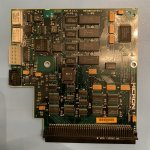
IMG_0391-1.jpg

IMG_0390.jpg

 
I can't say if replacing it would help your problem or not, but when replacing 7400 series logic IC's (which includes this flip-flop) you should generally use parts from the same (or compatible) family. In your case, the family is 'F' (for Fast), so it can be replaced with any 'F' family 74xx74 IC. In other words, all of the replacements you listed should work fine.

 
Welp a 74F74 is a Dflop, and since its near the oscillators, its probably part of the frequency divider network. 

Why it failed? really hard to say but I bet its not a lone-wolf. Hope it is, but eh i dunno. 

 
I suppose the SE/30 works fine without the card?

If the card doesn’t receive the sync signals from the logicboard it will not work and I guess things will get weird.

 
Thanks guys. Yeah the SE/30 works great without the card. I ordered the part and will try swapping out the flip-flop and will update whenever I have results. 

 
Well unfortunately (not surprisingly) you were right TK.  I replaced the Dflop, and it no longer gets hot -- which seemed like great news until I hooked it up to the CRT again.  Same issue:  bright scan lines, no raster (see pic).

Here's the other thing that's happening (unchanged since before replacing the IC):  on power on, I hear a couple soft pops/sizzles that seem to be coming from around the flyback transformer, at which time (I just noticed tonight) I see the grounding wire connected to the screw at top left of the CRT wiggle perceptibly (see short video).  The wiggle happens at exactly the same time as the sizzle.  At that time using my meter I can also measure a sudden 5 mV potential between the CRT grounding screw and the chassis, which seems like it shouldn't happen and makes me wonder if some component on the board is shorted out to ground somewhere.  Nothing seems to get particularly warm since replacing U1, though, even after several minutes.

Any ideas much appreciated -- would hate to give up on this board!

(I hear the sizzle even without the grayscale adapter vertical CRT board connected, and all of the above happens with two different known good power supplies and analog boards, so it's definitely an issue with the Xceed Color 30 board.)

IMG_0152.JPG

View attachment IMG_0448.MOV

 
The slight hissing on powerup seems to be normal. My grayscale setup is doing this as well.

What happens when you install the card but don’t hook up the wiring and CRT board and run on stock harness and CRT board?

Does the card work with an external monitor when installed without the grayscale hardware?

 
Last edited by a moderator:
Thanks Bolle. I would never have guessed that hissing is normal!

When I install the card into my PDS slot but run with stock harness and CRT board, everything is fine. 

You are implying maybe the problem is actually with the CRT board after all? I did test all the electrolytic caps on the CRT board with an ESR meter and they look good - maybe one of the transistors is bad?

I havent tested with an external monitor yet because I don’t have one - sounds like I should. 

 
I was asking because there might have been the chance that it is a logicboard problem. I have seen boards giving those scrambled scan line picture exactly like yours once you install certain PDS cards.

The cards I did test were fine and the problem was somewhere with the logicboard as I ruled out all other possibilities.

You don't happen to have another logicboard you could try just in case though?

Also I get a short spike with visible scan lines when the CRT kicks in as well. Have you tried adjusting the cutoff on the analog board? Had to turn it down quite a bit when I installed the grayscale setup if I remember right.

View attachment IMG_7095_720.mov

 
Thanks Bolle (and thanks for the video). Good ideas but I just tried cranking down the cutoff (and also tried fiddling with the pot on the grayscale CRT board itself) with no luck. Also as it happens I do have a spare known good logic board - just swapped it in, also no luck there. 

I had thought the pop/hiss from the analog board on startup is new since the Xceed card started failing ... but I wouldn’t swear to it. Maybe I just didn’t notice it when everything was fine. 

I noticed Dead Mac Scolls pp 168-68 describes identical symptoms with stock equipment and points to either a bad IC on the analog board (but I’ve seen this with two analog boards that otherwise work) or a transistor on the stock CRT board, which is why I was considering desoldering and testing the three Xceed CRT board transistors next, for lack of any better ideas (and since I already tested the electrolytic caps). But better advice most welcome. 

 
Aaaand I desoldered the three CRT board transistors to test them, and they seem fine. So I’m baffled. I could try getting an external monitor to see if the Color 30 card can drive it ... but honestly I’m not sure what I would do next if that worked or didn’t work!

 
I wouldn't totally rule out the video board yet.

You could hook up a scope to the input pin on the CRT board carrying the actual video signal and see if anything at all is coming in there.

If you have a signal there check the output of Q2 if the signal makes it through the amplifier circuit.


You need to verify the video card is "actually" working. The fact that you get that screen when hooked up into grayscale mode tells me the video card isnt driving the CRT. do you have a DB15 video harness for it? Maybe try an external monitor. 

 
Thanks @Bolle and @techknight for this good advice.  I took a break from this project and just got back to it.  I did the following tests with the Micron card in the PDS slot and the harness connected, but no CRT board in place:

1.  I hooked up an external LCD with a VGA adapter to the Xceed’s external monitor port and was thrilled to see it worked perfectly.  But:

2.  I am not sure there’s a video signal coming out of the card to the CRT board.  I think the video should be on the yellow wire connected to the second pin from the bottom, rear row, on the white Molex connector on the card (Bolle, do we know how the pins are numbered in the diagram you linked, by chance?).  That pin looks very quiet on my scope.  I’m not sure exactly what a CRT video signal should look like, though — the one on the other yellow wire (coming out of the analog board, going to the pin just above on the Micron card, third from the bottom) looks like a high frequency signal bouncing around between 0 and about 1V.  Is that what I should be looking for?  If so, and I have the pins right, something is definitely wrong.  Absent a schematic for the video card, I’m not sure what else to do in that case, other than go Micron Xceed shopping again ....

 
Pretty sure video output to the CRT board is not switched on if there is no video board connected.

There is a sense line going there to see if the board is actually there or not:

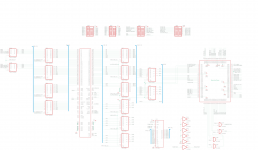
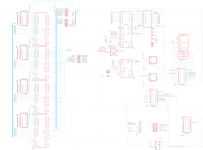
Pin 3 on the card connector gets grounded once the CRT board is connected and that flips a bit in data registers (DBB2 is the internal screen sense line) on the card which I think is then read out by the driver to see if it should be switching to internal or external video modes:

Micron XCeed Color30_1.png

Micron XCeed Color30_2.png

 
Last edited by a moderator:
Wow thanks. Ok now I feel dumb for having the CRT board disconnected - I was being lazy (because I haven’t yet resoldered the transistors after removing them for testing) and thought I would “obviously” see a video signal even if it had nowhere to go. That’s great news though. I will reconnect the board and check that signal again!

 
Thanks again for that tip @Bolle. Unfortunately reconnecting the CRT board didn’t make a difference - I still see nothing on the video out pin. Poking around the Maxim video switch IC at U12, I find a good video in signal on pin 5 but nothing on pins 9 or 14 (video out). I am trying to figure out if maybe this IC is bad, or if it’s not getting whatever signal is supposed to be driving it to doing the “switching”. (The sense line DBB2 is indeed grounded by the CRT board.) Unfortunately I’m not sure exactly what the Maxim chip is supposed to be doing, beyond realizing its one of these: https://www.mouser.com/datasheet/2/256/IH5341-IH5352-255453.pdf

My external monitor continues working fine via VGA, just the internal screen shows nothing. 

 
OK, I’m slowly learning how this is maybe supposed to work.

Per the spec sheet, it looks like the Maxim video switch IC at U12 should connect D1 (pin 3, “IOB”, maybe the “blue” channel which is used as then single channel for grayscale images?) to S1 (pin 14, “Vid Out”) if IN1 (pin 12, “In.Select1.GS”) is high, and should likewise connect D2 (pin 5, “Vid In”) to S2 (pin 9, connected to pin 14 so also “Vid Out”) if IN2 (pin 10, “In.Select2.Passthrough”) is high.  With an external display connected (and working fine), using my scope I can see that pin 10 “In.Select2.Passthrough” is at 4.2V (and pin 12, “In.Select1.GS” is at zero), but I have nothing on Vid Out despite a good signal on Vid In.  Also if I short pins 10 and 14 myself, I can see a gray desktop pattern on my internal display — so the CRT board is presumably good!

Next:  I unplugged the external monitor and rebooted.  Then I saw that pin 12, “In.Select1.GS” was at 4.2V (pin 10 is now at zero), but similarly there was no signal on “Vid Out” despite a (now) good signal on IOB.  So I manually shorted pin 3 (IOB) to pin 14 (Vid Out) and ... HEY LOOK a perfect grayscale image on my internal CRT!

This all makes me think U12 has to be dead.  It looks like that part is obsolete, unsurprisingly.  I wonder if there’s a suitable replacement available.  Otherwise I think I could permanently jump pin 3 to pin 14 on the Maxim chip, and I’d have workable internal grayscale albeit with no external monitor support (which I don’t really care about anyway).  What do you think?

(By the way, I haven’t done much other work on this particular SE/30, I’m wondering if the 4.2V levels on “high” signals indicate a bad PSU.)

 
Last edited by a moderator:
Back
Top