You are NOT supposed to discharge the CRT with the power cord connected to the wall. This is mainly a safety precaution because if you discharge foolishly and somehow flip the PSU switch with the cord connected, you're in a world of hurt! So always disconnect that power cord before you discharge in the normal way, or just use Professor Tom Lee's trick (Stanford University school of engineering, and author of the
Classic Mac Repair Notes) and turn up the display to full brightness while powered on and yank the power cord, which discharges it quite nicely.
READ THIS about why NEVER to discharge to the chassis ground.
The ground lug in the upper left corner of the CRT attaches to the metal belt that wraps completely around the rim of the CRT and is not directly connected to chassis ground. Not all grounds must be the same ground. How then does the CRT get discharged? Well, think about a capacitor. You can discharge it without connecting its ground lead to ground, right? Right. You need only short the leads together and you get the spark (never try that on really high capacitance values though or the cap might blow up -- 1000uF or below is best), and the spark indicates the capacitor discharged, just like the spark or pop you sometimes hear at the CRT cap when you discharge the CRT.
So because that CRT ground lug is NOT connected to chassis ground (and in turn, NOT connected to earth ground via the 3-prong power cord), there is no voltage spike that would travel through chassis ground and potentially zap the motherboard. (
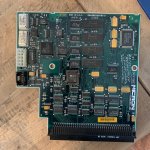
READ THIS, CRT Safety - 31) HOWEVER, the Micron Xceed Grayscale adapter affixes to the CRT Yoke and it's single ground pin splices two thin black wires (why so thin relative to the stock wire, I do not know), one wire leading to the CRT ground lug in the upper left and the other wire leading directly to chassis ground, which goes against everything I've heard about what you should or shouldn't do in a compact Mac.
To be honest, I've been a bit afraid to run my Grayscale setup without the chassis ground connected (which is an important test, I think) simply because Micron did that for some reason. I doubt disconnecting that one ground would blow up the yoke board because the other black wire still leads to the upper left CRT ground lug, but due to the rarity of these boards, I've been too chicken to try it. Perhaps someone braver than I will step up to the task. So for now I can only wonder and take care to remove the PDS card and completely disconnect and remove the motherboard BEFORE I discharge with the grayscale adapter attached. It worries me.
I look forward to hearing your test results about CRT jitter. Again, my eyes are seeing only HORIZONTAL expansion and contraction, and that movement is only a couple millimeters so it isn't hugely noticeable, but it is noticeable and is why I wanted to post my experience in hopes of getting feedback from my fellow Micron Xceed Grayscale users.
Thanks.
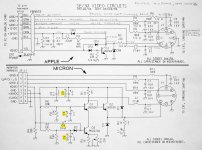
P.S. Below are the JPG schematic of the Grayscale adapter compared with the Apple adapter and also a PDF of the patent application. Note though that schematic markings on the patent don't perfectly match the JPG schematic. The JPEG schematic is correct. The 4 caps in yellow are the electrolytic capacitors that probably should be replaced.
View attachment Grayscale_video_conversion_system.pdf






 otherwise I'm following your advice and jumpering the signal. Thanks again!!

 )
)


