• Hello MLAers! We've re-enabled auto-approval for accounts. If you are still waiting on account approval, please check this thread for more information.

Mac IIci Bourns Filter - Part specification

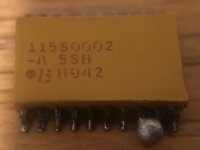
Looking at replacing the Bourns filters in my Mac IIci’s. They meter pin-to-opposing-pin at 45ohms but that may not be an accurate read because it’s an RC filter. Which I have to assume it is... but... I can get any kind of data sheet From the numbers on the top of the case.

I’ve replaced the through-hole Bourns filters on my SE/30s so I’m familiar with them. But I can’t get anything on these...

Anyone have any suggestions?
F3068622-4E49-4E6C-8AC5-451C35680E81.jpeg

 
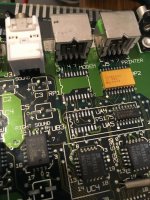
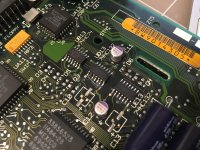
Also, if you have a Mac IIci, this repair is not for the rookie, nor for the impatient. These things are filthy. On both my boards nothing but grit has bubbled our from under these and the 75175 transceivers. Numerous broken traces once the chips are removed and the areas are cleaned.

You may well find that these repairs are mandatory at some point because it appears that this is where all the electrolyte from the caps ran to.

E763DBD3-F40A-42A0-A0DE-099A03E655CD.jpeg

 
While I’m feeling chatty, I already rebuilt the power circuit wIth shiny new ICs. New Q3, Q4, 7474, and 2x 74132s. And yeah, I crammed some oversized solid-electrolytic 10μf smd caps on there for good measure.

D174663D-31A5-4277-8CAA-0FEC37E54F64.jpeg

 
Aren’t those supposed to be plain resistor networks?

They should be 47 Ohms according to the schematics so everything seems to be ok with yours.

Make sure you don’t have internal shorts between the single resistors. But now that you have desoldered it you might as well just stick on a new resistor pack for good measure.

 
Last edited by a moderator:
Those filters are plain resistor networks.

... 47 Ohms ...
That sounds like something I saw on Mouser. I will update the thread with a part number of that works out.

I’m enjoying the challenges these two boards are giving me but I’m getting a little burned out by all the trace repair. Especially when the other one worked when I decided oh hey I should tear it down and *really* fix it... hope it works when I turn it back on.

 
Yeah, IIcis ca be a pin with that startup circuit.

I had a board like that as well... had to repair a ton of traces and swap the 132s and one of the transistors.

After all that it would turn on but did not POST. Turned out the CPU was dead so I had to replace that one as well. Great fun. :evil:

 
Last edited by a moderator:
Your repair work on that IIci looks really clean! I'm dealing with a similar issue on my newly acquired LC II, a whole bunch of capacitor crap got under the chips for the sound circuit and ate through a bunch of traces.  :-/

 
Figured it out:

[SIZE=12pt]4420P-601-250/201[/SIZE]

This is based on the idea that it’s the same basic need as the SE/30 filters which are:

[SIZE=12pt]4120R-601-250/201[/SIZE]

Note: the IIci are SMD, the SE/30 are through-hole.

Both are end-of-life and are non-stocked. So if you see them, buy them.

 
Your repair work on that IIci looks really clean! I'm dealing with a similar issue on my newly acquired LC II, a whole bunch of capacitor crap got under the chips for the sound circuit and ate through a bunch of traces.  :-/
Thanks!

I keep looking at the sound circuit thinking, “I should really rework and clean those, but... time already invested >> resale value...” but that never stopped me on my other Macs...

 
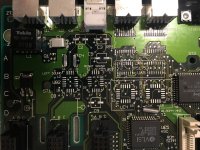
For anyone needing to map broken/disappeared traces on a Mac IIci, I cleared off everything in the serial/sound area. Note that some of my traces between UA4 and RP1 are shot to sh!t.

A093F33B-1C5C-4009-9995-2B6C23EE0BC4.jpeg

 
Just for documentation:
115S0002 is equal to 4420P-601-250/201
112S0302 is equal to 4816P-1-102 and SOMC1603-102G
 
This also may be helpfull for those who are fixing his/her IICI logicboard:

Power button: L212132MV02Q
C1: 10uF/16V (Tantalum - D size)
C4: 1uF (2220 package)
C7: 10uF/16V (Tantalum - D size)
C18: 47uF/16V (Tantalum - D size)
C19: 47uF/16V (Tantalum - D size)
C20: 47uF/16V (Tantalum - D size)
Q1: MMBT3904 (1A)
Q2: 79M05
Q3: MMBT3904 (1A)
Q4: MMBT3906 (2A)
D2: LM385-1
D3: MMBD914 (5D)
D4: MMBD914 (5D)
D5: MMBD914 (5D)
D6: MMBD914 (5D)
D7: MMBD914 (5D)
D8: MMBD914 (5D)
D9: 1SMB48AT3
D10: 1SMB48AT3
 
From an old post of mine:
Here is the proper datasheet for that part:

https://www.bourns.com/pdfs/601.pdf

4120R-601-250/201 is indeed an Resistive/capacitive network. Mouser drops the 250/ from its in house part number but lists the proper Bourns manufacturer part number. This combined with the wrong datasheet concerns me. I'm not convinced Mouser is shipping the proper part.

Looking at the datasheet, change the 4120 to 4420 to go from DIP to SOIC.

Hmm. The link to the datasheet is not good any more. But this works: file:///C:/Users/trag/Downloads/601.pdf

Huh. That doesn't work. But when I paste it into a new window, it does. Strange.


Okay, just attached the datasheet.
 

Attachments

Back
Top