• Hello MLAers! We've re-enabled auto-approval for accounts. If you are still waiting on account approval, please check this thread for more information.

jmacz journey

I also removed all the rust from the metal shielding using evaporust.
I've been working on the same. For the bottom shield, I've cleaned off all the rust and polished it with Brasso, and it looks clean and shiny, but still a very dark, gunmetal colour. I want to bring back the light silver colour – I'm thinking I need to use a polish that's a bit more abrasive, what do you think?
 
I've been working on the same. For the bottom shield, I've cleaned off all the rust and polished it with Brasso, and it looks clean and shiny, but still a very dark, gunmetal colour. I want to bring back the light silver colour – I'm thinking I need to use a polish that's a bit more abrasive, what do you think?

If it's dark, my guess is there's still a layer of stuff (carbon?) on it. Polish is not going to be abrasive enough to take that material off - you'll probably be sitting there polishing for a really long time. Might want to get a light sand paper (800 grit) and try a small area and see if you can get the shine back. If that works and is silver, you'll probably want to go 800 grit -> 1200 grit -> 1500 grit -> 2000 grit -> 2500 grit and at that point if it's silver but not shiny enough for you, you can pull out the polish at that point.

I'm leaving mine the darker slightly gunmetal color :) It's inside the case and I just don't have enough patience right now to restore that piece to a bright silver shine. :)

 
Working on the 3400c right now. I collected 3 of them in busted condition and it looks like I should be able to piece together one working one (minus the battery - struck out on all three). 2 of the 3 had missing PRAM batteries so someone saved them. The 3rd still had its PRAM battery but luckily it didn't leak.

I have a working 240MHz logic board, full memory (144MB), and 2 working screens (one is a Sharp the other is a Samsung - the third screen is a Samsung but it's got some polarizer film peeling). I have a 180MHz logic board also. Recapped everything. I just have to fix busted hinge mounts on the display plastic and then put everything back together.

Also have two working power supplies - not going to recap those for now.
 
If it's dark, my guess is there's still a layer of stuff (carbon?) on it. Polish is not going to be abrasive enough to take that material off - you'll probably be sitting there polishing for a really long time. Might want to get a light sand paper (800 grit) and try a small area and see if you can get the shine back. If that works and is silver, you'll probably want to go 800 grit -> 1200 grit -> 1500 grit -> 2000 grit -> 2500 grit and at that point if it's silver but not shiny enough for you, you can pull out the polish at that point.

I'm leaving mine the darker slightly gunmetal color :) It's inside the case and I just don't have enough patience right now to restore that piece to a bright silver shine. :)

I have a few shields that suffer from this... I’m not concerned with looks, as you said, it’s inside the machine, but I’d like something to at least stop the corrosion.

I have not tried evaporust; is the effect permanent or does the rust eventually return?

Or do we know? :)
 
Last edited:
I've been working on the same. For the bottom shield, I've cleaned off all the rust and polished it with Brasso, and it looks clean and shiny, but still a very dark, gunmetal colour. I want to bring back the light silver colour – I'm thinking I need to use a polish that's a bit more abrasive, what do you think?
That shielding is zinc-plated, isn't it? Seems like you'd need to re-plate it to fully restore it.
 
Might want to get a light sand paper (800 grit) and try a small area and see if you can get the shine back. If that works and is silver, you'll probably want to go 800 grit -> 1200 grit -> 1500 grit -> 2000 grit -> 2500 grit and at that point if it's silver but not shiny enough for you, you can pull out the polish at that point.
I'm tempted...

but I’d like something to at least stop the corrosion.
I think spraying with clearcoat after restoration would be a good idea.

That shielding is zinc-plated, isn't it? Seems like you'd need to re-plate it to fully restore it.
If this is true, then I'd probably better just leave it as is. Can anyone confirm?
 
The RF shielding is always nickel or zinc plated steel, with the plating layer providing corrosion resistance. Acids from exploded batteries or other sources dissolve the protective plating and corrode the steel underneath. If you remove the corrosion, you’re still left with exposed steel which can corrode again pretty quickly. Polishing/sanding the area will almost certainly remove even more plating and expose more steel to corrosion. Plus, if you sand it down to steel, no amount of polishing will ever make it look as shiny as the original plated finish. It will always look darker/duller.
 
Last edited:
If you remove the corrosion, you’re still left with exposed steel which can corrode again pretty quickly.

The zinc coating is just for corrosion protection right? If so, putting a coat of rust preventative spray paint after removing the rust should be good enough right?
 
The zinc coating is just for corrosion protection right? If so, putting a coat of rust preventative spray paint after removing the rust should be good enough right?

That should be fine for the most part. There are some boards that are designed to make electrical contact with the RF shield, in which case you should just make sure those contact points are not coated with non-conductive material.

Edit: To clarify further, I’m referring to boards like the Color Classic, LC575 etc, which have spring loaded contacts on the bottom of the board. The RF shield contact is functionally required.
 
Last edited:
That should be fine for the most part. There are some boards that are designed to make electrical contact with the RF shield, in which case you should just make sure those contact points are not coated with non-conductive material.

Edit: To clarify further, I’m referring to boards like the Color Classic, LC575 etc, which have spring loaded contacts on the bottom of the board. The RF shield contact is functionally required.

Yup, makes sense. Did similar when I coated the chassis in my 540c.
 
Working on the 3400c right now. I collected 3 of them in busted condition and it looks like I should be able to piece together one working one (minus the battery - struck out on all three).

Huh... left the lithium battery on the charger for a few hours and all of a sudden, it's got a bit of life. One bar. Going to leave it on for a bit longer and see if something happens.
 
Ok, I'm super confused.

The battery that showed signs of life, the OS says it's now fully charged. I take the battery out and press the button and I see all 4 green LEDs light up.

Now on the 5 copper pads on the battery, one is marked '+' and the one on the other side is marked '-'. Using a multimeter to check the voltage across those two pads yields 0V.

These lithium batteries look identical to the NiMH batteries from the 5300 which also has the same '+' and '-' marks on it. I don't have one handy as I sold my 5300, but going back on my 5300 battery rebuild threads, the pads on the 5300 NiMH battery are:
  • Battery Positive (marked '+' on the case)
  • Thermal Sensor
  • Circuit Ground
  • Data
  • Battery Ground (marked '-' on the case)
So based on the identical external appearance of these lithium 3400 batteries, and having the same '+' and '-' markings, I would expect to see positive voltage across the 1st and 5th pads (with the '+' and '-' markings). Yet I see 0V on both of my lithium batteries. Pressing the button on each of the batteries though, I see 4 leds light green on one and 3 leds light green on the other.

Now instead of the 1st and 5th pads, if I test the 1st (marked '+') and the 2nd pads, I see 11+ V on one battery and 7+ V on the other battery. None of the other pads give me anything but 0V.

Is the pinout on the 3400 batteries different from the 5300? I thought they were compatible?

Neither battery will power the 3400c although note that I don't have a PRAM battery installed and I remember the lack of a PRAM battery causing battery boot problems on other PowerBooks.

cc: @3lectr1cPPC @croissantking
 
It's booting off the battery now. So I don't understand something about the contacts here.. what I'm seeing is different from what I believe I saw with the 5300 batteries. Maybe I'm just not remembering correctly.

I was also seeing some jittering on the display whenever I tapped the ribbon connector to the logic board. This jittering happened on another display as well (with its own ribbon cable) so I knew it was on the logic board side. I reflowed the solder joints on the connector on the logic board and cleaned the contacts using deoxit. It seems good now.
 
The 3400c battery may not output voltage unless the BMS essentially does a handshake with the computer and says all’s good. That would be my guess.
 
The 3400c battery may not output voltage unless the BMS essentially does a handshake with the computer and says all’s good. That would be my guess.

Hmm, ok. Well, it looks like I have two working batteries then. Cool.

The hinge mounts worked and I have the laptop basically back together. Just waiting for a new PRAM battery to arrive and then I can put the remaining parts back together.
 
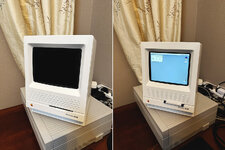
Recently got an SE/30 case (no logic board) as part of a trade. With folks jumping on clear cases, I decided to go with a stormtrooper look instead and spent time restoring the case (cracks, etc) and then refinishing it in matte white. I then moved my SE/30 guts into this new case (still have the old case). This SE/30 has @zigzagjoe's LCD kit and the black surround for it matches well with the new case. My SE/30 also still has the magento optical drive in place of the floppy so if you look carefully, you'll notice a case modification to make daily life with that MO drive more pleasant.

IMG_1462.JPG

Yes, I changed the font on the logo and moved it to the right. I was channeling the look of the white Apple IIc.
 
Back
Top