Spoilers: Firmware Lock issue incoming!
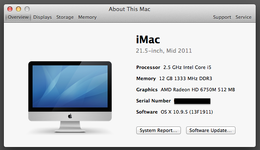
Been on the hunt for a good machine to run Photoshop CS4 under Mavericks 10.9, and also one that will do a decent job at Windows XP gaming. A single owner, incredibly well cared for Late 2011 iMac 21.5" popped up on Marketplace for $40 and decided it was the perfect machine for my needs.
Met up at a grocery store parking lot with this very nice, elderly (in his 70s) German immigrant original owner. Everything checked out, and included the original box, manual, keyboard, boxed Mighty Mouse, and boxed copies of 10.5 Leopard, 10.6 Snow Leopard, and iWork 09.
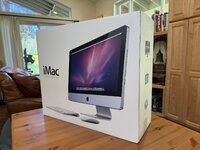
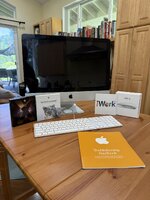
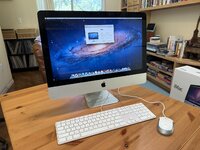
We talked for a bit about this iMac, his new (2020) Macbook M1, and graphic design and web design work. Said our goodbyes and I headed home to test it out.
Initial boot up was great. Everything checked out. 12Gb ram was a nice surprise for a machine of this vintage. 10.7 Lion was installed.
With everything looking good to go, I plugged in my Mavericks USB flash drive install and rebooted with option key down so I could select the Mavericks installer volume.
Then I ran into this:
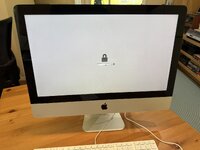
The dreaded firmware lock!
I emailed my elderly German Macintosh friend and explained the problem. But unfortunately, he doesn't understand the issue. Despite careful explanation (including photos and videos), he seems to believe that the user password and the firmware password are the same. And because he gave me login user / password combo, he doesn't understand (or doesn't want to understand) that the firmware lock requires a different password.
So now I'm stuck.
I tried the remove ram stick and pram reset (command-option-P-R) trick, but it appears this model is too new for that workaround, as it ignores the attempt and just boots up to the firmware lock screen.
I don't know any other way around the firmware lock. Ideas appreciated!
Been on the hunt for a good machine to run Photoshop CS4 under Mavericks 10.9, and also one that will do a decent job at Windows XP gaming. A single owner, incredibly well cared for Late 2011 iMac 21.5" popped up on Marketplace for $40 and decided it was the perfect machine for my needs.
Met up at a grocery store parking lot with this very nice, elderly (in his 70s) German immigrant original owner. Everything checked out, and included the original box, manual, keyboard, boxed Mighty Mouse, and boxed copies of 10.5 Leopard, 10.6 Snow Leopard, and iWork 09.
We talked for a bit about this iMac, his new (2020) Macbook M1, and graphic design and web design work. Said our goodbyes and I headed home to test it out.
Initial boot up was great. Everything checked out. 12Gb ram was a nice surprise for a machine of this vintage. 10.7 Lion was installed.
With everything looking good to go, I plugged in my Mavericks USB flash drive install and rebooted with option key down so I could select the Mavericks installer volume.
Then I ran into this:
The dreaded firmware lock!
I emailed my elderly German Macintosh friend and explained the problem. But unfortunately, he doesn't understand the issue. Despite careful explanation (including photos and videos), he seems to believe that the user password and the firmware password are the same. And because he gave me login user / password combo, he doesn't understand (or doesn't want to understand) that the firmware lock requires a different password.
So now I'm stuck.
I tried the remove ram stick and pram reset (command-option-P-R) trick, but it appears this model is too new for that workaround, as it ignores the attempt and just boots up to the firmware lock screen.
I don't know any other way around the firmware lock. Ideas appreciated!
Last edited: