Doom on SoftPC on an SE/30?

You're absolutely right - I was thinking about it in the context of a single thread where it's bad enough, but this attitude is not great for a retrocomputing forum or indeed any interaction with another human being in any situation whatsoever. Makes me wonder what the rest if their life is like.

Back on topic! Would be super interesting to see the difference between a straight-up port vs a generated assembly optimization. I have this sense that later 68k machines rarely got treated right in terms of game optimizations - with some exceptions: Marathon you have mentioned, also Avara runs ok on an stock SE/30 - it doesn't have texture mapping, BUT it is fully 3D and I think the source code is also available.
 
This is really cool. I'm looking forward to working with some kind of AI to learn. Nothing this cool, but I'm optimistic that it'll help me better understand what I'm coding.

I can't with the haters. Let's not turn this place into StackOverflow.
 
Great ideas all. On the front of “feeding it” other source codes for idea- that’s super interesting. I did that just yesterday with a doom port called FastFoom and asked the AI to study the code and see if there are any ideas etc that could apply to this project and it made a list where about ten of them were already implemented in macdoom se/30 but a few weren’t. It took the missing ideas and implemented them but it didn’t move the needle much. In particular it was a smarter way to avoid searching through the BSP more than necessary. Surprisingly it actually made performance a hair worse but the experiment setup isn’t perfect. Anyway I like the idea of trying to feed it other source codes of simmilar games that seem to perform better overall - like Marathon as mentioned earlier.
I hadn’t heard of Graphics Gems books — will look into them!

I feel bad that my doom project took over this SoftPC thread — but it has momentum and no one seems to mind.

Back to working with AI for a sec for coding:
  • Very low effort to ‘get off the ground’.
    • This is my first hobbby project using Claude Code and certainly the first using it for something on System 7 / vintage computing. I purposely spent an hour in a planning session with it before kicking off any work, which is highly advised (use /plan in claude cli) in most cases of using AI to code something.
    • But after that was done the first step was to just make a successful build that would show 1 frame on the screen and within a half hour of actually trying to have it code anything it had the game building and running on my se/30.
  • Claude has different models you can choose (they all are like this) and its latest one is called Opus. It costs more ‘tokens’ than the older Sonnet model but I found the best workflow to be to use Opus for planning and Sonnet for code implementation.
  • Bugs / workflow points
    • And when encountering tough bugs that Sonnet can’t figure out, switching to opus to tell it to try to solve it.
    • When any model has trouble figuring out bugs it is always helpful to suggeset how to solve bugs. This is where the more you know the bettter you can work with it to figure out the problem.
      • eg. telling it to instrument log file messages to fully figure out the problem
      • e.g. telling it a test plan: When sounds just wouldn’t play, it was stumped, but I told it to make a test where every time i press ‘Z’ it runs through a series of sound-producing functions from SYSBEEP all the way up to the full doom game sound function chain. After that the bug was found within one iteration of build+test.
    • The AI starts to flail when it can’t resolve a bug. More specifically, the AI was well aware of the criticality of performance in this project. Yet when it couldn’t find a bug a few tries it suggested a sort of blanket solution that indeed would have overcome the bug’s symptom but not by root-causing it but rather by expensive coverup — In particular it was suggesting we just redraw a whole screen portion or something every frame to avoid some bug. Certainly I yelled at it for suggesting that and of course it goes into “You’re right… I should work to find the root cause…” which eventually we did but geez.
    • I specifically told it many times NOT to modify code unless I have approved it. It continued to break this rule sporadically. I’d call it out every time and it’d apologize profusely until finally “admitting” that it’s a limitation of AI to have any hard-constraint rules it guarantees to follow. That was probably the most discouraging moment of all - not for making doom but for thinking about how much guardrails a user can put on AI when it matters...
  • AI like this is very good at rapid prototyping and getting you 80% of the way there extremely quickly. But letting it get you to 99% is harder for it to do. And in a world where you’re making a commercial product, 80% won’t cut it — but if you let AI do all of the work up to 80% you’ll have a steep angle to climb to get up to speed with what it did to help it get further along. Not so much a problem for a campy project - definitely a problem for professional / commercial projects. Better methodologies exist and I’d say are necessary
  • Opus model impressed me because it could read my resource fork files (converted from reseddit to .r files using derez) and find a quirky bug in how I set up one of them. Sonnet was completely stumped and really flailing

For purist hobbyists, I encourage them to check out my other vintage mac program MacDock — it’s like the modern macOS dock but for System 7. I wrote it a few years ago and programmed it entirely in THINK C - often right on my SE/30 natively and sometimes from an emulator. No AI at all.
 
For purist hobbyists, I encourage them to check out my other vintage mac program MacDock — it’s like the modern macOS dock but for System 7. I wrote it a few years ago and programmed it entirely in THINK C - often right on my SE/30 natively and sometimes from an emulator. No AI at all.
Hot diggety, a system 7 dock! Now that’s cool. And aside from asking AI for some assistance that’s how I want to do it-Think C right on the SE/30. Got my Ritchie and Toolbox primer at my side!
 
Hot diggety, a system 7 dock! Now that’s cool. And aside from asking AI for some assistance that’s how I want to do it-Think C right on the SE/30. Got my Ritchie and Toolbox primer at my side!
Thanks! Yes a looooot of pdf searching to go through the documentation from apple in order to sort through things…. look up which book it’d be in.. then open that book and look it up there… Fun times!

Someone posted it on macintoshgarden which made me happy. My little brick in the vintage macintosh wall of history :D
 
I always thought of the Control Strip as the Dock predecessor (or the Dock is the evolution of the Control Strip), so I’m curious to try this…
 
I always thought of the Control Strip as the Dock predecessor (or the Dock is the evolution of the Control Strip), so I’m curious to try this…
I usually think of the Dock as being the descendant of the Launcher app... but I guess the Launcher app (or whatever it's called now) is really the descendant of that, and Control Strip is more in-line with the Dock (or possibly QuicKeys).
 
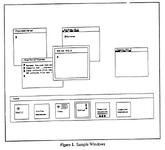
Possibly the Dock goes all the way back (via NeXTstep) to Accent, a predecessor to Mach that was developed (by Avie Tevanian and others) at Carnegie Mellon in the mid '80s. Here's a graphic (not a screenshot) that portrays what the UX on most Accent installations was like; that icon window at the bottom is very Dock-like. From here...

1775085121545.png
 
Possibly the Dock goes all the way back (via NeXTstep) to Accent, a predecessor to Mach that was developed (by Avie Tevanian and others) at Carnegie Mellon in the mid '80s. Here's a graphic (not a screenshot) that portrays what the UX on most Accent installations was like; that icon window at the bottom is very Dock-like. From here...
^^ This. The dock was a direct descendant of NeXTstep - not the control strip or the launcher, etc. NeXTstep had a dock but often shown on the right (IDK if it was moveable).
iu
 
^^ This. The dock was a direct descendant of NeXTstep - not the control strip or the launcher, etc. NeXTstep had a dock but often shown on the right (IDK if it was moveable).
iu
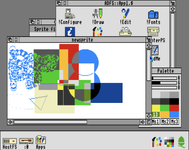
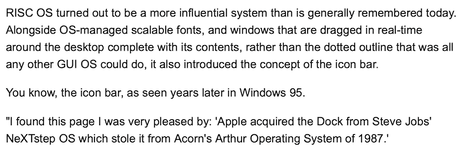
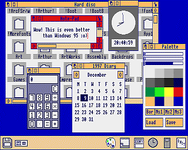
Although there may have been work in that area, it turns out the NeXT Step Dock (and Windows 95 taskbar) was derived from the first commercial implementation on the Acorn Archimedes' Arthur OS in 1987.

1775119842303.png

(So, note, Arthur/RiscOS could drag windows around on a 4 MIPS ARM).

1775119967320.png

 
Although there may have been work in that area, it turns out the NeXT Step Dock (and Windows 95 taskbar) was derived from the first commercial implementation on the Acorn Archimedes' Arthur OS in 1987.

View attachment 97222

(So, note, Arthur/RiscOS could drag windows around on a 4 MIPS ARM).

View attachment 97223


This one is a 24MHz Acorn A5000 I think, from about 1991. Showing full screen scrolling. It isn't mine (I was helping repair it for someone) and it is a while ago, so I might have some details wrong.

20230902_143734.jpg


View attachment 20230902_144138_1.mp4
 
Last edited:
it turns out the NeXT Step Dock (and Windows 95 taskbar) was derived from the first commercial implementation on the Acorn Archimedes' Arthur OS in 1987.

I would really like to see some direct proof of this, considering that the Sapphire window manager on the Accent system essentially had a dock three years prior (see above post). Besides my citation in my previous post about Accent, you can read this article about the Sapphire user interface, with details all about the "icon window" starting on PDF page 5. (The author is Sapphire's interface designer Brad Myers, who is often credited with inventing the progress bar. Accent had them, and Myers may have debuted them there.) So by timing alone, the Register article is wrong: RiscOS didn't introduce the icon bar concept in 1987. The Accent article I just linked is dated December 1984.

But why does Accent matter to NeXT?

Well, Accent was a direct ancestor of Mach and therefore NeXTstep; it was developed right in the same Carnegie Mellon lab where Mach was born. Avie Tevanian who I've mentioned was hired directly out of that lab by NeXT, albeit to work on the OS and not the interface. I suspect he was not directly responsible for the NeXTstep Dock, but that his computing community was. The NeXT was designed in the mould of a graphical workstation of the time, a late realisation of the CMU-originated "3M computer" concept that was quite influential (the link lays out the connections). Anyone who would have worked in the workstation space would have been familiar with Accent, as it was discussed at symposia like this one in Oxfordshire in 1985 if not experienced directly at major university CS labs in the North America and the UK. (Mouse over "Further reading" to see all the contents, and note participants including Myers and future Java inventor James Gosling.)

My evidence is circumstantial but I think it's pretty good; I'll need some convincing to believe that the Dock came from the Archimedes, and a quoted attestation in an article that has a factual error in it doesn't do it for me. But I'm ready to stand corrected if you have proof.

(And there can still be a UK connection: Accent ran on the PERQ, which was for much of its time an ICL co-production, though ICL preferred its own PNX OS to Accent. Accent would run on my PERQ too if I could just figure out what to fix in it...)
 
My evidence is circumstantial but I think it's pretty good; I'll need some convincing to believe that the Dock came from the Archimedes, and a quoted attestation in an article that has a factual error in it doesn't do it for me. But I'm ready to stand corrected if you have proof.

(And there can still be a UK connection: Accent ran on the PERQ, which was for much of its time an ICL co-production, though ICL preferred its own PNX OS to Accent. Accent would run on my PERQ too if I could just figure out what to fix in it...)
This lines up much better with my own recollection (I know, two anecdotes does not constitute evidence). I can definitely see Windows 95 getting its taskbar inspiration from Arthur OS, but the NeXTStep bar can draw a direct development line back to Accent.

And, of course, similar panels were already very much a thing in physical systems management going back at least to the late 1960s -- it was a different paradigm than the menu-driven one LisaOS opted for, but PLCs driven by programmable panels were a thing, and then in the late 70s Modbus enabled SCADA systems to be repurposed for managing PLCs instead of just handling telemetry and alarms, resulting in mixed general purpose panels that functioned pretty much the same way as Accent's software panels, with definable icons. Only difference being: you used icon overlays once you'd defined the panel functions in PLC land.

That said, none of this existed in a vacuum. Likely most of the systems developers, at least in the OS world, were aware of the other approaches out there and borrowed from them as it seemed useful. Which circles back to why Mac OS eventually got the Control Strip, and its functionality was later integrated into the dock when OS X came along (yeah, those dock modules were originally a thing, and eventually quietly went away again, to be replaced by more menu item apps, desktop widgets, and eventually the control center).
 
Back
Top