• Hello MLAers! We've re-enabled auto-approval for accounts. If you are still waiting on account approval, please check this thread for more information.

CPU swap PPC604e

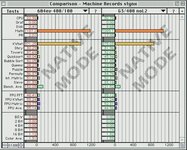
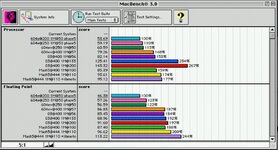
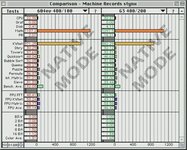
I have done some more benchmarks 604ev/400 vs. G3/400:

Here the G3 is about 34% faster in INT and 8% slower in FP.
Speedometer does not really care for cache.
HDPVRPRO60_20240911_144301_007.JPG

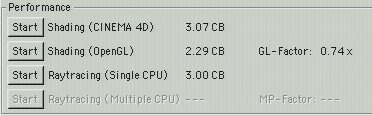
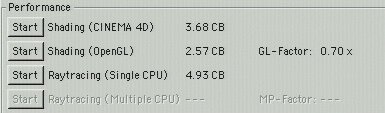
The G3 is much faster in Cinebench2000 rendering:

G3/400
HDPVRPRO60_20240911_142852_003.JPG

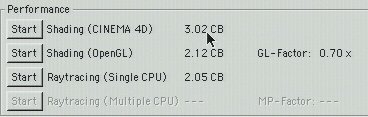
604ev/400
HDPVRPRO60_20240911_142203_001.JPG

In C4D The G3/300 is about 20% faster in shading and about 65% faster in rendering!

The 100MHz cache on the Mach5 card does not really speed up the CPU that much while the 200MHz L2 cache seems to do wonders on the G3 module. I suspect that the integrated cache-controller in the G3 is much more optimized and better integrated than the external cache controller on the Mach5 card. The G3 itself does seem to have some very important optimizations compared to the 604 architecture and i think that would be the branch prediction unit. The 604ev with integrated cache controller and optimized branch prediction was sadly scrapped in favor of developing the G3 further as the CX, FX and GX variants. The 3rd integer unit inside the 604ev does not really amount to much, it seems. Maybe it was not really utilized or there need to be special circumstances where the 3 integer units can be used at the same time?
 
That's some nice data for comparison. Are you able to turn off the L2 on the G3? I wonder how much that affects the results you're getting. Thanks for posting!
 
That's some nice data for comparison. Are you able to turn off the L2 on the G3? I wonder how much that affects the results you're getting. Thanks for posting!
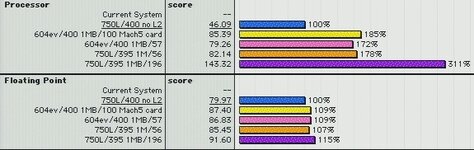
Here are the tests of a G3/400 with no L2

CineBench2000
HDPVRPRO60_20240912_015958_015.JPG
MacBench 3.0
HDPVRPRO60_20240912_020831_021.JPG
Speedometer 4.0
HDPVRPRO60_20240912_020246_017.JPG

The raytracing-results are extremely low compared to the results with cache. The 200MHz cache on the G3 gives a 2.4x performance increase against no L2 cache in raytracing. I think that Maxon really optimized the render engine towards the L2 cache of the G3 to have this much of a performance impact. They most likely optimized the renderer to run inside the L2 cache. Otherwise such a giant difference is hardly explained.
Shading is only somewhat lower, about as high as the 604ev/400. MacBench 3.0 also shows a lot of change when the cache of the G3 is disabled. Only Speedometer does not really show much of a change at alll. Speedometer seems to run the tests entirely inside the L1-cache.
 
edit time limit expired so additional post...

Did you change the CLKID pins on the card? They need to be adjusted if you're moving outside the 45 MHz - 50 MHz realm.

If you look at the third image in your first posting. IMG_1521.png and zoom in on the edge connector, you'll see that pins 15, 16 and 17 lead to resistor positions R51, R50 and R49. These encode a signal to Hammerhead telling it what clock speed the CPU card is supplying.

If you change the oscillator on the CPU card, then you need to adjust these settings. Unfortunately, I don't know what values correspond with which clock speed realms, although I'm pretty sure each setting is for a 5MHz span. But this is why it's so difficult to overclock most CPU cards beyond 45 or 50 MHz. Even the ones that came with adjustable bus speeds, didn't adjust the CLKID settings, except the PowerLogix (or was it XLR8) Power<mumble> Pro. Can't remember what they called that card. It has a PIC on board that takes the switch settings and adjusts both the clock generator and the CLKID settings.

I think this is an example of the non-Pro version. The only difference (AFAIK) is that the Pro version had a remote control unit (via ribbon cable) so that the clock adjustments could be brought outside the case. You can see the blank header for the ribbon cable on what I think is the non-PRo version of the card -- hwihc is why I think it is the non-PRo version.

https://www.ebay.com/itm/226220138455

All this information, except the existence of CLKID pins, is 20 year-old memories, so take with salt.

Regarding putting the 604EV/Mach V card in the non-Kansas 8600, years ago something lead me to believe that at least a few of the pins in the CPU slot were changed in the slot, however, I thought it was something like changing some of the 5V pins to 3.3V or some such. Old unreliable memories. But that would suggest that in your experiment you would end up shorting the 5V bus to the 3.3V bus and I don't think it would even boot if that were the case.
 
non-Kansas CPU slot pinout:

https://sphinxgroup.org/Apple_pinouts/CPU_Slot_Pinout

Note this is only the upper row of 146 distinct pins. The lower row is, IIRC, a long set of GND with some voltage on hte little separated segment.

I found some notes. The long continuous segment at the bottom of the connector is GNDs. The short contiguous segment is 3.3V. I'm not sure how the Mach V changes this pin out but popular wisdom is that something is different. The main signals would still be needed, so I would guess the power supply pins were adjusted. Maybe added some 12V pins, since they carry more power.
 
Last edited:
non-Kansas CPU slot pinout:

https://sphinxgroup.org/Apple_pinouts/CPU_Slot_Pinout

Note this is only the upper row of 146 distinct pins. The lower row is, IIRC, a long set of GND with some voltage on hte little separated segment.

I found some notes. The long continuous segment at the bottom of the connector is GNDs. The short contiguous segment is 3.3V. I'm not sure how the Mach V changes this pin out but popular wisdom is that something is different. The main signals would still be needed, so I would guess the power supply pins were adjusted. Maybe added some 12V pins, since they carry more power.
Since the Mach5 will actually work in a Nitro (8500) board with a Kansas ROM, the power rails will most likely be the same. My problems with that setup is that only drive-access is extremely slow. Something with timings and most likely a signal line related to that would be a bit different. It cannot be much different, though. There is something that needs to be configured on the Mach5 card on start up which is done in software (in the rom) and is not really hardware dependent. But maybe Hammerhead or GrandCentral were updated in hardware or it is just software tweaks that result in the bad hdd i/o performance. I can even use the smaller 7500 PSU without problems :)

The Mach5 is typically much less power hungry than the 150MHz 604 "MAX" card and the 5V/3.3V rails supply much more power (45A/225W) than the 12V (8A/96W) rail in the 390W PSU. The 150MHz card seems to be the most power hungry card i have encountered so far and runs on the 3.3V rail. The 604 150MHz CPU takes >20W and gets very hot, even with a fan.
 
I tested a bit more with the Mach5 in a Nitro-board and have found the source of the instability of the drive access. It is the Acard AEC-6860M IDE-controller i was using. Booting from the ZuluSCSI works (mostly) normally. Speedometer shows a Drive-performance of 4.3 vs. the 0.4 with the ACARD controller installed.

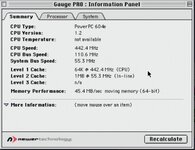
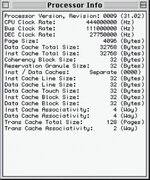
I furthermore overclocked the 400MHz card to 444MHz using a 18.432MHz oscillator, increasing the bus-speed to 55.3MHz. The System boots but has some problems with AppleTalk. Speedometer also calculates a 25.3 PR-rating for the 444/55 vs. 23 with a 400/50 Mach5
 
Another attempt to swap a 604e for a 604ev:
I recently got a 233MHz Umax 604e CPU card. That card uses a LT1580 VRM and can be adjusted through resistors. It was set to 2.35V (seemingly reduced from 2.5V to make the CPU cooler). The card worked and i prepared it for the 604ev (PPC604e3) swap. Everything went well and i could solder the 604ev to the card. When trying it in the 8500 mainboard, i could hear a chime when i started it for the first time. I had the Kansas Rom installed in the beginning. The Computer did not continue to boot, though. After removing the ROM module, the Computer would not even chime. Some more testing showed, that the CPU board would only chime with the Kansas Rom installed.

Searching for the Problem:
Fiers, I reflowed the CPU. By doing that, i must have shorted one or more VCore pads with ground and the PSU would go into auto shutdown mode. After that, nothing seemed to work anymore... i could not get a decent reball done, the flux would suddenly bubble and push the CPU off the pads (what it had never done before)... The screen for the recalling would sometimes buckle... everything went downhill. I spent several days trying to get the CPU reattached and finally succeeded today. But now i don't get any reaction anymore from the CPU... Maybe i killed it for good.

What i have learned:
  1. The Umax CPU board is of lesser quality than the Apple boards. The solder mask easily lifts off, even at lower temperatures. This is especially frustrating on the CPU pads that are connected. The solder-balls tend to clump together on such pads if the CPU is poked a bit too much in the solder-phase. This can lead to shorts.
  2. The Umax-CPU board initially showed a similar behavior as my previous attempt with a 150MHz Apple CPU board. Both boards would chime but not boot. Maybe there is a common problem?

Conclusions:
I was able to successfully swap the 'Helmwind' CPU onto a 604e Apple CPU board and i was successful in replacing the 250MHz "Mach 5" CPU with an IBM PPC604e3DB-350 to get to stable 444MHz (500MHz would not work, chime only). Maybe the 604ev (604r) does need some special circuit or signals that a normal 604e does not have? I have found nothing of that kind in the Datasheets, though. At the moment, i am a bit frustrated...
 
Back
Top