Can any useful emulation run on a Raspberry Pi Zero? CM4? CM5?

Trash80toHP_Mini

NIGHT STALKER
68040
I've got an empty PowerBook Duo in need of a complete rebuild with current LCD. CM4 setup won't fit, that one's going into my original, bought new PowerBook 100.

 
Might as well ask here, topic title edited within edit window:

Raspberry Pi Compute Module 4 harnesses the compute power of the popular Raspberry Pi 4 Model B
Raspberry Pi Compute Module 5 is a system on module that delivers the power of Raspberry Pi 5

Going with the CM4 because it's expensive in the maxed out config I have. The I/O card is perfect and can be upgraded with the CM5 Compute module. I've got plans to play around with another project or two, the I/O boards are relatively inexpensive and I can play musical chairs with the Compute Module. Knowing myself, the CM6 will be available by date of completion.:rolleyes:

I doubt the CM6 will be backward compatible with the CM4 I/O board as it will have a lot of additional pin connections. The CM5 board I wound up with at no cost because I ordered it by mistake and seller didn't want it back. Their admonition to be more careful in the future has been heeded., my bad. Anyway, the CM5 I/O board board is not at all well suited to my needs and the CM6 will likely be a worse fit.

However the additional oomph of a CM5/Raspberry Pi 5 should give me a lot more power for emulation tasks, no? CM4 is a great Linux platform, but a great emulation platform for the PowerBook form factor is the goal here. Might the CM5 upgrade give me the capability of running significantly higher OS level emulation?
 
Depends on what you want to emulate. I've been using Mini vMac on Raspberry Pis since the RPi3. I experimented with various OSes including RPiOS and DietPi without a desktop. I built Mini vMac with SDL and wrote a script so Mini vMac would be launched when the RPi3 booted.

This approach also works on the RPi4, 400, 5, and 500. I experimented with variations including Basilisk II and Sheepshaver.

Now we have more options. MAME does a pretty good job emulating 68K Macs and is easily built the same way I described, a "lite" version of an OS without a desktop, build MAME with SDL, and create a script to launch MAME when the RPi boots.

Theoretically you could do this with Snow as well but I haven't tried it because over the last few years I've been spending my time with real Mac hardware.
 
Wow! Fabulous reference linkage, thanks. Looks like I'll probably set up well enough to do OS9 in sheepshaver on the CM4/Pi4 platform at some point? Apparently it had not yet become compatible with Pi4 four years ago. I wonder if that's been achieved?

Wondering about the limits of emulation on the Zero 2 W. Didn't get a a Pi platform comparative benchmarking hit, but in his video, it looks like jaromac had SheepShaver running OS9 on a Zero!

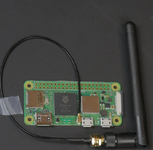
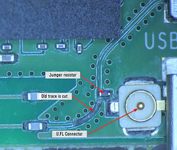
Looks like I'll be ordering up that Zero 2 W with external antenna mod after all! :)

Absolute noob on the emulation front here: can high resolution VidCard output be done in emulators in their present state or am I stuck running a standard 3:4 resolution letterboxed on my PowerBook 100's wider LCD? 640x400 is a possibility, but a drag even so.
 
Wow! Fabulous reference linkage, thanks. Looks like I'll probably set up well enough to do OS9 in sheepshaver on the CM4/Pi4 platform at some point? Apparently it had not yet become compatible with Pi4 four years ago. I wonder if that's been achieved?

Wondering about the limits of emulation on the Zero 2 W. Didn't get a a Pi platform comparative benchmarking hit, but in his video, it looks like jaromac had SheepShaver running OS9 on a Zero!

Looks like I'll be ordering up that Zero 2 W with external antenna mod after all! :)

Absolute noob on the emulation front here: can high resolution VidCard output be done in emulators in their present state or am I stuck running a standard 3:4 resolution letterboxed on my PowerBook 100's wider LCD? 640x400 is a possibility, but a drag even so.
I’m no emulation expert either, but you can generally set the resolution and color depth to the maximum supported by the OS you’re running. The main trade-off is that higher resolutions and deeper color palettes (like 'Millions of Colors') will significantly impact performance.

On my MacintoshPi setup using the Raspberry Pi W Zero, I find that 1024 x 768 with 'Thousands of Colors' stays quite snappy up to OS 8. However, once you jump to OS 9 with a 24-bit color depth, you’ll notice the performance hit immediately. For a Zero 2 W, you'll likely want to find that "sweet spot" between screen real estate and UI responsiveness.
 
Don't remember the panel's specs, but it's a wider aspect ratio than the PowerBook 100's 8:5 640x400 resolution, so it's sounding like a pillared emulation/full screen Linux setup for that one.

Everything for that hack was boxed up and relocated willy nilly getting set up for a Queen Size air mattress for the helpers coming in before and after rotator cuff surgery. Finally lifting a reasonable weight of box after 24 weeks recovery, so slowly getting the boxes back apart/together.

Looks like a Zero 2 W will be heading into the Duo I was unsuccessful in shoehorning the I/O board CM4 setup into. So almost all of the work of that conversion has been done. Will now be on the hunt for a panel to match the odd 8:5 640x400 PowerBook aspect ratio/bezel of the Duo lid.

Have thicker lidded DOA 280c lid if needs be. Panel controller board just might fit into the cubic available under the display. There's also the 2300c lid's nice big 4:3 panel, but I'll likely need to do a rare item trade from the hoard to source one of those, or a guaranteed DOA unit. I have the smaller 4:3 paneled 270c on hand, but it was alive when I last played with it. Panel search will determine which is better. Swap of a working 270c for a guaranteed DOA unit sounds like a deal to me

Duo battery form factor will make for a much easier 1/2AA battery pack build. So many toys out there that Battery Spot Welder for the tabbed variety is on the order of $32.
 
I checked the U.S. Raspberry Pi distributors and it looks like the Zero 2 w is out of stock. It sold for $15 for years, though the latest price is $20 at most places. If you can’t find a Zero 2 W for a reasonable price, the Raspberry Pi 3A+ is functionally similar and still in stock at some U.S. distributors for $25 such as https://www.pishop.us/product/raspberry-pi-3-model-a-plus-512mb-ram/?src=raspberrypi

The 3A+ has a full size HDMI port and a full size USB A port, so it’s easy to connect up.
 
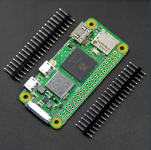
$25 Zero 2 W with WiFi antenna connector installed, headers included/not soldered so low profile for Duo build and on the way! ;)
So if I ever want to hang anything off the headers, they'll be the RA variety. Now I can have some fun after I box up the PowerBook 100.CM4 build while I wait for emulator compatibility for Raspberry Pi 4&5.

With that connector, I can route the lead up with HDMI and wrapping a wire antenna around the LCD's un-shielded lid like in the PB100/CM4 project spec.
 
Last edited:
Thinking someone who knows emulation should start a general PowerBook resurrection topic? Others invited to join the fun:
- Arduino peripherals conversion boffins for Keyboard matrices and ADB KBD/TrackBall (and TrackPad . . . BLECH!)
- Creative printed parts whizzes.
-battery pack tacker
- etc.

Dunno, all I'm good for would be component options and packaging design. The rest is way above my pay grade and my byline seems to be topic poison. :oops:
 
Last edited:
Don't remember the panel's specs, but it's a wider aspect ratio than the PowerBook 100's 8:5 640x400 resolution, so it's sounding like a pillared emulation/full screen Linux setup for that one.
Is your goal to output 640x400, or to fill the panel?

640x400 is a 16:10 aspect ratio (same as 8:5, but I think 16:10 is the more common description).
640x400 on 16:9 panel requires pillarboxing as you said.
640x400 on a 4:3 panel requires letterboxing.

SheepShaver supports arbitrary resolutions so you should be able to choose a full resolution mode for whatever panel you choose. I haven't checked MAME or Snow. I plan on adding the feature for DingusPPC.

Are there any GPUs for 68K Macs that support EDID with arbitrary resolutions/timings? I don't think so. If so, then you can create an EDID with the desired resolution (for emulators that support EDID - are there any, besides DingusPPC?). I think GPUs for 68K Macs may be limited in the range of pixel clocks they can support though. I haven't tried creating custom EDIDs for DingusPPC's emulated GPUs to see if they can provide arbitrary resolutions. 640x400 is not a standard mode that can be chosen using Apple monitor sense codes.
 
Looks like I found it: 10.1" IPS WXGA 1280x800 HDMI Panel for Pi
I'll need to do the new opening just above the speaker grille and fill in the cracks, that'll be out of alignment, but planning a darker gray paint job anyway.

PB100's 1400c KBD upgrade won't fit in the Duo, but hoping a full on metal support plate might make it "usable" if anyone else tries it. Keyboard oesn't bother me, used it for 10 years when not docked. A new build, mechanical switch design might just fit, that'd be amazing. Switches ought to fit at that scale, may need to print the smaller caps though. Backlight would be ridiculous. my kinda dream!

I'm hoping that panel's controller will be smart enough to autoscale 640x400 to 1280x800?
Have no idea what EDID would be, but sounds promising. Need to look at DingusPPP, it looks fabulous, great work! Will it run on Pi Zero/Pi4/Pi5? Didn't look like SheepShaver did or does it support them by now?

So glad you joined the fray!


edit: that panel is the only finger smudge free unit I found in a quick dredging of the 'Bay, only thing worse than TrackPad is touchscreen!
 
Last edited:
Back
Top