• Hello MLAers! We've re-enabled auto-approval for accounts. If you are still waiting on account approval, please check this thread for more information.

Calling all owners of rare ADB devices!

Yes, it did... until the Mac Classic II HDD decided to stop working a few hours ago. Ahem...
One other thought... are you sending ADB commands directly to the FM Radio on the IIgs? If so, you could try sending a Talk 0 after you send the Listen 2 to set the frequency. The FM Radio seems to echo the contents of register 2 in register 0 once after the frequency is set, I figured this was to let the Mac know it had finished tuning, but reading it might be required.
 
Hum... it works... And I do not know why really (perhaps because it is 3AM here)... I'm currently listening to Africa Radio at 107.5 MHz (when I thought I was at 107.7 MHz with value 25 00). That's cool. I will comment once I have things cleared. Thanks again.
 
Hum... it works... And I do not know why really (perhaps because it is 3AM here)... I'm currently listening to Africa Radio at 107.5 MHz (when I thought I was at 107.7 MHz with value 25 00). That's cool. I will comment once I have things cleared. Thanks again.
Cool! Glad you got it to work.
 
I wrote a test app today. I made a video of it that one can watch @
The IIgs is in the garage, sound is better when the computer is moved closer to the outside world.
Adding calls to Talk 0 helped, that's for sure. Using big endian values too. Last but not least, the IIgs does not talk to the ADB chip directly, it talks to Keygloo that communicates with the ADB chip. So, the TALK/LISTEN commands of the ADB Tool Set are different from the TALK/LISTEN commands of the ADB chip...
 
Solution found: I call Talk 0 four times before and after the call. That lets the FM Radio sync finely. It works pretty well now. Thank you a lot for your help and guidance. I've always wanted to listen to the radio from my beloved Apple IIgs, and, now... I can :-)
 
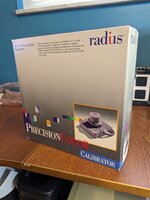
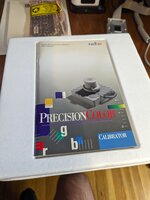
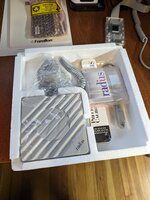
Just found this while reorganizing some stuff. I'll set it aside and maybe get around to installing it and adding it to your device list.

PXL_20231207_193236501.jpg PXL_20231207_193514171.jpg PXL_20231207_193533011.jpg
 
Would this be interesting?

IMG_5520.jpeg


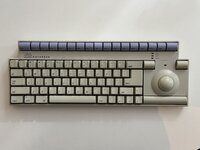
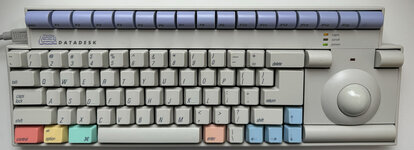
DataDesk with integrated trackball. The two buttons above the ball are drag (mouse button held down until pressed again) and automated double-click.
 
Just checked, and I have a few things.
  • A Wacom Intuos GD-0405-A.
  • A Logitech MouseMan(TM), ADB. "M/N: M-AC13-4MD".
  • A Logitech MouseMan(TM), Macintosh Version. "M/N: M-AH32 P/N:840015-00".
I also have a Wacom Digitizer "*UD-0608-A*", but I already see that in your list. The two MouseMan devices are three-button mice, and require different versions of the corresponding INIT (or is it a control panel, or both?), because reasons.

Are these worth trying to do some kind of analysis on?
 
Would this be interesting?
Are these worth trying to do some kind of analysis on?
Always happy to add more mice (or other devices) to the list! Here's a rundown of the procedure for gathering data on them:
  • Install the immensely useful ADB Parser on your ADB Mac.
  • Identify the device on the bus and note what its original (not current) address is.
    • Keyboards typically have original address 2.
    • Mice or other relative pointing devices typically have original address 3.
    • Tablets or other absolute pointing devices typically have original address 4.
    • Whatever the device type is, you should see the small Apple logo move next to the correct device when you move it or otherwise activate it such that it has data to send to the Mac.
  • Note what its original handler ID is.
    • For a mouse or other relative pointing device, this will likely be 01, though I know of at least one that has original handler ID 02, so it's not 100%.
    • For a tablet, this could be anything.
      • A tablet may, in fact, appear on the bus as two devices, one that is the actual tablet and one that pretends to be a mouse (with handler ID 01, 02, or 04).
  • For a mouse or other relative pointing device, try changing the handler ID to 01, 02, and 04 and make note of which ones the device understands.
    • Click the device in the list and send it a Listen command on register 3 with data of the form 6AHH.
      • Replace A by the device's current address.
      • Replace HH by the desired handler ID.
      • Example: to set the device on address 3 to handler ID 04, you would send it a Listen command on register 3 with data 6304.
    • On the off chance the mouse stops responding, hit the return key to activate ADB Parser's "ADB Reinit" button, this will reset the bus and should restore functionality.
    • Send the same device a Talk command on register 3. It should respond with data 6?HH.
      • ? is replaced by a random number which will change every time you send the Talk command.
      • If HH is not the handler ID that you sent with the earlier Listen command, the device does not understand that handler ID.
    • If the device understands handler ID 04, send it a Talk command on register 1 while its handler ID is set to 04 and note the data received.
  • Post your results in this thread, and thanks! =)
 
This took a bit more doing than I had expected, apparently my "working" IIfx isn't anymore, so I had to dig out my Q800.

MouseMan, Macintosh Version: Type: Mouse, original handler $01, original address $03, current handler $04. Supports handlers $01, $02, and $04. Does not support handler $03. Register 1 response '4C54303101900103'. The right button doesn't seem to do anything, but the middle button seems to act like the left button, possibly because the appropriate MouseKey driver isn't present.

MouseMan, ADB: Appears as two devices. One is type: Mouse, original handler $01, original address $03, current handler $04. Supports handlers $01, $02, $03, and $04. Register 1 response '9A2022E13C3B8138'. The other is type: Keyboard, original handler $02, original address $02, current handler $02. Supports handlers $02 and $03. Does not support handlers $01 or $04. This second device activates for middle and right mouse clicks. This device doesn't seem to work well as a mouse at the moment, for whatever reason, possibly because it's not the only mouse connected to the system, possibly because the appropriate MouseKey driver isn't present, possibly the rotary encoders are shot.

Intuos 4x5: Type: Wacom Intuos, original handler $6A, original address $04, current handler $6A. Does not support handlers $01, $02, $03, or $04. Register 1 response (with handler $6A selected) '0412319C29680007'. Judging by the LED on the tablet, it recognizes the stylus that I have (specifically, the LED turns from orange to green when the stylus is touched to the surface of the tablet), but it is otherwise unrecognized by the system, possibly because the appropriate driver isn't present.

Unknown Wacom tablet: Type Wacom ArtZ II, original handler $3A, original address $04, current handler $3A. Does not support handlers $01, $02, $03, or $04. Register 1 response (with handler $3A selected) '384850003C000615'. Judging by the LED on the tablet, it doesn't recognize the stylus that I have. Presumably not even having the appropriate driver would help without also finding an appropriate stylus.

 
DataDesk TK-3000, "Version 1"

IMG_2931.jpg

  • Original Address:
    • Keyboard: 02
    • Mouse: 03
  • Handler ID:
    • Keyboard: 02
    • Mouse: 01
  • Change Mouse to Handler...
    • 01: yes
    • 02: no
    • 04: no
 
Thanks @nyef and @pl212 ! I've added your devices to the appropriate documents in TashNotes. Sorry this took me so long, life's been busy.

Couple of minor followups:

@nyef - Does the Intuos appear only as one device with handler 0x6A, or does it emulate a mouse as well like the ArtZ II is known to?

@nyef - Is it the MouseMan's "mouse" device (the one with original address 0x3) that's giving the "9A2022E13C3B8138" response on register 0x1? I ask because that's definitely not the standard handler 0x4 format, which is strange, I'd almost expect that to cause trouble with the standard System 7 driver...

@pl212 - Does the keyboard have a model name of any kind that you know of, or just "TK-3000"?
 
@nyef - Does the Intuos appear only as one device with handler 0x6A, or does it emulate a mouse as well like the ArtZ II is known to?

@nyef - Is it the MouseMan's "mouse" device (the one with original address 0x3) that's giving the "9A2022E13C3B8138" response on register 0x1? I ask because that's definitely not the standard handler 0x4 format, which is strange, I'd almost expect that to cause trouble with the standard System 7 driver...
So far as I am aware, the Intuos is only providing the one device with handler 0x6A, but I don't have a mouse for it so perhaps that's required for it to mode-shift?

Yes, the MouseMan ADB's "mouse" device returned that string, and I was running some version of System 7.x, which might explain why it was responding poorly to motion events.
 
I did this once before, but it's been about a year, so I figured it's time to shake the tree again...

Do you, dear reader, own or have access to any ADB devices that aren't on the list?

I can send you a MacHASP-M rather than submit to electronics recycling.
If you want it, send a postal address. Thx, peter at easthope d ca
 

Attachments

  • MacHASP.jpg
    MacHASP.jpg
    70.8 KB · Views: 25
I can send you a MacHASP-M rather than submit to electronics recycling.
If you want it, send a postal address. Thx, peter at easthope d ca
If @Tashtari doesn't want or need it, I would gladly take it. I'm reversing some old mac copy protections and a MacHASP would be nice for testing and playing around.
 
Back
Top