• Hello MLAers! We've re-enabled auto-approval for accounts. If you are still waiting on account approval, please check this thread for more information.

Best way to archive vintage Mac floppies & CD's to images

Well, you are correct much to my surprise. I took what I thought was the DC6 image and put the .dsk extension on it and Basilisk II mounted it fine.

I was working from here:

http://www.applefool.com/se30/moreinfo.html#Working_with_Disk_Images

Specifically:
 

To image a disk in Terminal, which produces a NDIF format image (compatible with DC 6.3.3, but not DC 4.2), use something similar to the next line below:

dd if=/dev/disk2 of=/Users/icecube/Desktop/SystemAdditions.img
 
If you use this feature in this fashion, change the type and creator of the file to dimg and ddsk, respectively, to use it with Disk Copy 6.3.3+.


Ah, I see it now "compatible with DC 6.3.3".  I misread that as being a DC6 image. 

Well Anyways, the ability to convert DC6 images to DC42 format on a modern Mac is pretty cool. 

 
Ah, I see it now "compatible with DC 6.3.3".  I misread that as being a DC6 image.
Yes, that makes a lot more sense.

Honestly I'm pretty negative about the idea of using the proprietary native DC6 format for archiving disk images you're intending to share with anyone else simply because so far as I know there aren't any reliable tools for non-Apple operating systems for manipulating them. Which means if someone interested in them doesn't have a working Mac they're stuck having to use some really cumbersome workarounds to get the disk into a form they can either shove at an emulator or write to real media. DC42 or RAW for floppies and one of the standard cross-platform iso/bin/cue formats for CDs would be preferable unless there's a really good reason to use the Mac formats.

 
For my part:

My intent with the dc6 cd images on vtools is that they’ll get mounted directly on the machine that’s intended to use them. Floppies I’m planning on using dc42 format.

for anything that’s a bootable/system cd, I intend to burn and make an iso of using a modern pc.

i also use dc6 for containers of personal files if there’s some kind of need.

 
From what I recall the DC 6.3.3 output isn't special in by itself: it's NDIF, which first came out with Disk Copy 6.0. NDIF images are produced by OmniFlop/RawWrite Windows tools, and you can make a compatible DC 6.3.3 image using $ dd. (Disk Copy Scripts can be pretty handy too. You can use them to create segmented images or .smi images from within DC 6.1.2 (IIRC) or later.)

Here's some stuff I found around the web:

http://disktype.sourceforge.net/doc/ch03s13.html

https://web.archive.org/web/20030217235008/http://www.tidbits.com/tb-issues/TidBITS-339.html

At the end of the day, you want to use DC 4.2 for 400KiB and 800KiB disks* (any machine that can write/read them can run that program anyways, unless it's pre S3.3/F5.4 AFAIK), and from there, 1.44MB disks can roll with DC 4.2 or 6.3.3. Worst case? Have both! If it's a special copy-protected disk, there's other programs to deal with that. Generally I like it when people tell me what kind of format the disk image is: if it's not a commonly obtainable one such as Disk Copy variants seen around, supply the program to write such disks. I.E. Disk Dup+.

*: 400KiB and 800KiB disks use tag checksums, which were ostensibly were for some kind of feature that never really made it to market. DC 4.2 will preserve that information.

 
Last edited by a moderator:
From what I recall the DC 6.3.3 output isn't special in by itself: it's NDIF. NDIF images are produced by OmniFlop/RawWrite Windows tools, and you can make a compatible DC 6.3.3 image using $ dd.
Maybe I'm missing something, but I don't see anything in those documents that say the files produced with Diskcopy 6.3.3 are even remotely cross-platform, and in fact it specifically says this:

Unfortunately, Apple is very secretive and doesn't publish the format specifications. Apparently, they fear a degradation in user experience, were third parties allowed to write alternative utilities for handling disk images. Some older formats use proprietary compression algorithms, although the latest compressed format (UDZO) uses zlib. Mac OS X has a library (DiskImages.framework) that handles the various formats using a nice plug-in architecture, but it is marked private and neither headers nor documentation are available.
That 6.3.3 can handle a plain old RAW image doesn't change the fact that it can also produce horribly proprietary compressed images that no good third-party tools exist to deal with.

 
Maybe it's that DC 6.3.3 can handle a raw disk image dump? I won't discount your point until we understand the topic further with more information.

The compression feature is something you specifically have to set. My SE/30 is under going a troublesome fit of Simasimac and is unreliable, but I'm pretty sure you have a choice of: Read Only, Read Only Compressed and Disk Copy 4.2 within DC 6.3.3. Gonna check with the iMac in a moment...

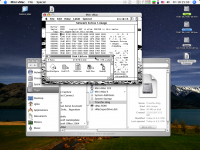
EDIT: Here we go. 1.44MB System 6 hard disk utility disk. External USB drive, iMac G4 800MHz, 9.2.2.

111.png

 
Last edited by a moderator:
Looks like you've been playing BOlo against a few bots on your machine ;). I still want to get a game together with a few people here.

 
Maybe it's that DC 6.3.3 can handle a raw disk image dump? I won't discount your point until we understand the topic further with more information.
I'm not going to say this definitively without a chance to actually look at a binary dump of the various types of NDIF images, but based on this:

The NDIF ("New Disk Image Format") format was introduced with Disk Copy 6.0. NDIF is a dual-fork format, meaning that all meta-data is stored in the resource fork. This makes them fragile for cross-system transport. Various variants of the format allow for sparse images (only actually used sectors are present), compression, and self-mounting images.
My speculation is that the data fork for this type of NDIF:

Code:
RdWr  NDIF read/write image (deprecated)
Is the same as a raw image. (IE, since it's neither compressed or self-mounting it's effectively just a linear array of sectors, same as a RAW.) DC6 probably includes the ability to make guesses about files that have had their resource forks destroyed so, yes, if this conjecture is correct then you can make an argument that a RAW image is a *type* of NDIF. But this property is not transitive, IE, if you create images with DC6 that *are* sparse or compressed then there's going to be an issue.

Maybe I should clarify my stance a little: if you're sticking something in compressed self-mounting DC6 format that's only useful if you're mounting it on a fully installed and working MacOS installation then that's probably okay. The issue I have with it is anything that:

A: Would be useful for *bootstrapping* a Mac, like OS disks, or

B: Things that are intended to be burned to a CD, because that could be a real bummer.

 
Last edited by a moderator:
@LaPorta Hell yeah, to me Bolo is the best game ever made, full stop.

@Gorgonops I getcha. I'm not going to disagree with you, neither will I say what I said was set in stone about NDIF/DC 6.3.3 until we resolve the matter.

The only way to settle the matter that I know of is to use a hex editor to compare the images directly. Here, I have a photo of a Disk Copy 4.2 disk image which I opened up with Fedit 3.5. I'm sure this is an avenue we can explore for sure. (Finding Fedit was no easy task, by the way.)

Mini vMac 3.2.3 (Plus), System 7.0.1. Tiger in the background. (BootConfigure is used for old MFS systems which didn't do "blessing" of the System Folder as per HFS setups. If your boot disk wasn't working you'd have to either make another or use something like BootConfigure to edit the disk headers manually. I should point out that Fedit and so are SUPER OLD programs. There's definitely better stuff we can use for this kind of stuff.)

Picture 1.png

 
Last edited by a moderator:
Gorgonops I getcha. I'm not going to disagree with you, neither will I say what I said was set in stone about NDIF/DC 6.3.3 until we resolve the matter
I'm unclear exactly what the argument is here. While I concede that there may be one sub-variant of "DC6" format that consists of a data payload that once extracted from the fragile wrapper might be manipulate-able by non-Apple tools that doesn't mean it's even remotely an ideal cross-platform interchange format. I can't claim I've exhaustively eliminated all possibility that there is some very well hidden open-source project that has cracked the sparse/compressed variants but if it exists I sure can't find it.

I'm unclear exactly why DC6 is preferable for floppy images in the first place if you're not intending to use compression. I do not think it preserves any metadata that RAW doesn't.

 
Last edited by a moderator:
@Mk.558 Windows 2000 can install on Fat32 just fine (I did it all the time back in the day before I had hard drives >20 GB). Likewise with XP (which is a close relative of 2000, due to their sharing the same NT 5.x codebase). Windows Vista (aka NT 6.x) was the first to not support booting from Fat32, I believe.

c

 
The only way to settle the matter that I know of is to use a hex editor to compare the images directly. Here, I have a photo of a Disk Copy 4.2 disk image which I opened up with Fedit 3.5. I'm sure this is an avenue we can explore for sure. (Finding Fedit was no easy task, by the way.)
Try using Hex Fiend on Mac OS X to examine and edit disk images. It's what I use all the time.

If you're running an old version of OS X, you can download older versions of Hex Fiend.

 
Resource forks have been represented by extended file attributes (xattrs) since Mac OS X 10.4 and, while software that doesn't know how to handle extended attributes properly will just flatly ignore resource forks (so don't use the old, built in rsync), Mac OS X's support for resource forks has been solid in my experience going as far as APFS.
I use HexEdit v1.7 on Mac OS X to edit resource forks. It's a Carbon-PPC binary, so it won't work on the newer OS X systems, unfortunately...

A quick-n-dirty way to examine the resource fork on any file in any OS X version is to run 

Code:
macbinary encode [filename]
from Terminal.app

 
I'll triage what the AFP problems I ran into were perhaps later today...
Many days later...

Reproducing my issues, I can tick the "File Sharing" box in Mojave (10.14) for AFP. The interesting thing about those shares is that they don't see any of the user folders from Mac OS X 10.5. All they see is an external USB drive. However, it turns out this applies to both my Leopard machine and my Sierra machine... macOS 10.12 can't see anything but this USB drive, either.

I had a little thought, and then I came to this article, which isn't even a tech note:

https://support.apple.com/guide/mac-help/set-up-file-sharing-on-mac-mh17131/mac

AFP can't share APFS disks! That's a limitation I wasn't aware of. Mostly because we don't use AFP at the office. :)

Now I try file sharing with Windowsy SMB via Mojave. My Leopard machine can't connect to Mojave via SMB. My Sierra machine can connect just fine, and it sees all the AFPS disks and HFS+ disks without issue.

So, hmm, looks like AFP is regressing further in later Mac OS X. Kind of sends a signal when the latest disk format is impossible to share, no?

EDIT: To be thorough, I can connect to Leopard shared drives from Mojave via AFP and SMB without any issues, they're all visible and work as you'd expect.

 
Last edited by a moderator:
Disk image compression with DC 6+ is just a nice way to mess up the guy after you because only DC 6 can handle them.

DC 6.3.3 has a better overall interface and features than DC 4.2, I see no reason why Read Only images can't suffice just fine. It's a versatile, capable program. Its primary limitations are not imaging 400k and 800k MFS disks properly, requires System 7+, and disables the Make a Floppy... command if you don't have an internal drive.

 
I think (???) 4.2 also records track and header information, which can be important for archival purposes.  4.2 is also straight forward.  Launch the app, put in a floppy, it reads it, then save the disk image.  Rinse & repeat.

It's why I recommend Disk Copy 4.2 for archiving non-copy protected floppies.  For copy protected floppies, use DiskDup+.  For everything else, there's Master Card ... I mean Disk Copy 6.3.3.

 
I think (???) 4.2 also records track and header information, which can be important for archival purposes.
It does not. Disk Copy 4.1 and 4.2 format is an 84-byte long header, followed by x bytes of image data, followed by x bytes of tag data.

Within the header is Disk encoding, a byte describing whether the disk was GCR or MFM. Another byte is for Format, with options for Mac 400K, 800K, ProDOS, and interleave.

At its core, Disk Copy is a block-level copier.

 
Back
Top