• Hello MLAers! We've re-enabled auto-approval for accounts. If you are still waiting on account approval, please check this thread for more information.

Best way to archive vintage Mac floppies & CD's to images

The newer versions of OS X, such as 10.8 and above, can have problems with files with the resource fork structure, or at least I did.
Oh, great. More conflicting information. :o)

 Do you have any more details? Because I manipulate forked files on 10.11 El Capitan all the time with no problem.

 
I would avoid disk dup personally, unless it was DIRELY REQUIRED, for some specific reason, mostly because it's not a standard vintage mac toolbox item. DC4.2 and DC6 are.

EDIT: Also ShrinkWrap.

Re resource forks: Modern OS X seems to be able to handle them fine, but the newer you get the fewer options you get to safely transmit a file with a resource fork, at least without using a couple different bridges. I'm using 10.6 to fill VTools mostly because it can connect to the ASIP share.

 
Last edited by a moderator:
Isn't DiskDup format required for use with Floppy Emu?  For some reason I have that impression.  I realize there is a tool from BMOW to convert from CD42 format to DiskDup, so perhaps just doing everything in DC42 and converting as necessary is a good idea.  But that involves moving the files to a modern computer.

 
The .dsk format is needed to write on the floppy emu if I’m not mistaken. DiskCopy

for some reason is read only.

 
The reason is because a lot of times, DC 6.3.3 or 4.2 can do just fine, and are readily available and work just fine. Disk Dup+ doesn't offer anything interesting over those formats, although I fully acknowledge that it often is the only choice. Disk Dup+ uses the .dsk extension, which is often confusing and doesn't infer any clues about the creator if you loose the resource fork.

As for newer versions of OS X and file compatibility, when I was testing out old macs a few years ago for the Guide, I had issues with OS X 10.8-ish copying files and resource forks. I'm not going to say that 10.8+ won't destroy your files, but merely to point out that I had issues with file integrity and copying.

 
For diskettes, I'm told the best format is diskcopy 4.2: DC6 can read it and 1.4M DC42 images should be writeable with PCs and USB floppy drives as well.


Can you perhaps provide an exact procedure for writing a DC42 image using PAC and a USB floppy drive?

Happen to know if by chance that also works with a modern Mac and the dd command?

For CDs, I'm partial to DC6 images for anything that'll be opened on a vintage Mac, and using a PC with something like infrarecorder or imgburn (I have both) to image the disks into something that'll be burnable with win/mac. It's what I used for what's at http://personal.stenoweb.net/oldmac/ 
So DC6 can image a CD.  That's cool. 

All my personal floppies are imaged with dc6, the good news is I'm told dc6 can convert floppy image formats.
Convert from DC6 to DC42, or something else?

 
Thanks for all the great tips guys.  I just read the Working with Disk Images section of the Classic Mac Networking v3.1 guide, and that is incredibly chock full of information.  It is pretty much the guide I was looking for. 

I am going to find a reliable Mac out of my collection that supports most, if not all of the disk formats, and then image them all using DC42.  Then I'll probably Binhex or MacBinary them for good measure before I do anything else to them. 

There are some remaining open questions though.

For the Floppy Emu, given the measures necessary to protect the resource fork, I wonder about the process of copying images to the SD card on a modern day Mac or Windows PC.  For one, the SD card must be formatted as Fat32.  How is that preserving the resource fork?  For another, wouldn't the process of uncompressing it and moving it around on a modern Mac or PC cause problems with the resource fork? 

Based on the discussion above, I get that modern Macs _may_ be ok for handling straight image files, but it is no guarantee.

I did find a discussion on 68kmla that talks about this.
 

Would the fact that Disk Copy 6 images rely on resource fork data be a problem? As I recall, this is an issue with DC 6 images more than with DC 4.2 images (the latter will often survive improper stuffing and transportation over non-compatible platforms, DC 6 images won't).

It's interesting that Floppy EMU doesn't require resource fork data at all. My computer lizard brain is firmly stuck in 1992, and is convinced that any failure to preserve resource forks will result in utter ruination.


But would that mean losing the custom disk icons and what not? 

 
As for newer versions of OS X and file compatibility, when I was testing out old macs a few years ago for the Guide, I had issues with OS X 10.8-ish copying files and resource forks. I'm not going to say that 10.8+ won't destroy your files, but merely to point out that I had issues with file integrity and copying.
I wish you had more details on how to repro because I'd love to try this out on a 10.8 VM sometime on ESXi, if there are issues. Granted this is part of what I used to do for work, file bugs on Mac software against kexts and a custom software stack intended for use by developers and find solutions. And uh, I still do this even though it's no longer in my job description.  :)

For what it's worth, the only problems I've found came from using the 10.5 AppleTalk kernel extensions with a later Mac OS X to try to bring back legacy AppleTalk support.

Resource forks have been represented by extended file attributes (xattrs) since Mac OS X 10.4 and, while software that doesn't know how to handle extended attributes properly will just flatly ignore resource forks (so don't use the old, built in rsync), Mac OS X's support for resource forks has been solid in my experience going as far as APFS. I'm still happy that the latest StuffIt Expander handles them well.

On the other hand, file sharing between early Mac OS X (Leopard) and later Mac OS X (Mojave) is... interesting, in general. I haven't had great success getting a Leopard machine to connect to a Mojave computer over AFP, though (perhaps not too surprising) Windows legacy SMB seems to work a little better.

 
Last edited by a moderator:
For one, the SD card must be formatted as Fat32.  How is that preserving the resource fork?  For another, wouldn't the process of uncompressing it and moving it around on a modern Mac or PC cause problems with the resource fork? 
Simple answer! It won't. There is nothing in FAT32 that natively handles resource forks, unlike HFS Extended and APFS.

 
Simple answer! It won't. There is nothing in FAT32 that natively handles resource forks, unlike HFS Extended and APFS.
So basically, the DC42 and .dsk image files will preserve everything inside of them, but any extended attributes for those will always be lost with the Floppy Emu, simply because of Fat32.  I think then that removes the worry about handling files on Mojave or another modern variant, or Windows, when simply getting stuff to the Floppy Emu. 

 
I used AFP yesterday to hook up my 10.4 iMac G4 800MHz machine to 10.14, so...yeah. Transferred some Stuffit Deluxe .sea archive, appeared to be OK but we were testing other things.

So I'm not going to be able to say I can reproduce it today, but I did run into that problem before. I think what I was doing was testing OS 8.6 or something to some variant of OS X (mostly likely 10.6...it's been too long) and transferred the file one way, was OK, copied it back and and it came back corrupted. This was all part of testing the 10.5 AppleFileServer.app downgrade in later OSs that I did 4 years ago, because I wanted to figure how high I could go in OS version before it wouldn't work. (I stopped at 10.10 because that was the newest distribution at the time.)

Both Disk Copy 6 and 4.2 disk images keep the image data in the data fork. The resource fork is irrelevant, that only holds the type/creator info, some other irrelevant stuff and the disk image icon. If you restore the type/creator info using something like: DiskTop (pretty handy tool sometimes), ResEdit, Finder Info 1.1.1, Creator Changer, or whatever, it'll be back to working. The Working with Disk Images section of the Guide has a reference section in case you need to look those up.

EDIT: I only messed with Windows 2000 Server with the Services for Macintosh package installed. When you install the SFM package, some alterations are made to make the system "Aware" of resource fork type files and you shouldn't have problems with them. Windows 2000 does run NTFS the last time I checked, I could be seriously mistaken but I'm pretty sure you can't install it on a FAT32 volume -- if my memory serves me right Win 98SE was the last one to work off a FAT32 volume.

EDIT2: The disk image writing tools I used for Windows are NOT capable of working with DC 4.2 images. If you are a devout Windows user, I would just use a Linux VM with Netatalk 2.1.6 file server and a command line process for $ dd to cook those up.


 
Last edited by a moderator:
That makes sense.

Back porting kernel extensions from earlier Mac OS X is always dodgy, and with the changes to the file system in general that have been happening through extended file attributes (Gatekeeper verification was a big one), and with Core Storage that was introduced as a file system abstraction in 10.7, I wouldn't expect a 10.5 driver that handles the file system to work well in 10.7 or later. MacFUSE and its derivatives have needed to jump a number of hoops over the years to stay functional.

I'll triage what the AFP problems I ran into were perhaps later today. I have a Leopard VM running alongside Mojave on ESXi, and a Leopard PowerBook G4 with a Sierra MacBook retina. There were some things about connecting through Leopard that didn't work without additional wrangling as I was trying to get remote CD/DVD feature to work between all of these machines. I remember 10.5 Server needed a user defaults preference activated to even see remote CD/DVD shares, but there were a few more kinks.

 
Last edited by a moderator:
Simple answer! It won't. There is nothing in FAT32 that natively handles resource forks, unlike HFS Extended and APFS.
When you copy a file with a resource fork to a FAT filesystem from MacOS I believe it *should* still generate an AppleDouble file structure (prefixed with ._). Technically if you keep this second file together with the data fork you've preserved the resource fork and it'll get put back together with it if you copy it back to a Mac file system. (AppleDouble format is also natively supported by some third party software that stores Mac files on non-Mac filesystems, like the NetaTalk file server packages.) But, yes, if you move or manipulate the files there's a really good chance you'll lose the fork portion.

Re: DC42 images, I am pretty sure that there's nothing in the resource fork you care about so losing it isn't the end of the world as long as you have a way to repair the file association. (The data portions of a DC42 image is just a RAW image file with a header pasted in front of it.) So far as I know there are no emulators or devices that can handle DC6 images, so technically speaking there's no reason why you'd ever need to copy one to an SD card you're planning to use in a FloppyEMU.

 
Just to add some real-world use into this:

My 2014 Mac Mini runs 10.14 with an external RAID drive. I connect to that via AFP with my 2000 iMac G4 running 10.4. I copy the files there, then connect to that with my PowerTower Pro running 8.6. The files show up with resource forks intact, no issue. That is from 10.14. Obviously the resource forks are not an issue.

 
Here's a good post from BMoW about why DC63 doesn't work for drive emulators:


And further down the thread he has a really useful tip about using the hdiutil command in OS X to convert DC63 files to DC42 and RAW images. (The tip about using dd to skip the 84 byte header to convert DC42 to RAW works on any unix-like OS, of course.)

 
Well this is promising.  Using a USB floppy with a touchbar MBP, I was able to do the following.

1. Make a DC6 image:

dd if=/dev/disk4 of=/Users/pcam/Desktop/disk_DC6.img

2. Convert to DC42:

hdiutil convert dark_castle_DC6.img -format DC42 -0 disk_DC42.img

That command gave me an error:

Code:
Preparing imaging engine…
................................................................................................................................................................................................................
Terminating imaging engine…
NDIFImagingCore: updating Disk Copy 4.2 header to:
   diskName
   dataSize            1474560 (0x00168000)
   tagSize             0
   dataChecksum        $3566DB95
   tagChecksum         $00000000
   format              0x03 kSonyFormat1440K
   fmtByte             0x02 kSonyFmtByte400K/kSonyFmtByte720K/kSonyFmtByte1440K/kSonyFmtByte1680K
   valid               0x01
   reserved            0x00
Elapsed Time:  12.527ms
 (1 task, weight 0)
File size: 1474644 bytes, Checksum: DC42 $95DB6635
Sectors processed: 2880, 2880 copied
Speed: 112.3Mbytes/sec

hdiutil: convert failed - corrupt image
But the image seems fine based on the next two steps.

3. Convert to raw disk format

dd ibs=1 skip=84 if=dark_castle_DC42.img of=disk_raw.dsk

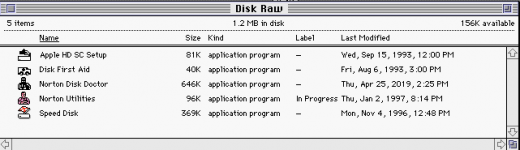
4. Mount in Basilisk II

Screen Shot 2019-04-25 at 2.30.19 PM.png

Confirmed the program's work fine. 

That was a 1.44 MB disk.  Apparently it isn't possible to read 800k disks with a USB floppy drive.  I put one in, and got nothing.  The Mac couldn't see it at all. 

 
1. Make a DC6 image:

dd if=/dev/disk4 of=/Users/pcam/Desktop/disk_DC6.img
Wait, how is that a DC6 image? DD will just produce a RAW image; what is the file size you got from that? I'm guessing it's exactly the same as the file you ended up with when you trimmed the header off the DC42 image.

Apparently it isn't possible to read 800k disks with a USB floppy drive.  I put one in, and got nothing.  The Mac couldn't see it at all.
Yes, that would be expected behavior.

 
Back
Top