• Hello MLAers! We've re-enabled auto-approval for accounts. If you are still waiting on account approval, please check this thread for more information.

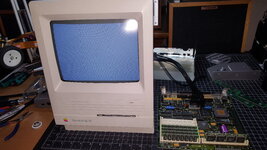
Macintosh SE/30 M5119 - Restoration

Yes, remove the ROM first. Start from A2. It should look like a clock signal since the CPU will “walk” every address sequentially. A3 will look like clock half the frequency as A2, etc. sometimes you only see a quick pulse then you should wait a while for all capacitors on the board to discharge.

Keep the reset button pushed while measuring will stop the walking, release it the walking will restart. A good way to check if the reset signal is working.
 
Remove the ROM, and pick any address line. It's easiest to probe at the PDS slot. You should see a square wave if the CPU is basically sane and is trying to run code. Anything else generally indicates a stuck data line, held reset line, or other fundamental issues.

Thanks for the help, the PDS slot is much easier to measure. I'll go over all this thoroughly this weekend.


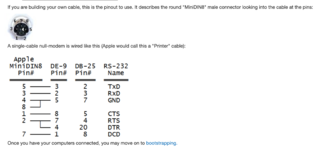
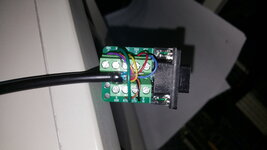
This is the diagram I used to construct my working tech step cable I made for my SE/30 - using similar green DE9 breakout connector like you are using:

I cut the end off an extra imagewriter II cable I had and put the DE9 breakout on. Try using a multimeter to confirm continuity for pinout described below?


View attachment 84866

I got the above instructions from https://adtpro.com/connectionsserial.html
1743124346106.png
I gave that pinout a try, and there is still no answer from either the SE or SE/30.
20250328_134505.jpg

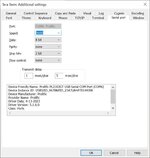
With TeraTerm setup like the ADB video:
Term.jpg

Can't believe how difficult this has been for some reason.


Yes, remove the ROM first. Start from A2. It should look like a clock signal since the CPU will “walk” every address sequentially. A3 will look like clock half the frequency as A2, etc. sometimes you only see a quick pulse then you should wait a while for all capacitors on the board to discharge.

Keep the reset button pushed while measuring will stop the walking, release it the walking will restart. A good way to check if the reset signal is working.

Will definitely do this over the weekend, thanks!
 
Can't believe how difficult this has been for some reason.

Is it an issue with the USB serial adapter drivers? Do you have some other serial device to test the adapter with, or a computer running another operating system - a raspberry pi running linux (I noticed you were using windows). I am into Amateur Radio and swear half the posts on forums and facebook are issues with USB serial drivers on Windows preventing folks from programming or flashing their radios.

And you are hitting the reset/interrupt switch (AKA programmers button) on startup on your working Mac SE to get it into test mode? You need to hear the sad mac chime.

Some info in the Tech Step thread: https://68kmla.org/bb/index.php?threads/apple-techstep-overview-video.34480/post-372079
 
Last edited:
Is it an issue with the USB serial adapter drivers? Do you have some other serial device to test the adapter with, or a computer running another operating system - a raspberry pi running linux (I noticed you were using windows). I am into Amateur Radio and swear half the posts on forums and facebook are issues with USB serial drivers on Windows preventing folks from programming or flashing their radios.

And you are hitting the reset/interrupt switch (AKA programmers button) on startup on your working Mac SE to get it into test mode? You need to hear the sad mac chime.

Some info in the Tech Step thread: https://68kmla.org/bb/index.php?threads/apple-techstep-overview-video.34480/post-372079

I have never once been able to enter test mode on this SE/30, or an SE. I've only recently come to understand that a Sad Mac tone must be heard, in order for the Test Mode to work at all.

I plugged in an SE and a genuine Mac 8-pin COM cable, straight through to the SE/30 board, hit reset a bunch of times, still could not get an answer. Used ZTerm 1.0.1 for System 6.0.8.

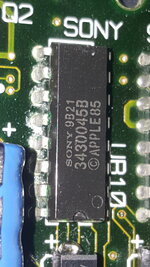
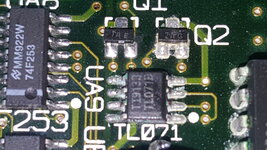
The sound chips were the worst on this board, I can't tell if I'm not getting a Sad Mac tone due to the chip corrosion, or some other reason.
20250414_155213.jpg

20250414_155222.jpg

Looks like I need to work on removing the Sony sound chips, and the TL071, not sure how else to get any sound out of this.
20250414_155155.jpg

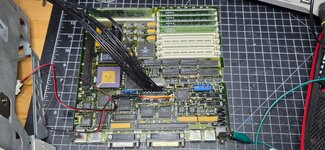
Toned out the entire Address and Data pin matrix, all lines from the ROM/RAM/CPU are connected still, and all I get is:
20250216_122626.jpg

Thinking about ordering a Reloaded v4 board, too.


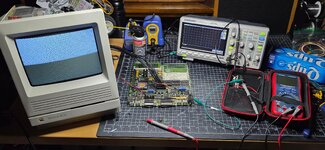
Using the scope to probe the address lines in the PDS socket, with no ROM installed, did not show any clean square clock, not "walking the bus" as far as I can tell.
 
Last edited:
The sound chips were the worst on this board, I can't tell if I'm not getting a Sad Mac tone due to the chip corrosion, or some other reason.

Have you tried via headphones? I'm working on an SE/30 right now that only emits sound via the headphones.
 
Have you tried via headphones? I'm working on an SE/30 right now that only emits sound via the headphones.
Definitely did try headphones, same click-pop noise as the speaker. You can see how nasty my sound chips are though, UE10 was already removed and replaced.
 
It seems that you need to check more basic functions of the board. I remember you already checked all the power rails.
1. Reset signal generated by UB11, search for "Reset*" signal in your schematic and it is on pin 5 of UB11. press the reset button and see if this signal go down to 0 from 5V and if it stays 5V when button is not pressed.
2. Clock signals: Search for C16M and checkthe R29, it is generated by UI6 from C16G. Basically probe around UI6 and see if 32MHz is on pin 1 and 16MHz on pin 17 / pin 2
 
It seems that you need to check more basic functions of the board. I remember you already checked all the power rails.
1. Reset signal generated by UB11, search for "Reset*" signal in your schematic and it is on pin 5 of UB11. press the reset button and see if this signal go down to 0 from 5V and if it stays 5V when button is not pressed.
2. Clock signals: Search for C16M and checkthe R29, it is generated by UI6 from C16G. Basically probe around UI6 and see if 32MHz is on pin 1 and 16MHz on pin 17 / pin 2

1. I'm getting 5.04V at pin-5 of both UB11 and UB10, and they both go to 0V with the Reset button.

2. Was able to see UI6: 32MHz on Pin-1, and 16MHz on Pin-17, and Pin-2

Thanks!


It’s V5 now :cool:
Good to know, thanks!
 
Last edited:
Looks like the bodges won't be difficult to get connected again. The red line is GND, and can be patched in to the via above it, tested and proven. The green bodge doesn't have far to go either.
View attachment 81955

Will get the parts ordered and get back to this soon.
Just catching up with this scary SE/30 thread... It really looks like there are too many rotten traces here, but... Did you really bridge green pad on UE8 to the UD8 pin 15? I'm not sure that's right. Original Apple schematics show that green pad to be "VID(4)" signal, connected to pins 2 on both UC6 and UC7 (on-board VRAM I guess).
 
I would fix every rotten trace on this board, no matter how long it took, if it were to even produce a Sad Mac error code, or a sound.

I tested the UE8 connections with a meter, to figure out what was broken; UE8 was entirely replaced. I should have screen artifacts, or missing video lines if those traces were connected wrong - not sure about UD8 to UE8, been too long, need to go over it again.
index.php

One of the prettiest simasimac displays I've seen :)


I've been working on other projects, but this project is not forgotten. I was going to remove and reinsert all the GAL chips and deoxit the sockets, the next time I get to it.

I went through every data and address line, not only from the CPU socket, but to the PDS slot and then the locations on the board itself - all lines are connected. I checked the crystals, and found the correct clocks.

I took some notes from one of Adrian's DB video's, regarding what's necessary to access the internal diagnostics mode:
It's ROM code running on the CPU. So you do need the CPU to be working along with the serial controller and associated circuitry. The PLA equivalent needs to be working which is the GLUE chip on the SE/30. Apple basically gave direct access to the various tests that the system runs when it first powers up.

Need to check the PLA/Glue chip to see if I have power, and then the connection to the Serial controller. Wonder how often CPU's ever went bad, but really doubt this one is.

This is a serious test, one that I'm determined to figure out how to pass.

You may have reignited the spark for this project, @MBehr, thanks!
 
I just read your thread from start to finish. What a journey! This is all stuff that is way over my head and I could never do with shaking hands and bad eyes, but I did enjoy reading about your troubleshooting adventures and the other forum members chiming in with suggestions and information. I appreciate you documenting everything.
 
I just read your thread from start to finish. What a journey! This is all stuff that is way over my head and I could never do with shaking hands and bad eyes, but I did enjoy reading about your troubleshooting adventures and the other forum members chiming in with suggestions and information. I appreciate you documenting everything.
Thanks so much for the encouragement, it really does mean a lot to me :)

Using a magnifier headset with LED's on it is the only way I could see what's going on here, would really like one of the fancier microscopes, so I could get over 2X-4X magnification. The pro repair guys all have ultrasonic cleaners and the stereo trinocular microscopes, they get real results. Need to get back to this project, soon. Thanks again!
 
Alright back at this. I have a Reloaded V5 Purple board that is due to arrive tomorrow, thanks to @schrockwell, but I'm going to give my stock board every last chance to work before scrapping it.

Still no chime, just an audio pop on boot and static through the speaker or external audio jack when probing points on the board - at times.


I am currently awaiting Admin approval for a new account at tinkerdifferent.com, I downloaded their excellent Simasima Repair guide found here:

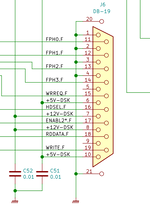
On page 11, of Theory 02, they recommend to first check the voltages in the Floppy Port, by linking to this video, which demonstrates at the 2:19 mark what the voltages should be:

I have +12.67V at pin 8, +5.05V at pin 6, and then absolutely nothing at pin 5, which is supposed to be -12V.

All of my boards have been entirely recapped, and at the LB power connector I am getting -11.77V where I should be:
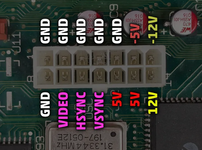
Analog_connector_front.png

20251221_170909.jpg
20251221_170924.jpg
20251221_170933.jpg

Nothing on Pin 5/-12V; I should be seeing the -11.77V I get at the LB connector for pin 5.

Can anyone recommend what could cause this, or where to look next that might be responsible for the missing negative voltage at the floppy port?

I plan to ask this same question over at tinkerdifferent.com when my new account is approved.

Thanks for any help you can give me!

 
Last edited:
After going through the Simasima Repair Guide from TD.com, it is recommended to start with UE10 ASC sound chip, as everything crucial to boot passes through there.

Printed out the Address and Data line matrix and went through all of the UE10 pins, back to the ROM slot.

On the very last pin to be checked, I found a problem with pin 10 of UE10, it was not connected to pin 34 in the ROM slot, all other pins are connected, both Address and Data.

The UE10 chip itself was not connected to the board trace. Soldered pin 10 to the board and now the test via shows pin 10 connected to the top side via, but still no connection from pin 10-UE10 to any of the other traces/components.

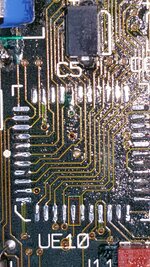
Under the UE10 chip when I repaired some of the broken traces earlier this year:
20250127_165839.jpg

I now get a tone from the UE10 chip to the via, but that's where the signal disappears.

Need to figure out how to get from there to slot 34 on the ROM and also to the rest of the chip connections. Not sure how to make this happen as the trace looks to go through the board to the bottom, or possibly in between.

Any recommendations on how to reattach this trace?
UE10 Pin 10.jpg

Thanks!
 
Back
Top