
-
 Hello Guest! We're hosting a challenge to welcome vintage Intel macs to the MLA during the month of July! See this thread for more information.
 -
We've made some quality of life improvements to the Trading Post. More info here.
You are using an out of date browser. It may not display this or other websites correctly.
You should upgrade or use an alternative browser.
You should upgrade or use an alternative browser.
Anyone up for some IIcx troubleshooting assistance? We have clocks but no activity...
- Thread starter Sideburn
- Start date


I have had the speaker hooked up it does make a very faint click sound when i power up the board.Macs are crap for POST output: you either have the debug connector, which relies on the serial port/SCC, plus some via signals to indicate factory mode, or sound. You don't have sound hooked up, I'd plug that in because even glitching noises may help.

I don't have a NuBus Mac II handy to check if they run hot at idle so no reference frame, but UC9 thru 12 being warm sounds kind of concerning. Those are the NuBus transceivers. If they were bad they could clamp the address and data lines low. What's on the pins?
ROMs are not the issue because the CPU isn't doing anything, and that includes trying to access the ROM. Unless of course they were all very bad and clamped all the data/address lines low.
ROMs are not the issue because the CPU isn't doing anything, and that includes trying to access the ROM. Unless of course they were all very bad and clamped all the data/address lines low.
I’ll jump back on it and check again. I think they were all high any specific pins to check?I don't have a NuBus Mac II handy to check if they run hot at idle so no reference frame, but UC9 thru 12 being warm sounds kind of concerning. Those are the NuBus transceivers. If they were bad they could clamp the address and data lines low. What's on the pins?
ROMs are not the issue because the CPU isn't doing anything, and that includes trying to access the ROM. Unless of course they were all very bad and clamped all the data/address lines low.
They can't all be high if the CPU lines are low. I mentioned tristate drivers earlier, those are the only ones the IIcx has, but they aren't what I was thinking of (some machines have drivers inbetween the CPU bus and the machine-side address/data buses). In any case, UD13-9 are what stick the CPU data into NuBus and vice-versa, and UC13-9 do the same for addresses (NuBus is multiplexed, i.e. it uses the same pins to provide address and data, at separate times).
The NuBus side can and should be high, but the machine-side should read the same as the CPU pins.
The NuBus side can and should be high, but the machine-side should read the same as the CPU pins.
To be clearer: the pins we care on these particular ICs are 13-20 (B side, facing CPU), and maybe 4-11, which is the A-side, facing NuBus. You have a broken trace/via there, UC12 and 13 have to be triggered off the same selection signals as 9 and 10. That signal on pin 1 is certainly correlated to the 10MHz NuBus clock.
However, those transceivers should not be selected at this moment, and so it's normal that things on the A-side be floating (and appear high because they're pulled up). NuBus uses negative logic, so asserted signals are low. UC/UD13-9 are inverting devices, so if one side is low, the other will be high.
However, those transceivers should not be selected at this moment, and so it's normal that things on the A-side be floating (and appear high because they're pulled up). NuBus uses negative logic, so asserted signals are low. UC/UD13-9 are inverting devices, so if one side is low, the other will be high.
Yes I found the broken traces.To be clearer: the pins we care on these particular ICs are 13-20 (B side, facing CPU), and maybe 4-11, which is the A-side, facing NuBus. You have a broken trace/via there, UC12 and 13 have to be triggered off the same selection signals as 9 and 10. That signal on pin 1 is certainly correlated to the 10MHz NuBus clock.
However, those transceivers should not be selected at this moment, and so it's normal that things on the A-side be floating (and appear high because they're pulled up). NuBus uses negative logic, so asserted signals are low. UC/UD13-9 are inverting devices, so if one side is low, the other will be high.
Do it on a couple ICs for a test. I still find it weird these devices would be hot/warm if not actually driving anything. Depending on what we see I may ask you to check a few of the control signals.
(theory: if the transceivers have broken traces on the control signals, they might be seeing themselves as selected in 'put inverted A on B' mode, and attempting to drive the machine side low from the pulled-high A side.)
(theory: if the transceivers have broken traces on the control signals, they might be seeing themselves as selected in 'put inverted A on B' mode, and attempting to drive the machine side low from the pulled-high A side.)
Do it on a couple ICs for a test. I still find it weird these devices would be hot/warm if not actually driving anything. Depending on what we see I may ask you to check a few of the control signals.
(theory: if the transceivers have broken traces on the control signals, they might be seeing themselves as selected in 'put inverted A on B' mode, and attempting to drive the machine side low from the pulled-high A side.)
Ok I’ll fix the broken traces and then tell you the state of each lower side pin on a couple. They are Definately not hot. Just a bit warm to the touch. Warmer than anything else on the board. I would say it’s a normal level of warmth but yes odd that they are warm at all.Do it on a couple ICs for a test. I still find it weird these devices would be hot/warm if not actually driving anything. Depending on what we see I may ask you to check a few of the control signals.
(theory: if the transceivers have broken traces on the control signals, they might be seeing themselves as selected in 'put inverted A on B' mode, and attempting to drive the machine side low from the pulled-high A side.)
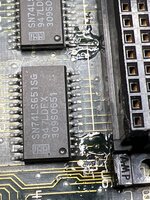
Uc9
pin 13 - low
pin 14- low
pin 15- low
pin 16- low
pin 17- low
pin 18- low
pin 19- low
pin 20- low
pin 21- high
pin 22- low
pin 23- low
pin 24- high
Uc13
pin 13 - high
pin 14- high
pin 15- high
pin 16- high
pin 17- low
pin 18- high
pin 19- high
pin 20- low
pin 21- high
pin 22- low
pin 23- low
pin 24- high
pin 13 - low
pin 14- low
pin 15- low
pin 16- low
pin 17- low
pin 18- low
pin 19- low
pin 20- low
pin 21- high
pin 22- low
pin 23- low
pin 24- high
Uc13
pin 13 - high
pin 14- high
pin 15- high
pin 16- high
pin 17- low
pin 18- high
pin 19- high
pin 20- low
pin 21- high
pin 22- low
pin 23- low
pin 24- high
I’m scraping them clean with exacto then coating with flux, adding solder and then placing wire.Lots of those look iffy, lol. Any dark-green spot deserves a scrubbing, and why not, tinning with fresh solder.
Just the broken ones. The entire board is hellLots of those look iffy, lol. Any dark-green spot deserves a scrubbing, and why not, tinning with fresh solder.



If there isn't actually a break, all you need to do is tin them to add some material and protect them.I’m scraping them clean with exacto then coating with flux, adding solder and then placing wire.
Similar threads

- Replies
- 6
- Views
- 424

- Replies
- 2
- Views
- 1K

- Replies
- 8
- Views
- 2K
- Replies
- 22
- Views
- 2K