
You are using an out of date browser. It may not display this or other websites correctly.
You should upgrade or use an alternative browser.
You should upgrade or use an alternative browser.
Mac IIx Mainboard Repair
- Thread starter gonzo
- Start date

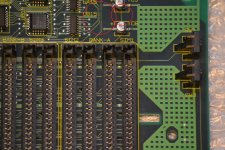
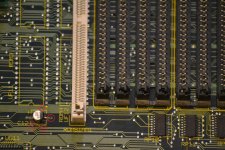
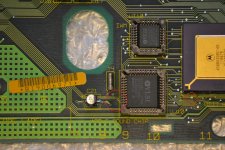
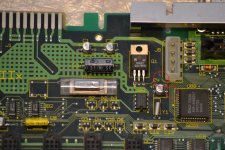
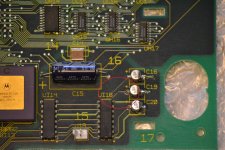
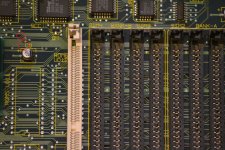

Hello folks,
thanks a lot for the help. Sadly the Mac is still dead. I rewired some of the broken lines, some looked bad and were OK. Checked them with my lab ohm meter. Are there some other tips to diagnose where the error is? The RAM is definitely OK my IIsi runs with it without errors. BTW I placed all RAM modules on the right field (BANK-A). Is this correct? Which NUBUS slot should be used for the graphics card?
Regards
Florian
thanks a lot for the help. Sadly the Mac is still dead. I rewired some of the broken lines, some looked bad and were OK. Checked them with my lab ohm meter. Are there some other tips to diagnose where the error is? The RAM is definitely OK my IIsi runs with it without errors. BTW I placed all RAM modules on the right field (BANK-A). Is this correct? Which NUBUS slot should be used for the graphics card?
Regards
Florian


slow chimes of death on powerup = you have a break between the RAM slots, and the rest of the bus. Somewhere...
Last edited by a moderator:
Hello folks,
when I place RAM in all slots now, I get the good chime. When I add RAM only to BANK A I still get the dead chime.
But the connected monitor only turns on and still no picture. Do you have any suggestions what to check next? It was no keyboard/mouse connected. Macs do not need this, right? The display is capable of the Mac VGA signal, doublechecked with my IIsi before, used the same adaptor.
Thanks in advance,
Florian
when I place RAM in all slots now, I get the good chime. When I add RAM only to BANK A I still get the dead chime.
But the connected monitor only turns on and still no picture. Do you have any suggestions what to check next? It was no keyboard/mouse connected. Macs do not need this, right? The display is capable of the Mac VGA signal, doublechecked with my IIsi before, used the same adaptor.
Thanks in advance,
Florian


adapters for the II's for some reason dont play the same. I also had to recap the radials on all my II video cards. None would produce signal. The II needing a video card makes troubleshooting harder because of that. No other macs that I recall require a card until the B&W G3's. All have built in onboard video at a minimum.
I am sure he means he is using an adapter on it.
ya he said he tried the adapter on his IIsiHello folks,
when I place RAM in all slots now, I get the good chime. When I add RAM only to BANK A I still get the dead chime.
But the connected monitor only turns on and still no picture. Do you have any suggestions what to check next? It was no keyboard/mouse connected. Macs do not need this, right? The display is capable of the Mac VGA signal, doublechecked with my IIsi before, used the same adaptor.
Thanks in advance,
Florian
Hi again,
a pic of the video card is here: https://www.hidrive.strato.com/share/x7sd5uwnbe
It's a TFB Controller 20R6A
The caps look OK is this one of those which need the recap?
Does this produce RGB? Where can I find a pinout? What are its frequencies?
I have a Sony studio monitor which I use together with my Commodore 128 also in 80 columns mode (640x200 RGB). I could try with this screen.
Regards
Florian
a pic of the video card is here: https://www.hidrive.strato.com/share/x7sd5uwnbe
It's a TFB Controller 20R6A
The caps look OK is this one of those which need the recap?
Does this produce RGB? Where can I find a pinout? What are its frequencies?
I have a Sony studio monitor which I use together with my Commodore 128 also in 80 columns mode (640x200 RGB). I could try with this screen.
Regards
Florian
Last edited by a moderator:
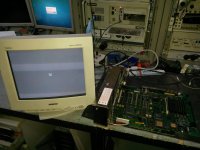

I think his use of an rgb capable monitor did the trick.
I have a Sony studio monitor which I use together with my Commodore 128 also in 80 columns mode (640x200 RGB). I could try with this screen.
Last edited by a moderator:
That sony monitor, 15sf, and 15SX in my opinion were one of the best 15" monitors from sony you could get. they worked with everything.
To be honest, I miss my 15sx. dad bought it new back in 96, and I had it all the way up to about 05 when I finally got rid of it.
To be honest, I miss my 15sx. dad bought it new back in 96, and I had it all the way up to about 05 when I finally got rid of it.

]Hello Guys
i recently acquire a Macintosh IIx in very bad conditions , i recapped logic board ( only the 47uF16v and one axial 10uf16v ) after recap the computer only starts with battery on psu contact as suggested, i followed your guides and found a lot of broken traces , now computer starts from keyboard and power key in the back , still persist the problem that i have NO video in any slot , i own another working Macintosh IIx and i have tested video card on this one and it works so i think the problem is somewhere on the logic board, i founded UC7 that i suppose it has a broken pin ( who can suggest me a replacing component for this one TIT939 BF ALS5651)?
any other suggestion is appreciated
thank you for your support
see pictures attached
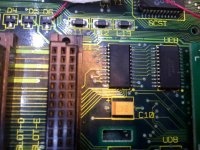
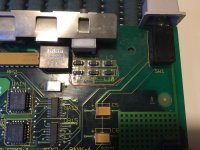
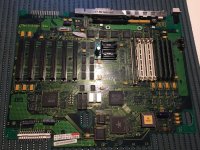
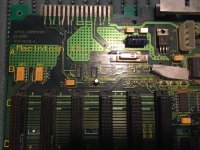
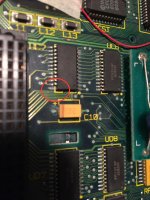
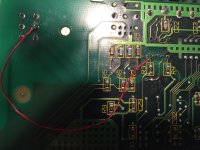
i recently acquire a Macintosh IIx in very bad conditions , i recapped logic board ( only the 47uF16v and one axial 10uf16v ) after recap the computer only starts with battery on psu contact as suggested, i followed your guides and found a lot of broken traces , now computer starts from keyboard and power key in the back , still persist the problem that i have NO video in any slot , i own another working Macintosh IIx and i have tested video card on this one and it works so i think the problem is somewhere on the logic board, i founded UC7 that i suppose it has a broken pin ( who can suggest me a replacing component for this one TIT939 BF ALS5651)?
any other suggestion is appreciated
thank you for your support
see pictures attached
Last edited by a moderator:

Take an Xacto knife and scrape the plastic around the broken pin to expose the metal a bit, then put a tiny put of solder on it and solder a tiny wire to it and solder that wire to the broken pin on the board. This should bring back that dead chip.
Do not try to cut out a chunk of plastic off the chip. Just shave the plastic little by little until you have some metal to work with. Just a tiny bit will do.
Do not try to cut out a chunk of plastic off the chip. Just shave the plastic little by little until you have some metal to work with. Just a tiny bit will do.
thank you Elfen i'll try this way and let you update as i'll do this work!Take an Xacto knife and scrape the plastic around the broken pin to expose the metal a bit, then put a tiny put of solder on it and solder a tiny wire to it and solder that wire to the broken pin on the board. This should bring back that dead chip.
Do not try to cut out a chunk of plastic off the chip. Just shave the plastic little by little until you have some metal to work with. Just a tiny bit will do.
Similar threads


- Replies
- 2
- Views
- 422


