
-
 Hello Guest! We're hosting a challenge to welcome vintage Intel macs to the MLA during the month of July! See this thread for more information.
 -
We've made some quality of life improvements to the Trading Post. More info here.
You are using an out of date browser. It may not display this or other websites correctly.
You should upgrade or use an alternative browser.
You should upgrade or use an alternative browser.
Wombat (650, 800) board overclocking limitations
- Thread starter jessenator
- Start date



700 will do much better with a clock doubler in the socket. Keeps it stock too...ish! Sadly they're unobtainium and Bolle only made one lot of clones. We can only be so greedyOk cool, thanks. I've got the ROM socket soldered in and the oscillator replaced. Just waiting for the ROM and programmer from CayMac. With all of this got tempted to think about my Q700 as well but I've decided to leave that one stock.
 .
.


I was reading through the 68040 designer's handbook tonight and figured I'd share the reference thermals for future overclockers.
Motorola's reference heat sink is a Thermalloy 2338B: https://www.farnell.com/datasheets/94193.pdf
It's designed around the E-Z Mount which never really gained traction for 040's (maybe in industrial applications?), but overall it's pretty similar to most heat sinks people use for 040s.
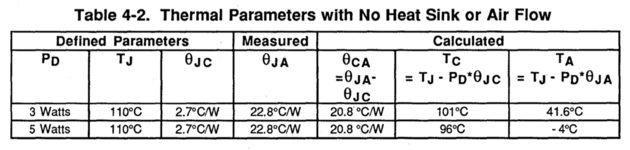
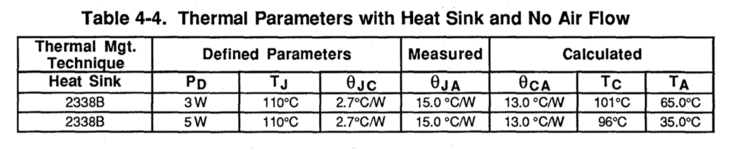
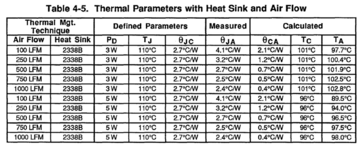
Table 4-3 covers air flow with no heat sink, but that's not a common configuration for most of our systems, so I've excluded it here.
You can see that even minor air flow with a 2338B-style heat sink causes significant decrease in ϴJA, which measures the thermal resistance from the processor core to the ambient air.
In other words: a heat sink does a little, a heat sink with even a tiny little slow fan does a huge amount. If you're still running hot, add a fan!
Motorola's reference heat sink is a Thermalloy 2338B: https://www.farnell.com/datasheets/94193.pdf
It's designed around the E-Z Mount which never really gained traction for 040's (maybe in industrial applications?), but overall it's pretty similar to most heat sinks people use for 040s.
Table 4-3 covers air flow with no heat sink, but that's not a common configuration for most of our systems, so I've excluded it here.
You can see that even minor air flow with a 2338B-style heat sink causes significant decrease in ϴJA, which measures the thermal resistance from the processor core to the ambient air.
In other words: a heat sink does a little, a heat sink with even a tiny little slow fan does a huge amount. If you're still running hot, add a fan!

I was reading through the 68040 designer's handbook tonight and figured I'd share the reference thermals for future overclockers.
Motorola's reference heat sink is a Thermalloy 2338B: https://www.farnell.com/datasheets/94193.pdf
It's designed around the E-Z Mount which never really gained traction for 040's (maybe in industrial applications?), but overall it's pretty similar to most heat sinks people use for 040s.
View attachment 85040
View attachment 85038
View attachment 85039
Table 4-3 covers air flow with no heat sink, but that's not a common configuration for most of our systems, so I've excluded it here.
You can see that even minor air flow with a 2338B-style heat sink causes significant decrease in ϴJA, which measures the thermal resistance from the processor core to the ambient air.
In other words: a heat sink does a little, a heat sink with even a tiny little slow fan does a huge amount. If you're still running hot, add a fan!
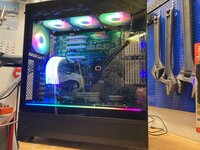
For my extremly silly build of putting an Q900 in a modern ATX case I'm using water cooler from Cooler master with a custom bracket
 :
:
80MHz 040 when??For my extremly silly build of putting an Q900 in a modern ATX case I'm using water cooler from Cooler master with a custom bracket
View attachment 85046
lol, yeah, that't not gonna happen on a 900, it caps at 37Mhz due to limitations in the graphics circuits. But a 475 board might be another story80MHz 040 when??

If anyone wants to try for 50MHz, here's a checklist of what you'd probably want:
- Get a 68040 that overclocks well (later revision mask?) + active cooling.
- Change Gestalt ID to 51 or 59 by removing R151, R152 for 40MHz ROM timings.
- Solder 70ns (or 60ns, but good luck finding them) VRAMs to the motherboard.
- Solder 60ns DRAMs to the motherboard (some boards came from the factory with these, others did not).
- Solder an 80MHz rated 88916 clock gen IC (IDK if this is necessary?) to the motherboard.
- 25MHz CPU oscillator, of course.
That's fantastic! Is the board roughly compatible with stock ATX style mounting screw positions, or how did you pull that off?For my extremly silly build of putting an Q900 in a modern ATX case I'm using water cooler from Cooler master with a custom bracket
Unfortunately not a single screw would line up, so I made an ATX-dummy board where I then made holes to mount the Q900. But that was actually great since it made it possible to get all connectors out of the case in a nice way. Only issue is of course that I can't use the Nubus, but since I'm running the graphics of from the PDS and it has otherwise all I need (built in network etc) it was not an issue. Otherwise it would be quite possible to make a new back plate for it.That's fantastic! Is the board roughly compatible with stock ATX style mounting screw positions, or how did you pull that off?
Here is a little bit more background (copied from another forum
 ):
):Here is a short description of my own project for #Marchintosh 2025 that is nearing completion. An RGB 900
.But first a short background, I have several Quadra 900 logic boards that I have been thinking about what to do with(besides the obvious – playing with them on my bench). Since long I’ve been thinking about building a rack based 900, but then one day the crazy idea of putting one of the boards into a modern ATX case with some RGB struck me. It’s crazy of course, but I couldn’t let the idea go, so I decided to see what was possible
.After searching a while for suitable cases (and even trying out a few different ones) I came across a good offer on a Phanteks XT View:
After a first “trial fit” I realized that this otherwise massive board would actually fit this case!
Of course, one realizes immediately that the Nubus cards are opposite compared to PCI, but for this build I anyway do not intend to use any Nubus slots. Otherwise, it would be quite possible to make a cut out or even make a completely new rear piece for the case.
The next “issue” is that the 900 board has a completely different hole pattern compared to an ATX board, and it would not hurt to be raised a little, so what to do?? Well, I decided to just make a simple “ATX-dummy board” that fits to the case and where I then can mount the 900 board:
Would have been nicer to also include mounting holes for the 900 directly, but I just drilled the holes “on the fly” once I had the dummy board from China. There are of course many other ways to do this, but PCBs are fairly cheap, also large ones, so I figured this was a good enough solution for me.
The next topic that needed attention was the fact that although the 900/950 looks like it has an “ATX-connector”, nothing could be more wrong! The pinning is totally different and the logic how to start the PSU is also opposite. Since I also wanted some kind of modern storage for this build, I decided to redesign a bluescsi board by extending it to fit a 120x120mm fan position (there are plenty of those in the case) and include an ATX to Quadra adapter on it:
The last thing to tackle was making an interface for the Power, Reset and Speaker, once again the 120x120mm fan mounting was found to be suitable:
I also did include a simple VU-meter but that unfortunately did not work as intended, so I will probably just leave it out in the end.
Then it was time to build:
At the top of the case, I’ve put 3 aRGB fans and a water cooler. For graphics I’m using an FPGA (carrier and software designed by @Melkhior ) that uses the PDS-socket. This card does full acceleration and 1920x1080 natively over HDMI. Through a short adapter cable I’m able to utilize the PCI brackets (although shortened at the bottom) which makes the rear look very nice. At a later stage I plan to make a little PCB to cover the hole around the top connectors.
The RAMs are based of simmba’s 16MB 30 pin RAMs available on github but with added LED for the R/W signal. For ROM I’m not using my normal 8MB uniROM but instead a special 16MB (two banks with a switch between) SIMM designed by @zigzagjoe . This ROM is very clever in the sense that it also includes an RP2040 for in system programming. ROM is then connected to one of the USB-ports on top of the case, and the onboard reset, so I can reflash the ROM and have the machine to reboot without opening the case or turning off the machine, very nifty.
At this point I was quite happy, but that ATX-extension cable looked kind of dull so after some googling, I stumbled upon a nice aRGB ATX-extension cable.
The final step was to make a bracket for the CPU to hold the water cooler and by turning the Bluescsi board, the cable management turned out a little nicer.
Some minor adjustments are still necessary, more cable management of course, but so far I’m pretty happy with the result. The aRGB can be controlled also on the case (this case has a built in controller) from two buttons, one for the mode and one for color combination. The whole thing is of course very silly, but it was a long time ago since I had this much fun doing something
. Did I tell you that my kids absolutely L O V E it! At some point I might also make video about it.

Hmm, so I noticed this weekend that launching Disk First Aid (Apple's from both System 7.5.5 and System 7.6.1) results in an immediate crash on my Q800 and my Q700. Re-launching Disk First Aid again after it crashes then works, but it always crashes the very first time it's launched after boot. Whereas the same binary runs fine on my other 68K Macs. The difference was the Q800/Q700 have a custom ROM that I downloaded from Caymac's GitHub repo:
github.com/CayMac-Team/UniversalROMImages
If I pull out the ROMs from these machines and run the stock ROM, no crash. But with the custom ROMs, I'm hitting a crash every first launch. I then decided to take the stock ROM from both of these machines (fetched from Macintosh Repository) and programmed them onto the ROM SIMMs and that works fine. I then modified both ROMs to disable checksums, disable the memory test, etc (this is what spawned the three modified stock ROM threads I posted this weekend regarding the IIfx, IIci, and SE/30 ROMs). And that also works fine.
My conclusion is that some other changes in the custom ROM on CayMac's GitHub is causing a problem with Disk First Aid? Was curious if this issue is documented somewhere?
github.com/CayMac-Team/UniversalROMImages
If I pull out the ROMs from these machines and run the stock ROM, no crash. But with the custom ROMs, I'm hitting a crash every first launch. I then decided to take the stock ROM from both of these machines (fetched from Macintosh Repository) and programmed them onto the ROM SIMMs and that works fine. I then modified both ROMs to disable checksums, disable the memory test, etc (this is what spawned the three modified stock ROM threads I posted this weekend regarding the IIfx, IIci, and SE/30 ROMs). And that also works fine.
My conclusion is that some other changes in the custom ROM on CayMac's GitHub is causing a problem with Disk First Aid? Was curious if this issue is documented somewhere?

My conclusion is that some other changes in the custom ROM on CayMac's GitHub is causing a problem with Disk First Aid? Was curious if this issue is documented somewhere?
I think we need a 0x067c compatible version of tbxi (currently supports only 0x077d ROM versions). Then you can take apart the ROMs to compare the parts?
https://github.com/elliotnunn/tbxi
https://68kmla.org/bb/index.php?threads/lc475-disassembled-rom.49526
The only other changes are modifications to the mmu table to allocate 8MB for the rom and address stripping for the 24bit mode. Only ”necessary” changes are the changes to the MMU tables. All this is only to be able to support rom disk in 24bit mode. If you don’t want/need rom disk, you can leave it out. Likely also not necessary for rom disk in 32bit mode only.
If you are running custom ROMs you must assume you will hit weird stability issues. That should be your base expectation. Stability on hacked ROMs is a blessing, but not a foregone conclusion. Even Apple with all their QA apparatus and the source code found working on the ROMs in a backwards-compatible manner almost impossible (read the comments in SuperMario). Even the most talented amateurs with the best intentions cannot expect to do better.
Similar threads


- Replies
- 3
- Views
- 3K

