• Hello MLAers! We've re-enabled auto-approval for accounts. If you are still waiting on account approval, please check this thread for more information.

Wings card. Performance enhancement?

Hello friends. I have finally acquired a Wings A/V card for my Beige G4 with the intent to play PS1 games and capture ancient VHS tapes. It works, however I notice the video is very choppy when viewing with AVP; I tried HackTV and BTV(sp?) and they too work, but with little improvement on the video stream aspect. Oddly enough, captured video plays back fine with no stutter or audio channel desync like I’ve heard about. I have a Rage 128 as my primary GPU and a DB15 adapter plugged into the onboard Rage II, G4/500, 512MB RAM, and a fresh PRAM batt. Is there anything I can do to improve the video quality? I would have thought the G4 would help a lot but I guess I was wrong. I plan on replacing the spinning disk inside with an SSD and cleaning the RCA plugs, maybe even adding a SATA card, but that’s all I can really think of unless you guys have any ideas.
 
Is anything plugged into the Rage 128?
Yes, I’m using the Rage 128 as my primary display with no display connected to the onboard Rage II. I haven’t tried it yet, but do you think having a second monitor connected to the Rage II would help? Like if I ran AVP on the monitor being served by the Rage II so the CPU doesn’t have to send the video data all over the place? Just a thought.
 
Yes, I’m using the Rage 128 as my primary display with no display connected to the onboard Rage II. I haven’t tried it yet, but do you think having a second monitor connected to the Rage II would help? Like if I ran AVP on the monitor being served by the Rage II so the CPU doesn’t have to send the video data all over the place? Just a thought.
I'd try two things, suspect you've tried one already but...

What happens if you remove the Rage and just use the onboard?

What happens if you remove the adapter from the onboard?

In the past, as fast a disk as possible came recommended. A SATA card and SSD may help matters.
If it is capturing ok and just lagging to display during capture, I don't suspect it is the disk, feels like the disk is keeping up better than the display.
 
At first I had nothing plugged into the onboard Rage II but I quickly realized that *something* needs to be connected to the socket in order for the video in on the Wings to become available. If I remove the adapter, audio works but video does not. I haven’t tried removing the Rage 128 and using solely the Rage II, as the latter doesn’t quite cut the mustard in 3D performance.

If it is capturing ok and just lagging to display during capture, I don't suspect it is the disk, feels like the disk is keeping up better than the display.
That’s what I figured, I was kind of grasping at straws here 😅
 
I haven’t tried removing the Rage 128 and using solely the Rage II, as the latter doesn’t quite cut the mustard in 3D performance.
But try using the onboard video, because the onboard Rage chip is doing the actual capture, so it doesn't have to push the video over the PCI bus to display it. The VRAM is faster than the PCI bus, so PCI is probably a bottleneck that won't be there if you do it all on the one chip. Just move your monitor cable over, don't bother removing the Rage 128.
 
So you think running two displays and just using AVP, et. al on the Rage II’s monitor would alleviate some of the chop? That’s what I’m thinking, I’ll have to try it when I’m home next and I’ll report back.
 
So you think running two displays and just using AVP, et. al on the Rage II’s monitor would alleviate some of the chop? That’s what I’m thinking, I’ll have to try it when I’m home next and I’ll report back.
Possibly, or one monitor on the Rage II while you're doing video capture.
 
UPDATE: Moving the monitor from the Rage 128 to the integrated Rage II completely solved the chop issue. I have not tried two monitors at once yet, but I doubt it’ll make a difference. Thanks to @Phipli for the suggestion.

To wrap up for those of you googling in the future with a problem like mine, in order to get your Wings card working properly…
✅ view the preview stream on the display connected to onboard video for maximum performance and reduction of stutter / choppiness / frame drops
✅ if you must have a monitor plugged into a second video card, you must have something, anything plugged into the onboard DB15 port or the Wings card video won’t become available to software. Audio capture will still work, however.
✅ SSW doesn’t seem to make a difference in my experience as some say; all my experiments were performed on 9.2.x and I still get good performance.

Will update with more findings, if necessary. Gotta upgrade that ROM so I can dual boot OS X and experiment some more…
 
Bring out your dead!

So to revive this, what software does anyone use to capture movies on the Wings card?

I have a G4 433Mhz Beige with the Wings card and 768MB of ram, but with BTV Pro it only seems to grab composite video, when I try and encode with one of the other Quicktime setting like DV or MPEG4 it just records in composite anyway and QTP thinks it component video????

The colors are off in the captured video files and using QT Pro to convert them to DV really screws things up, random pixels all in the video.

I'm using the built-in Rage II-C with 6MB VRAM.

Video plays well in AVP and BTV Pro, just capture is crap.

Audio capture seems to work fine with the proper settings, if I could just figure why BTV is stuck in composite mode even when I set the settings to MPEG4 or DV NTSC??/?
 
I wonder how a era-compatible copy of avid premiere from the garden site would had liked your setup considering that avid had been making their software compatible with system os and then-typical capture hardware options for quite awhile (then again there also was that "cutdown" avid videoshop software that came bundled free with the videoin-card-equipped performa systems too)
 
I wonder how a era-compatible copy of avid premiere from the garden site would had liked your setup considering that avid had been making their software compatible with system os and then-typical capture hardware options for quite awhile (then again there also was that "cutdown" avid videoshop software that came bundled free with the videoin-card-equipped performa systems too)
It was Adobe Premiere, AVID made competing products.

I dug up the old copy of Premiere 5.1 but no dice on getting that to work well either, it pretty much uses the same backend BTV does for everything.

Frames just drop all over the place when trying to capture using the QT backend.

I suppose the Wings card and the older OWM's with video inputs were never really fast enough to transcode the video at 640x480 into a format like DV NTSC without just dropping frames like crazy.
 
It was Adobe Premiere, AVID made competing products.

I dug up the old copy of Premiere 5.1 but no dice on getting that to work well either, it pretty much uses the same backend BTV does for everything.

Frames just drop all over the place when trying to capture using the QT backend.

Yeah ... I'll bet they do.

From what I can recall, any Apple-supplied video I/O from that era wasn't really designed to capture/output high-quality video.

It's probably pushing it to capture 1/4 res video (320 x 240)

I suppose the Wings card and the older OWM's with video inputs were never really fast enough to transcode the video at 640x480 into a format like DV NTSC without just dropping frames like crazy.

Not real familiar with the Wings card but I would guess you're correct.

But even using a setup with a hardware assisted Motion-JPEG compression card, you're still talking about a 4MB/sec SUSTAINED data rate to capture high-quality video @ 640 x 480 without dropping frames ... and that's with the hardware card (or cards in some cases) doing pretty much all the work in compressing the data stream down to a level where the Macs of that era could handle it and get it recorded onto the drive (or more likely drives, as in RAID 0 array)

Without that taking place, the data rate is much higher (uncompressed standard definition video)

This (or something similar) is what it took to make that happen on the generation of machines just prior to the one you are using:
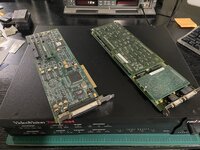
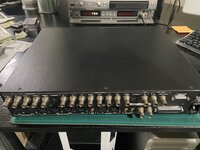
IMG_3561 copy.jpg

IMG_3563 copy.jpg

The key in those two pictures are the PCI cards - or more specifically, one of them (if I recall correctly) - which handles the compression of the video data.

The 2U breakout out box just handles the video I/O to the two PCI cards, all the real work takes place on the cards.

 
sorry got avid and adobe mixed up there, thanks for pointing that out

and @GorfTheChosen thats two variations of the targa pci card I think both low (with added daughter cards) and medium range but I'll had to recheck my notes placed elsewhere? I had been seriously wondering about one for awhile especially as I'm still curious about regarding that the card seemingly can also output to a monitor but I never could quite yet figure out if that was from its own 2d gpu or that it still required a dedicated video card adjacent to the targa card instead

the pdf did indeed mention up to 720x something resolution for some targa card variations as I recall now nevertheless
 
@joevt wrote a SoftVdig for OS X and the PowerMac 8600 video capture HW, so he likely has some idea what the Apple supplied HW of this ear can handle?

As far as data rates and CPU needed to encode in real time.
 
Back
Top



