As far as I know, there isn't any way to do 720p on that board. There are multiple factors at work.
Problem 1:
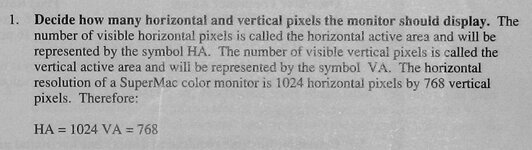
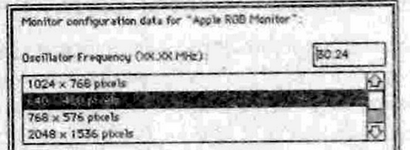
Regarding the Slot Manager, video cards on the Mac have to have sRecs for the target resolution/configuration. IIRC, the Spectrum/24 Series III supported resolutions of 1024x768 (Sony 60Hz Trinitron), 768x576 (PAL/MultiSync) and 640x480 (Apple/NTSC). Later ROMs added support for Apple/SuperMac 16" @ 832x624 and Apple 12" @ 512x384. There are also sRecs for the stock virtual desktops, including 2048x1536 and 4096x1536 (but within the context of 1024x768). Even with custom timing in SuperVideo, I think it still had to adhere to one of the stock resolutions. But, I will think about that one some more - it's from 30 years ago. IIRC, SuperVideo built and installed custom sRecs into slot PRAM, and I will try to play around here with some of my boards (if they still work) to see if I can recall anything else.
I think the oscillators for 16" mode were: 57.28Mhz (Apple/75Hz) and 55Mhz (SuperMac 16"/75Hz). The timings were slightly different (even though the monitors were the same). There was a philosophy of anti-mix-and-match.
Apple 12" mode was 15.67Mhz...I think (and I don't think virtual desktops worked on that monitor).
Problem 2:
As above, the default config for the original Spectrum/24 was 64Mhz 1024x768/60Hz and Spectrum/24 Series III was 80Mhz and 1024x768/75Hz (primary config). With custom mode, even if the oscillator already exists on the board, you still have to put a duplicate in the socket in order to use it with a custom config...and the board has to detect it. But, I don't think the board could detect custom oscillators beyond 64Mhz (or thereabouts). So, even if you were to install an 80Mhz oscillator in the extra socket, the board probably wouldn't detect it because it would be off the top end (even though there is one on the board already - not usable for custom). And, you can tell when detections fails -- the oscillator does not show up in the SuperVideo custom config screen.
Problem 3:
If you have a later ROM that adds 12" and 16" support, I don't think the later versions even supported custom configs via SuperVideo. They were too problematic. Now that I'm thinking of it, early versions of SuperVideo had a feature called "Lock Menubar," which eventually went away - maybe related. The point of Lock Menubar was to try to keep the menu on the screen while in Virtual Desktop mode, but it didn't work very well and also caused problems with custom configs. So, if you have an original/1.0 ROM, then custom configs probably still work. Otherwise, they won't.
Also, FYI, cable sense didn't work for every mode, which is why some of the SuperMac boards have a rotating startup config. If the board sees cable sense, it uses that -- especially on later boards with 1152x870. Failing that, The board will cycle and failing that, the user can choose the config in SuperVideo.
Anyway - that's the best I can do for now. I hope the additional detail helps. As above, I see what else I remember while experimenting with my boards.
Problem 1:
Regarding the Slot Manager, video cards on the Mac have to have sRecs for the target resolution/configuration. IIRC, the Spectrum/24 Series III supported resolutions of 1024x768 (Sony 60Hz Trinitron), 768x576 (PAL/MultiSync) and 640x480 (Apple/NTSC). Later ROMs added support for Apple/SuperMac 16" @ 832x624 and Apple 12" @ 512x384. There are also sRecs for the stock virtual desktops, including 2048x1536 and 4096x1536 (but within the context of 1024x768). Even with custom timing in SuperVideo, I think it still had to adhere to one of the stock resolutions. But, I will think about that one some more - it's from 30 years ago. IIRC, SuperVideo built and installed custom sRecs into slot PRAM, and I will try to play around here with some of my boards (if they still work) to see if I can recall anything else.
I think the oscillators for 16" mode were: 57.28Mhz (Apple/75Hz) and 55Mhz (SuperMac 16"/75Hz). The timings were slightly different (even though the monitors were the same). There was a philosophy of anti-mix-and-match.
Apple 12" mode was 15.67Mhz...I think (and I don't think virtual desktops worked on that monitor).
Problem 2:
As above, the default config for the original Spectrum/24 was 64Mhz 1024x768/60Hz and Spectrum/24 Series III was 80Mhz and 1024x768/75Hz (primary config). With custom mode, even if the oscillator already exists on the board, you still have to put a duplicate in the socket in order to use it with a custom config...and the board has to detect it. But, I don't think the board could detect custom oscillators beyond 64Mhz (or thereabouts). So, even if you were to install an 80Mhz oscillator in the extra socket, the board probably wouldn't detect it because it would be off the top end (even though there is one on the board already - not usable for custom). And, you can tell when detections fails -- the oscillator does not show up in the SuperVideo custom config screen.
Problem 3:
If you have a later ROM that adds 12" and 16" support, I don't think the later versions even supported custom configs via SuperVideo. They were too problematic. Now that I'm thinking of it, early versions of SuperVideo had a feature called "Lock Menubar," which eventually went away - maybe related. The point of Lock Menubar was to try to keep the menu on the screen while in Virtual Desktop mode, but it didn't work very well and also caused problems with custom configs. So, if you have an original/1.0 ROM, then custom configs probably still work. Otherwise, they won't.
Also, FYI, cable sense didn't work for every mode, which is why some of the SuperMac boards have a rotating startup config. If the board sees cable sense, it uses that -- especially on later boards with 1152x870. Failing that, The board will cycle and failing that, the user can choose the config in SuperVideo.
Anyway - that's the best I can do for now. I hope the additional detail helps. As above, I see what else I remember while experimenting with my boards.
Last edited:



 One good thing has come of it though, Spectrum/24/1.0 now resides in the NuBus Adapter of a recapped IIsi for some quality playtime!