I sold
@Byte Knight an ATI Radeon 9800 Pro that I repaired earlier this year, and he asked me about this card, reasoning that if I was able to repair the video card, perhaps I could repair the CPU accelerator too. I agreed to take a look at it, and here's what I found:
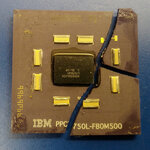
First of all, the ceramic substrate on this poor G3 was cracked! How does that happen?!
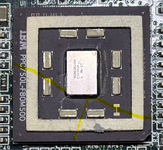
I've never seen anything like that before. It would take a crazy amount of force to break that thick ceramic, yet the die looks fine. The cause was a mystery until I saw Sonnet's heatsink mounting strategy. They used screws going through the board into threaded holes in the heatsink. I would call that design unsafe; at least, it gives an unsuspecting user plenty of rope to hang themselves with. Over-torque those screws and the pressure on the CPU quickly becomes extreme. That's why almost every other heatsink is mounted with some sort of springy element in the system. Of course, Sonnet does it correctly at the factory, and you're never supposed to take it apart, right?
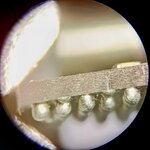
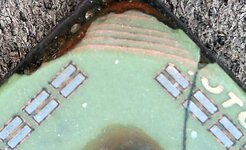
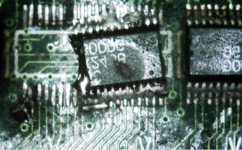
The excess solder on the cache chip pins wicked up very easily. I think it may have been ChipQuik or some other low temp alloy. Perhaps this was the beginning of someone's aborted attempt to salvage the cache chips from the damaged card? There were no damaged traces around the level shifter footprint, just 2-2/3 lifted pads, one of which was a no-connect anyway.
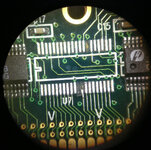
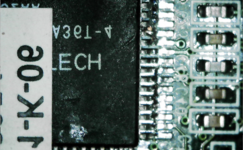
I found another one of those Pericom level shifters for a couple bucks on eBay. It isn't a perfect match (different date code and different font for some reason), but it's the same part number.
I set about pulling the dead G3 off the board. Here it is on my little preheater. I built a wall from foil tape to protect the stickers from the heat, and it worked well, but I accidentally melted one of them later anyway


As I feared, the chip came off in pieces. RIP, little buddy.
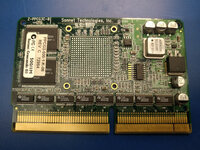
I cleaned up the board and it came out looking great, with no other apparent damage. I also installed the replacement level shifter, which needed only minor trace repairs as expected.
 @Byte Knight
 and I went back and forth on what to replace the CPU with, and ultimately settled on another 500MHz 750L. The cheapest not-super-sketchy source I could find was Quest, who had one in stock for $68 shipped. Knowing that it would be a NOS part, not remarked, and that there would be no customs or tariff hangups, we went with that.
Because the G3 from Quest was new, it had IBM's odd arrangement of higher-melting-point solder balls, attached to the substrate with regular tin/lead alloy. The idea with the "high-melt" balls is they do not melt at standard soldering temperatures; you solder them to the PCB with more regular tin/lead solder. There are some other threads on the forum where I recall
@herd and others discussing this. I've never actually installed a
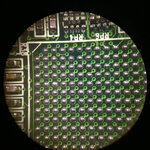
new PowerPC chip before, only used reballed parts, so this was uncharted territory for me. I fluxed and tinned the pads on the card, leaving each with a smooth, shiny dome of 63/37 leaded solder:
Positioning the CPU on the card then proved very difficult; like balancing a ball on a ball, made worse by the flux acting as a bit of a lubricant. The chip always seemed to be just a little bit off, and the tiniest adjustment would cause it to quickly slide out of place. After a long time nudging the CPU back and forth in all directions, I finally got it as close as I could. The surface tension of liquid solder tends to cause surface-mount components to self-align, and I was hoping that effect would take care of any remaining misalignment. As I started heating the CPU, and the solder melted, the CPU
did pop into place...one row off. Disaster. My heart sank into my stomach. In hindsight, I should have stopped and reconsidered my approach when I was having trouble getting the CPU positioned. I may have been able to get away with taping the CPU in place before soldering, but the tape may also have interfered with even heating. Solder paste and a stencil would probably have been the best approach, but I had neither, so I went to plan B.
I removed the CPU, cleaned up the card again, and reballed the CPU with 0.76mm leaded solder balls. This is a tedious process, but I have some practice at it and I know it works. I installed the reballed CPU on the card, installed the card in the system, and...no bong. To add insult to injury, the power button of 7600 I was using for testing chose this moment to crumble into pieces.
Time to take a step back and re-assess. I made a list of things that could be wrong at this point:
- Maybe the Pericom chip from eBay was bad. @Byte Knight sent a working 400MHz G3 card also, so I had a donor to swap with.
- Maybe a few of the balls on the CPU didn't get fully soldered. I thought I had done a good job, but I could try reflowing it just to be sure.
- Maybe there was something else wrong with the card as a result of whatever was done to it by its previous owner. Potentially a deep rabbit hole, but I could start by probing voltages and make sure that the power supply circuit is at least good.
I tried steps 1 and 2, and there was no change. The working card still worked, the non-working card still didn't. I was as confident as possible at this point that my work wasn't the problem, so I started looking at the power supply on the card to see what I could figure out. There's a TI LM2931 linear regulator at U16. It takes 5V input and generates ~4.2V for the level shifters. Both of those voltages checked out good. There's a switching regulator made from a TI TLV431 and a big ol' Fairchild HUF75329 FET (no inductor, cheapskates). It takes 3.3V input and chops it down to 2.1V for the CPU VDD. Both of those voltages checked out good. There's an IDT ICS9112-17 clock buffer at U14, it has 3.3V input as expected, as do the cache chips. I couldn't find any problems. From a power standpoint, this card should work.
I decided to check the clock. The card has an onboard 50MHz oscillator; I probed its output, and the input and output of the clock buffer chip. These are C2, C3, and C4 respectively in this trace:
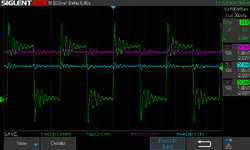
Yeah, that's bad. It was such a relief to finally find a problem! The output from the oscillator and input to the clock buffer are floating at DC. Amusingly, the clock buffer still generates an output at 5.89MHz; maybe that's a default behavior or maybe it thinks it sees enough of something on the input at that frequency, but a G3 is not going to run with a 5.89MHz bus.
Here's the output from the oscillator of the good card:

So, maybe the 50MHz metal half-can oscillator on the bad card is dead? I've heard of that happening but never experienced it myself. I started removing it from the card, and when I went to desolder the ground pin...it wiggled. It looked connected, but it wasn't! The solder joint was broken. I reflowed that pin with some flux and fresh solder, put the card back in the 7600, and BONG! Finally! That was it: just one bad solder joint on the oscillator. Maybe that's what doomed this card to being taken apart and messed up in the first place?
Here it is, fully repaired:
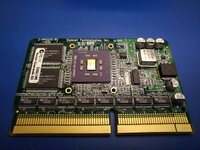
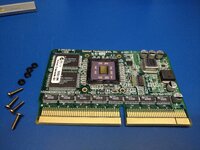
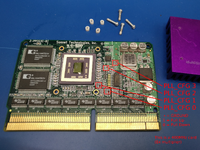
I 3D-printed a new shim to go around the die, and new spacers to go between the board and the heatsink screws. The working 400MHz card had similar plastic spacers from Sonnet, but they were missing from the 500MHz card, which probably led directly to the substrate getting cracked. The shim is 0.7mm thick and the spacers are 2.3mm tall. I also replaced the screws with 4 new matching ones, they are 2-56 thread.
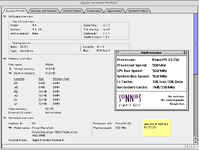
Here's the proof for
@Byte Knight 




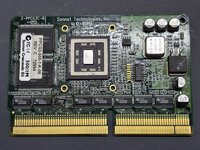




 Agreed this was a great save by you - I was just about to toss this thing before I came across your restored video cards thread...