• Hello MLAers! We've re-enabled auto-approval for accounts. If you are still waiting on account approval, please check this thread for more information.

SIMMspender™ & IIsi memory expansion hack reboot.

Trash80toHP_Mini

NIGHT STALKER
68040
I need to figure this out all over again, but at least I can play with it at work.

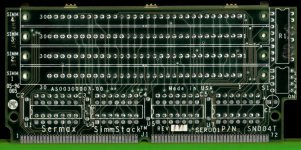
SIMMspender™ is the reverse of a SIMM Saver, it breaks the four 30pin memory sockets in a bank out to a pair of 72pin 32MB SIMMs.

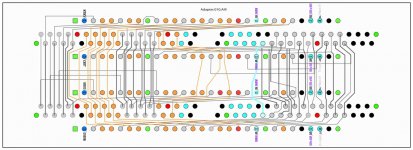
Adapter.010.2p.jpg

This one includes another pair of 72pin SIMMs on the bus and addressing jumpers wedging into Bank A an on a IIsi mobo.

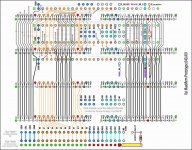
IIsi MaxMem Proto.TIF.040.0.jpg

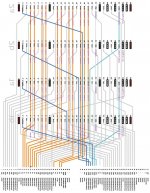
View attachment IIsiMaxMemPDF.PDF

TBC

 
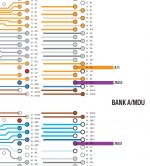
IIRC dark blue denotes /CAS and /RAS addressing I've yet to figure out and light blue needs to be jumpered to legs on the Memory Controller of the IIsi to take Bank A to 64MB.

10cm x 10cm SEEED boards now beckon! :D

 
Sorry, the explanation is limited, and my understanding of your diagrams is not what it should be. I take it these are theoretical doodles rather than objects in the world, but if implemented, this would move you from 4x30pin SIMM slots to 2 or 8x72pin slots? I’ll assume the latter, since otherwise, there’d hardly be much point.

It impresses me to see you trying to figure such things out. I wouldn’t know where to begin.

 
Last edited by a moderator:
Yep, I am not an engineer and I don't follow the diagrams but is the point of this effort to get more than 16MB RAM running in a IIsi?  I think that is the upper limit even if >4MB RAM chips are installed each of the 4 slots.

 
When I started talking about this project in theoretical terms, the maximum RAM for the IIsi was 65MB. uniserver picked up the ball, ran like a madman with it upping that limit to 68MB.

His fabulous hack involved desoldering the paltry 1MB Apple deigned to put on the board and installing higher capacity chips (shades of 128K/512K conversions past?) bringing the IIsi "stock memory" to its physical limit of 4MB. IIRC the pincount of DRAM ICs for taking it to the next step was too high for the available pads on the board, but the signals were available?

This project is real, alive and well, but suffered a serious setback due to an ID10T error. I tried to use the Quicksilver's HDD in the Beige G3 after a PSU failure. Didn't dawn on me to check for max partition compatibility. Having much of my graphics disappear in the last forums change almost put the last nail in its coffin.

Wound up using my Pismo for doing graphics for a while, still haven't looked there for the rest of the missing research. I just posted what I could dredge up here now that my attachments are back online. This way I can try to figure out what the heck I was up to during downtime at work. :blink:

End game is to match the SE/30's maximum loadout of 128MB in my souped up IIsi using four 32MB 72pin SIMMs. Gotta recap some IIsi boards before I can do much now, but the playing field for prototyping has changed drastically over the years I've been toying with this one. [:D]

edit: thanks for the interest beachy! Gotta keep agitating the graying matter or it sets up like concrete. [;)]

 
Last edited by a moderator:
Aren’t there 64mb 72-pin SIMMs available? I seem to recall having some in a 6100 at one time, at any rate. That would make for an even larger RAM complement in a IIsi. 

 
Nope, I'd only be using a pair of 64MB SIMMs I don't know where to source instead of relieving trag of four from his hoard of the 32MB variety, which is my preference. Two in Bank B and another pair in my Bank A hack hits the hard, ROM limited 128MB ceiling for every 68030 Mac I can think of. I'm just trying to de-compromise a mid-range Mac if I can. My MEH lil' IIsi needs to kick some serious SE/30 butt! :ph34r:

A tangential offshoot of this and another notion I was looking into for doing a 68030 socket (PDS) expansion card hack along with discussion in the PowerBook 100 Accelerator thread has visions of RAM Disk expansion floating around in the back of my head. Dunno, too many hacks cluttering up my head, gotta cut back on the hardware cluttering up the joint as well. Thankfully I can shelve my (procured in a hackable state) Luggable's project box until some folks decide to pitch in and do the technical lifting.

 
Beachy, we covered a lot of these questions way back when folks first said it was a crazy idea if you can imagine that! I'll try to figure out what the heck I was up to, fielding questions again as I go. [;)]

It'd be a big help if that original thread reappeared, but I just checked "my attachments" and the related uploads remain labeled: "No locations to display. The content may not have been saved yet or may have been deleted."

Which means the original thread is still disappeared along with a few others I really miss. :/

 
THX my friend, but collecting every type I could lay my grubby little paws upon was key to my research efforts. Post a piccie if there are any active components on it though, you never know. [;)]

edit: muchas gracias for that memory jog, oP! Lots of useful stuff was dislodged from my cobwebs!

 
Last edited by a moderator:
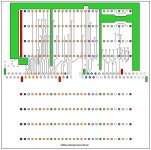
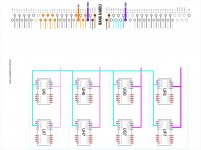
OK, I've finally got the first prototype worked out! Maybe  .  .  . :blink:   Simplified view of traces on both sides of a 10x10 PCB:
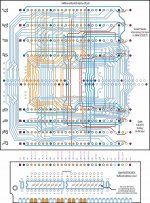
SIMM-1Layer-028-2p.jpg

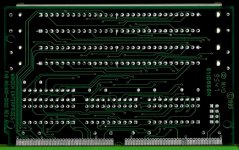
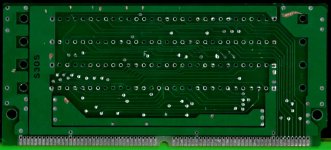
Decided I should make provision for adding line drivers (245s) and maybe the resistor packs found on higher quality SIMM savers. So I'm back to using dummy SIMM cards and a header/socket interface with 245s on at least one pair of risers. I'll definitely test without drivers or resistors first. The taller B & C versions of my Type D adapter may have pretty long traces.
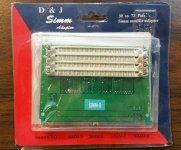
Type_B.jpg

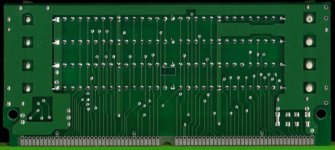
Dunno, we'll see. Broke one of the SIMM sockets taking my Type D apart to scan the component side, so I'll have to tear up another cheapo board for parts.

Still need to replicate the mirrored Power/Ground planes and I'll probably add a triplet of vias on all  lines heading into and out of the 72pin SIMM socket for easily drilling out the center and soldering patch wires for any corrections to the outer vias. I hate cutting traces. You can see the vias to be drilled out for installing the line drivers and they'll be added for cutting any redundant connections to the mobo.

Does anyone have any idea why there are traces leading to n.c. positions? They're in brown. Very curious, they don't appear to be going anywhere?

Makers seem to have laid out data lines any which way to get the board down to two layers. I suppose it doesn't matter where the bits wind up, so long as everything's consistent. Colors got messed up a bit somewhere between AI, PDF and JPG export, I'm tired, but it's good enough for a look see.

Any suggestions? Corrections? Anything?

edit: looks like the address buses on the Verification test SIMM sockets didn't get copied over to the single layer file. It's a lot prettier when it's fully symmetrical tracewise, if not in connector spacing. Oopsie! :-/

 
Last edited by a moderator:
Very, very strange about colors shifting when I export a jpg from AI9. Had to do a screen shot to keep the gray color coding for the data lines from turning blue!

View attachment 22371

Gotta check everything against the IIsi Schematic, but it seems to be OK for now.

edit: except for some missing bits again! :-/

 
Last edited by a moderator:
View attachment SIMM-BANK-A-MDU-000.PDF

Looks like moving Bank A to the adapter board could be as simple as patching just three signals from the logic board to unimplemented Address and /RAS pins on the 72pin SIMM? Doesn't sound right, gotta check for differentiation of Address lines to Banks A and B on the schematic.

Quick question: Did they make 128MB versions of the 72pin SIMM or would these three signals be for double banked SIMMs?

Bank A - MDU Jumpers.JPG

 
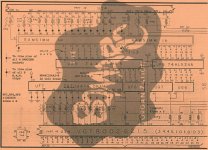
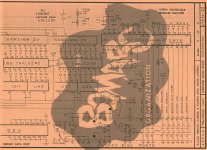
Had some time to search. 128MB and even 256MB versions of the 72pin SIMM were made. Wonder if I can get a single 128MB SIMM to max out both Banks in the IIsi?IIsi-Memory-p6.JPG

IIsi-Memory-p5.JPG

 
Last edited by a moderator:
Back
Top