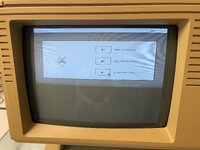
I don't think the problem here lies with the ESProFile or the Selector --- my hunch is that your Lisa has the square pixel modification intended for later versions of the MacWorks operating environment. The Selector is written for the original Lisa screen dimensions.
Try powering on your Lisa and watching the top right-hand corner of the screen: while the Lisa is engaged in its self-test, you'll see some characters that indicate the versions of the boot ROM and (after a moment) the I/O board ROM. If you see a single letter in the range A through H, you have a Lisa with the original rectangular pixels. If you see "3A" instead, then you have a Lisa with square pixels, and you can't really run the Selector on it.
You can still use your ESProFile without the Selector, where it will basically just act like a regular hard drive. Start with a blank ProFile image: that's a file of exactly 5175296 bytes in size; doesn't matter what's in it. Copy it onto your ESProFile SD card and call it "profile.image" (this will overwrite the Selector, but it's not working anyway, and you can always get the Selector back if you need to). Then you can use it just like a ProFile. If your Lisa has the square pixel modification, your only option will be to install a new-enough version of MacWorks.
For museum use without the Selector, you can always keep a backup of your profile.image on the SD card under another name. Then you can just copy this backup onto profile.image if you need to restore your setup.
Please let us know if your Lisa has the 3A ROM and the square pixel mod. I've never seen the Selector run on a square pixel machine, so if that's what's happening here, I'd like to know.