• Hello MLAers! We've re-enabled auto-approval for accounts. If you are still waiting on account approval, please check this thread for more information.

ProFile Drive Emulator for Lisa?

Zhinü

6502
Does anyone here sell or have files for emulating a ProFile drive for an Apple Lisa? I have a dead Profile 5MB drive i'd like to convert over (doesn't go through full seek) but the two options I know of aren't the most desirable. IDEFile (or whatever) is pretty expensive and afaik isn't the best at emulation, while the ArcaneByte emulators are out of production due to the boards they use going out of production.
 
Not really a "special", the X/Profile is a current product and fully supported, the parts are normally stocked, and X/Profiles are built to order. I am not the seller, but If you PM me I will help you get a quote for price and lead time.

X/Profile is an amazing device, I have four of them!
 
Don’t you need to special order it from the guy or something like that?

It was out of stock for a long time, but it's back available now.

The X/Profile is what I use and it's been really solid and reliable for me, and the documentation is really very good indeed. It's not cheap, but at least for me, I feel like I got what I paid for - no regrets.

I haven't used any of the other options. I kept intending to build a cameo/aphid but looks like that won't happen now if the beaglebone is now unobtainium :-(.
 
Yes, the PocketBeagle is EOL unfortunately. It was a fun project...

IDEfile is a fine and capable emulator that you build yourself. I've had one for over a decade and it works dependably.

Since you have a 2/5, you can use ArduinoFile if you feel like building one.

One advantage of ArduinoFile (and Cameo/Aphid if you have a time machine) is that you can choose and manage hard drive images from your Lisa with the Selector program.

Another advantage of both is that hard drive images are just files on an SD card, so it's pretty easy to work with hard drive images on a modern computer.
 
The parallel port inside a 2/10 runs faster than the external port on a 2/5, or something like that. (I forget the details even though I knew them fairly well at one point; only around two computers can fit in my head at the same time.) However Alex claims that experimental 2/10 support "appears to be pretty solid". YMMV...

 
Hey Stepleton,
Is your website down? I was playing with my Cameo/Aphid and I can't seem to be able to access the link to the prebuild images:
cameo/aphid image

Using the wayback machine I did finally locate a google drive link to the file.
 
Don't mean to resurrect from the dead, but the ArcaneByte emulator (repackaged/form-factored cameo/aphid adapter) is indeed EOS due to the PocketBeagle itself being EOL. There is or will be a PocketBeagle 2, but AFAIK it's not a direct replacement. I always want to point out that it's Tom's brain child and he deserves all the credit!

That said, the newcomer in this area is the ESProFile, a ProFile emulator using an ESP32, from the same developer of the ArduinoFile (AlexTheCat123). Should be a link to the repo on GitHub. Have had great success with this gadget so far, and for the price it can't really be beat. It's also compatible with Tom's Selector app and really helps make the Lisa easier to use, especially if you switch between OSes often.
 
Thanks! PB 2 is out, and it's electrically compatible with PB 1 and mechanically compatible with the "Cameo" adaptor board that Cameo/Aphid uses. Getting it to work would probably be a week's work of spare-time hobby time, the bulk of it likely in setting up the overlay files and so on.

But I think there is little point! A PB 2 costs $30 all by itself, while the complete cost of thew new ESProFile is comfortably under $15. About the only knock against it AFAIK is that it doesn't work with Apple /// yet, while C/A does. I suspect it's only a matter of time before Alex fixes this.
 
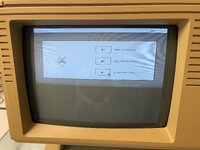
Hey. I am pretty new to all things Lisa. Got one for our little museum(digitalretropark.net / tour: http://computer-classics.de/_extdata/panoDRP/app-files/) a while ago and it came with a working ProFile drive. However as we embrace the hands on imperative all machines turned on are meant to be used and thus quite often results in corrupted systems due to visitors moving files around and renaming stuff. No option for a drive without backup and so I went and ordered a bunch of ESProfiles at JLCPCB. So far the green light comes up and I somewhat boots into the selector (renamed to profile.image on my SD card), but the screen is somehow distorted. Menu works and I can see the selection bar go up and down when I hit the keyboard > see attached video, but have no clue what is wrong here. Despite that I don't seem to find the right or valid images. Action Retro is talking about preped images with serialised software in his video (
). Kinda stuck here and my questions are:

Anyone got a clue why the selector looks like this? Was wondering if this might be due to wrong Widgetcable, but I guess it wouldn't boot in the first place with mixed up pins.

Does anyone have a working image that I can try booting from, or knows where to get those?

I do have another four of the ESProfiles (external version) that I want to sell if it finally works - only need one for myself. ;)

Cheers.
Falk
 

Attachments

I don't think the problem here lies with the ESProFile or the Selector --- my hunch is that your Lisa has the square pixel modification intended for later versions of the MacWorks operating environment. The Selector is written for the original Lisa screen dimensions.

Try powering on your Lisa and watching the top right-hand corner of the screen: while the Lisa is engaged in its self-test, you'll see some characters that indicate the versions of the boot ROM and (after a moment) the I/O board ROM. If you see a single letter in the range A through H, you have a Lisa with the original rectangular pixels. If you see "3A" instead, then you have a Lisa with square pixels, and you can't really run the Selector on it.

You can still use your ESProFile without the Selector, where it will basically just act like a regular hard drive. Start with a blank ProFile image: that's a file of exactly 5175296 bytes in size; doesn't matter what's in it. Copy it onto your ESProFile SD card and call it "profile.image" (this will overwrite the Selector, but it's not working anyway, and you can always get the Selector back if you need to). Then you can use it just like a ProFile. If your Lisa has the square pixel modification, your only option will be to install a new-enough version of MacWorks.

For museum use without the Selector, you can always keep a backup of your profile.image on the SD card under another name. Then you can just copy this backup onto profile.image if you need to restore your setup.

Please let us know if your Lisa has the 3A ROM and the square pixel mod. I've never seen the Selector run on a square pixel machine, so if that's what's happening here, I'd like to know.

 
Great to hear that my attempt at ESProfile seems to work. Thanks for the insight. Never heard of that pixel mod, but as I said, I am new to the whole Lisa topic. As Lisa and the ESProfile are in the museum right now, I can't tell, when I am there next time (probably tomorrow), but will check for any 3A indication. The Lisa was originally a version 1 that was upgraded with a bezel and 3,5" drive which is sadly broken by now. Are there any other indicators that this pixel mod is installed, despite the 3A popping up?

I see that the ESProfile has a diagnostic mode that comes with backup functionality. I not quite sure how to set it up. Do I plug the ESProfile in my real ProFile drive and hook the USB to my Mac and run terminal? Once I know how to backup, I will do exactly as you said. Put two images on the SD card: one is the original backup and one is the "profile.image" for people to use and break. ;)
 
Ha! Found a picture from the repair porcess, when we were fixing the faulty RAM and look what's up in the right corner: 3A. Mystery solved. So now I need a proper image to boot from.
 

Attachments

  • IMG_3331 copy 2.jpg
    IMG_3331 copy 2.jpg
    1.8 MB · Views: 21
Thanks for confirming that you have the square pixel mod! I was curious to know what happens when you try to run the Selector on it, and now we see.

I see that the ESProfile has a diagnostic mode that comes with backup functionality. I not quite sure how to set it up.

The diagnostic mode allows your ESProFile to pretend to be the Lisa and to read and write from a separate ProFile or Widget hard drive. If you are not trying to archive the data on a ProFile or a Widget, it will probably not be of much use to you.

Otherwise, I believe it is as you have described it, although I have not experimented with it myself.
 
Back
Top